
Learner 连接器管道#
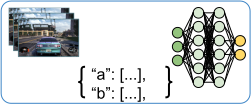
在每个 Learner actor 上都有一个 Learner 连接器管道 (见下图),负责从一系列 episode 中为 RLModule 编译训练批次 (train batch)。

Learner ConnectorV2 管道:Learner 连接器管道位于输入训练数据 (一系列 episode) 和 Learner actor 的 RLModule 之间。该管道将此输入数据转换为 forward_train() 方法可读的训练批次。#
在调用 Learner 连接器管道时,会进行从一系列 Episode 对象 到 RLModule 可读的张量批次 (也称为“训练批次”) 的转换,并且 Learner actor 会将管道的输出直接发送到 RLModule 的 forward_train() 方法。
默认 Learner 管道行为#
默认情况下,RLlib 会为每个 Learner 连接器管道填充以下内置连接器组件。
AddObservationsFromEpisodesToBatch:将传入 episode 中的所有观察值放入批次。列名为obs。例如,如果您有两个长度分别为 10 和 20 的传入 episode,则生成的训练批次大小为 30。AddColumnsFromEpisodesToBatch:将传入 episode 中的所有其他列,例如奖励、动作和终止标志,放入批次。仅对有状态模型有效:
AddTimeDimToBatchAndZeroPad:如果RLModule是有状态的,则在 axis=1 处为批次中的所有数据添加大小为max_seq_len的时间维度,并在 episode 在不能被max_seq_len整除的时间步长结束时进行 (右侧) 零填充。您可以通过 RLModule 的model_config_dict修改max_seq_len(在您的AlgorithmConfig对象上调用config.rl_module(model_config_dict={'max_seq_len': ...}))。仅对有状态模型有效:
AddStatesFromEpisodesToBatch:如果RLModule是有状态的,则将模块的最近状态输出来作为新的状态输入放入批次。列名为state_in,值为无时间维度。仅用于多智能体:
AgentToModuleMapping:根据每个多智能体 episode 中已确定的智能体到模块的映射,将每个智能体的数据映射到 respective 的每个模块数据。BatchIndividualItems:将批次中所有目前还是单个项目列表的数据转换为批处理结构,即 NumPy 数组,其第 0 轴是批次轴。NumpyToTensor:将批次中的所有 NumPy 数组转换为特定框架的张量,并在需要时将它们移到 GPU。
您可以通过在您的 算法配置 中设置 config.learners(add_default_connectors_to_learner_pipeline=False) 来禁用所有前面的默认连接器组件。
请注意,这些转换的顺序对于管道的功能至关重要。
编写自定义 Learner 连接器#
您可以通过在 AlgorithmConfig 中指定一个函数来定制 Learner 连接器管道,该函数接受观察空间和动作空间作为输入参数,并返回一个 ConnectorV2 组件或其列表。
RLlib 将这些 ConnectorV2 实例按返回的顺序添加到 默认 Learner 管道 的前面,除非您在配置中设置了 add_default_connectors_to_learner_pipeline=False,在这种情况下,RLlib 将仅使用提供的 ConnectorV2 组件,而没有任何自动添加的默认行为。
例如,要在 Learner 连接器管道前面添加一个自定义 ConnectorV2 组件,您可以在配置中这样做
config.learners(
    learner_connector=lambda obs_space, act_space: MyLearnerConnector(..),
)
如果您想向管道添加多个自定义组件,请将它们作为列表返回
# Return a list of connector pieces to make RLlib add all of them to your
# Learner pipeline.
config.learners(
    learner_connector=lambda obs_space, act_space: [
        MyLearnerConnector(..),
        MyOtherLearnerConnector(..),
        AndOneMoreConnector(..),
    ],
)
RLlib 将您函数返回的连接器组件添加到 Learner 管道的开头,在 RLlib 自动添加的、前面描述的默认连接器组件之前。

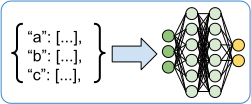
将自定义 ConnectorV2 组件插入 Learner 管道:RLlib 将自定义连接器组件(例如内在奖励计算)插入到默认组件之前。这样,如果您的自定义连接器以任何方式修改了输入 episode,例如像后续示例那样更改奖励,管道末尾的默认组件将自动将这些更改后的奖励添加到批次中。#
示例:在损失计算之前进行奖励塑形#
编写自定义 Learner ConnectorV2 组件的一个好例子是在计算算法的损失之前进行奖励塑形。Learner 连接器的 __call__() 方法可以完全访问整个 episode 数据,包括观察值、动作、多智能体场景中的其他智能体数据以及所有奖励。
以下是设置一个简单的、基于计数计算的内在奖励信号的最重要的代码片段。自定义连接器将内在奖励计算为智能体已经看到特定观察值的次数的倒数。因此,智能体访问某个状态的次数越多,该状态的内在奖励就越低,这激励智能体访问新状态并展现更好的探索行为。
您可以通过继承 ConnectorV2 并覆盖 __call__() 方法来编写自定义 Learner 连接器。
from collections import Counter
from ray.rllib.connectors.connector_v2 import ConnectorV2

class CountBasedIntrinsicRewards(ConnectorV2):

    def __init__(self, **kwargs):
        super().__init__(**kwargs)

        # Observation counter to compute state visitation frequencies.
        self._counts = Counter()
在 __call__() 方法中,您将遍历所有单智能体 episode,并将其中存储的奖励更改为:r(t) = re(t) + 1 / N(ot),其中 re 是来自 RL 环境的外在奖励,N(ot) 是智能体已经访问过观察值 o(t) 的次数。
def __call__(
    self,
    *,
    rl_module,
    batch,
    episodes,
    explore=None,
    shared_data=None,
    **kwargs,
):
    for sa_episode in self.single_agent_episode_iterator(
        episodes=episodes, agents_that_stepped_only=False
    ):
        # Loop through all observations, except the last one.
        observations = sa_episode.get_observations(slice(None, -1))
        # Get all respective extrinsic rewards.
        rewards = sa_episode.get_rewards()

        for i, (obs, rew) in enumerate(zip(observations, rewards)):
            # Add 1 to obs counter.
            obs = tuple(obs)
            self._counts[obs] += 1
            # Compute the count-based intrinsic reward and add it to the extrinsic
            # reward.
            rew += 1 / self._counts[obs]
            # Store the new reward back to the episode (under the correct
            # timestep/index).
            sa_episode.set_rewards(new_data=rew, at_indices=i)

    return batch
如果您通过算法配置 (config.learners(learner_connector=lambda env: CountBasedIntrinsicRewards())) 将此自定义 ConnectorV2 组件插入管道,则您的损失函数应在传入批次的 rewards 列中接收修改后的奖励信号。
注意
您的自定义逻辑将新奖励直接写回到给定的 episode 中,而不是将其放入训练批次。这种将从 episode 中提取的数据写回同一 episode 的策略可确保从这一点开始,后续连接器组件只能看到已更改的数据。批次起初保持不变。然而,后续的 默认 Learner 连接器组件 之一 AddColumnsFromEpisodesToBatch 会用 episode 中的奖励数据填充批次。因此,RLlib 会自动将您对 episode 对象所做的任何更改添加到训练批次中。
示例:堆叠 N 个最近的观察值#
Learner 连接器 API 的另一个应用,结合 自定义环境到模块的连接器组件,是高效的观察帧堆叠,无需对堆叠的、重叠的观察数据进行去重,也无需在 episode 中存储这些额外的、重叠的观察值,或通过网络进行它们之间的 actor 通信。

ConnectorV2 观察帧堆叠设置:EnvRunner 中的环境到模块连接器管道,以及 Learner actor 中的 Learner 连接器管道,都包含一个自定义 ConnectorV2 组件,该组件堆叠来自当前正在进行的 (EnvRunner) 或已收集的 episode (Learner) 的最后四个观察值,并将它们放入批次。请注意,在 episode 开始附近进行堆叠时,您应该使用虚拟的、零填充的观察值(在批次中,用红色表示)。#
由于您没有覆盖收集的 episode 中原始的、未堆叠的观察值,因此您必须对负责观察值堆叠的相同批次构建逻辑应用两次,一次用于 EnvRunner actor 上的动作计算,另一次用于 Learner actor 上的损失计算。
为了更清楚,您可能需要记住,连接器管道产生的批次是短暂的,RLlib 会在 RLModule 前向传播后立即丢弃它们。因此,如果您希望避免在 episode 中加载去重后的、堆叠的观察值,则必须在批次构造过程中直接进行帧堆叠,您必须应用两次堆叠逻辑(在 环境到模块的管道 和 Learner 连接器管道中)。
以下是使用 ConnectorV2 API 实现这种帧堆叠机制的示例,该机制应用于观察值为纯一维张量的 RL 环境。
有关更复杂的端到端 PPO Atari 示例,请参阅 此处。
您可以编写一个单独的 ConnectorV2 类来同时覆盖环境到模块和 Learner 的自定义连接器部分。
import gymnasium as gym
import numpy as np
from ray.rllib.connectors.connector_v2 import ConnectorV2
from ray.rllib.core.columns import Columns


class StackFourObservations(ConnectorV2):
    """A connector piece that stacks the previous four observations into one.

    Works both as Learner connector as well as env-to-module connector.
    """

    def recompute_output_observation_space(
        self,
        input_observation_space,
        input_action_space,
    ):
        # Assume the input observation space is a Box of shape (x,).
        assert (
            isinstance(input_observation_space, gym.spaces.Box)
            and len(input_observation_space.shape) == 1
        )

        # This connector concatenates the last four observations at axis=0, so the
        # output space has a shape of (4*x,).
        return gym.spaces.Box(
            low=input_observation_space.low,
            high=input_observation_space.high,
            shape=(input_observation_space.shape[0] * 4,),
            dtype=input_observation_space.dtype,
        )

    def __init__(
        self,
        input_observation_space,
        input_action_space,
        *,
        as_learner_connector,
        **kwargs,
    ):
        super().__init__(input_observation_space, input_action_space, **kwargs)
        self._as_learner_connector = as_learner_connector

    def __call__(self, *, rl_module, batch, episodes, **kwargs):

        # Loop through all (single-agent) episodes.
        for sa_episode in self.single_agent_episode_iterator(episodes):

            # Get the four most recent observations from the episodes.
            last_4_obs = sa_episode.get_observations(
                indices=[-4, -3, -2, -1],
                fill=0.0,  # Left-zero-fill in case you reach beginning of episode.
            )
            # Concatenate all stacked observations.
            new_obs = np.concatenate(last_4_obs, axis=0)

            # Add the stacked observations to the `batch` using the
            # `ConnectorV2.add_batch_item()` utility.

            # Note that you don't change the episode here, which means, if `self` is
            # the env-to-module connector piece (as opposed to the Learner connector
            # piece), the episode collected still has only single, non-stacked
            # observations, which the Learner pipeline must stack again for the
            # `forward_train()` pass through the model.
            self.add_batch_item(
                batch=batch,
                column=Columns.OBS,
                item_to_add=new_obs,
                single_agent_episode=sa_episode,
            )

        # Return batch (with stacked observations).
        return batch
然后,将这些行添加到您的 AlgorithmConfig 中
您的 RLModule 会在其 setup() 方法中自动接收正确的、调整后的观察空间。 EnvRunner 及其 环境到模块的连接器管道 通过 recompute_output_observation_space() 方法方便地计算这些信息。请确保您的 RLModule 支持堆叠的观察值而不是单个观察值。
请注意,您不必像在前面 __call__() 方法中所做的那样将观察值连接到原始的相同维度,但您也可以堆叠到新的观察维度,只要您的 RLModule 知道如何处理修改后的观察形状。
提示
前面的代码仅用于演示和解释目的。RLlib 中已经有一个现成的 ConnectorV2 组件,它可以在环境到模块和 Learner 连接器管道中执行堆叠最后 N 个观察值的任务,并且还支持多智能体情况。将这些行添加到您的配置中以启用观察帧堆叠:
from ray.rllib.connectors.common.frame_stacking import FrameStacking

N = 4  # number of frames to stack

# Framestacking on the EnvRunner side.
config.env_runners(
    env_to_module_connector=lambda env, spaces, device: FrameStacking(num_frames=N),
)
# Then again on the Learner side.
config.training(
    learner_connector=lambda obs_space, act_space: FrameStacking(num_frames=N, as_learner_connector=True),
)