KubeRay 自动伸缩#
本指南介绍了如何在 Kubernetes 上配置 Ray 自动伸缩器。Ray 自动伸缩器是一个 Ray 集群进程,它根据资源需求自动向上和向下伸缩集群。自动伸缩器通过根据任务、执行器或放置组所需的资源来调整集群中的节点(Ray Pod)数量来实现这一点。
自动伸缩器利用逻辑资源请求(在 @ray.remote 中指示,并在 ray status 中显示),而不是物理机利用率来伸缩。如果您启动一个执行器、任务或放置组,并且资源不足,自动伸缩器会将请求排队。它会调整节点数量以满足队列需求,并随着时间的推移移除没有任务、执行器或对象的空闲节点。
何时使用自动伸缩?
自动伸缩可以降低工作负载成本,但会增加节点启动的开销,并且配置起来可能很棘手。如果您是 Ray 的新手,建议从非自动伸缩集群开始。
Ray 自动伸缩 V2 alpha (KubeRay) (@ray 2.10.0)
使用 Ray 2.10,Ray 自动伸缩 V2 alpha 可与 KubeRay 一起使用。它在可观测性和稳定性方面有所改进。有关更多详细信息,请参阅 本节。
概述#
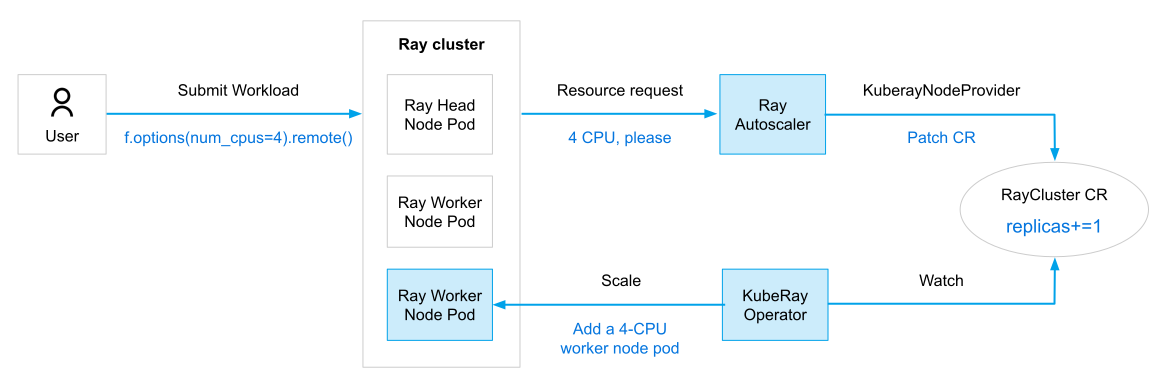
下图说明了 Ray 自动伸缩器与 KubeRay Operator 的集成。虽然为了清晰起见,将其描绘成一个独立的实体,但在实际实现中,Ray 自动伸缩器实际上是 Ray Head Pod 中的一个 sidecar 容器。
KubeRay 中的 3 个自动伸缩级别
Ray 执行器/任务:一些 Ray 库,如 Ray Serve,可以根据传入的请求量自动调整 Serve 副本的数量(即 Ray 执行器)。
Ray 节点:Ray 自动伸缩器根据 Ray 执行器/任务的资源需求自动调整 Ray 节点(即 Ray Pod)的数量。
Kubernetes 节点:如果 Kubernetes 集群没有足够的资源来支持 Ray 自动伸缩器创建的新 Ray Pod,Kubernetes 自动伸缩器可以配置一个新的 Kubernetes 节点。您必须自己配置 Kubernetes 自动伸缩器。
自动伸缩器通过以下事件顺序来伸缩集群
用户提交 Ray 工作负载。
Ray Head 容器聚合工作负载的资源需求,并将其传达给 Ray 自动伸缩器 sidecar。
自动伸缩器决定添加一个 Ray Worker Pod 来满足工作负载的资源需求。
自动伸缩器通过增加 RayCluster CR 的
replicas字段来请求一个额外的 Worker Pod。KubeRay Operator 创建一个 Ray Worker Pod 以匹配新的
replicas规范。Ray 调度器将用户的工作负载放置在新创建的 Worker Pod 上。
自动伸缩器还会通过删除空闲的 Worker Pod 来缩减集群。如果它找到一个空闲的 Worker Pod,它会减少 RayCluster CR 的
replicas字段中的计数,并将识别出的 Pod 添加到 CR 的workersToDelete字段中。然后,KubeRay Operator 删除workersToDelete字段中的 Pod。
快速入门#
步骤 1:使用 Kind 创建 Kubernetes 集群#
kind create cluster --image=kindest/node:v1.26.0
步骤 2:安装 KubeRay operator#
按照 本指南 通过 Helm 仓库安装最新的稳定版 KubeRay Operator。
步骤 3:创建启用了自动伸缩的 RayCluster 自定义资源#
kubectl apply -f https://raw.githubusercontent.com/ray-project/kuberay/v1.5.1/ray-operator/config/samples/ray-cluster.autoscaler.yaml
步骤 4:验证 Kubernetes 集群状态#
# Step 4.1: List all Ray Pods in the `default` namespace.
kubectl get pods -l=ray.io/is-ray-node=yes

# [Example output]
# NAME                         READY   STATUS    RESTARTS   AGE
# raycluster-autoscaler-head   2/2     Running   0          107s

# Step 4.2: Check the ConfigMap in the `default` namespace.
kubectl get configmaps

# [Example output]
# NAME                  DATA   AGE
# ray-example           2      21s
# ...
RayCluster 包含一个 Head Pod 和零个 Worker Pod。Head Pod 包含两个容器:一个 Ray Head 容器和一个 Ray 自动伸缩器 sidecar 容器。此外,ray-cluster.autoscaler.yaml 包含一个名为 ray-example 的 ConfigMap,其中包含两个 Python 脚本:detached_actor.py 和 terminate_detached_actor.py。
detached_actor.py是一个创建需要 1 个 CPU 的已分离执行器的 Python 脚本。import ray import sys @ray.remote(num_cpus=1) class Actor: pass ray.init(namespace="default_namespace") Actor.options(name=sys.argv[1], lifetime="detached").remote()
terminate_detached_actor.py是一个终止已分离执行器的 Python 脚本。import ray import sys ray.init(namespace="default_namespace") detached_actor = ray.get_actor(sys.argv[1]) ray.kill(detached_actor)
步骤 5:通过创建已分离执行器触发 RayCluster 扩容#
# Step 5.1: Create a detached actor "actor1" which requires 1 CPU.
export HEAD_POD=$(kubectl get pods --selector=ray.io/node-type=head -o custom-columns=POD:metadata.name --no-headers)
kubectl exec -it $HEAD_POD -- python3 /home/ray/samples/detached_actor.py actor1

# Step 5.2: The Ray Autoscaler creates a new worker Pod.
kubectl get pods -l=ray.io/is-ray-node=yes

# [Example output]
# NAME                                             READY   STATUS    RESTARTS   AGE
# raycluster-autoscaler-head                       2/2     Running   0          xxm
# raycluster-autoscaler-small-group-worker-yyyyy   1/1     Running   0          xxm

# Step 5.3: Create a detached actor which requires 1 CPU.
kubectl exec -it $HEAD_POD -- python3 /home/ray/samples/detached_actor.py actor2
kubectl get pods -l=ray.io/is-ray-node=yes

# [Example output]
# NAME                                             READY   STATUS    RESTARTS   AGE
# raycluster-autoscaler-head                       2/2     Running   0          xxm
# raycluster-autoscaler-small-group-worker-yyyyy   1/1     Running   0          xxm
# raycluster-autoscaler-small-group-worker-zzzzz   1/1     Running   0          xxm

# Step 5.4: List all actors in the Ray cluster.
kubectl exec -it $HEAD_POD -- ray list actors


# ======= List: 2023-09-06 13:26:49.228594 ========
# Stats:
# ------------------------------
# Total: 2

# Table:
# ------------------------------
#     ACTOR_ID  CLASS_NAME    STATE    JOB_ID    NAME    ...
#  0  xxxxxxxx  Actor         ALIVE    02000000  actor1  ...
#  1  xxxxxxxx  Actor         ALIVE    03000000  actor2  ...
Ray 自动伸缩器为每个新创建的已分离执行器生成一个新的 Worker Pod。这是因为 Ray Head 中的 rayStartParams 字段指定了 num-cpus: "0",阻止 Ray 调度器将任何 Ray 执行器或任务调度到 Ray Head Pod。此外,每个 Ray Worker Pod 的容量为 1 个 CPU,因此自动伸缩器会创建一个新的 Worker Pod 来满足需要 1 个 CPU 的已分离执行器的资源需求。
使用已分离执行器并非触发集群扩容的必要条件。常规执行器和任务也可以启动它。已分离执行器即使在作业驱动进程退出后仍然持久存在,这也是为什么当
detached_actor.py进程退出时,自动伸缩器不会自动缩减集群,这使得本教程更加方便。在此 RayCluster 自定义资源中,从 Ray 自动伸缩器的角度来看,每个 Ray Worker Pod 仅拥有 1 个逻辑 CPU。因此,如果您创建一个具有
@ray.remote(num_cpus=2)的已分离执行器,自动伸缩器不会启动创建新的 Worker Pod,因为现有 Pod 的容量仅限于 1 个 CPU。(进阶) Ray 自动伸缩器还提供了一个 Python SDK,允许高级用户(如 Ray 维护者)直接从自动伸缩器请求资源。通常,大多数用户不需要使用 SDK。
步骤 6:通过终止已分离执行器触发 RayCluster 缩容#
# Step 6.1: Terminate the detached actor "actor1".
kubectl exec -it $HEAD_POD -- python3 /home/ray/samples/terminate_detached_actor.py actor1

# Step 6.2: A worker Pod will be deleted after `idleTimeoutSeconds` (default 60s) seconds.
kubectl get pods -l=ray.io/is-ray-node=yes

# [Example output]
# NAME                                             READY   STATUS    RESTARTS   AGE
# raycluster-autoscaler-head                       2/2     Running   0          xxm
# raycluster-autoscaler-small-group-worker-zzzzz   1/1     Running   0          xxm

# Step 6.3: Terminate the detached actor "actor2".
kubectl exec -it $HEAD_POD -- python3 /home/ray/samples/terminate_detached_actor.py actor2

# Step 6.4: A worker Pod will be deleted after `idleTimeoutSeconds` (default 60s) seconds.
kubectl get pods -l=ray.io/is-ray-node=yes

# [Example output]
# NAME                         READY   STATUS    RESTARTS   AGE
# raycluster-autoscaler-head   2/2     Running   0          xxm
步骤 7:Ray 自动伸缩器可观测性#
# Method 1: "ray status"
kubectl exec $HEAD_POD -it -c ray-head -- ray status

# [Example output]:
# ======== Autoscaler status: 2023-09-06 13:42:46.372683 ========
# Node status
# ---------------------------------------------------------------
# Healthy:
#  1 head-group
# Pending:
#  (no pending nodes)
# Recent failures:
#  (no failures)

# Resources
# ---------------------------------------------------------------
# Usage:
#  0B/1.86GiB memory
#  0B/514.69MiB object_store_memory

# Demands:
#  (no resource demands)

# Method 2: "kubectl logs"
kubectl logs $HEAD_POD -c autoscaler | tail -n 20

# [Example output]:
# 2023-09-06 13:43:22,029 INFO autoscaler.py:421 --
# ======== Autoscaler status: 2023-09-06 13:43:22.028870 ========
# Node status
# ---------------------------------------------------------------
# Healthy:
#  1 head-group
# Pending:
#  (no pending nodes)
# Recent failures:
#  (no failures)

# Resources
# ---------------------------------------------------------------
# Usage:
#  0B/1.86GiB memory
#  0B/514.69MiB object_store_memory

# Demands:
#  (no resource demands)
# 2023-09-06 13:43:22,029 INFO autoscaler.py:464 -- The autoscaler took 0.036 seconds to complete the update iteration.
步骤 8:清理 Kubernetes 集群#
# Delete RayCluster and ConfigMap
kubectl delete -f https://raw.githubusercontent.com/ray-project/kuberay/v1.5.1/ray-operator/config/samples/ray-cluster.autoscaler.yaml

# Uninstall the KubeRay operator
helm uninstall kuberay-operator

# Delete the kind cluster
kind delete cluster
KubeRay 自动伸缩配置#
快速入门示例中使用的 ray-cluster.autoscaler.yaml 包含有关配置选项的详细注释。建议将本节与 YAML 文件结合阅读。
1. 启用自动伸缩#
enableInTreeAutoscaling:通过设置enableInTreeAutoscaling: true,KubeRay Operator 会自动为 Ray Head Pod 配置一个自动伸缩 sidecar 容器。minReplicas/maxReplicas/replicas:设置minReplicas和maxReplicas字段以定义workerGroup中replicas的范围。通常,在部署自动伸缩集群时,您会将replicas和minReplicas初始化为相同的值。之后,Ray 自动伸缩器在向集群添加或移除 Pod 时会调整replicas字段。
2. 扩容和缩容速度#
如果需要,您可以调节从集群添加或删除节点的 pace。对于具有大量短期任务的应用程序,考虑采用更保守的方法来调整扩容和缩容速度可能是有益的。
利用 RayCluster CR 的 autoscalerOptions 字段来实现这一点。此字段包含以下子字段:
upscalingMode:此选项控制扩容过程的速率。有效值为:Conservative:扩容受到速率限制;待处理的 Worker Pod 数量最多为连接到 Ray 集群的 Worker Pod 的数量。Default:不限制扩容速率。Aggressive:Default 的别名;不限制扩容速率。
idleTimeoutSeconds(默认 60 秒):这表示在缩减空闲 Worker Pod 之前等待的时间(以秒为单位)。当 Worker 节点没有任何活动任务、执行器或引用的对象(无论是存储在内存中还是溢出到磁盘)时,该节点被视为空闲。
3. 自动伸缩器 sidecar 容器#
autoscalerOptions 字段还提供了配置自动伸缩器容器的选项。通常,不需要指定这些选项。
resources:autoscalerOptions的resources子字段设置自动伸缩器 sidecar 容器的可选资源覆盖。这些覆盖应按照标准的 容器资源规格格式 进行指定。下面显示了默认值。resources: limits: cpu: "500m" memory: "512Mi" requests: cpu: "500m" memory: "512Mi"
image:此字段覆盖自动伸缩器容器的镜像。默认情况下,容器使用与 Ray 容器相同的 **镜像**。imagePullPolicy:此字段覆盖自动伸缩器容器的镜像拉取策略。默认值为IfNotPresent。env和envFrom:这些字段指定自动伸缩器容器的环境变量。这些字段应遵循 Kubernetes API 关于容器环境变量的格式。
4. 设置 rayStartParams 和 Ray 容器的资源限制#
从 Ray 2.41.0 开始,资源限制是可选的。
从 Ray 2.41.0 开始,Ray 自动伸缩器可以从 rayStartParams、资源限制或 Ray 容器的资源请求中读取资源规范。您必须指定至少一个这些字段。早期版本仅支持 rayStartParams 或资源限制,而不识别资源请求。
如果您使用的是带有 Ray 2.45.0 或更高版本的自动伸缩镜像,则 rayStartParams 是可选的。
从 KubeRay 1.4.0 开始,RayCluster CRD 的 rayStartParams 是可选的,但在早期版本中是必需的。如果您省略 rayStartParams 并想使用自动伸缩,自动伸缩镜像必须包含 Ray 2.45.0 或更高版本。
Ray 自动伸缩器会读取 RayCluster 自定义资源规范中的 rayStartParams 字段或 Ray 容器的资源限制,以确定 Ray Pod 的资源需求。关于 CPU 数量的信息对于 Ray 自动伸缩器伸缩集群至关重要。因此,没有这些信息,Ray 自动伸缩器将报告错误并无法启动。以下面的 ray-cluster.autoscaler.yaml 为例:
如果用户在
rayStartParams中设置了num-cpus,Ray 自动伸缩器将能正常工作,而无需考虑容器上的资源限制。如果用户未设置
rayStartParams,则 Ray 容器必须具有指定的 CPU 资源限制。
headGroupSpec:
  rayStartParams:
    num-cpus: "0"
  template:
    spec:
      containers:
      - name: ray-head
        resources:
          # The Ray Autoscaler still functions if you comment out the `limits` field for the
          # head container, as users have already specified `num-cpus` in `rayStartParams`.
          limits:
            cpu: "1"
            memory: "2G"
          requests:
            cpu: "1"
            memory: "2G"
...
workerGroupSpecs:
- groupName: small-group
  template:
    spec:
      containers:
      - name: ray-worker
        resources:
          limits:
            # The Ray Autoscaler versions older than 2.41.0 will fail to start if the CPU resource limit for the worker
            # container is commented out because `rayStartParams` is empty.
            # The Ray Autoscaler starting from 2.41.0 will not fail but use the resource requests if the resource
            # limits are commented out and `rayStartParams` is empty.
            cpu: "1"
            memory: "1G"
          requests:
            cpu: "1"
            memory: "1G"
5. 自动伸缩器环境配置#
您可以使用 RayCluster 自定义资源 autoscalerOptions 下的 env 或 envFrom 字段中指定的环境变量来配置 Ray 自动伸缩器。这些变量可以对自动伸缩器内部行为进行精细控制。
例如,AUTOSCALER_UPDATE_INTERVAL_S 决定了自动伸缩器检查集群状态并决定是否扩容或缩容的频率。
有关完整示例,请参阅 ray-cluster.autoscaler.yaml 和 ray-cluster.autoscaler-v2.yaml。
autoscalerOptions:
  env:
    - name: AUTOSCALER_UPDATE_INTERVAL_S
      value: "5"
下一步#
有关 Ray 自动伸缩器与 Kubernetes 自动伸缩器之间关系 的更多详细信息,请参阅 (进阶) 理解 Kubernetes 环境下的 Ray 自动伸缩器。
自动伸缩器 V2 (KubeRay)#
先决条件#
KubeRay v1.4.0 和最新的 Ray 版本是自动伸缩器 V2 的首选配置。
Ray 2.10.0 的发布引入了与 KubeRay 集成的 Ray 自动伸缩器 V2 的 alpha 版本,在可观测性和稳定性方面带来了改进。
可观测性:自动伸缩器 V2 为每个 Ray Worker 的生命周期提供实例级别跟踪,从而更容易调试和理解自动伸缩器的行为。它还报告每个节点的空闲信息,包括节点为何空闲或活动的原因。
> ray status -v

======== Autoscaler status: 2024-03-08 21:06:21.023751 ========
GCS request time: 0.003238s

Node status
---------------------------------------------------------------
Active:
 1 node_40f427230584b2d9c9f113d8db51d10eaf914aa9bf61f81dc7fabc64
Idle:
 1 node_2d5fd3d4337ba5b5a8c3106c572492abb9a8de2dee9da7f6c24c1346
Pending:
 (no pending nodes)
Recent failures:
 (no failures)

Resources
---------------------------------------------------------------
Total Usage:
 1.0/64.0 CPU
 0B/72.63GiB memory
 0B/33.53GiB object_store_memory

Pending Demands:
 (no resource demands)

Node: 40f427230584b2d9c9f113d8db51d10eaf914aa9bf61f81dc7fabc64
 Usage:
  1.0/32.0 CPU
  0B/33.58GiB memory
  0B/16.79GiB object_store_memory
 # New in autoscaler V2: activity information
 Activity:
  Busy workers on node.
  Resource: CPU currently in use.

Node: 2d5fd3d4337ba5b5a8c3106c572492abb9a8de2dee9da7f6c24c1346
 # New in autoscaler V2: idle information
 Idle: 107356 ms
 Usage:
  0.0/32.0 CPU
  0B/39.05GiB memory
  0B/16.74GiB object_store_memory
 Activity:
  (no activity)
稳定性:自动伸缩器 V2 在空闲节点处理方面取得了显著改进。V1 自动伸缩器可能会停止在终止处理过程中变为活动的节点,从而可能导致任务或执行器失败。V2 使用 Ray 的优雅排水机制,可以安全地停止空闲节点而不会中断正在进行的工作。
ray-cluster.autoscaler-v2.yaml 是一个启用了自动伸缩器 V2 的 RayCluster 的示例 YAML 文件,可与最新的 KubeRay 版本配合使用。
如果您使用的是 KubeRay >= 1.4.0,请通过设置 RayCluster.spec.autoscalerOptions.version: v2 来启用 V2。
spec:
  enableInTreeAutoscaling: true
  # Set .spec.autoscalerOptions.version: v2
  autoscalerOptions:
    version: v2
如果您使用的是 KubeRay < 1.4.0,请通过在 Head 中设置 RAY_enable_autoscaler_v2 环境变量,并在 Head 和所有 Worker Group 上使用 restartPolicy: Never 来启用 V2。
spec:
  enableInTreeAutoscaling: true
  headGroupSpec:
    template:
      spec:
        containers:
        - name: ray-head
          image: rayproject/ray:2.X.Y
          env:
          # Set this environment variable
          - name: RAY_enable_autoscaler_v2
            value: "1"
        restartPolicy: Never # Prevent container restart to maintain Ray health.


  # Prevent Kubernetes from restarting Ray worker pod containers, enabling correct instance management by Ray.
  workerGroupSpecs:
  - replicas: 1
    template:
      spec:
        restartPolicy: Never
        ...