使用 Ray Tune 调优 XGBoost 超参数#

本教程演示如何使用 Ray Tune 优化 XGBoost 模型。您将学到:
XGBoost 的基础知识及其关键超参数
如何训练一个简单的 XGBoost 分类器(无需超参数调优)
如何使用 Ray Tune 查找最优超参数
诸如提前停止和 GPU 加速等高级技术
XGBoost 目前是最受欢迎的机器学习算法之一。它在大量任务上表现出色,并且是许多 Kaggle 竞赛成功的关键。

注意
要运行本教程,您需要安装以下内容
$ pip install -q "ray[tune]" scikit-learn xgboost
什么是 XGBoost#
XGBoost (eXtreme Gradient Boosting) 是梯度提升 决策树 的强大而高效的实现。它因其以下特点而成为最受欢迎的机器学习算法之一:
性能:在多种问题上始终获得强大结果
速度:高度优化的实现,可以利用 GPU 加速
灵活性:适用于多种预测问题(分类、回归、排名)
关键概念
使用简单的决策树集成
树是顺序构建的,每棵树都会纠正前一棵树的错误
采用梯度下降来最小化损失函数
即使单棵树可能存在高偏差,使用提升集成也能带来更好的预测并减少偏差
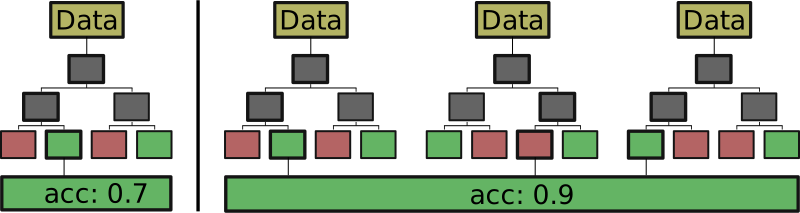
对于二分类任务,单棵决策树(左)可能只能达到 70% 的准确率。通过组合多棵小型决策树的输出,集成学习器(右)的准确率可能达到 90%。#
提升算法从一个小型决策树开始,并评估它对给定示例的预测效果。在构建下一棵树时,先前被错误分类的样本有更高的概率被用来生成这棵树。这很有用,因为它避免了对易于分类的样本进行过拟合,而是试图构建能够对难例进行分类的模型。有关 bagging 和 boosting 算法的更详细介绍,请参见 此处。
有许多提升算法。本质上,它们都非常相似。XGBoost 使用二阶导数来找到最大化增益(损失的倒数)的分割点,因此得名。实际上,XGBoost 通常在与其他提升算法的比较中表现最佳,尽管 LightGBM 对于大型数据集而言往往更快且内存效率更高。
训练一个简单的 XGBoost 分类器#
让我们先看看如何训练一个简单的 XGBoost 分类器。我们将使用包含在 sklearn 数据集集合中的 breast_cancer 数据集。这是一个二分类数据集。给定 30 个不同的输入特征,我们的任务是学习识别患有乳腺癌的受试者和未患病的受试者。
以下是训练简单 XGBoost 模型的完整代码:
SMOKE_TEST = False
显示代码单元格内容
SMOKE_TEST = True
import sklearn.datasets
import sklearn.metrics
from sklearn.model_selection import train_test_split
import xgboost as xgb


def train_breast_cancer(config):
    # Load dataset
    data, labels = sklearn.datasets.load_breast_cancer(return_X_y=True)
    # Split into train and test set
    train_x, test_x, train_y, test_y = train_test_split(data, labels, test_size=0.25)
    # Build input matrices for XGBoost
    train_set = xgb.DMatrix(train_x, label=train_y)
    test_set = xgb.DMatrix(test_x, label=test_y)
    # Train the classifier
    results = {}
    bst = xgb.train(
        config,
        train_set,
        evals=[(test_set, "eval")],
        evals_result=results,
        verbose_eval=False,
    )
    return results


results = train_breast_cancer(
    {"objective": "binary:logistic", "eval_metric": ["logloss", "error"]}
)
accuracy = 1.0 - results["eval"]["error"][-1]
print(f"Accuracy: {accuracy:.4f}")
Accuracy: 0.9650
正如您所见,代码非常简单。首先,加载数据集并将其分为test和train集。使用 xgb.train() 训练 XGBoost 模型。XGBoost 会自动在测试集上评估我们指定的指标。在本例中,它计算logloss和预测error(错误率),即错误分类样本的百分比。要计算准确率,我们只需从 1.0 中减去错误率即可。即使在这个简单的示例中,大多数运行也会获得超过 0.90 的良好准确率。
您可能注意到了我们传递给 XGBoost 算法的 config 参数。这是一个 dict,您可以在其中指定 XGBoost 算法的参数。在这个简单的示例中,我们仅传递了 objective 和 eval_metric 参数。值 binary:logistic 告诉 XGBoost 我们旨在为二分类任务训练一个逻辑回归模型。您可以在 XGBoost 文档中 此处 找到所有有效目标函数的概述。
使用 Ray Train 扩展 XGBoost 训练#
在 使用 XGBoost 入门分布式训练 中,我们介绍了如何使用Ray Train来扩展 XGBoost 单模型训练。在本教程的其余部分,我们将重点介绍如何使用Ray Tune优化 XGBoost 模型的超参数。
XGBoost 超参数#
即使使用默认设置,XGBoost 也能在乳腺癌数据集上获得良好的准确率。然而,与许多机器学习算法一样,有许多参数可以调整,这可能会带来更好的性能。下面我们来探讨其中一些。
最大树深度#
请记住,XGBoost 内部使用许多决策树模型来进行预测。在训练决策树时,我们需要告诉算法树可以长多大。用于此的参数称为树的深度。
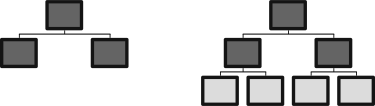
在此图像中,左侧的树深度为 2,右侧的树深度为 3。请注意,每增加一个级别,就会增加 \(2^{(d-1)}\) 个分割点,其中 *d* 是树的深度。#
树深度是影响模型复杂度的属性。如果只允许短树,模型可能不够精确——它们会欠拟合数据。如果允许非常大的树,单棵模型很可能会过拟合数据。实际上,对于此参数,2 到 6 之间的数字通常是一个不错的起点。
XGBoost 的默认值为 3。
最小子节点权重#
当决策树创建新叶节点时,它会将一个节点中的剩余数据分割成两个组。如果其中一个组中的样本很少,通常没有必要进一步分割。原因之一是,当样本较少时,模型更难训练。
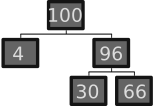
在此示例中,我们从 100 个示例开始。在第一个节点,它们分别被分割成 4 个和 96 个样本。在下一步中,我们的模型可能会发现进一步分割 4 个示例没有意义。因此,它只在右侧继续添加叶节点。#
模型用于决定是否分割节点的参数称为最小子节点权重。对于线性回归,这只是每个子节点所需的节点绝对数量。对于其他目标函数,此值是使用样本的权重确定的,因此得名。
该值越大,树的约束越多,深度也越浅。因此,此参数也影响模型复杂度。因此,对于有噪声或小型数据集,倾向于使用较小的值。值可以从 0 到无穷大,具体取决于样本大小。对于我们拥有仅 500 个样本的乳腺癌数据集,0 到 10 之间的值应该是合理的。
XGBoost 的默认值为 1。
子样本大小#
我们添加的每棵决策树都是在总训练数据集的一个子样本上训练的。样本的权重根据 XGBoost 算法进行加权,但我们可以决定在每个决策树的训练中使用多少比例的样本。
将此值设置为 0.7 意味着我们在每次训练迭代之前随机抽取 70% 的训练数据集。较低的值会产生更多样化的树,而较高的值会产生更相似的树。较低的值有助于防止过拟合。
XGBoost 的默认值为 1。
学习率/Eta#
请记住,XGBoost 顺序训练许多决策树,并且较晚的树更有可能在先前树已错误分类的数据上进行训练。实际上,这意味着早期的树负责判断容易的样本(即易于分类的样本),而晚期的树负责判断困难的样本。因此,可以合理地假设晚期树的准确性低于早期树。
为了解决这个问题,XGBoost 使用一个名为Eta的参数,有时也称为学习率。不要将其与梯度下降的学习率混淆!原始的 随机梯度提升论文 如此介绍了此参数:
这只是一个复杂的方式来说明,当我们训练一个新的决策树时,表示为 \(\gamma_{lm} \textbf{1}(x \in R_{lm})\),我们希望用因子 \(\eta\) 来抑制它对先前预测 \(F_{m-1}(x)\) 的影响。
该参数的典型值在 0.01 和 0.3` 之间。
XGBoost 的默认值为 0.3。
提升轮数#
最后,我们可以决定执行多少次提升轮,这意味着我们最终训练多少棵决策树。当我们进行大量子采样或使用较低的学习率时,增加提升轮数可能是有意义的。
XGBoost 的默认值为 10。
整合#
让我们看看代码中的样子!我们只需要调整我们的 config 字典:
config = {
    "objective": "binary:logistic",
    "eval_metric": ["logloss", "error"],
    "max_depth": 2,
    "min_child_weight": 0,
    "subsample": 0.8,
    "eta": 0.2,
}
results = train_breast_cancer(config)
accuracy = 1.0 - results["eval"]["error"][-1]
print(f"Accuracy: {accuracy:.4f}")
Accuracy: 0.9231
其余部分保持不变。请注意,我们在此处不调整 num_boost_rounds。结果也应该显示超过 90% 的高准确率。
调优配置参数#
XGBoost 的默认参数已经带来了良好的准确率,即使是我们上一个部分中的猜测也应该能产生远高于 90% 的准确率。然而,我们的猜测仅仅是猜测。通常我们不知道哪种参数组合实际上能为机器学习任务带来最佳结果。
不幸的是,我们可以尝试的超参数组合有无数种。我们将 max_depth=3 与 subsample=0.8 结合,还是与 subsample=0.9 结合?其他参数呢?
这时就需要超参数调优了。通过使用 Ray Tune 等调优库,我们可以尝试超参数的组合。利用先进的搜索策略,可以选择这些参数,使其可能带来好的结果(避免昂贵的穷举搜索)。此外,表现不佳的试验可以被提前停止,以减少计算资源的浪费。最后,Ray Tune 还负责并行训练这些运行,大大提高了搜索速度。
让我们从一个关于如何使用 Tune 进行此操作的基础示例开始。我们只需要对我们的代码块做一些小改动:
import sklearn.datasets
import sklearn.metrics

from ray import tune


def train_breast_cancer(config):
    # Load dataset
    data, labels = sklearn.datasets.load_breast_cancer(return_X_y=True)
    # Split into train and test set
    train_x, test_x, train_y, test_y = train_test_split(data, labels, test_size=0.25)
    # Build input matrices for XGBoost
    train_set = xgb.DMatrix(train_x, label=train_y)
    test_set = xgb.DMatrix(test_x, label=test_y)
    # Train the classifier
    results = {}
    xgb.train(
        config,
        train_set,
        evals=[(test_set, "eval")],
        evals_result=results,
        verbose_eval=False,
    )
    # Return prediction accuracy
    accuracy = 1.0 - results["eval"]["error"][-1]
    tune.report({"mean_accuracy": accuracy, "done": True})


config = {
    "objective": "binary:logistic",
    "eval_metric": ["logloss", "error"],
    "max_depth": tune.randint(1, 9),
    "min_child_weight": tune.choice([1, 2, 3]),
    "subsample": tune.uniform(0.5, 1.0),
    "eta": tune.loguniform(1e-4, 1e-1),
}
tuner = tune.Tuner(
    train_breast_cancer,
    tune_config=tune.TuneConfig(num_samples=10),
    param_space=config,
)
results = tuner.fit()
显示代码单元格输出
Tune 状态
| 当前时间 | 2025-02-11 16:13:34 |
| 运行中 | 00:00:01.87 |
| 内存 | 22.5/36.0 GiB |
系统信息
正在使用 FIFO 调度算法。逻辑资源使用情况:1.0/12 CPUs, 0/0 GPUs
试验状态
| 试验名称 | 状态 | 位置 | eta | max_depth | min_child_weight | subsample | acc | 迭代 | 总时间 (秒) |
|---|---|---|---|---|---|---|---|---|---|
| train_breast_cancer_31c9f_00000 | 已终止 | 127.0.0.1:89735 | 0.0434196 | 8 | 1 | 0.530351 | 0.909091 | 1 | 0.0114911 |
| train_breast_cancer_31c9f_00001 | 已终止 | 127.0.0.1:89734 | 0.0115669 | 6 | 2 | 0.996519 | 0.615385 | 1 | 0.01138 |
| train_breast_cancer_31c9f_00002 | 已终止 | 127.0.0.1:89740 | 0.00124339 | 7 | 3 | 0.536078 | 0.629371 | 1 | 0.0096581 |
| train_breast_cancer_31c9f_00003 | 已终止 | 127.0.0.1:89742 | 0.000400434 | 6 | 3 | 0.90014 | 0.601399 | 1 | 0.0103199 |
| train_breast_cancer_31c9f_00004 | 已终止 | 127.0.0.1:89738 | 0.0121308 | 6 | 3 | 0.843156 | 0.629371 | 1 | 0.00843 |
| train_breast_cancer_31c9f_00005 | 已终止 | 127.0.0.1:89733 | 0.0344144 | 2 | 3 | 0.513071 | 0.895105 | 1 | 0.00800109 |
| train_breast_cancer_31c9f_00006 | 已终止 | 127.0.0.1:89737 | 0.0530037 | 7 | 2 | 0.920801 | 0.965035 | 1 | 0.0117419 |
| train_breast_cancer_31c9f_00007 | 已终止 | 127.0.0.1:89741 | 0.000230442 | 3 | 3 | 0.946852 | 0.608392 | 1 | 0.00917387 |
| train_breast_cancer_31c9f_00008 | 已终止 | 127.0.0.1:89739 | 0.00166323 | 4 | 1 | 0.588879 | 0.636364 | 1 | 0.011095 |
| train_breast_cancer_31c9f_00009 | 已终止 | 127.0.0.1:89736 | 0.0753618 | 3 | 3 | 0.55103 | 0.909091 | 1 | 0.00776482 |
2025-02-11 16:13:34,649	INFO tune.py:1009 -- Wrote the latest version of all result files and experiment state to '/Users/rdecal/ray_results/train_breast_cancer_2025-02-11_16-13-31' in 0.0057s.
2025-02-11 16:13:34,652	INFO tune.py:1041 -- Total run time: 1.88 seconds (1.86 seconds for the tuning loop).
(train_breast_cancer pid=90413) Checkpoint successfully created at: Checkpoint(filesystem=local, path=/Users/rdecal/ray_results/train_breast_cancer_2025-02-11_16-17-11/train_breast_cancer_b412c_00000_0_eta=0.0200,max_depth=4,min_child_weight=2,subsample=0.7395_2025-02-11_16-17-11/checkpoint_000000)
(train_breast_cancer pid=90413) Checkpoint successfully created at: Checkpoint(filesystem=local, path=/Users/rdecal/ray_results/train_breast_cancer_2025-02-11_16-17-11/train_breast_cancer_b412c_00000_0_eta=0.0200,max_depth=4,min_child_weight=2,subsample=0.7395_2025-02-11_16-17-11/checkpoint_000001)
(train_breast_cancer pid=90413) Checkpoint successfully created at: Checkpoint(filesystem=local, path=/Users/rdecal/ray_results/train_breast_cancer_2025-02-11_16-17-11/train_breast_cancer_b412c_00000_0_eta=0.0200,max_depth=4,min_child_weight=2,subsample=0.7395_2025-02-11_16-17-11/checkpoint_000002)
(train_breast_cancer pid=90413) Checkpoint successfully created at: Checkpoint(filesystem=local, path=/Users/rdecal/ray_results/train_breast_cancer_2025-02-11_16-17-11/train_breast_cancer_b412c_00000_0_eta=0.0200,max_depth=4,min_child_weight=2,subsample=0.7395_2025-02-11_16-17-11/checkpoint_000003)
(train_breast_cancer pid=90413) Checkpoint successfully created at: Checkpoint(filesystem=local, path=/Users/rdecal/ray_results/train_breast_cancer_2025-02-11_16-17-11/train_breast_cancer_b412c_00000_0_eta=0.0200,max_depth=4,min_child_weight=2,subsample=0.7395_2025-02-11_16-17-11/checkpoint_000004)
(train_breast_cancer pid=90413) Checkpoint successfully created at: Checkpoint(filesystem=local, path=/Users/rdecal/ray_results/train_breast_cancer_2025-02-11_16-17-11/train_breast_cancer_b412c_00000_0_eta=0.0200,max_depth=4,min_child_weight=2,subsample=0.7395_2025-02-11_16-17-11/checkpoint_000005)
(train_breast_cancer pid=90413) Checkpoint successfully created at: Checkpoint(filesystem=local, path=/Users/rdecal/ray_results/train_breast_cancer_2025-02-11_16-17-11/train_breast_cancer_b412c_00000_0_eta=0.0200,max_depth=4,min_child_weight=2,subsample=0.7395_2025-02-11_16-17-11/checkpoint_000006)
(train_breast_cancer pid=90413) Checkpoint successfully created at: Checkpoint(filesystem=local, path=/Users/rdecal/ray_results/train_breast_cancer_2025-02-11_16-17-11/train_breast_cancer_b412c_00000_0_eta=0.0200,max_depth=4,min_child_weight=2,subsample=0.7395_2025-02-11_16-17-11/checkpoint_000007)
(train_breast_cancer pid=90413) Checkpoint successfully created at: Checkpoint(filesystem=local, path=/Users/rdecal/ray_results/train_breast_cancer_2025-02-11_16-17-11/train_breast_cancer_b412c_00000_0_eta=0.0200,max_depth=4,min_child_weight=2,subsample=0.7395_2025-02-11_16-17-11/checkpoint_000008)
(train_breast_cancer pid=90413) Checkpoint successfully created at: Checkpoint(filesystem=local, path=/Users/rdecal/ray_results/train_breast_cancer_2025-02-11_16-17-11/train_breast_cancer_b412c_00000_0_eta=0.0200,max_depth=4,min_child_weight=2,subsample=0.7395_2025-02-11_16-17-11/checkpoint_000009)
正如您所见,实际训练函数的改动很小。我们没有返回准确率值,而是使用 tune.report() 将其报告给 Tune。我们的 config 字典只发生了一点变化。我们没有传递硬编码的参数,而是告诉 Tune 从一系列有效选项中选择值。我们在这里有许多选项,所有选项都在 Tune 文档 中进行了说明。
简而言之,它们的作用如下:
tune.randint(min, max)在 *min* 和 *max* 之间随机选择一个整数值。请注意,*max* 是不包含的,所以不会被采样。tune.choice([a, b, c])随机选择列表中的一个项。每个项被采样的概率相同。tune.uniform(min, max)在 *min* 和 *max* 之间采样一个浮点数。请注意,*max* 在这里也不包含。tune.loguniform(min, max)在 *min* 和 *max* 之间采样一个浮点数,但首先对这些边界进行对数转换。因此,这使得从不同数量级采样值变得容易。
我们传递给 TuneConfig() 的 num_samples=10 选项意味着我们从这个搜索空间中采样 10 种不同的超参数配置。
我们的训练运行的输出可能如下所示:
 Number of trials: 10/10 (10 TERMINATED)
 +---------------------------------+------------+-------+-------------+-------------+--------------------+-------------+----------+--------+------------------+
 | Trial name                      | status     | loc   |         eta |   max_depth |   min_child_weight |   subsample |      acc |   iter |   total time (s) |
 |---------------------------------+------------+-------+-------------+-------------+--------------------+-------------+----------+--------+------------------|
 | train_breast_cancer_b63aa_00000 | TERMINATED |       | 0.000117625 |           2 |                  2 |    0.616347 | 0.916084 |      1 |        0.0306492 |
 | train_breast_cancer_b63aa_00001 | TERMINATED |       | 0.0382954   |           8 |                  2 |    0.581549 | 0.937063 |      1 |        0.0357082 |
 | train_breast_cancer_b63aa_00002 | TERMINATED |       | 0.000217926 |           1 |                  3 |    0.528428 | 0.874126 |      1 |        0.0264609 |
 | train_breast_cancer_b63aa_00003 | TERMINATED |       | 0.000120929 |           8 |                  1 |    0.634508 | 0.958042 |      1 |        0.036406  |
 | train_breast_cancer_b63aa_00004 | TERMINATED |       | 0.00839715  |           5 |                  1 |    0.730624 | 0.958042 |      1 |        0.0389378 |
 | train_breast_cancer_b63aa_00005 | TERMINATED |       | 0.000732948 |           8 |                  2 |    0.915863 | 0.958042 |      1 |        0.0382841 |
 | train_breast_cancer_b63aa_00006 | TERMINATED |       | 0.000856226 |           4 |                  1 |    0.645209 | 0.916084 |      1 |        0.0357089 |
 | train_breast_cancer_b63aa_00007 | TERMINATED |       | 0.00769908  |           7 |                  1 |    0.729443 | 0.909091 |      1 |        0.0390737 |
 | train_breast_cancer_b63aa_00008 | TERMINATED |       | 0.00186339  |           5 |                  3 |    0.595744 | 0.944056 |      1 |        0.0343912 |
 | train_breast_cancer_b63aa_00009 | TERMINATED |       | 0.000950272 |           3 |                  2 |    0.835504 | 0.965035 |      1 |        0.0348201 |
 +---------------------------------+------------+-------+-------------+-------------+--------------------+-------------+----------+--------+------------------+
我们找到的最佳配置使用了 eta=0.000950272,max_depth=3,min_child_weight=2,subsample=0.835504,并达到了 0.965035 的准确率。
提前停止#
目前,Tune 采样 10 种不同的超参数配置,并对它们全部进行完整的 XGBoost 训练。在我们的小例子中,训练非常快。然而,如果训练耗时较长,则会花费大量的计算资源在最终表现不佳(例如,准确率低)的试验上。如果我们能及早识别出这些试验并停止它们,以免浪费任何资源,那就太好了。
这时 Tune 的调度器就派上用场了。Tune 的 TrialScheduler 负责启动和停止试验。Tune 实现了一系列不同的调度器,每个调度器都在 Tune 文档 中进行了描述。对于我们的例子,我们将使用 AsyncHyperBandScheduler 或 ASHAScheduler。
该调度器的基本思想是:我们采样一些超参数配置。每种配置都训练特定数量的迭代。经过这些迭代后,只保留表现最佳的超参数。这些超参数根据某种损失指标(通常是评估损失)进行选择。此循环会重复进行,直到我们得到最佳配置。
ASHAScheduler 需要知道三件事:
应该使用哪个指标来识别表现不佳的试验?
应该最大化还是最小化该指标?
每次试验训练多少次迭代?
还有其他参数,已在 文档 中进行说明。
最后,我们必须将损失指标报告给 Tune。我们通过 XGBoost 接受并在每次评估回合后调用的 Callback 来完成此操作。Ray Tune 提供了 两个 XGBoost 回调 供我们使用。 TuneReportCallback 仅将评估指标报告给 Tune。 TuneReportCheckpointCallback 还在每次评估回合后保存检查点。在本例中,我们将仅使用后者,以便以后可以检索保存的模型。
来自 eval_metrics 配置设置的这些参数将通过回调自动报告给 Tune。在这里,将报告原始错误,而不是准确率。为了显示达到的最佳准确率,我们将在稍后对其进行反转。
我们还将加载最佳检查点模型,以便可以使用它进行预测。最佳模型是根据我们传递给 TunerConfig() 的 metric 和 mode 参数选择的。
import sklearn.datasets
import sklearn.metrics
from ray.tune.schedulers import ASHAScheduler
from sklearn.model_selection import train_test_split
import xgboost as xgb

from ray import tune
from ray.tune.integration.xgboost import TuneReportCheckpointCallback


def train_breast_cancer(config: dict):
    # This is a simple training function to be passed into Tune
    # Load dataset
    data, labels = sklearn.datasets.load_breast_cancer(return_X_y=True)
    # Split into train and test set
    train_x, test_x, train_y, test_y = train_test_split(data, labels, test_size=0.25)
    # Build input matrices for XGBoost
    train_set = xgb.DMatrix(train_x, label=train_y)
    test_set = xgb.DMatrix(test_x, label=test_y)
    # Train the classifier, using the Tune callback
    xgb.train(
        config,
        train_set,
        evals=[(test_set, "eval")],
        verbose_eval=False,
        # `TuneReportCheckpointCallback` defines the checkpointing frequency and format.
        callbacks=[TuneReportCheckpointCallback(frequency=1)],
    )


def get_best_model_checkpoint(results):
    best_result = results.get_best_result()

    # `TuneReportCheckpointCallback` provides a helper method to retrieve the
    # model from a checkpoint.
    best_bst = TuneReportCheckpointCallback.get_model(best_result.checkpoint)

    accuracy = 1.0 - best_result.metrics["eval-error"]
    print(f"Best model parameters: {best_result.config}")
    print(f"Best model total accuracy: {accuracy:.4f}")
    return best_bst


def tune_xgboost(smoke_test=False):
    search_space = {
        # You can mix constants with search space objects.
        "objective": "binary:logistic",
        "eval_metric": ["logloss", "error"],
        "max_depth": tune.randint(1, 9),
        "min_child_weight": tune.choice([1, 2, 3]),
        "subsample": tune.uniform(0.5, 1.0),
        "eta": tune.loguniform(1e-4, 1e-1),
    }
    # This will enable aggressive early stopping of bad trials.
    scheduler = ASHAScheduler(
        max_t=10, grace_period=1, reduction_factor=2  # 10 training iterations
    )

    tuner = tune.Tuner(
        train_breast_cancer,
        tune_config=tune.TuneConfig(
            metric="eval-logloss",
            mode="min",
            scheduler=scheduler,
            num_samples=1 if smoke_test else 10,
        ),
        param_space=search_space,
    )
    results = tuner.fit()
    return results


results = tune_xgboost(smoke_test=SMOKE_TEST)

# Load the best model checkpoint.
best_bst = get_best_model_checkpoint(results)

# You could now do further predictions with
# best_bst.predict(...)
显示代码单元格输出
Tune 状态
| 当前时间 | 2025-02-11 16:13:35 |
| 运行中 | 00:00:01.05 |
| 内存 | 22.5/36.0 GiB |
系统信息
使用 AsyncHyperBand:num_stopped=1Bracket: Iter 8.000: -0.6414526407118444 | Iter 4.000: -0.6439705872452343 | Iter 2.000: -0.6452721030145259 | Iter 1.000: -0.6459394399519567
逻辑资源使用情况:1.0/12 CPUs, 0/0 GPUs
试验状态
| 试验名称 | 状态 | 位置 | eta | max_depth | min_child_weight | subsample | 迭代 | 总时间 (秒) | eval-logloss | eval-error |
|---|---|---|---|---|---|---|---|---|---|---|
| train_breast_cancer_32eb5_00000 | 已终止 | 127.0.0.1:89763 | 0.000830475 | 5 | 1 | 0.675899 | 10 | 0.0169384 | 0.640195 | 0.342657 |
2025-02-11 16:13:35,717	INFO tune.py:1009 -- Wrote the latest version of all result files and experiment state to '/Users/rdecal/ray_results/train_breast_cancer_2025-02-11_16-13-34' in 0.0018s.
2025-02-11 16:13:35,719	INFO tune.py:1041 -- Total run time: 1.05 seconds (1.04 seconds for the tuning loop).
Best model parameters: {'objective': 'binary:logistic', 'eval_metric': ['logloss', 'error'], 'max_depth': 5, 'min_child_weight': 1, 'subsample': 0.675899175238225, 'eta': 0.0008304750981897656}
Best model total accuracy: 0.6573
我们运行的输出可能如下所示:
 Number of trials: 10/10 (10 TERMINATED)
 +---------------------------------+------------+-------+-------------+-------------+--------------------+-------------+--------+------------------+----------------+--------------+
 | Trial name                      | status     | loc   |         eta |   max_depth |   min_child_weight |   subsample |   iter |   total time (s) |   eval-logloss |   eval-error |
 |---------------------------------+------------+-------+-------------+-------------+--------------------+-------------+--------+------------------+----------------+--------------|
 | train_breast_cancer_ba275_00000 | TERMINATED |       | 0.00205087  |           2 |                  1 |    0.898391 |     10 |        0.380619  |       0.678039 |     0.090909 |
 | train_breast_cancer_ba275_00001 | TERMINATED |       | 0.000183834 |           4 |                  3 |    0.924939 |      1 |        0.0228798 |       0.693009 |     0.111888 |
 | train_breast_cancer_ba275_00002 | TERMINATED |       | 0.0242721   |           7 |                  2 |    0.501551 |     10 |        0.376154  |       0.54472  |     0.06993  |
 | train_breast_cancer_ba275_00003 | TERMINATED |       | 0.000449692 |           5 |                  3 |    0.890212 |      1 |        0.0234981 |       0.692811 |     0.090909 |
 | train_breast_cancer_ba275_00004 | TERMINATED |       | 0.000376393 |           7 |                  2 |    0.883609 |      1 |        0.0231569 |       0.692847 |     0.062937 |
 | train_breast_cancer_ba275_00005 | TERMINATED |       | 0.00231942  |           3 |                  3 |    0.877464 |      2 |        0.104867  |       0.689541 |     0.083916 |
 | train_breast_cancer_ba275_00006 | TERMINATED |       | 0.000542326 |           1 |                  2 |    0.578584 |      1 |        0.0213971 |       0.692765 |     0.083916 |
 | train_breast_cancer_ba275_00007 | TERMINATED |       | 0.0016801   |           1 |                  2 |    0.975302 |      1 |        0.02226   |       0.691999 |     0.083916 |
 | train_breast_cancer_ba275_00008 | TERMINATED |       | 0.000595756 |           8 |                  3 |    0.58429  |      1 |        0.0221152 |       0.692657 |     0.06993  |
 | train_breast_cancer_ba275_00009 | TERMINATED |       | 0.000357845 |           8 |                  1 |    0.637776 |      1 |        0.022635  |       0.692859 |     0.090909 |
 +---------------------------------+------------+-------+-------------+-------------+--------------------+-------------+--------+------------------+----------------+--------------+


 Best model parameters: {'objective': 'binary:logistic', 'eval_metric': ['logloss', 'error'], 'max_depth': 7, 'min_child_weight': 2, 'subsample': 0.5015513240240503, 'eta': 0.024272050872920895}
 Best model total accuracy: 0.9301
正如您所见,大多数试验仅在几次迭代后就被停止了。只有两个最有希望的试验运行了完整的 10 次迭代。
当调度器终止试验并释放资源时,您还可以确保所有可用资源都得到利用。这可以通过 ResourceChangingScheduler 来完成。相关示例可以在这里找到:XGBoost 动态资源示例。
使用分数 GPU#
您通常可以通过使用 GPU 并结合 CPU 来加速训练。但是,您通常没有像要运行的试验那么多 GPU。例如,如果您并行运行 10 个 Tune 试验,您通常无法获得 10 个独立的 GPU。
Tune 支持分数 GPU。这意味着每个任务被分配一定比例的 GPU 内存用于训练。对于 10 个任务,这可能看起来像这样:
config = {
    "objective": "binary:logistic",
    "eval_metric": ["logloss", "error"],
    "tree_method": "gpu_hist",
    "max_depth": tune.randint(1, 9),
    "min_child_weight": tune.choice([1, 2, 3]),
    "subsample": tune.uniform(0.5, 1.0),
    "eta": tune.loguniform(1e-4, 1e-1),
}

tuner = tune.Tuner(
    tune.with_resources(train_breast_cancer, resources={"cpu": 1, "gpu": 0.1}),
    tune_config=tune.TuneConfig(num_samples=1 if SMOKE_TEST else 10),
    param_space=config,
)
results = tuner.fit()
因此,每个任务使用 10% 的可用 GPU 内存进行工作。您还必须告诉 XGBoost 使用 gpu_hist 树方法,以便它知道应该使用 GPU。
结论#
您现在应该对如何训练 XGBoost 模型以及如何调优超参数以获得最佳结果有了基本了解。在我们这个简单的例子中,调优参数并没有显著提高准确率。但在更大的应用中,智能的超参数调优可以弥合一个模型似乎根本学不到东西与一个模型超越所有其他模型之间的差距。
更多 XGBoost 示例#
XGBoost 动态资源示例:使用类 API 和 ResourceChangingScheduler 在 Tune 中训练一个基本的 XGBoost 模型,确保所有资源始终得到利用。
使用 XGBoost 入门分布式训练:展示如何使用Ray Train来扩展 XGBoost 单模型训练(而不是使用 Ray Tune 进行超参数调优)。