蒙特卡洛方法估算 π#

本教程将向您展示如何使用蒙特卡洛方法估算 π 的值。该方法通过在 2x2 的正方形内随机采样点来工作。我们可以使用落在单位圆(以原点为圆心)内的点所占的比例来估计圆的面积与正方形面积之比。已知真实的比例是 π/4,我们可以将估算的比例乘以 4 来近似 π 的值。采样越多点来计算这个近似值,结果就应该越接近 π 的真实值。
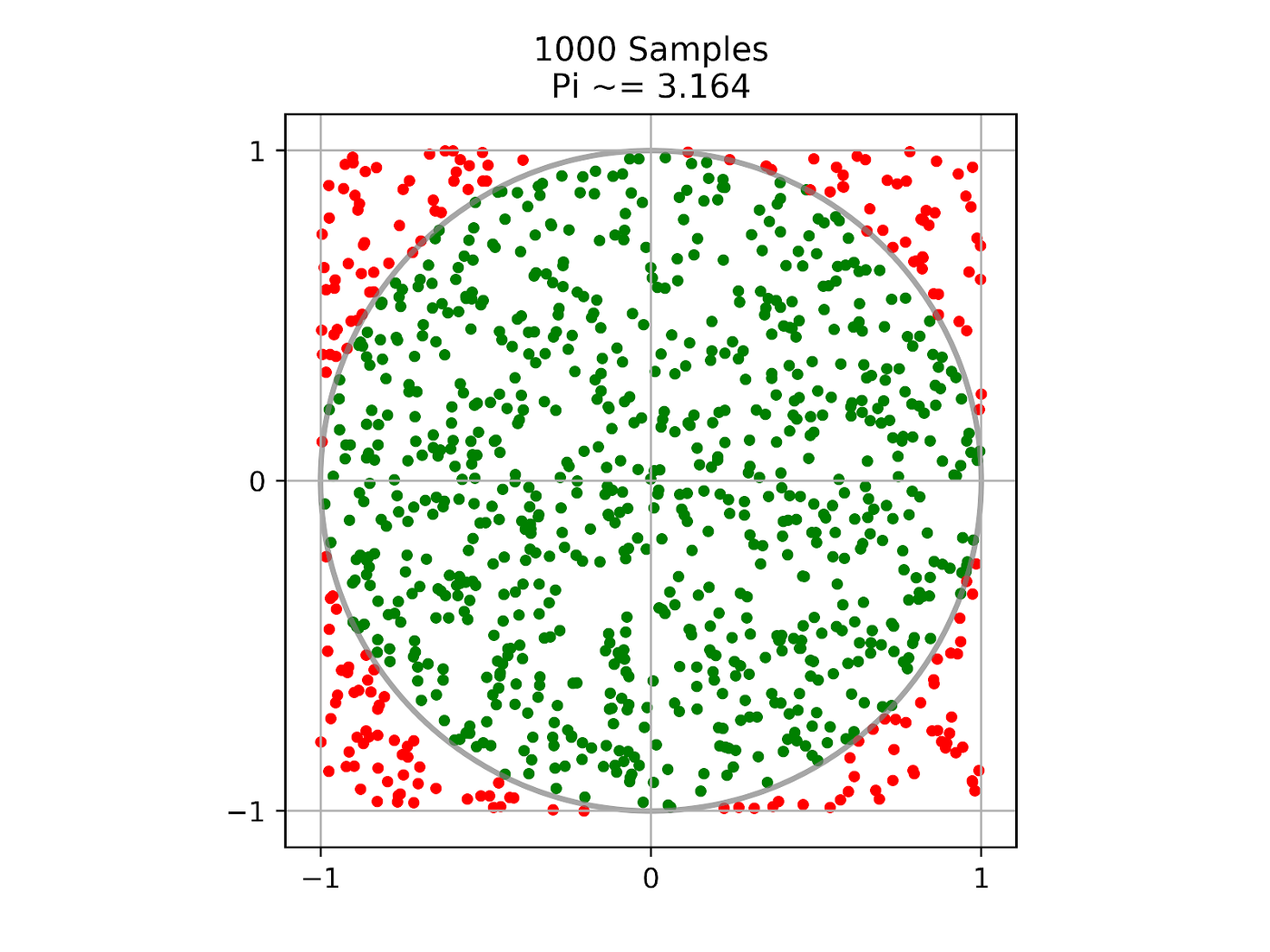
我们使用 Ray 任务 (tasks) 来分发采样工作,使用 Ray Actor (actors) 来跟踪这些分布式采样任务的进度。代码可以在您的笔记本电脑上运行,并且可以轻松扩展到大型集群,以提高估算的准确性。
首先,通过 pip install -U ray 安装 Ray。更多安装选项请参阅安装 Ray。
启动 Ray#
首先,让我们导入本教程所需的所有模块,并使用 ray.init() 启动本地 Ray 集群
import ray
import math
import time
import random

ray.init()
注意
在 Ray 的最新版本(>=1.5)中,首次使用 Ray 远程 API 时会自动调用 ray.init()。
定义进度 Actor#
接下来,我们定义一个 Ray Actor,采样任务可以调用它来更新进度。Ray Actor 本质上是有状态的服务,任何持有该 Actor 实例(句柄)的人都可以调用其方法。
@ray.remote
class ProgressActor:
    def __init__(self, total_num_samples: int):
        self.total_num_samples = total_num_samples
        self.num_samples_completed_per_task = {}

    def report_progress(self, task_id: int, num_samples_completed: int) -> None:
        self.num_samples_completed_per_task[task_id] = num_samples_completed

    def get_progress(self) -> float:
        return (
            sum(self.num_samples_completed_per_task.values()) / self.total_num_samples
        )
我们通过使用 ray.remote 装饰一个普通 Python 类来定义一个 Ray Actor。进度 Actor 有一个 report_progress() 方法,该方法将由采样任务调用以单独更新其进度,还有一个 get_progress() 方法用于获取总体进度。
定义采样任务#
定义好 Actor 后,我们现在定义一个 Ray 任务,该任务进行最多 num_samples 次采样,并返回圆内的样本数量。Ray 任务是无状态函数。它们异步执行,并并行运行。
@ray.remote
def sampling_task(num_samples: int, task_id: int,
                  progress_actor: ray.actor.ActorHandle) -> int:
    num_inside = 0
    for i in range(num_samples):
        x, y = random.uniform(-1, 1), random.uniform(-1, 1)
        if math.hypot(x, y) <= 1:
            num_inside += 1

        # Report progress every 1 million samples.
        if (i + 1) % 1_000_000 == 0:
            # This is async.
            progress_actor.report_progress.remote(task_id, i + 1)

    # Report the final progress.
    progress_actor.report_progress.remote(task_id, num_samples)
    return num_inside
要将一个普通 Python 函数转换为 Ray 任务,我们使用 ray.remote 装饰该函数。采样任务将进度 Actor 句柄作为输入,并向其报告进度。上述代码展示了从任务调用 Actor 方法的示例。
创建进度 Actor#
Actor 定义好后,我们可以创建它的一个实例。
# Change this to match your cluster scale.
NUM_SAMPLING_TASKS = 10
NUM_SAMPLES_PER_TASK = 10_000_000
TOTAL_NUM_SAMPLES = NUM_SAMPLING_TASKS * NUM_SAMPLES_PER_TASK

# Create the progress actor.
progress_actor = ProgressActor.remote(TOTAL_NUM_SAMPLES)
要创建进度 Actor 的实例,只需调用 ActorClass.remote() 方法并传入构造函数的参数。这会在远程工作进程上创建并运行该 Actor。ActorClass.remote(...) 的返回值是一个 Actor 句柄,可用于调用其方法。
执行采样任务#
任务定义好后,我们可以异步执行它。
# Create and execute all sampling tasks in parallel.
results = [
    sampling_task.remote(NUM_SAMPLES_PER_TASK, i, progress_actor)
    for i in range(NUM_SAMPLING_TASKS)
]
我们通过调用 remote() 方法并传入函数参数来执行采样任务。这会立即返回一个作为未来结果的 ObjectRef,然后在远程工作进程上异步执行该函数。
调用进度 Actor#
在采样任务运行时,我们可以通过调用 Actor 的 get_progress() 方法定期查询进度。
# Query progress periodically.
while True:
    progress = ray.get(progress_actor.get_progress.remote())
    print(f"Progress: {int(progress * 100)}%")

    if progress == 1:
        break

    time.sleep(1)
要调用 Actor 方法,请使用 actor_handle.method.remote()。此调用会立即返回一个作为未来结果的 ObjectRef,然后在远程 Actor 进程上异步执行该方法。要获取 ObjectRef 的实际返回值,我们使用阻塞方法 ray.get()。
计算 π#
最后,我们从远程采样任务中获取圆内的样本数量,并计算 π。
# Get all the sampling tasks results.
total_num_inside = sum(ray.get(results))
pi = (total_num_inside * 4) / TOTAL_NUM_SAMPLES
print(f"Estimated value of π is: {pi}")
从上面的代码可以看出,除了单个 ObjectRef 外,ray.get() 还可以接收一个 ObjectRef 列表,并返回一个结果列表。
如果您运行本教程,您将看到类似如下的输出
Progress: 0%
Progress: 15%
Progress: 28%
Progress: 40%
Progress: 50%
Progress: 60%
Progress: 70%
Progress: 80%
Progress: 90%
Progress: 100%
Estimated value of π is: 3.1412202