Ray Tune 关键概念#
让我们快速了解一下使用 Tune 所需的关键概念。如果您想立即查看实践教程,请访问我们的 用户指南。本质上,Tune 有六个关键组成部分需要您理解。
首先,您在 搜索空间 中定义要调整的超参数,并将它们传递给指定要调整目标的 trainable。然后,您选择一个 搜索算法 来有效地优化您的参数,并可选择使用 调度器 来提前停止搜索并加速您的实验。与其他配置一起,您的 trainable、搜索算法和调度器会传递给 Tuner,后者会运行您的实验并创建 trials。 Tuner 返回一个 ResultGrid 来检查您的实验结果。下图展示了这些组件的概述,我们将在接下来的部分中详细介绍。
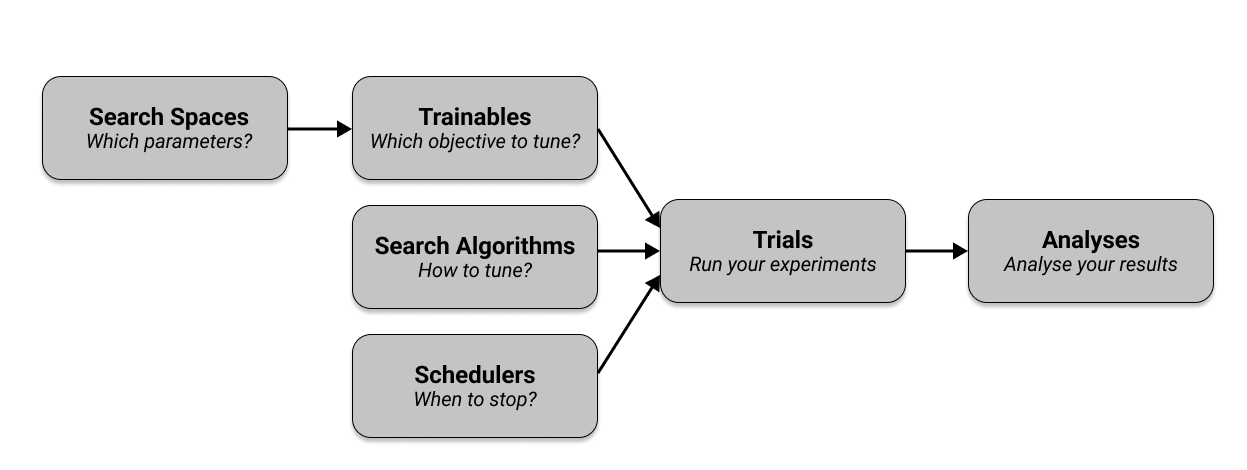
Ray Tune Trainables
简而言之,Trainable 是您可以传递给 Tune 运行的对象。Ray Tune 有两种定义 trainable 的方式,即 函数 API 和 类 API。两者都是定义 trainable 的有效方式,但函数 API 通常更受欢迎,并且在本指南的其余部分中都会使用。
考虑一个优化简单目标函数 a * (x ** 2) + b 的例子,其中 a 和 b 是我们要调整以 最小化 目标的超参数。由于目标函数还有一个变量 x,因此我们需要测试 x 的不同值。给定 a、b 和 x 的具体选择,我们可以评估目标函数并获得一个要最小化的 分数。
使用 基于函数的 API,您可以创建一个函数(此处称为 trainable),该函数接收一个超参数字典。此函数在“训练循环”中计算一个 分数,并将其 报告 给 Tune。
from ray import tune


def objective(x, a, b):  # Define an objective function.
    return a * (x**2) + b


def trainable(config):  # Pass a "config" dictionary into your trainable.

    for x in range(20):  # "Train" for 20 iterations and compute intermediate scores.
        score = objective(x, config["a"], config["b"])

        tune.report({"score": score})  # Send the score to Tune.
请注意,我们在训练循环中使用 tune.report(...) 来报告中间 分数,这在许多机器学习任务中非常有用。如果您只想报告此循环外的最终 分数,您可以直接在 trainable 函数末尾返回分数,例如 return {"score": score}。您也可以使用 yield {"score": score} 来代替 tune.report()。
以下是使用 基于类的 API 指定目标函数的示例。
from ray import tune


def objective(x, a, b):
    return a * (x**2) + b


class Trainable(tune.Trainable):
    def setup(self, config):
        # config (dict): A dict of hyperparameters
        self.x = 0
        self.a = config["a"]
        self.b = config["b"]

    def step(self):  # This is called iteratively.
        score = objective(self.x, self.a, self.b)
        self.x += 1
        return {"score": score}
提示
tune.report 不能在 Trainable 类中使用。
在此处 详细了解 Trainables,并 查看我们的示例。接下来,让我们仔细看看您传递给 trainable 的 config 字典是什么。
Tune 搜索空间
为了优化您的超参数,您必须定义一个搜索空间。搜索空间定义了超参数的有效值,并且可以指定这些值的采样方式(例如,从均匀分布或正态分布)。
Tune 提供了各种函数来定义搜索空间和采样方法。您可以在此处 找到这些搜索空间定义的文档。
以下是一个涵盖所有搜索空间函数的示例。同样,您可以在此处 找到所有这些函数的完整解释。
config = {
    "uniform": tune.uniform(-5, -1),  # Uniform float between -5 and -1
    "quniform": tune.quniform(3.2, 5.4, 0.2),  # Round to multiples of 0.2
    "loguniform": tune.loguniform(1e-4, 1e-1),  # Uniform float in log space
    "qloguniform": tune.qloguniform(1e-4, 1e-1, 5e-5),  # Round to multiples of 0.00005
    "randn": tune.randn(10, 2),  # Normal distribution with mean 10 and sd 2
    "qrandn": tune.qrandn(10, 2, 0.2),  # Round to multiples of 0.2
    "randint": tune.randint(-9, 15),  # Random integer between -9 and 15
    "qrandint": tune.qrandint(-21, 12, 3),  # Round to multiples of 3 (includes 12)
    "lograndint": tune.lograndint(1, 10),  # Random integer in log space
    "qlograndint": tune.qlograndint(1, 10, 2),  # Round to multiples of 2
    "choice": tune.choice(["a", "b", "c"]),  # Choose one of these options uniformly
    "func": tune.sample_from(
        lambda spec: spec.config.uniform * 0.01
    ),  # Depends on other value
    "grid": tune.grid_search([32, 64, 128]),  # Search over all these values
}
Tune Trials
您使用 Tuner.fit 来执行和管理超参数调优并生成您的 trials。最低限度,您的 Tuner 调用将 trainable 作为第一个参数,并将 param_space 字典作为定义搜索空间。
Tuner.fit() 函数还提供了许多功能,例如 日志记录、检查点 和 提前停止。在示例中,最小化 a (x ** 2) + b,一个具有简单 a 和 b 搜索空间的简单 Tune 运行如下所示:
# Pass in a Trainable class or function, along with a search space "config".
tuner = tune.Tuner(trainable, param_space={"a": 2, "b": 4})
tuner.fit()
Tuner.fit 将根据其参数生成几个超参数配置,并将它们包装成 Trial 对象。
Trials 包含大量信息。例如,您可以使用(trial.config)获取超参数配置,Trial ID(trial.trial_id),Trial 的资源规范(resources_per_trial 或 trial.placement_group_factory)以及许多其他值。
默认情况下,Tuner.fit 将一直执行,直到所有 trials 停止或出错。以下是 trial 运行的示例输出:
== Status ==
Memory usage on this node: 11.4/16.0 GiB
Using FIFO scheduling algorithm.
Resources requested: 1/12 CPUs, 0/0 GPUs, 0.0/3.17 GiB heap, 0.0/1.07 GiB objects
Result logdir: /Users/foo/ray_results/myexp
Number of trials: 1 (1 RUNNING)
+----------------------+----------+---------------------+-----------+--------+--------+----------------+-------+
| Trial name           | status   | loc                 |         a |      b |  score | total time (s) |  iter |
|----------------------+----------+---------------------+-----------+--------+--------+----------------+-------|
| Trainable_a826033a | RUNNING  | 10.234.98.164:31115 | 0.303706  | 0.0761 | 0.1289 |        7.54952 |    15 |
+----------------------+----------+---------------------+-----------+--------+--------+----------------+-------+
您还可以通过指定样本数(num_samples)轻松运行 10 个 trials。Tune 会自动 确定并行运行的 trials 数量。请注意,您可以将 num_samples 指定为样本数,也可以通过 time_budget_s 指定以秒为单位的时间预算,如果您将 num_samples=-1。
tuner = tune.Tuner(
    trainable, param_space={"a": 2, "b": 4}, tune_config=tune.TuneConfig(num_samples=10)
)
tuner.fit()
最后,您可以使用更有趣的搜索空间来优化您的超参数,方法是利用 Tune 的 搜索空间 API,例如使用随机采样或网格搜索。以下是一个示例,为 a 和 b 在 [0, 1] 之间进行均匀采样。
space = {"a": tune.uniform(0, 1), "b": tune.uniform(0, 1)}
tuner = tune.Tuner(
    trainable, param_space=space, tune_config=tune.TuneConfig(num_samples=10)
)
tuner.fit()
要了解有关配置 Tune 运行的各种方法的更多信息,请查看 Tuner API 参考。
Tune 搜索算法
为了优化训练过程的超参数,您需要使用 搜索算法,它会建议超参数配置。如果您不指定搜索算法,Tune 默认将使用随机搜索,这可以为您的超参数优化提供一个良好的起点。
例如,要将 Tune 与通过 bayesian-optimization 包实现的简单贝叶斯优化结合使用(请确保首先运行 pip install bayesian-optimization),我们可以使用 BayesOptSearch 定义一个 algo。只需将 search_alg 参数传递给 tune.TuneConfig,它会被 Tuner 接受。
from ray.tune.search.bayesopt import BayesOptSearch

# Define the search space
search_space = {"a": tune.uniform(0, 1), "b": tune.uniform(0, 20)}

algo = BayesOptSearch(random_search_steps=4)

tuner = tune.Tuner(
    trainable,
    tune_config=tune.TuneConfig(
        metric="score",
        mode="min",
        search_alg=algo,
    ),
    run_config=tune.RunConfig(stop={"training_iteration": 20}),
    param_space=search_space,
)
tuner.fit()
Tune 提供了与许多流行的优化库集成的搜索算法,例如 HyperOpt 或 Optuna。Tune 会自动将提供的搜索空间转换为搜索算法和底层库所需的搜索空间。有关更多详细信息,请参阅 搜索算法 API 文档。
以下是 Tune 中所有可用搜索算法的概述。
SearchAlgorithm |
总结 |
网站 |
代码示例 |
|---|---|---|---|
随机搜索/网格搜索 |
|||
贝叶斯/ Bandit 优化 |
[Ax] |
||
Tree-Parzen Estimators |
[HyperOpt] |
||
贝叶斯优化 |
|||
贝叶斯优化/HyperBand |
[BOHB] |
||
无梯度优化 |
|||
Optuna 搜索算法 |
[Optuna] |
注意
与 Tune 的 Trial Schedulers 不同,Tune 搜索算法不能影响或停止训练过程。但是,您可以将它们结合使用以提前停止评估效果不佳的 trials。
如果您想实现自己的搜索算法,界面很容易实现,您可以 阅读此处的说明。
Tune 还提供了与搜索算法一起使用的有用工具。
重复评估 (tune.search.Repeater):支持使用多个随机种子运行每个采样的超参数。
并发限制器 (tune.search.ConcurrencyLimiter):限制运行优化时的并发 trials 数量。
Shim 实例化 (tune.create_searcher):允许根据字符串创建搜索算法对象。
请注意,在上面的示例中,我们告诉 Tune 在 20 次训练迭代后停止。这种通过显式规则停止 trials 的方法很有用,但在许多情况下,我们可以通过调度器做得更好。
Tune 调度器
为了使您的训练过程更有效,您可以使用 Trial Scheduler。例如,在我们最小化训练循环中函数的 trainable 示例中,我们使用了 tune.report()。这会报告增量结果,给定由搜索算法选择的超参数配置。基于这些报告的结果,Tune 调度器可以决定是否提前停止 trial。如果您不指定调度器,Tune 将默认使用先进先出(FIFO)调度器,它只会按选择顺序传递由搜索算法选择的 trials,并且不会执行任何提前停止。
简而言之,调度器可以停止、暂停或调整正在运行的 trials 的超参数,从而可能使您的超参数调优过程快得多。与搜索算法不同,Trial Schedulers 不会选择要评估的超参数配置。
这是一个使用所谓的 HyperBand 调度器来调优实验的简短示例。所有调度器都接受一个 metric,这是由您的 trainable 报告的值。 metric 然后根据您提供的 mode 进行最大化或最小化。要使用调度器,只需将 scheduler 参数传递给 tune.TuneConfig,它会被 Tuner 接受。
from ray.tune.schedulers import HyperBandScheduler

# Create HyperBand scheduler and minimize the score
hyperband = HyperBandScheduler(metric="score", mode="max")

config = {"a": tune.uniform(0, 1), "b": tune.uniform(0, 1)}

tuner = tune.Tuner(
    trainable,
    tune_config=tune.TuneConfig(
        num_samples=20,
        scheduler=hyperband,
    ),
    param_space=config,
)
tuner.fit()
Tune 包含早期停止算法的分布式实现,例如 Median Stopping Rule、HyperBand 和 ASHA。Tune 还包含 Population Based Training (PBT) 和 Population Based Bandits (PB2) 的分布式实现。
提示
最容易开始使用的是 ASHAScheduler,它将积极地终止表现不佳的 trials。
在使用调度器时,您可能会遇到兼容性问题,如下面的兼容性矩阵所示。某些调度器不能与搜索算法一起使用,而某些调度器要求您实现检查点。
调度器可以在调优过程中动态更改 trial 资源需求。这在 ResourceChangingScheduler 中实现,它可以包装任何其他调度器。
调度器 |
需要检查点? |
SearchAlg 兼容? |
示例 |
|---|---|---|---|
否 |
是 |
||
否 |
是 |
||
是 |
是 |
||
是 |
仅 TuneBOHB |
||
是 |
不兼容 |
||
是 |
不兼容 |
在 调度器 API 文档 中了解有关 Trial Schedulers 的更多信息。
Tune ResultGrid
Tuner.fit() 返回一个 ResultGrid 对象,其中包含可用于分析训练的方法。以下示例显示了如何从 ResultGrid 对象访问各种指标,例如最佳可用 trial 或该 trial 的最佳超参数配置。
tuner = tune.Tuner(
    trainable,
    tune_config=tune.TuneConfig(
        metric="score",
        mode="min",
        search_alg=BayesOptSearch(random_search_steps=4),
    ),
    run_config=tune.RunConfig(
        stop={"training_iteration": 20},
    ),
    param_space=config,
)
results = tuner.fit()

best_result = results.get_best_result()  # Get best result object
best_config = best_result.config  # Get best trial's hyperparameters
best_logdir = best_result.path  # Get best trial's result directory
best_checkpoint = best_result.checkpoint  # Get best trial's best checkpoint
best_metrics = best_result.metrics  # Get best trial's last results
best_result_df = best_result.metrics_dataframe  # Get best result as pandas dataframe
此对象还可以将所有训练运行检索为数据帧,从而允许您对结果进行临时数据分析。
# Get a dataframe with the last results for each trial
df_results = results.get_dataframe()

# Get a dataframe of results for a specific score or mode
df = results.get_dataframe(filter_metric="score", filter_mode="max")
有关更多用法示例,请参阅 结果分析用户指南。
下一步?
现在您对 Tune 有了基本了解,请查看:
用户指南:将 Tune 与您喜欢的机器学习库一起使用的教程。
Ray Tune 示例:使用 Tune 与您喜欢的机器学习库的端到端示例和模板。
Ray Tune 入门:一个简单的教程,引导您完成设置 Tune 实验的过程。
更多问题或疑虑?
您可以通过以下渠道提交问题、反馈或报告问题:
讨论区:用于**关于 Ray 使用的提问**或**功能请求**。
GitHub Issues:用于** bug 报告**。
Ray Slack:用于**与 Ray 维护者联系**。
StackOverflow:使用 [ray] 标签**提问关于 Ray 的问题**。