回调#
注意
Ray 2.40 默认使用 RLlib 的新 API 栈。Ray 团队已基本完成算法、示例脚本和文档到新代码库的迁移。
如果您仍在使用旧的 API 栈,请参阅新 API 栈迁移指南了解如何迁移的详细信息。
回调是将代码注入实验的最直接方法。您可以定义在某些事件发生时执行的代码,并将其传递给您的 AlgorithmConfig。
以下是一个定义简单 lambda 的示例,该 lambda 在回合结束后打印出该回合的收益
from ray.rllib.algorithms.ppo import PPOConfig

ppo = config = (
    PPOConfig()
    .environment("CartPole-v1")
    .callbacks(
        on_episode_end=(
            lambda episode, **kw: print(f"Episode done. R={episode.get_return()}")
        )
    )
    .build()
)
ppo.train()
Callback lambdas vs 有状态 RLlibCallback#
有两种方法可以为各种回调事件定义要执行的自定义代码。
Callback lambdas#
如果注入的代码相当简单,并且不需要存储临时信息以便在后续事件调用中重用,您可以使用 lambda,并如前所示将其传递给 callbacks() 方法。
请参阅 ref:Callback events <rllib-callback-event-overview> 获取完整列表。事件名称始终与 callbacks() 方法的参数名称匹配。
有状态 RLlibCallback#
如果注入的代码是有状态的,并且临时存储结果以便在由相同或不同事件触发的后续调用中重用,您需要继承 RLlibCallback API,然后实现一个或多个方法,例如 on_algorithm_init()
以下是打印终止回合收益的相同示例,但使用了 RLlibCallback 的子类。
from ray.rllib.algorithms.ppo import PPOConfig
from ray.rllib.callbacks.callbacks import RLlibCallback

class EpisodeReturn(RLlibCallback):
    def __init__(self):
        super().__init__()
        # Keep some global state in between individual callback events.
        self.overall_sum_of_rewards = 0.0

    def on_episode_end(self, *, episode, **kwargs):
        self.overall_sum_of_rewards += episode.get_return()
        print(f"Episode done. R={episode.get_return()} Global SUM={self.overall_sum_of_rewards}")

ppo = (
    PPOConfig()
    .environment("CartPole-v1")
    .callbacks(EpisodeReturn)
    .build()
)
ppo.train()
回调事件#
在训练迭代期间,Algorithm 通常会遍历以下事件树,这是 RLlib 回调系统中所有支持事件的高级概述
Algorithm
    .__init__()
        `on_algorithm_init` - After algorithm construction and setup.
    .train()
        `on_train_result` - After a training iteration.
    .evaluate()
        `on_evaluate_start` - Before evaluation starts using the eval ``EnvRunnerGroup``.
        `on_evaluate_end` - After evaluation is finished.
    .restore_from_path()
        `on_checkpoint_loaded` - After a checkpoint's new state has been loaded.

EnvRunner
    .__init__()
        `on_environment_created` - After the RL environment has been created.
    .sample()
        `on_episode_created` - After a new episode object has been created.
        `on_episode_start` - After an episode object has started (after ``env.reset()``).
        `on_episode_step` - After an episode object has stepped (after ``env.step()``).
        `on_episode_end` - After an episode object has terminated (or truncated).
        `on_sample_end` - At the end of the ``EnvRunner.sample()`` call.
请注意,树中的某些事件通过 Ray actor 在不同的进程上同时发生。例如,一个 EnvRunner actor 可能会触发其 on_episode_start 事件,而与此同时,另一个 EnvRunner actor 可能会触发其 on_sample_end 事件,并且主 Algorithm 进程触发 on_train_result。
RLlibCallback 中绑定到 Algorithm 的方法
|
新的 Algorithm 实例完成设置后运行的回调。 |
|
评估开始前的回调。 |
|
评估完成后运行。 |
一个或多个 EnvRunner actor 被重新创建后运行的回调。 |
|
Algorithm 从检查点加载新状态后运行的回调。 |
RLlibCallback 中绑定到 EnvRunner 的方法
创建新的环境对象后运行的回调。 |
|
|
创建新回合(但尚未开始!)时运行的回调。 |
|
回合开始后立即运行的回调。 |
|
在每个回合步骤中调用(在记录动作之后)。 |
|
当回合结束时调用(在记录 terminated/truncated 之后)。 |
|
在 |
链接回调#
您可以定义多个 RLlibCallback 类,并将它们放入列表中,然后将列表传递给 callbacks() 方法。您也可以将可调用函数的列表(而不是单个可调用函数)传递给该方法的不同参数。
例如,如果您已经编写了 RLlibCallback 的子类,并希望在不同的实验中重用它。由于您的一个实验需要一些调试回调代码,您只想在少数几次运行时临时注入它。
链式回调的解析顺序#
RLlib 按以下方式解析给定事件的所有可用回调方法和可调用函数
RLlibCallback 的子类优先于您通过 callbacks() 方法的各种参数提供的单个或列表可调用函数。
例如,假设回调事件是 on_train_result,它在训练迭代结束时并在算法进程内部触发
RLlib 遍历所有给定的
RLlibCallback子类列表,并调用它们的on_train_result方法。在此过程中,它保持用户在列表中提供的确切顺序。然后,RLlib 遍历所有已定义的
on_train_result可调用函数列表。您通过调用callbacks()方法并在此调用中定义on_train_result参数来配置它们。
class MyCallbacks(RLlibCallback):
    def on_train_result(self, *, algorithm, metrics_logger, result, **kwargs):
        print("RLlibCallback subclass")

class MyDebugCallbacks(RLlibCallback):
    def on_train_result(self, *, algorithm, metrics_logger, result, **kwargs):
        print("debug subclass")

# Define the callbacks order through the config.
# Subclasses first, then individual `on_train_result` (or other events) callables:
config.callbacks(
    callbacks_class=[MyDebugCallbacks, MyCallbacks],  # <- note: debug class first
    on_train_result=[
        lambda algorithm, **kw: print('lambda 1'),
        lambda algorithm, **kw: print('lambda 2'),
    ],
)

# When training the algorithm, after each training iteration, you should see
# something like:
# > debug subclass
# > RLlibCallback subclass
# > lambda 1
# > lambda 2
示例#
以下是两个示例,演示了如何在 Algorithm 进程和 EnvRunner 进程上设置自定义回调。
示例 1:on_train_result#
以下示例演示了如何实现一个简单的自定义函数,该函数不时地将回放缓冲区的内容写入磁盘。
通常您不想将缓冲区的内容与 Algorithm 检查点一起写入,因此通过自定义回调以更受控的方式减少写入频率可能是一个不错的折衷方案。
import ormsgpack
from ray.rllib.algorithms.dqn import DQNConfig

def _write_buffer_if_necessary(algorithm, metrics_logger, result):
    # Write the buffer contents only every ith iteration.
    if algorithm.training_iteration % 2 == 0:
        # python dict
        buffer_contents = algorithm.local_replay_buffer.get_state()

        # binary
        msgpacked = ormsgpack.packb(
           buffer_contents,
           option=ormsgpack.OPT_SERIALIZE_NUMPY,
        )

        # Open some file and write the buffer contents into it using `ormsgpack`.
        with open("replay_buffer_contents.msgpack", "wb") as f:
           f.write(msgpacked)

config = (
    DQNConfig()
    .environment("CartPole-v1")
    .callbacks(
       on_train_result=_write_buffer_if_necessary,
    )
)
dqn = config.build()

# Train n times. Expect RLlib to write buffer every ith iteration.
for _ in range(4):
    print(dqn.train())
有关所有可用回调的确切调用签名及其预期参数类型的详细信息,请参阅 在 Algorithm 中调用的回调。
示例 2:on_episode_step 和 on_episode_end#
以下示例演示了如何实现一个自定义 RLlibCallback 类,用于计算 Acrobot-v1 RL 环境的平均“第一个关节角度”
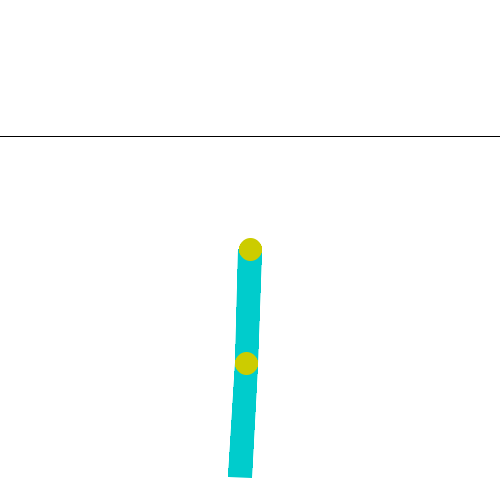
Acrobot-v1 环境:env 代码描述了您将通过自定义回调计算和记录的角度:#
`theta1` is the angle of the first joint, where an angle of 0.0 indicates that the first
link is pointing directly downwards.
此示例利用 RLlib 的 MetricsLogger API 来记录注入代码的自定义计算。有关 MetricsLogger API 的更多详细信息,请参阅 MetricsLogger API。
另请参阅这个更复杂的示例,它生成并将 PacMan 热力图(图像)记录到 WandB。
import math
import numpy as np
from ray.rllib.algorithms.ppo import PPOConfig
from ray.rllib.callbacks.callbacks import RLlibCallback

class LogAcrobotAngle(RLlibCallback):
    def on_episode_created(self, *, episode, **kwargs):
        # Initialize an empty list in the `custom_data` property of `episode`.
        episode.custom_data["theta1"] = []

    def on_episode_step(self, *, episode, env, **kwargs):
        # First get the angle from the env (note that `env` is a VectorEnv).
        # See https://github.com/Farama-Foundation/Gymnasium/blob/main/gymnasium/envs/classic_control/acrobot.py
        # for the env source code.
        cos_theta1, sin_theta1 = env.envs[0].unwrapped.state[0], env.envs[0].unwrapped.state[1]
        # Convert cos/sin/tan into degree.
        deg_theta1 = math.degrees(math.atan2(sin_theta1, cos_theta1))

        # Log the theta1 degree value in the episode object, temporarily.
        episode.custom_data["theta1"].append(deg_theta1)

    def on_episode_end(self, *, episode, metrics_logger, **kwargs):
        # Get all the logged theta1 degree values and average them.
        theta1s = episode.custom_data["theta1"]
        avg_theta1 = np.mean(theta1s)

        # Log the final result - per episode - to the MetricsLogger.
        # Report with a sliding/smoothing window of 50.
        metrics_logger.log_value("theta1_mean", avg_theta1, reduce="mean", window=50)

config = (
    PPOConfig()
    .environment("Acrobot-v1")
    .callbacks(
        callbacks_class=LogAcrobotAngle,
    )
)
ppo = config.build()

# Train n times. Expect to find `theta1_mean` in the results under:
# `env_runners/theta1_mean`
for i in range(10):
    results = ppo.train()
    print(
        f"iter={i} "
        f"theta1_mean={results['env_runners']['theta1_mean']} "
        f"R={results['env_runners']['episode_return_mean']}"
    )
提示
您可以根据调用 EnvRunner 是常规的“训练”EnvRunner(用于收集训练样本)还是评估 EnvRunner(仅用于评估时玩回合)来构建自定义逻辑。访问 env_runner.config.in_evaluation 布尔标志,该标志在评估 EnvRunner actor 上为 True,在用于收集训练数据的 EnvRunner actor 上为 False。
有关所有可用回调的确切调用签名及其预期参数类型的详细信息,请参阅 在 Algorithm 中调用的回调。