检查点#
注意
Ray 2.40 默认使用 RLlib 的新 API stack。Ray 团队已基本完成算法、示例脚本和文档向新代码库的过渡。
如果你仍在使用旧的 API stack,请参阅新 API stack 迁移指南了解如何迁移的详细信息。
RLlib 为其所有主要类提供强大的检查点系统,允许你将 Algorithm 实例及其子组件的状态保存到本地磁盘或云存储中,并恢复先前运行的实验状态和单个子组件。该系统允许你从先前状态继续训练模型,或将精简的 PyTorch 模型部署到生产环境中。
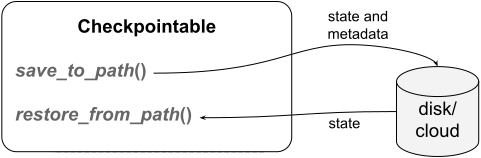
保存到磁盘或云存储以及从中恢复:使用 save_to_path() 方法将任何 Checkpointable() 组件或整个 Algorithm 的当前状态写入磁盘或云存储。要将保存的状态加载回正在运行的组件或你的 Algorithm 中,请使用 restore_from_path() 方法。#
检查点是磁盘上的目录或某个 PyArrow 支持的云位置,例如 gcs 或 S3。它包含架构信息,例如用于创建新实例的类和构造函数参数,一个包含状态信息的 pickle 或 msgpack 文件,以及一个包含 Ray 版本、git commit 和检查点版本信息的可读 metadata.json 文件。
你可以使用 from_checkpoint() 方法从现有检查点生成新的 Algorithm 实例或其他子组件,例如 RLModule。例如,你可以部署一个先前训练好的 RLModule,而无需任何其他 RLlib 组件,将其部署到生产环境中。
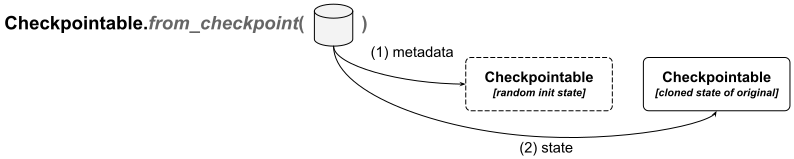
直接从检查点创建新实例:使用 classmethod from_checkpoint() 方法直接从检查点实例化对象。RLlib 首先使用保存的元数据创建一个原始检查点对象的精简实例,然后从检查点目录中的状态信息恢复其状态。#
另一种可能性是将特定子组件的状态加载到包含它的更高级别对象中。例如,你可能只想加载你的 RLModule 的状态(位于你的 Algorithm 内),而保持所有其他组件原样。
Checkpointable API#
RLlib 通过 Checkpointable API 管理检查点,该 API 公开以下三个主要方法
save_to_path()用于创建新检查点restore_from_path()用于将检查点中的状态加载到正在运行的对象中from_checkpoint()用于从检查点创建新对象
RLlib 中目前支持 Checkpointable API 的类有
RLModule(以及MultiRLModule)EnvRunner(因此也包括SingleAgentEnvRunner和MultiAgentEnvRunner)ConnectorV2(因此也包括ConnectorPipelineV2)
使用 save_to_path() 创建新检查点#
你可以通过 save_to_path() 方法从已实例化的 RLlib 对象创建新检查点。
以下是两个示例(单智能体和多智能体),使用 Algorithm 类,展示如何创建检查点
from ray.rllib.algorithms.ppo import PPOConfig

# Configure and build an initial algorithm.
config = (
    PPOConfig()
    .environment("Pendulum-v1")
)
ppo = config.build()

# Train for one iteration, then save to a checkpoint.
print(ppo.train())
checkpoint_dir = ppo.save_to_path()
print(f"saved algo to {checkpoint_dir}")
from ray.rllib.algorithms.ppo import PPOConfig
from ray.rllib.examples.envs.classes.multi_agent import MultiAgentPendulum
from ray.tune import register_env

register_env("multi-pendulum", lambda cfg: MultiAgentPendulum({"num_agents": 2}))

# Configure and build an initial algorithm.
multi_agent_config = (
    PPOConfig()
    .environment("multi-pendulum")
    .multi_agent(
        policies={"p0", "p1"},
        # Agent IDs are 0 and 1 -> map to p0 and p1, respectively.
        policy_mapping_fn=lambda aid, eps, **kw: f"p{aid}"
    )
)
ppo = multi_agent_config.build()

# Train for one iteration, then save to a checkpoint.
print(ppo.train())
multi_agent_checkpoint_dir = ppo.save_to_path()
print(f"saved multi-agent algo to {multi_agent_checkpoint_dir}")
注意
使用 Ray Tune 运行实验时,每当训练迭代次数与通过 Tune 配置的检查点频率匹配时,Tune 都会自动在 Algorithm 实例上调用 save_to_path() 方法。Tune 创建这些检查点的默认位置是 ~/ray_results/[你的实验名称]/[Tune 试验名称]/checkpoint_[序列号]。
检查点版本#
RLlib 使用检查点版本控制系统来确定如何从给定目录恢复 Algorithm 或任何子组件。
从 Ray 2.40 开始,你可以在所有检查点目录内人类可读的 metadata.json 文件中找到检查点版本。
同样从 Ray 2.40 开始,RLlib 检查点是向后兼容的。这意味着使用 Ray 2.x 创建的检查点可以被 Ray 2.x+n 读取和处理,只要 x >= 40。Ray 团队通过对先前 Ray 版本创建的检查点进行全面的 CI 测试来确保向后兼容性。
检查点目录结构#
将 PPO 的状态保存在 checkpoint_dir 目录中,或者如果使用 Ray Tune 则保存在 ~/ray_results/ 的某个位置后,目录结构如下所示
$ cd [your algo checkpoint dir]
$ ls -la
    .
    ..
    env_runner/
    learner_group/
    algorithm_state.pkl
    class_and_ctor_args.pkl
    metadata.json
检查点目录内的子目录,例如 env_runner/,暗示着子组件自身的检查点数据。例如,一个 Algorithm 总是同时保存其 EnvRunner 状态和 LearnerGroup 状态。
注意
每个子组件的目录本身包含一个 metadata.json 文件、一个 class_and_ctor_args.pkl 文件以及一个 pickle 或 msgpack 状态文件,所有这些文件都与主算法检查点目录中的对应文件具有相同的作用。例如,在 learner_group/ 子目录中,你会找到 LearnerGroup 自身的架构、状态和元信息
$ cd env_runner/
$ ls -la
.
..
state.pkl
class_and_ctor_args.pkl
metadata.json
有关详细信息,请参见RLlib 组件树。
metadata.json 文件仅为了方便你而存在,RLlib 并不需要它。
注意
metadata.json 文件包含用于创建检查点的 Ray 版本、Ray commit、RLlib 检查点版本以及同一目录中状态文件和构造函数信息文件的名称等信息。
$ more metadata.json
{
    "class_and_ctor_args_file": "class_and_ctor_args.pkl",
    "state_file": "state",
    "ray_version": ..,
    "ray_commit": ..,
    "checkpoint_version": "2.1"
}
class_and_ctor_args.pkl 文件存储了构建一个“全新”对象(不包含任何特定状态)所需的元信息。顾名思义,此信息包含已保存对象的类及其构造函数参数和关键字参数。RLlib 在调用 from_checkpoint() 时使用此文件来创建初始新对象。
最后,.._state.[pkl|msgpack] 文件包含已保存对象的 pickle 或 msgpack 序列化状态字典。RLlib 在保存检查点时,通过调用对象的 get_state() 方法获取此状态字典。
注意
基于 msgpack 的检查点支持是实验性的,但将来可能会成为默认设置。与 pickle 不同,msgpack 的优势在于与 Python 版本无关,因此用户可以从他们使用旧 Python 版本生成的旧检查点中恢复实验和模型状态。
Ray 团队正在努力在检查点中完全分离状态和架构,这意味着所有状态信息都应存储在与 Python 版本无关的 state.msgpack 文件中,而所有架构信息则应存储在仍依赖于 Python 版本的 class_and_ctor_args.pkl 文件中。从检查点加载时,用户必须提供检查点的后一部分/架构部分。
RLlib 组件树#
以下是 RLlib 组件树的结构,显示了你可以在更高级别检查点中以什么名称访问子组件自身的检查点。最高级别是 Algorithm 类
algorithm/
    learner_group/
        learner/
            rl_module/
                default_policy/  # <- single-agent case
                [module ID 1]/  # <- multi-agent case
                [module ID 2]/  # ...
    env_runner/
        env_to_module_connector/
        module_to_env_connector/
注意
env_runner/ 子组件目前不持有 RLModule 检查点的副本,因为它已保存在 learner/ 下。Ray 团队正在努力解决这个问题,可能通过软链接避免文件重复和不必要的磁盘使用。
使用 from_checkpoint 从检查点创建实例#
一旦你有了训练好的 Algorithm 或其任何子组件的检查点,你可以直接从该检查点重新创建新对象。
以下是两个示例
要从检查点重新创建完整的 Algorithm 实例,你可以执行以下操作
# Import the correct class to create from scratch using the checkpoint.
from ray.rllib.algorithms.algorithm import Algorithm

# Use the already existing checkpoint in `checkpoint_dir`.
new_ppo = Algorithm.from_checkpoint(checkpoint_dir)
# Confirm the `new_ppo` matches the originally checkpointed one.
assert new_ppo.config.env == "Pendulum-v1"

# Continue training.
new_ppo.train()
从 Algorithm 检查点创建新的 RLModule 在将训练好的模型部署到生产环境或在训练进行时在单独进程中评估它们时非常有用。要仅从算法的检查点重新创建 RLModule,你可以执行以下操作。
from pathlib import Path
import torch

# Import the correct class to create from scratch using the checkpoint.
from ray.rllib.core.rl_module.rl_module import RLModule

# Use the already existing checkpoint in `checkpoint_dir`, but go further down
# into its subdirectory for the single RLModule.
# See the preceding section on "RLlib component tree" for the various elements in the RLlib
# component tree.
rl_module_checkpoint_dir = Path(checkpoint_dir) / "learner_group" / "learner" / "rl_module" / "default_policy"

# Now that you have the correct subdirectory, create the actual RLModule.
rl_module = RLModule.from_checkpoint(rl_module_checkpoint_dir)

# Run a forward pass to compute action logits.
# Use a dummy Pendulum observation tensor (3d) and add a batch dim (B=1).
results = rl_module.forward_inference(
    {"obs": torch.tensor([0.5, 0.25, -0.3]).unsqueeze(0).float()}
)
print(results)
请参阅此训练后运行策略推理的示例以及此使用 LSTM 运行策略推理的示例。
提示
由于你的 RLModule 也是 PyTorch Module,你可以轻松将模型导出到 ONNX、IREE 或其他易于部署的格式。
使用 restore_from_path 从检查点恢复状态#
通常,save_to_path() 和 from_checkpoint() 方法足以创建检查点并从中重新创建实例。
但是,有时你已经有一个实例化并正在运行的对象,并希望“加载”另一个状态到其中。例如,考虑通过多智能体训练训练两个 RLModule 网络,让它们以自博弈的方式相互对弈。一段时间后,你可能希望在不中断实验的情况下,将其中一个 RLModules 替换为你之前保存到磁盘或云存储的第三个 RLModule 的状态。
这时 restore_from_path() 方法就派上用场了。它将状态加载到已经运行的对象中,例如你的 Algorithm,或者加载到该对象的子组件中,例如你的 Algorithm 内的特定 RLModule。
直接使用 RLlib 时,即不使用 Ray Tune 时,将状态加载到正在运行的实例中是直接的
# Recreate the preceding PPO from the config.
new_ppo = config.build()

# Load the state stored previously in `checkpoint_dir` into the
# running algorithm instance.
new_ppo.restore_from_path(checkpoint_dir)

# Run another training iteration.
new_ppo.train()
然而,通过 Ray Tune 运行时,你无法直接访问 Algorithm 对象或其任何子组件。你可以使用RLlib 的回调 API注入自定义代码来解决此问题。
此外,请参阅此关于如何使用不同配置继续训练的示例。
from ray import tune

# Reuse the preceding PPOConfig (`config`).
# Inject custom callback code that runs right after algorithm's initialization.
config.callbacks(
    on_algorithm_init=(
        lambda algorithm, _dir=checkpoint_dir, **kw: algorithm.restore_from_path(_dir)
    ),
)

# Run the experiment, continuing from the checkpoint, through Ray Tune.
results = tune.Tuner(
    config.algo_class,
    param_space=config,
    run_config=tune.RunConfig(stop={"num_env_steps_sampled_lifetime": 8000})
).fit()
在前面关于 save_to_path 的部分,你创建了一个使用 default_policy ModuleID 的单智能体检查点,以及一个包含两个 ModuleID(p0 和 p1)的多智能体检查点。
以下是如何继续多智能体实验的训练,并将 p1 替换为单智能体实验中 default_policy 的状态。你可以使用RLlib 的回调 API将自定义代码注入 Ray Tune 实验中
# Reuse the preceding multi-agent PPOConfig (`multi_agent_config`).

# But swap out ``p1`` with the state of the ``default_policy`` from the
# single-agent run, using a callback and the correct path through the
# RLlib component tree:
multi_rl_module_component_tree = "learner_group/learner/rl_module"

# Inject custom callback code that runs right after algorithm's initialization.

def _on_algo_init(algorithm, **kwargs):
    algorithm.restore_from_path(
        # Checkpoint was single-agent (has "default_policy" subdir).
        path=Path(checkpoint_dir) / multi_rl_module_component_tree / "default_policy",
        # Algo is multi-agent (has "p0" and "p1" subdirs).
        component=multi_rl_module_component_tree + "/p1",
    )

# Inject callback.
multi_agent_config.callbacks(on_algorithm_init=_on_algo_init)

# Run the experiment through Ray Tune.
results = tune.Tuner(
    multi_agent_config.algo_class,
    param_space=multi_agent_config,
    run_config=tune.RunConfig(stop={"num_env_steps_sampled_lifetime": 8000})
).fit()