Tune 中的日志记录和输出#
默认情况下,Tune 会记录 TensorBoard、CSV 和 JSON 格式的结果。如果您需要记录模型权重或梯度等较低级别的内容,请参阅Trainable 日志记录。您可以在此处了解更多关于日志记录和自定义的信息:Tune 日志记录器 (tune.logger)。
如何在 Tune 中配置日志记录?#
Tune 会将每个 trial 的结果记录到指定本地目录下的子文件夹中,该目录默认为 ~/ray_results。
# This logs to two different trial folders:
# ~/ray_results/trainable_name/trial_name_1 and ~/ray_results/trainable_name/trial_name_2
# trainable_name and trial_name are autogenerated.
tuner = tune.Tuner(trainable, run_config=RunConfig(num_samples=2))
results = tuner.fit()
您可以指定 storage_path 和 trainable_name
# This logs to 2 different trial folders:
# ./results/test_experiment/trial_name_1 and ./results/test_experiment/trial_name_2
# Only trial_name is autogenerated.
tuner = tune.Tuner(trainable,
    tune_config=tune.TuneConfig(num_samples=2),
    run_config=RunConfig(storage_path="./results", name="test_experiment"))
results = tuner.fit()
要了解有关 Trial 的更多信息,请参阅其详细的 API 文档:Trial。
如何将 Tune 运行记录到 TensorBoard?#
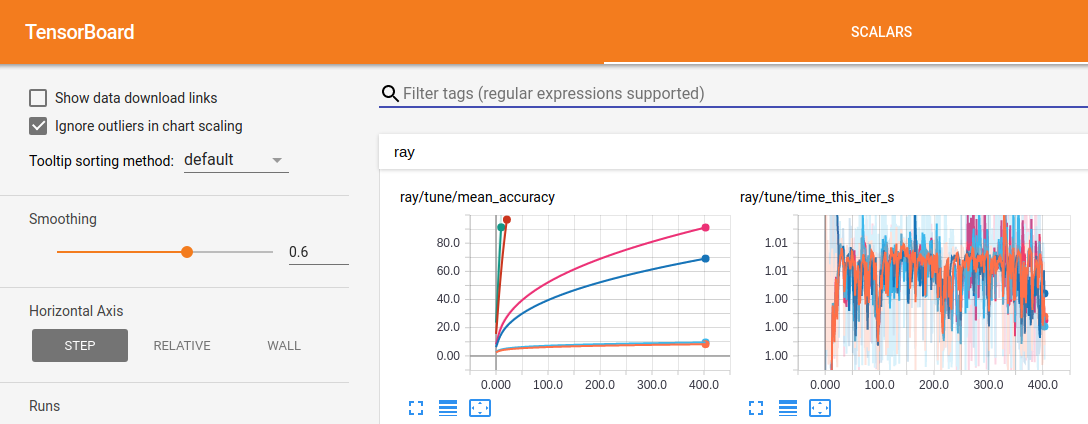
Tune 在 Tuner.fit() 期间会自动输出 TensorBoard 文件。要可视化 tensorboard 中的学习过程,请安装 tensorboardX
$ pip install tensorboardX
然后,在运行实验后,您可以通过指定结果的输出目录来使用 TensorBoard 可视化您的实验。
$ tensorboard --logdir=~/ray_results/my_experiment
如果您在没有 sudo 访问权限的远程多用户集群上运行 Ray,您可以运行以下命令确保 tensorboard 能够写入临时目录
$ export TMPDIR=/tmp/$USER; mkdir -p $TMPDIR; tensorboard --logdir=~/ray_results
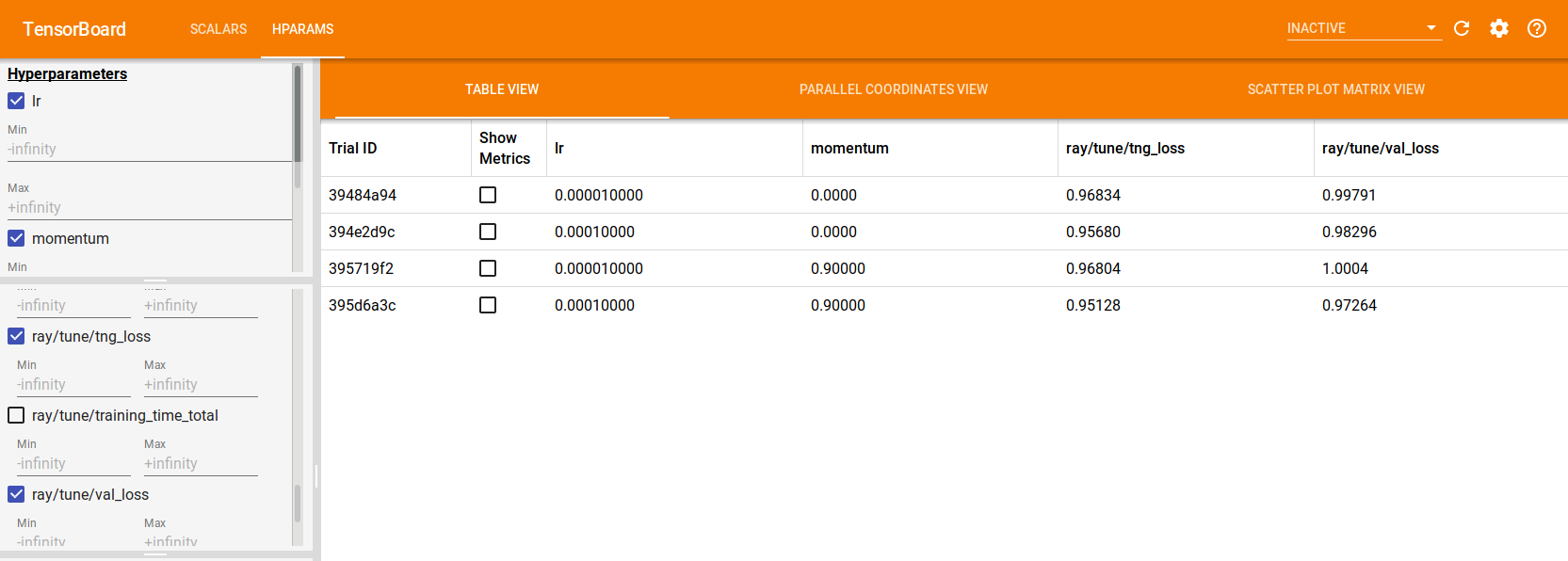
如果使用 TensorFlow 2.x,Tune 也会自动生成 TensorBoard HParams 输出,如下所示
tuner = tune.Tuner(
    ...,
    param_space={
        "lr": tune.grid_search([1e-5, 1e-4]),
        "momentum": tune.grid_search([0, 0.9])
    }
)
results = tuner.fit()
如何控制 Tune 的控制台输出?#
用户提供的字段将根据尽力而为的原则自动输出。您可以使用 Reporter 对象自定义控制台输出。
== Status ==
Memory usage on this node: 11.4/16.0 GiB
Using FIFO scheduling algorithm.
Resources requested: 4/12 CPUs, 0/0 GPUs, 0.0/3.17 GiB heap, 0.0/1.07 GiB objects
Result logdir: /Users/foo/ray_results/myexp
Number of trials: 4 (4 RUNNING)
+----------------------+----------+---------------------+-----------+--------+--------+----------------+-------+
| Trial name           | status   | loc                 |    param1 | param2 |    acc | total time (s) |  iter |
|----------------------+----------+---------------------+-----------+--------+--------+----------------+-------|
| MyTrainable_a826033a | RUNNING  | 10.234.98.164:31115 | 0.303706  | 0.0761 | 0.1289 |        7.54952 |    15 |
| MyTrainable_a8263fc6 | RUNNING  | 10.234.98.164:31117 | 0.929276  | 0.158  | 0.4865 |        7.0501  |    14 |
| MyTrainable_a8267914 | RUNNING  | 10.234.98.164:31111 | 0.068426  | 0.0319 | 0.9585 |        7.0477  |    14 |
| MyTrainable_a826b7bc | RUNNING  | 10.234.98.164:31112 | 0.729127  | 0.0748 | 0.1797 |        7.05715 |    14 |
+----------------------+----------+---------------------+-----------+--------+--------+----------------+-------+
如何在 Tune 运行中将 Trainable 日志重定向到文件?#
在 Tune 中,Trainable 作为远程 actor 运行。默认情况下,Ray 会收集 actor 的 stdout 和 stderr 并将其打印到 head 进程(更多信息请参阅 ray worker logs)。Tune Trainable 内发生的日志记录默认遵循此处理方式。但是,如果您希望将 Trainable 日志收集到文件中进行分析,Tune 为此提供了 log_to_file 选项。这适用于 print 语句、warnings.warn 和 logger.info 等等。
通过将 log_to_file=True 传递给由 Tuner 接收的 RunConfig,stdout 和 stderr 将分别记录到 trial_logdir/stdout 和 trial_logdir/stderr
tuner = tune.Tuner(
    trainable,
    run_config=RunConfig(log_to_file=True)
)
results = tuner.fit()
如果您想指定输出文件,可以传递一个文件名(合并输出将存储在此文件)或两个文件名(分别用于 stdout 和 stderr)
tuner = tune.Tuner(
    trainable,
    run_config=RunConfig(log_to_file="std_combined.log")
)
tuner.fit()

tuner = tune.Tuner(
    trainable,
    run_config=RunConfig(log_to_file=("my_stdout.log", "my_stderr.log")))
results = tuner.fit()
文件名相对于 trial 的日志目录。您也可以传递绝对路径。
注意事项#
在分布式训练 worker 中发生的日志记录(如果您恰好将 Ray Tune 与 Ray Train 一起使用)不属于此 log_to_file 配置的一部分。
在哪里可以找到 log_to_file 文件?#
如果您的 Tune 工作负载配置了同步到头节点,则相应的 log_to_file 输出可以在每个 trial 文件夹下找到。如果您的 Tune 工作负载配置了同步到云端,则相应的 log_to_file 输出将 不 同步到云端,只能在运行相应 trial 的 worker 节点上找到。
注意
当 trainable 在其生命周期中跨不同节点移动时,这可能会导致问题。这可能会在某些调度器或节点故障时发生。如果有足够的用户请求,我们可能会优先启用此功能。如果这影响了您的工作流,请考虑在此 [ticket](ray-project/ray#32142) 上发表评论。
请就此功能向我们提供反馈#
我们知道日志记录和可观测性可以极大地提升您的工作流性能。请告诉我们您偏好的方式来与 trainable 中的日志记录进行交互。请在此 [ticket](ray-project/ray#32142) 中留下您的评论。
如何从 Tune Trainable 记录任意文件?#
默认情况下,Tune 仅记录来自 Trainable 的训练结果字典和检查点。但是,您可能希望保存一个文件来可视化模型权重或模型图,或者使用需要多进程日志记录的自定义日志记录库。例如,如果您尝试将图像记录到 TensorBoard,您可能想这样做。我们将这些保存的文件称为 trial artifacts。
注意
如果 SyncConfig(sync_artifacts=True),则 trial artifacts 会定期从每个 trial(或 Ray Train 的每个远程训练 worker)上传到 RunConfig(storage_path)。
有关 artifact 同步配置选项,请参阅 SyncConfig API 参考。
您可以直接在 trainable 中保存 trial artifacts,如下所示
提示
确保所有日志记录调用或对象都保留在 Trainable 的作用域内。否则可能会出现 pickling 或其他序列化错误或日志不一致。
import logging_library  # ex: mlflow, wandb
from ray import train

def trainable(config):
    logging_library.init(
        name=trial_id,
        id=trial_id,
        resume=trial_id,
        reinit=True,
        allow_val_change=True)
    logging_library.set_log_path(os.getcwd())

    for step in range(100):
        logging_library.log_model(...)
        logging_library.log(results, step=step)

        # You can also just write to a file directly.
        # The working directory is set to the trial directory, so
        # you don't need to worry about multiple workers saving
        # to the same location.
        with open(f"./artifact_{step}.txt", "w") as f:
            f.write("Artifact Data")

        tune.report(results)
import logging_library  # ex: mlflow, wandb
from ray import tune

class CustomLogging(tune.Trainable)
    def setup(self, config):
        trial_id = self.trial_id
        logging_library.init(
            name=trial_id,
            id=trial_id,
            resume=trial_id,
            reinit=True,
            allow_val_change=True
        )
        logging_library.set_log_path(os.getcwd())

    def step(self):
        logging_library.log_model(...)

        # You can also write to a file directly.
        # The working directory is set to the trial directory, so
        # you don't need to worry about multiple workers saving
        # to the same location.
        with open(f"./artifact_{self.iteration}.txt", "w") as f:
            f.write("Artifact Data")

    def log_result(self, result):
        res_dict = {
            str(k): v
            for k, v in result.items()
            if (v and "config" not in k and not isinstance(v, str))
        }
        step = result["training_iteration"]
        logging_library.log(res_dict, step=step)
在上面的代码片段中,logging_library 指的是您正在使用的任何第三方日志记录库。请注意,logging_library.set_log_path(os.getcwd()) 是我们用于演示目的的假想 API,它强调第三方库应该配置为记录到 Trainable 的工作目录。默认情况下,功能型和类 Trainable 的当前工作目录在作为远程 Ray actor 启动后都会设置为相应的 trial 目录。
如何构建自定义 Tune 日志记录器?#
您可以通过继承 LoggerCallback 接口来创建自定义日志记录器(LoggerCallback 接口 (tune.logger.LoggerCallback))
from typing import Dict, List

import json
import os

from ray.tune.logger import LoggerCallback


class CustomLoggerCallback(LoggerCallback):
    """Custom logger interface"""

    def __init__(self, filename: str = "log.txt"):
        self._trial_files = {}
        self._filename = filename

    def log_trial_start(self, trial: "Trial"):
        trial_logfile = os.path.join(trial.logdir, self._filename)
        self._trial_files[trial] = open(trial_logfile, "at")

    def log_trial_result(self, iteration: int, trial: "Trial", result: Dict):
        if trial in self._trial_files:
            self._trial_files[trial].write(json.dumps(result))

    def on_trial_complete(self, iteration: int, trials: List["Trial"],
                          trial: "Trial", **info):
        if trial in self._trial_files:
            self._trial_files[trial].close()
            del self._trial_files[trial]
然后您可以按如下方式传入您自己的日志记录器
from ray import tune

tuner = tune.Tuner(
    MyTrainableClass,
    run_config=tune.RunConfig(
        name="experiment_name", callbacks=[CustomLoggerCallback("log_test.txt")]
    )
)
results = tuner.fit()
默认情况下,如果您不自己传入,Ray Tune 会创建 JSON、CSV 和 TensorBoardX 日志记录器回调。您可以通过将 TUNE_DISABLE_AUTO_CALLBACK_LOGGERS 环境变量设置为 "1" 来禁用此行为。
创建自定义日志记录器的示例可以在日志记录示例中找到。