注意
Ray 2.40 默认使用 RLlib 的新 API 栈。Ray 团队已基本完成将算法、示例脚本和文档迁移到新的代码库。
如果你仍在使用旧 API 栈,请参阅新 API 栈迁移指南了解如何迁移的详细信息。
RL 模块#
RLlib 新 API 栈中的 RLModule 类允许你编写自定义模型,包括多智能体或基于模型的算法中常见的复杂多网络设置。
RLModule 是主要的神经网络类,它公开了三个公共方法,每个方法对应强化学习周期的不同阶段: - forward_exploration() 处理数据收集期间的动作计算,如果 RLlib 将数据用于后续训练步骤,则平衡探索和利用。 - forward_inference() 计算用于评估和生产的动作,这些动作通常需要是贪婪或随机性较低的。 - forward_train() 管理训练阶段,执行计算损失所需的计算,例如 DQN 模型中的 Q 值、PG 风格设置中的值函数预测或基于模型的算法中的世界模型预测。
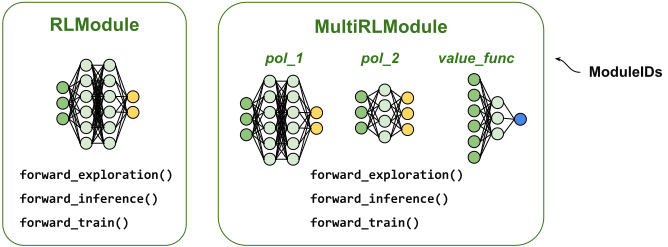
RLModule 概览:(左)一个普通的 RLModule 包含 RLlib 用于计算的神经网络,例如用 PyTorch 编写的策略网络,并公开了三个前向方法:用于样本收集的 forward_exploration()、用于生产/部署的 forward_inference(),以及用于训练时计算损失函数输入的 forward_train()。(右)一个 MultiRLModule 可以包含一个或多个子 RLModule,每个子模块由一个 ModuleID 标识,允许你实现任意复杂的多网络或多智能体架构和算法。#
在 AlgorithmConfig 中启用 RLModule API#
在新 API 栈中,默认启用 RLlib,并仅使用 RLModules。
如果你正在使用旧版配置或想将 ModelV2 或 Policy 类迁移到新的 API 栈,请参阅新 API 栈迁移指南了解更多信息。
如果你将 Algorithm 配置为使用旧 API 栈,请使用 api_stack() 方法进行切换
from ray.rllib.algorithms.algorithm_config import AlgorithmConfig

config = (
    AlgorithmConfig()
    .api_stack(
        enable_rl_module_and_learner=True,
        enable_env_runner_and_connector_v2=True,
    )
)
默认 RL 模块#
如果你没有在 AlgorithmConfig 中指定与模块相关的设置,RLlib 将使用相应算法的默认 RLModule,这是进行初步实验和基准测试的合适选择。所有默认 RLModule 都支持 1D 张量和图像观察 ([宽度] x [高度] x [通道])。
注意
对于离散或更复杂的输入观察空间(如字典),请按如下方式使用 FlattenObservations 连接器模块
from ray.rllib.algorithms.ppo import PPOConfig
from ray.rllib.connectors.env_to_module import FlattenObservations

config = (
    PPOConfig()
    # FrozenLake has a discrete observation space (ints).
    .environment("FrozenLake-v1")
    # `FlattenObservations` converts int observations to one-hot.
    .env_runners(env_to_module_connector=lambda env: FlattenObservations())
)
此外,所有默认模型都提供可配置的架构选项,包括所用层(Dense 或 Conv2D)的数量和大小、它们的激活函数和初始化方法,以及自动的 LSTM 封装行为。
使用 DefaultModelConfig 数据字典类来配置 RLlib 中的任何默认模型。请注意,此类别仅应用于配置默认模型。编写自己的自定义 RLModules 时,请使用普通的 Python 字典来定义模型配置。有关如何编写和配置自定义 RLModules 的信息,请参阅 实现自定义 RLModules。
配置默认 MLP 网络#
要使用 PPO 和默认 RLModule 训练一个仅包含全连接层的简单多层感知机 (MLP) 策略,请按如下方式配置您的实验:
from ray.rllib.algorithms.ppo import PPOConfig
from ray.rllib.core.rl_module.default_model_config import DefaultModelConfig

config = (
    PPOConfig()
    .environment("CartPole-v1")
    .rl_module(
        # Use a non-default 32,32-stack with ReLU activations.
        model_config=DefaultModelConfig(
            fcnet_hiddens=[32, 32],
            fcnet_activation="relu",
        )
    )
)
以下是所有支持的 fcnet_.. 选项的完整列表:
    #: List containing the sizes (number of nodes) of a fully connected (MLP) stack.
    #: Note that in an encoder-based default architecture with a policy head (and
    #: possible value head), this setting only affects the encoder component. To set the
    #: policy (and value) head sizes, use `post_fcnet_hiddens`, instead. For example,
    #: if you set `fcnet_hiddens=[32, 32]` and `post_fcnet_hiddens=[64]`, you would get
    #: an RLModule with a [32, 32] encoder, a [64, act-dim] policy head, and a [64, 1]
    #: value head (if applicable).
    fcnet_hiddens: List[int] = field(default_factory=lambda: [256, 256])
    #: Activation function descriptor for the stack configured by `fcnet_hiddens`.
    #: Supported values are: 'tanh', 'relu', 'swish' (or 'silu', which is the same),
    #: and 'linear' (or None).
    fcnet_activation: str = "tanh"
    #: Initializer function or class descriptor for the weight/kernel matrices in the
    #: stack configured by `fcnet_hiddens`. Supported values are the initializer names
    #: (str), classes or functions listed by the frameworks (`torch`). See
    #: https://pytorch.ac.cn/docs/stable/nn.init.html for `torch`. If `None` (default),
    #: the default initializer defined by `torch` is used.
    fcnet_kernel_initializer: Optional[Union[str, Callable]] = None
    #: Kwargs passed into the initializer function defined through
    #: `fcnet_kernel_initializer`.
    fcnet_kernel_initializer_kwargs: Optional[dict] = None
    #: Initializer function or class descriptor for the bias vectors in the stack
    #: configured by `fcnet_hiddens`. Supported values are the initializer names (str),
    #: classes or functions listed by the frameworks (`torch`). See
    #: https://pytorch.ac.cn/docs/stable/nn.init.html for `torch`. If `None` (default),
    #: the default initializer defined by `torch` is used.
    fcnet_bias_initializer: Optional[Union[str, Callable]] = None
    #: Kwargs passed into the initializer function defined through
    #: `fcnet_bias_initializer`.
    fcnet_bias_initializer_kwargs: Optional[dict] = None
配置默认 CNN 网络#
对于像 Atari 这样的基于图像的环境,请使用 DefaultModelConfig 中的 conv_.. 字段来配置卷积神经网络 (CNN) 堆栈。
您可能需要检查您的 CNN 配置是否与输入的观测图像维度兼容。例如,对于 Atari 环境,您可以使用 RLlib 的 Atari 封装实用程序,该程序执行图像大小调整(默认 64x64)和灰度处理(默认 True)、帧堆叠(默认 None)、跳帧(默认 4)、归一化(从 uint8 到 float32),并在重置后应用最多 30 个“noop”动作,这些动作不属于回合的一部分。
import gymnasium as gym  # `pip install gymnasium[atari,accept-rom-license]`

from ray.rllib.algorithms.ppo import PPOConfig
from ray.rllib.env.wrappers.atari_wrappers import wrap_atari_for_new_api_stack
from ray.rllib.core.rl_module.default_model_config import DefaultModelConfig
from ray.tune import register_env

register_env(
    "image_env",
    lambda _: wrap_atari_for_new_api_stack(
        gym.make("ale_py:ALE/Pong-v5"),
        dim=64,  # resize original observation to 64x64x3
        framestack=4,
    )
)

config = (
    PPOConfig()
    .environment("image_env")
    .rl_module(
        model_config=DefaultModelConfig(
            # Use a DreamerV3-style CNN stack for 64x64 images.
            conv_filters=[
                [16, 4, 2],  # 1st CNN layer: num_filters, kernel, stride(, padding)?
                [32, 4, 2],  # 2nd CNN layer
                [64, 4, 2],  # etc..
                [128, 4, 2],
            ],
            conv_activation="silu",
            # After the last CNN, the default model flattens, then adds an optional MLP.
            head_fcnet_hiddens=[256],
        )
    )
)
以下是所有支持的 conv_.. 选项的完整列表:
    #: List of lists of format [num_out_channels, kernel, stride] defining a Conv2D
    #: stack if the input space is 2D. Each item in the outer list represents one Conv2D
    #: layer. `kernel` and `stride` may be single ints (width and height have same
    #: value) or 2-tuples (int, int) specifying width and height dimensions separately.
    #: If None (default) and the input space is 2D, RLlib tries to find a default filter
    #: setup given the exact input dimensions.
    conv_filters: Optional[ConvFilterSpec] = None
    #: Activation function descriptor for the stack configured by `conv_filters`.
    #: Supported values are: 'tanh', 'relu', 'swish' (or 'silu', which is the same), and
    #: 'linear' (or None).
    conv_activation: str = "relu"
    #: Initializer function or class descriptor for the weight/kernel matrices in the
    #: stack configured by `conv_filters`. Supported values are the initializer names
    #: (str), classes or functions listed by the frameworks (`torch`). See
    #: https://pytorch.ac.cn/docs/stable/nn.init.html for `torch`. If `None` (default),
    #: the default initializer defined by `torch` is used.
    conv_kernel_initializer: Optional[Union[str, Callable]] = None
    #: Kwargs passed into the initializer function defined through
    #: `conv_kernel_initializer`.
    conv_kernel_initializer_kwargs: Optional[dict] = None
    #: Initializer function or class descriptor for the bias vectors in the stack
    #: configured by `conv_filters`. Supported values are the initializer names (str),
    #: classes or functions listed by the frameworks (`torch`). See
    #: https://pytorch.ac.cn/docs/stable/nn.init.html for `torch`. If `None` (default),
    #: the default initializer defined by `torch` is used.
    conv_bias_initializer: Optional[Union[str, Callable]] = None
    #: Kwargs passed into the initializer function defined through
    #: `conv_bias_initializer`.
    conv_bias_initializer_kwargs: Optional[dict] = None
其他默认模型设置#
有关基于 LSTM 的配置和连续动作输出层的特定设置,请参阅 DefaultModelConfig。
注意
要使用额外的 LSTM 层自动封装您的默认编码器,并让您的模型能够在非马尔可夫、部分可观察的环境中学习,您可以尝试使用便利的 DefaultModelConfig.use_lstm 设置,并结合使用 DefaultModelConfig.lstm_cell_size 和 DefaultModelConfig.max_seq_len 设置。有关使用带有 LSTM 层的默认 RLModule 的调优示例,请参阅此处。
构建 RLModule 实例#
为了保持一致性和可用性,RLlib 提供了一种标准化的方法来构建 RLModule 实例,适用于单模块和多模块用例。单模块用例的示例是单智能体实验。多模块用例的示例是多智能体学习或其他多神经网络设置。
通过类构造函数构建#
构建 RLModule 的最直接方法是通过其构造函数:
import gymnasium as gym
from ray.rllib.algorithms.bc.torch.default_bc_torch_rl_module import DefaultBCTorchRLModule

# Create an env object to know the spaces.
env = gym.make("CartPole-v1")

# Construct the actual RLModule object.
rl_module = DefaultBCTorchRLModule(
    observation_space=env.observation_space,
    action_space=env.action_space,
    # A custom dict that's accessible inside your class as `self.model_config`.
    model_config={"fcnet_hiddens": [64]},
)
注意
如果您有 py:class:`~ray.rllib.algorithms.algorithm.Algorithm 或单个 RLModule 的检查点,请参阅 使用 from_checkpoint 创建实例 了解如何从磁盘重新创建您的 RLModule。
通过 RLModuleSpecs 构建#
由于 RLlib 是一个分布式强化学习库,需要创建不止一个您的 RLModule 副本,您可以使用 RLModuleSpec 对象来定义 RLlib 在算法设置过程中应如何构建每个副本。算法将该 Spec 传递给所有需要您的 RLModule 副本的子组件。
创建 RLModuleSpec 很简单,类似于 RLModule 构造函数:
import gymnasium as gym
from ray.rllib.algorithms.bc.torch.default_bc_torch_rl_module import DefaultBCTorchRLModule
from ray.rllib.core.rl_module.rl_module import RLModuleSpec

# Create an env object to know the spaces.
env = gym.make("CartPole-v1")

# First construct the spec.
spec = RLModuleSpec(
    module_class=DefaultBCTorchRLModule,
    observation_space=env.observation_space,
    action_space=env.action_space,
    # A custom dict that's accessible inside your class as `self.model_config`.
    model_config={"fcnet_hiddens": [64]},
)

# Then, build the RLModule through the spec's `build()` method.
rl_module = spec.build()
import gymnasium as gym
from ray.rllib.algorithms.bc.torch.default_bc_torch_rl_module import DefaultBCTorchRLModule
from ray.rllib.core.rl_module.rl_module import RLModuleSpec
from ray.rllib.core.rl_module.multi_rl_module import MultiRLModuleSpec

# First construct the MultiRLModuleSpec.
spec = MultiRLModuleSpec(
    rl_module_specs={
        "module_1": RLModuleSpec(
            module_class=DefaultBCTorchRLModule,

            # Define the spaces for only this sub-module.
            observation_space=gym.spaces.Box(low=-1, high=1, shape=(10,)),
            action_space=gym.spaces.Discrete(2),

            # A custom dict that's accessible inside your class as
            # `self.model_config`.
            model_config={"fcnet_hiddens": [32]},
        ),
        "module_2": RLModuleSpec(
            module_class=DefaultBCTorchRLModule,

            # Define the spaces for only this sub-module.
            observation_space=gym.spaces.Box(low=-1, high=1, shape=(5,)),
            action_space=gym.spaces.Discrete(2),

            # A custom dict that's accessible inside your class as
            # `self.model_config`.
            model_config={"fcnet_hiddens": [16]},
        ),
    },
)

# Construct the actual MultiRLModule instance with .build():
multi_rl_module = spec.build()
您可以将 RLModuleSpec 实例传递给您的 AlgorithmConfig,以告诉 RLlib 使用特定的模块类和构造函数参数:
from ray.rllib.algorithms.ppo import PPOConfig
from ray.rllib.core.rl_module.rl_module import RLModuleSpec

config = (
    PPOConfig()
    .environment("CartPole-v1")
    .rl_module(
        rl_module_spec=RLModuleSpec(
            module_class=MyRLModuleClass,
            model_config={"some_key": "some_setting"},
        ),
    )
)
ppo = config.build()
print(ppo.get_module())
注意
通常,在创建 RLModuleSpec 时,您无需定义诸如 observation_space 或 action_space 之类的属性,因为 RLlib 会根据使用的环境或其他配置参数自动推断这些属性。
from ray.rllib.algorithms.ppo import PPOConfig
from ray.rllib.core.rl_module.rl_module import RLModuleSpec
from ray.rllib.core.rl_module.multi_rl_module import MultiRLModuleSpec
from ray.rllib.examples.envs.classes.multi_agent import MultiAgentCartPole

config = (
    PPOConfig()
    .environment(MultiAgentCartPole, env_config={"num_agents": 2})
    .rl_module(
        rl_module_spec=MultiRLModuleSpec(
            # All agents (0 and 1) use the same (single) RLModule.
            rl_module_specs=RLModuleSpec(
                module_class=MyRLModuleClass,
                model_config={"some_key": "some_setting"},
            )
        ),
    )
)
ppo = config.build()
print(ppo.get_module())
from ray.rllib.algorithms.ppo import PPOConfig
from ray.rllib.core.rl_module.rl_module import RLModuleSpec
from ray.rllib.core.rl_module.multi_rl_module import MultiRLModuleSpec
from ray.rllib.examples.envs.classes.multi_agent import MultiAgentCartPole

config = (
    PPOConfig()
    .environment(MultiAgentCartPole, env_config={"num_agents": 2})
    .multi_agent(
        policies={"p0", "p1"},
        # Agent IDs of `MultiAgentCartPole` are 0 and 1, mapping to
        # "p0" and "p1", respectively.
        policy_mapping_fn=lambda agent_id, episode, **kw: f"p{agent_id}"
    )
    .rl_module(
        rl_module_spec=MultiRLModuleSpec(
            # Agents (0 and 1) use different (single) RLModules.
            rl_module_specs={
                "p0": RLModuleSpec(
                    module_class=MyRLModuleClass,
                    # Small network.
                    model_config={"fcnet_hiddens": [32, 32]},
                ),
                "p1": RLModuleSpec(
                    module_class=MyRLModuleClass,
                    # Large network.
                    model_config={"fcnet_hiddens": [128, 128]},
                ),
            },
        ),
    )
)
ppo = config.build()
print(ppo.get_module())
实现自定义 RLModules#
要实现您自己的神经网络架构和计算逻辑,请为任何单智能体学习实验或独立的多智能体学习子类化 TorchRLModule。
对于更高级的多智能体用例,例如智能体之间共享通信的用例,或任何多模型用例,请转而子类化 MultiRLModule 类。
注意
除了子类化 TorchRLModule 之外,另一种方法是直接子类化您的算法的默认 RLModule。例如,要使用 PPO,您可以子类化 DefaultPPOTorchRLModule。在这种情况下,您应该仔细研究现有的默认模型,以了解如何重写 setup()、_forward_() 方法,以及可能的某些算法特定的 API 方法。有关如何确定您的算法要求您实现哪些 API,请参阅 算法特定的 RLModule API。
setup() 方法#
您应该首先实现 setup() 方法,在该方法中添加所需的 NN 子组件并将其分配给您选择的类属性。
请注意,您应该在实现中调用 super().setup()。
您还可以在类的任何位置(包括在 setup() 中)访问以下属性:
self.observation_spaceself.action_spaceself.inference_onlyself.model_config(包含任何自定义配置设置的字典)
import torch
from ray.rllib.core.rl_module.torch.torch_rl_module import TorchRLModule

class MyTorchPolicy(TorchRLModule):
    def setup(self):
        # You have access here to the following already set attributes:
        # self.observation_space
        # self.action_space
        # self.inference_only
        # self.model_config  # <- a dict with custom settings

        # Use the observation space (if a Box) to infer the input dimension.
        input_dim = self.observation_space.shape[0]

        # Use the model_config dict to extract the hidden dimension.
        hidden_dim = self.model_config["fcnet_hiddens"][0]

        # Use the action space to infer the number of output nodes.
        output_dim = self.action_space.n

        # Build all the layers and subcomponents here you need for the
        # RLModule's forward passes.
        self._pi_head = torch.nn.Sequential(
            torch.nn.Linear(input_dim, hidden_dim),
            torch.nn.ReLU(),
            torch.nn.Linear(hidden_dim, output_dim),
        )
Forward 方法#
实现前向计算逻辑时,您可以通过重写私有方法 _forward() 来定义通用前向行为,RLlib 将在模型的整个生命周期中使用此方法;或者,如果您需要更精细的控制,可以定义以下三个私有方法:
_forward()_forward_inference()和_forward_exploration()方法,您必须返回一个包含键actions和/或键action_dist_inputs的字典。如果您从前向方法中返回
actions键:RLlib 直接使用提供的动作。
如果您还返回了
action_dist_inputs键,RLlib 将根据该键下的参数创建一个Distribution实例。对于forward_exploration(),RLlib 还会自动为给定的动作计算动作概率和对数概率。有关自定义动作分布类别的更多信息,请参阅 自定义动作分布。
如果您没有从前向方法中返回
actions键:您必须从
_forward_exploration()和_forward_inference()方法中返回action_dist_inputs键。RLlib 将根据该键下的参数创建一个
Distribution实例,并从该分布中采样动作。有关自定义动作分布类别的更多信息,请参阅 此处。对于
_forward_exploration(),RLlib 还会自动从采样的动作中计算动作概率和对数概率值。
注意
对于
_forward_inference(),RLlib 总是首先通过to_deterministic()实用程序将从返回的键action_dist_inputs生成的分布确定性化,然后进行可能的动作采样步骤。例如,RLlib 将从 Categorical 分布采样简化为从分布的 logits 或概率中选择argmax动作。如果您返回“actions”键,RLlib 将跳过该采样步骤。from ray.rllib.core import Columns, TorchRLModule class MyTorchPolicy(TorchRLModule): ... def _forward_inference(self, batch): ... return { Columns.ACTIONS: ... # RLlib uses these actions as-is } def _forward_exploration(self, batch): ... return { Columns.ACTIONS: ... # RLlib uses these actions as-is (no sampling step!) Columns.ACTION_DIST_INPUTS: ... # If provided, RLlib uses these dist inputs to compute probs and logp. }
from ray.rllib.core import Columns, TorchRLModule

class MyTorchPolicy(TorchRLModule):
    ...

    def _forward_inference(self, batch):
        ...
        return {
            # RLlib:
            # - Generates distribution from ACTION_DIST_INPUTS parameters.
            # - Converts distribution to a deterministic equivalent.
            # - Samples from the deterministic distribution.
            Columns.ACTION_DIST_INPUTS: ...
        }

    def _forward_exploration(self, batch):
        ...
        return {
            # RLlib:
            # - Generates distribution from ACTION_DIST_INPUTS parameters.
            # - Samples from the stochastic distribution.
            # - Computes action probs and logs automatically using the sampled
            #   actions and the distribution.
            Columns.ACTION_DIST_INPUTS: ...
        }
切勿重写构造函数(
__init__),但是,请注意RLModule类的构造函数需要以下参数,并且在您调用 Spec 的build()方法时也会正确接收这些参数:observation_space:通过所有连接器后的观测空间;此观测空间是所有预处理步骤后模型的实际输入空间。action_space:环境的动作空间。inference_only:RLlib 是否应以仅推断模式构建 RLModule,从而丢弃仅用于学习的子组件。model_config:模型配置,对于自定义 RLModules 是一个自定义字典,对于 RLlib 的默认模型则是一个DefaultModelConfigdataclass 对象。在此对象中定义模型超参数,例如层数、激活函数类型等。
有关如何通过构造函数创建 RLModule 的更多详细信息,请参阅 通过类构造函数构建。
算法特定的 RLModule API#
您选择与 RLModule 一起使用的算法在一定程度上影响最终自定义模块的结构。每个算法类都有一个固定的 API 集,由该算法训练的所有 RLModules 都需要实现。
要找出您的算法需要哪些 API,请执行以下操作:
# Import the config of the algorithm of your choice.
from ray.rllib.algorithms.sac import SACConfig

# Print out the abstract APIs, you need to subclass from and whose
# abstract methods you need to implement, besides the ``setup()`` and ``_forward_..()``
# methods.
print(
    SACConfig()
    .get_default_learner_class()
    .rl_module_required_apis()
)
注意
在前面的示例模块中,您没有实现任何 API,因为您还没有考虑使用任何特定算法进行训练。您可以在 tiny_atari_cnn_rlm 示例和 lstm_containing_rlm 示例中找到实现 SelfSupervisedLossAPI 并因此可用于使用 PPO 进行训练的自定义 RLModule 类的示例。
您可以通过 SelfSupervisedLossAPI 将监督损失混合到任何 RLlib 算法中。您的 Learner actor 会自动调用已实现的 compute_self_supervised_loss() 方法来计算模型自身的损失,并将 forward_train() 调用的输出传递给它。
有关利用自监督损失 RLModule 的示例脚本,请参阅此处。损失可以定义在策略评估输入或从离线存储读取的数据上。请注意,如果您不需要自监督模型在 EnvRunner actors 中收集样本,您可能希望在自定义 RLModuleSpec 中将 learner_only 属性设置为 True。在这种情况下,您可能还需要额外的 Learner 连接器部分,以确保您的 RLModule 接收到数据进行学习。
端到端示例#
将您实现的自定义 RLModule 的各个元素组合起来,一个可工作的端到端示例如下:
import torch

from ray.rllib.core.columns import Columns
from ray.rllib.core.rl_module.torch import TorchRLModule


class VPGTorchRLModule(TorchRLModule):
    """A simple VPG (vanilla policy gradient)-style RLModule for testing purposes.

    Use this as a minimum, bare-bones example implementation of a custom TorchRLModule.
    """

    def setup(self):
        # You have access here to the following already set attributes:
        # self.observation_space
        # self.action_space
        # self.inference_only
        # self.model_config  # <- a dict with custom settings
        input_dim = self.observation_space.shape[0]
        hidden_dim = self.model_config["hidden_dim"]
        output_dim = self.action_space.n

        self._policy_net = torch.nn.Sequential(
            torch.nn.Linear(input_dim, hidden_dim),
            torch.nn.ReLU(),
            torch.nn.Linear(hidden_dim, output_dim),
        )

    def _forward(self, batch, **kwargs):
        # Push the observations from the batch through our `self._policy_net`.
        action_logits = self._policy_net(batch[Columns.OBS])
        # Return parameters for the (default) action distribution, which is
        # `TorchCategorical` (due to our action space being `gym.spaces.Discrete`).
        return {Columns.ACTION_DIST_INPUTS: action_logits}

        # If you need more granularity between the different forward behaviors during
        # the different phases of the module's lifecycle, implement three different
        # forward methods. Thereby, it is recommended to put the inference and
        # exploration versions inside a `with torch.no_grad()` context for better
        # performance.
        # def _forward_train(self, batch):
        #    ...
        #
        # def _forward_inference(self, batch):
        #    with torch.no_grad():
        #        return self._forward_train(batch)
        #
        # def _forward_exploration(self, batch):
        #    with torch.no_grad():
        #        return self._forward_train(batch)
自定义动作分布#
前面的示例依赖于 RLModule 使用正确动作分布,并使用前向方法返回的计算出的 ACTION_DIST_INPUTS。RLlib 根据动作空间选择默认的分布类,对于 Discrete 动作空间是 TorchCategorical,对于 Box 动作空间是 TorchDiagGaussian。
要使用不同的分布类并从前向方法返回其构造函数的参数,请在 RLModule 实现中重写以下方法:
注意
如果您的前向方法仅返回 ACTION_DIST_INPUTS,RLlib 会自动使用您的 get_inference_action_dist_cls() 返回的分布的 to_deterministic() 方法。
有关常见的分布实现,请参阅 torch_distributions.py。
自回归动作分布#
在具有多个组件的动作空间中,例如 Tuple(a1, a2),您可能希望根据 a1 的采样值来条件化 a2 的采样,使得 a2_sampled ~ P(a2 | a1_sampled, obs)。请注意,在默认的非自回归情况下,RLlib 将结合独立 TorchMultiDistribution 使用默认模型,从而独立采样 a1 和 a2。这使得在某些环境中学习成为不可能,例如一个动作组件应该依赖于另一个已经采样的动作组件进行采样的环境。有关“相关动作”环境的示例,请参阅此处。
要编写一个自定义的 RLModule,按照前面的描述采样各种动作组件,您需要仔细实现其前向逻辑。
此类自回归动作模型的示例,请参阅此处。
您在 _forward_...() 方法中实现主要的动作采样逻辑。
def _pi(self, obs, inference: bool):
    # Prior forward pass and sample a1.
    prior_out = self._prior_net(obs)
    dist_a1 = TorchCategorical.from_logits(prior_out)
    if inference:
        dist_a1 = dist_a1.to_deterministic()
    a1 = dist_a1.sample()

    # Posterior forward pass and sample a2.
    posterior_batch = torch.cat(
        [obs, one_hot(a1, self.action_space[0])],
        dim=-1,
    )
    posterior_out = self._posterior_net(posterior_batch)
    dist_a2 = TorchDiagGaussian.from_logits(posterior_out)
    if inference:
        dist_a2 = dist_a2.to_deterministic()
    a2 = dist_a2.sample()
    actions = (a1, a2)

    # We need logp and distribution parameters for the loss.
    return {
        Columns.ACTION_LOGP: (
            TorchMultiDistribution((dist_a1, dist_a2)).logp(actions)
        ),
        Columns.ACTION_DIST_INPUTS: torch.cat([prior_out, posterior_out], dim=-1),
        Columns.ACTIONS: actions,
    }
实现自定义 MultiRLModules#
对于多模块设置,RLlib 提供了 MultiRLModule 类,其默认实现是一个由单个 RLModule 对象组成的字典,每个子模块一个,由 ModuleID 标识。
基类 MultiRLModule 的实现适用于大多数需要定义独立神经网络的用例。但是,对于任何复杂的、多网络或多智能体用例,其中智能体共享一个或多个神经网络,您应该继承此类并重写默认实现。
以下代码片段创建了一个自定义多智能体 RL 模块,其中包含两个简单的“策略头”模块,它们共享同一个编码器,即 MultiRLModule 中的第三个网络。编码器接收环境中的原始观测,并输出嵌入向量,这些向量随后用作两个策略头的输入,以计算智能体的动作。
class VPGMultiRLModuleWithSharedEncoder(MultiRLModule):
    """VPG (vanilla pol. gradient)-style MultiRLModule handling a shared encoder.
    """

    def setup(self):
        # Call the super's setup().
        super().setup()

        # Assert, we have the shared encoder submodule.
        assert (
            SHARED_ENCODER_ID in self._rl_modules
            and isinstance(self._rl_modules[SHARED_ENCODER_ID], SharedEncoder)
            and len(self._rl_modules) > 1
        )
        # Assign the encoder to a convenience attribute.
        self.encoder = self._rl_modules[SHARED_ENCODER_ID]

    def _forward(self, batch, **kwargs):
        # Collect our policies' outputs in this dict.
        outputs = {}

        # Loop through the policy nets (through the given batch's keys).
        for policy_id, policy_batch in batch.items():
            rl_module = self._rl_modules[policy_id]

            # Pass policy's observations through shared encoder to get the features for
            # this policy.
            policy_batch["encoder_embeddings"] = self.encoder._forward(batch[policy_id])

            # Pass the policy's embeddings through the policy net.
            outputs[policy_id] = rl_module._forward(batch[policy_id], **kwargs)

        return outputs
在 MultiRLModule 中,您需要有两个策略子 RLModule。它们可以是同一个类,您可以按照以下方式实现:
class VPGPolicyAfterSharedEncoder(TorchRLModule):
    """A VPG (vanilla pol. gradient)-style RLModule using a shared encoder.
    """

    def setup(self):
        super().setup()

        # Incoming feature dim from the shared encoder.
        embedding_dim = self.model_config["embedding_dim"]
        hidden_dim = self.model_config["hidden_dim"]

        self._pi_head = torch.nn.Sequential(
            torch.nn.Linear(embedding_dim, hidden_dim),
            torch.nn.ReLU(),
            torch.nn.Linear(hidden_dim, self.action_space.n),
        )

    def _forward(self, batch, **kwargs):
        # Embeddings can be found in the batch under the "encoder_embeddings" key.
        embeddings = batch["encoder_embeddings"]
        logits = self._pi_head(embeddings)
        return {Columns.ACTION_DIST_INPUTS: logits}
最后,共享编码器 RLModule 应该类似于这样:
class SharedEncoder(TorchRLModule):
    """A shared encoder that can be used with `VPGMultiRLModuleWithSharedEncoder`."""

    def setup(self):
        super().setup()

        input_dim = self.observation_space.shape[0]
        embedding_dim = self.model_config["embedding_dim"]

        # A very simple encoder network.
        self._net = torch.nn.Sequential(
            torch.nn.Linear(input_dim, embedding_dim),
        )

    def _forward(self, batch, **kwargs):
        # Pass observations through the net and return outputs.
        return {"encoder_embeddings": self._net(batch[Columns.OBS])}
要将第一个选项卡中的自定义 MultiRLModule 插入到您的算法配置中,请使用新类及其构造函数设置创建一个 MultiRLModuleSpec。此外,为每个智能体和共享编码器 RLModule 创建一个 RLModuleSpec,因为 RLlib 需要它们的观测和动作空间以及它们的模型超参数:
            import gymnasium as gym
            from ray.rllib.algorithms.ppo import PPOConfig
            from ray.rllib.core import MultiRLModuleSpec, RLModuleSpec
            from ray.rllib.examples.envs.classes.multi_agent import MultiAgentCartPole

            single_agent_env = gym.make("CartPole-v1")

            EMBEDDING_DIM = 64  # encoder output dim

            config = (
                PPOConfig()
                .environment(MultiAgentCartPole, env_config={"num_agents": 2})
                .multi_agent(
                    # Declare the two policies trained.
                    policies={"p0", "p1"},
                    # Agent IDs of `MultiAgentCartPole` are 0 and 1. They are mapped to
                    # the two policies with ModuleIDs "p0" and "p1", respectively.
                    policy_mapping_fn=lambda agent_id, episode, **kw: f"p{agent_id}"
                )
                .rl_module(
                    rl_module_spec=MultiRLModuleSpec(
                        rl_module_specs={
                            # Shared encoder.
                            SHARED_ENCODER_ID: RLModuleSpec(
                                module_class=SharedEncoder,
                                model_config={"embedding_dim": EMBEDDING_DIM},
                                observation_space=single_agent_env.observation_space,
                            ),
                            # Large policy net.
                            "p0": RLModuleSpec(
                                module_class=VPGPolicyAfterSharedEncoder,
                                model_config={
                                    "embedding_dim": EMBEDDING_DIM,
                                    "hidden_dim": 1024,
                                },
                            ),
                            # Small policy net.
                            "p1": RLModuleSpec(
                                module_class=VPGPolicyAfterSharedEncoder,
                                model_config={
                                    "embedding_dim": EMBEDDING_DIM,
                                    "hidden_dim": 64,
                                },
                            ),
                        },
                    ),
                )
            )
            algo = config.build()
            print(algo.get_module())
注意
为了使用前面的设置进行适当的学习,您应该编写和使用一个特定的多智能体 Learner,它能够处理共享编码器。该 Learner 应该只有一个优化器,更新所有三个子模块(编码器和两个策略网络)以稳定学习。然而,当使用标准的“每个模块一个优化器”的 Learner 时,策略 1 和策略 2 的两个优化器会轮流更新同一个共享编码器,这将导致学习不稳定。
检查点 RLModules#
您可以使用 RLModules 实例的 save_to_path() 方法创建检查点。如果您已经实例化了一个 RLModule 并希望从现有检查点加载新的模型权重,请使用 restore_from_path() 方法。
以下示例演示了如何在 RLlib 算法之外或结合 RLlib 算法使用这些方法。
创建 RLModule 检查点#
import tempfile

import gymnasium as gym

from ray.rllib.algorithms.ppo.torch.default_ppo_torch_rl_module import DefaultPPOTorchRLModule
from ray.rllib.core.rl_module.default_model_config import DefaultModelConfig

env = gym.make("CartPole-v1")

# Create an RLModule to later checkpoint.
rl_module = DefaultPPOTorchRLModule(
    observation_space=env.observation_space,
    action_space=env.action_space,
    model_config=DefaultModelConfig(fcnet_hiddens=[32]),
)

# Finally, write the RLModule checkpoint.
module_ckpt_path = tempfile.mkdtemp()
rl_module.save_to_path(module_ckpt_path)
从 (RLModule) 检查点创建 RLModule#
如果您已保存 RLModule 检查点,并希望直接从检查点创建新的 RLModule,请使用 from_checkpoint() 方法:
from ray.rllib.core.rl_module.rl_module import RLModule

# Create a new RLModule from the checkpoint.
new_module = RLModule.from_checkpoint(module_ckpt_path)
将 RLModule 检查点加载到正在运行的算法中#
from ray.rllib.algorithms.ppo import PPOConfig

# Create a new Algorithm (with the changed module config: 32 units instead of the
# default 256; otherwise loading the state of ``module`` fails due to a shape
# mismatch).
config = (
    PPOConfig()
    .environment("CartPole-v1")
    .rl_module(model_config=DefaultModelConfig(fcnet_hiddens=[32]))
)
ppo = config.build()
现在,您可以将前面 module.save_to_path() 保存的 RLModule 状态直接加载到正在运行的算法 RLModules 中。请注意,算法中的所有 RLModules 都会更新,包括 Learner workers 中的和 EnvRunners 中的。
ppo.restore_from_path(
    module_ckpt_path,  # <- NOT an Algorithm checkpoint, but single-agent RLModule one.

    # Therefore, we have to provide the exact path (of RLlib components) down
    # to the individual RLModule within the algorithm, which is:
    component="learner_group/learner/rl_module/default_policy",
)