注意
Ray 2.40 默认使用 RLlib 的新 API 堆栈。Ray 团队已基本完成算法、示例脚本和文档向新代码库的迁移。
如果您仍在使用旧的 API 堆栈,请参阅新 API 堆栈迁移指南了解如何迁移的详细信息。
高级 Python API#
自定义训练工作流程#
在基本训练示例中,Tune 会在每次训练迭代时调用算法的 train() 方法并报告新的训练结果。有时,希望完全控制训练过程,但仍能在 Tune 中运行。Tune 支持使用自定义可训练函数来实现自定义训练工作流程(示例)。
课程学习#
在课程学习中,您可以在整个训练过程中将环境设置为不同的难度。此设置允许算法通过在越来越困难的阶段进行交互和探索,逐步学习如何解决实际的最终问题。通常,这种课程学习从将环境设置为容易的级别开始,然后随着训练的进展,逐渐转向更难解决的难度。请参阅强化学习智能体的逆向课程生成博客文章,了解进行课程学习的另一个示例。
RLlib 的 Algorithm 和自定义回调 API 允许实现任意课程。此示例脚本介绍了您需要理解的基本概念。
首先,定义一些环境选项。本示例使用 FrozenLake-v1 环境,这是一个网格世界,其地图可以完全自定义。RLlib 使用略有不同的地图表示三个不同环境难度的任务,智能体必须在其中导航。
ENV_OPTIONS = {
    "is_slippery": False,
    # Limit the number of steps the agent is allowed to make in the env to
    # make it almost impossible to learn without the curriculum.
    "max_episode_steps": 16,
}

# Our 3 tasks: 0=easiest, 1=medium, 2=hard
ENV_MAPS = [
    # 0
    [
        "SFFHFFFH",
        "FFFHFFFF",
        "FFGFFFFF",
        "FFFFFFFF",
        "HFFFFFFF",
        "HHFFFFHF",
        "FFFFFHHF",
        "FHFFFFFF",
    ],
    # 1
    [
        "SFFHFFFH",
        "FFFHFFFF",
        "FFFFFFFF",
        "FFFFFFFF",
        "HFFFFFFF",
        "HHFFGFHF",
        "FFFFFHHF",
        "FHFFFFFF",
    ],
    # 2
    [
        "SFFHFFFH",
        "FFFHFFFF",
        "FFFFFFFF",
        "FFFFFFFF",
        "HFFFFFFF",
        "HHFFFFHF",
        "FFFFFHHF",
        "FHFFFFFG",
    ],
]
然后,定义控制课程的核心部分,这是一个覆盖 on_train_result() 的自定义回调类。
import ray
from ray import tune
from ray.rllib.callbacks.callbacks import RLlibCallback

class MyCallbacks(RLlibCallback):
    def on_train_result(self, algorithm, result, **kwargs):
        if result["env_runners"]["episode_return_mean"] > 200:
            task = 2
        elif result["env_runners"]["episode_return_mean"] > 100:
            task = 1
        else:
            task = 0
        algorithm.env_runner_group.foreach_worker(
            lambda ev: ev.foreach_env(
                lambda env: env.set_task(task)))

ray.init()
tune.Tuner(
    "PPO",
    param_space={
        "env": YourEnv,
        "callbacks": MyCallbacks,
    },
).fit()
全局协调#
有时,您需要协调 RLlib 管理的不同进程中的代码片段。例如,维护某个变量的全局平均值,或集中控制策略使用的超参数可能很有用。Ray 提供了一种通过 命名 actor 实现这种协调的通用方法。请参阅Ray actor了解更多信息。RLlib 会为这些 actor 分配一个全局名称。您可以使用这些名称检索它们的句柄。例如,考虑维护一个共享的全局计数器,环境会递增它,并且驱动程序会定期读取它。
import ray


@ray.remote
class Counter:
    def __init__(self):
        self.count = 0

    def inc(self, n):
        self.count += n

    def get(self):
        return self.count


# on the driver
counter = Counter.options(name="global_counter").remote()
print(ray.get(counter.get.remote()))  # get the latest count

# in your envs
counter = ray.get_actor("global_counter")
counter.inc.remote(1)  # async call to increment the global count
Ray actor 提供高水平的性能。在更复杂的情况下,您可以使用它们实现参数服务器和 all-reduce 等通信模式。
可视化自定义指标#
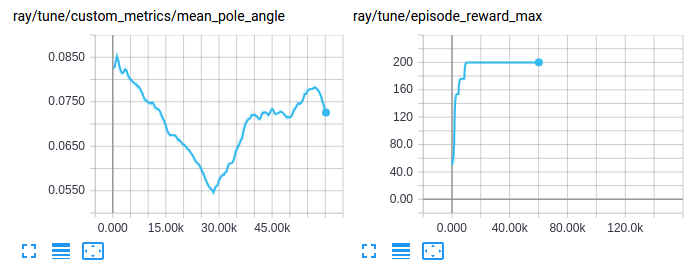
像访问和可视化任何其他训练结果一样访问和可视化自定义指标
自定义探索行为#
RLlib 提供了一个统一的顶级 API,用于配置和自定义智能体的探索行为,包括如何以及是否从分布中采样动作(随机或确定性)。使用内置的 Exploration 类设置行为。请参阅此包),您可以在 AlgorithmConfig().env_runners(..) 内部指定并进一步配置。除了使用现有的类之外,您还可以继承任何这些内置类,向其添加自定义行为,并在配置中使用该新类。
每个策略都有一个 Exploration 对象,RLlib 从 AlgorithmConfig 的 .env_runners(exploration_config=...) 方法创建它。该方法通过特殊的“type”键指定要使用的类,并通过所有其他键指定构造函数参数。例如
from ray.rllib.algorithms.algorithm_config import AlgorithmConfig

config = AlgorithmConfig().env_runners(
    exploration_config={
        # Special `type` key provides class information
        "type": "StochasticSampling",
        # Add any needed constructor args here.
        "constructor_arg": "value",
    }
)
下表列出了所有内置的 Exploration 子类以及默认使用它们的智能体
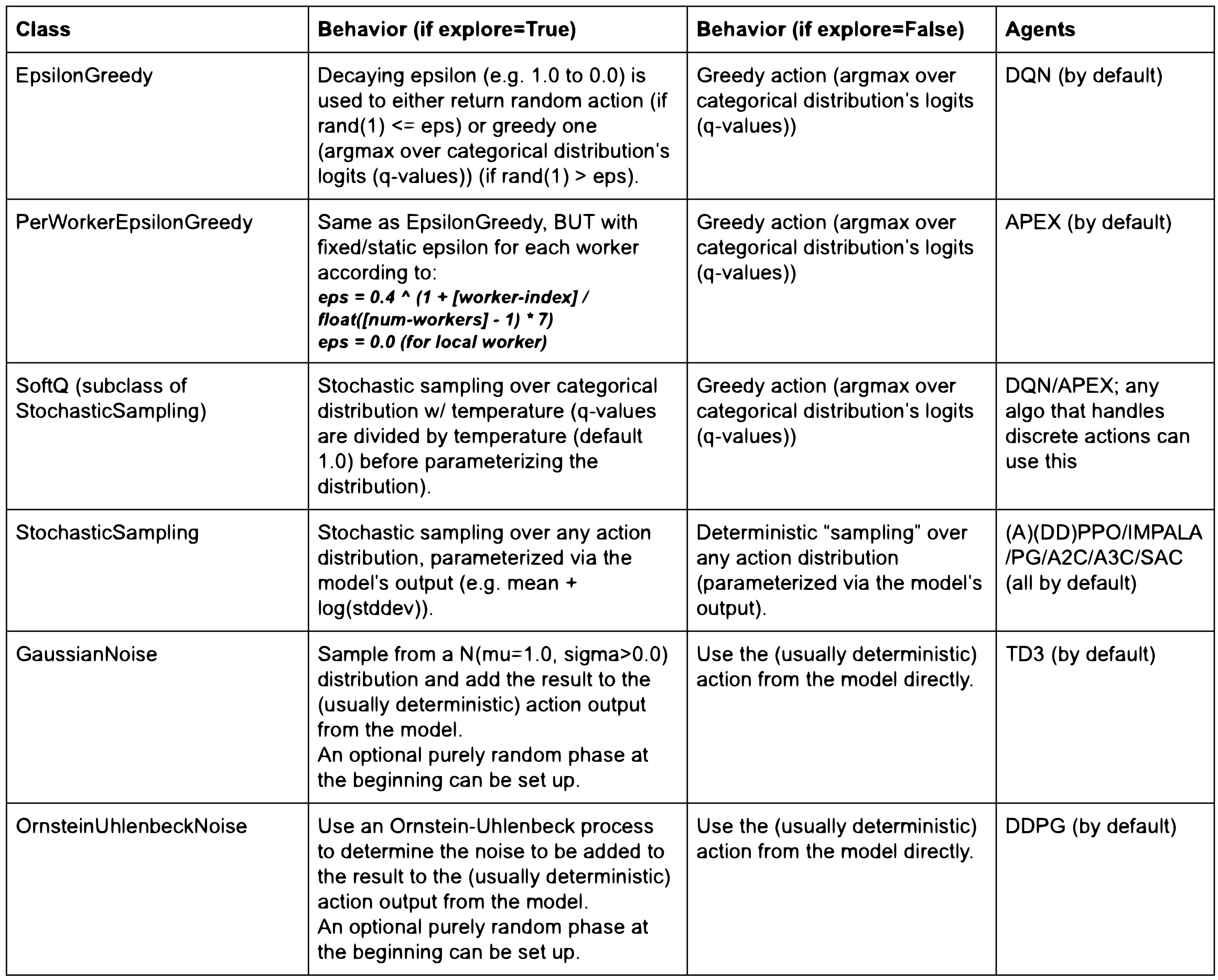
Exploration 类实现了 get_exploration_action 方法,您可以在其中定义确切的探索行为。它接收模型的输出、动作分布类、模型本身、时间步(例如已进行的全局环境采样步)和一个 explore 开关。它输出一个元组,包含 a) 动作 和 b) 对数似然。
    def get_exploration_action(self,
                               *,
                               action_distribution: ActionDistribution,
                               timestep: Union[TensorType, int],
                               explore: bool = True):
        """Returns a (possibly) exploratory action and its log-likelihood.

        Given the Model's logits outputs and action distribution, returns an
        exploratory action.

        Args:
            action_distribution: The instantiated
                ActionDistribution object to work with when creating
                exploration actions.
            timestep: The current sampling time step. It can be a tensor
                for TF graph mode, otherwise an integer.
            explore: True: "Normal" exploration behavior.
                False: Suppress all exploratory behavior and return
                a deterministic action.

        Returns:
            A tuple consisting of 1) the chosen exploration action or a
            tf-op to fetch the exploration action from the graph and
            2) the log-likelihood of the exploration action.
        """
        pass
在最高级别,Algorithm.compute_actions 和 Policy.compute_actions 方法有一个布尔类型的 explore 开关,RLlib 将其传递给 Exploration.get_exploration_action。如果 explore=None,RLlib 使用 Algorithm.config[“explore”] 的值,这作为探索行为的主开关,例如可以轻松地在评估时关闭任何探索。请参阅训练期间的自定义评估。
以下是来自不同算法配置的示例片段,用于设置 rllib/algorithms/algorithm.py 中的不同探索行为
# All of the following configs go into Algorithm.config.

# 1) Switching *off* exploration by default.
# Behavior: Calling `compute_action(s)` without explicitly setting its `explore`
# param results in no exploration.
# However, explicitly calling `compute_action(s)` with `explore=True`
# still(!) results in exploration (per-call overrides default).
"explore": False,

# 2) Switching *on* exploration by default.
# Behavior: Calling `compute_action(s)` without explicitly setting its
# explore param results in exploration.
# However, explicitly calling `compute_action(s)` with `explore=False`
# results in no(!) exploration (per-call overrides default).
"explore": True,

# 3) Example exploration_config usages:
# a) DQN: see rllib/algorithms/dqn/dqn.py
"explore": True,
"exploration_config": {
   # Exploration sub-class by name or full path to module+class
   # (e.g., “ray.rllib.utils.exploration.epsilon_greedy.EpsilonGreedy”)
   "type": "EpsilonGreedy",
   # Parameters for the Exploration class' constructor:
   "initial_epsilon": 1.0,
   "final_epsilon": 0.02,
   "epsilon_timesteps": 10000,  # Timesteps over which to anneal epsilon.
},

# b) DQN Soft-Q: In order to switch to Soft-Q exploration, do instead:
"explore": True,
"exploration_config": {
   "type": "SoftQ",
   # Parameters for the Exploration class' constructor:
   "temperature": 1.0,
},

# c) All policy-gradient algos and SAC: see rllib/algorithms/algorithm.py
# Behavior: The algo samples stochastically from the
# model-parameterized distribution. This is the global Algorithm default
# setting defined in algorithm.py and used by all PG-type algos (plus SAC).
"explore": True,
"exploration_config": {
   "type": "StochasticSampling",
   "random_timesteps": 0,  # timesteps at beginning, over which to act uniformly randomly
},
训练期间的自定义评估#
RLlib 报告在线训练奖励,但在某些情况下,您可能希望使用不同的设置计算奖励。例如,在关闭探索或在特定环境配置集上进行计算。您可以通过将 evaluation_interval 设置为正整数来激活训练期间的策略评估 (Algorithm.train())。此值指定 RLlib 每次运行“评估步”时应发生多少次 Algorithm.train() 调用
from ray.rllib.algorithms.algorithm_config import AlgorithmConfig

# Run one evaluation step on every 3rd `Algorithm.train()` call.
config = AlgorithmConfig().evaluation(
    evaluation_interval=3,
)
评估步使用自己的 EnvRunner 实例运行,持续 evaluation_duration 个情节或时间步,具体取决于 evaluation_duration_unit 设置,其值可以是默认的 "episodes",也可以是 "timesteps"。
# Every time we run an evaluation step, run it for exactly 10 episodes.
config = AlgorithmConfig().evaluation(
    evaluation_duration=10,
    evaluation_duration_unit="episodes",
)
# Every time we run an evaluation step, run it for (close to) 200 timesteps.
config = AlgorithmConfig().evaluation(
    evaluation_duration=200,
    evaluation_duration_unit="timesteps",
)
请注意,当使用 evaluation_duration_unit=timesteps 且 evaluation_duration 设置不能被评估 worker 数量整除时,RLlib 会将指定的时间步数向上取整到最接近的能被评估 worker 数量整除的整数。此外,当使用 evaluation_duration_unit=episodes 且 evaluation_duration 设置不能被评估 worker 数量整除时,RLlib 会在前面的 n 个评估 EnvRunner 上运行剩余的情节,并让剩余的 worker 在这段时间处于空闲状态。您可以通过 evaluation_num_env_runners 配置评估 worker。
例如
# Every time we run an evaluation step, run it for exactly 10 episodes, no matter,
# how many eval workers we have.
config = AlgorithmConfig().evaluation(
    evaluation_duration=10,
    evaluation_duration_unit="episodes",
    # What if number of eval workers is non-dividable by 10?
    # -> Run 7 episodes (1 per eval worker), then run 3 more episodes only using
    #    evaluation workers 1-3 (evaluation workers 4-7 remain idle during that time).
    evaluation_num_env_runners=7,
)
在每个评估步之前,RLlib 会将主模型的权重同步到所有评估 worker。
默认情况下,RLlib 会在相应的训练步之后立即运行评估步(如果当前迭代中存在)。例如,对于 evaluation_interval=1,事件序列是:train(0->1), eval(1), train(1->2), eval(2), train(2->3), ...。索引显示了 RLlib 使用的神经网络权重版本。train(0->1) 是一个更新步,将权重从版本 0 更改为版本 1,然后 eval(1) 使用版本 1 的权重。权重索引 0 表示神经网络的随机初始化权重。
以下是另一个示例。对于 evaluation_interval=2,序列是:train(0->1), train(1->2), eval(2), train(2->3), train(3->4), eval(4), ...。
除了按顺序运行 train 和 eval 步之外,您还可以使用 evaluation_parallel_to_training=True 配置设置并行运行它们。在这种情况下,RLlib 使用多线程同时运行训练和评估步。这种并行化可以显著加快评估过程,但会导致报告的训练和评估结果之间存在 1 次迭代的延迟。在这种情况下,评估结果会滞后,因为它们使用了稍过时的模型权重,RLlib 在上一个训练步之后才进行同步。
例如,对于 evaluation_parallel_to_training=True 和 evaluation_interval=1,序列是:train(0->1) + eval(0), train(1->2) + eval(1), train(2->3) + eval(2),其中 + 连接同时发生的阶段。请注意,权重索引的变化是相对于非并行示例而言的。评估权重索引现在比结果训练权重索引“落后一步”(train(1->**2**) + eval(**1**))。
当使用 evaluation_parallel_to_training=True 设置运行时,RLlib 支持 evaluation_duration 的特殊“auto”值。使用此自动设置可使评估步的耗时大致与同时进行的训练步相同
# Run evaluation and training at the same time via threading and make sure they roughly
# take the same time, such that the next `Algorithm.train()` call can execute
# immediately and not have to wait for a still ongoing (e.g. b/c of very long episodes)
# evaluation step:
config = AlgorithmConfig().evaluation(
    evaluation_interval=2,
    # run evaluation and training in parallel
    evaluation_parallel_to_training=True,
    # automatically end evaluation when train step has finished
    evaluation_duration="auto",
    evaluation_duration_unit="timesteps",  # <- this setting is ignored; RLlib
    # will always run by timesteps (not by complete
    # episodes) in this duration=auto mode
)
evaluation_config 键允许您覆盖评估 worker 的任何配置设置。例如,要在评估步中关闭探索,请执行以下操作
# Switching off exploration behavior for evaluation workers
# (see rllib/algorithms/algorithm.py). Use any keys in this sub-dict that are
# also supported in the main Algorithm config.
config = AlgorithmConfig().evaluation(
    evaluation_config=AlgorithmConfig.overrides(explore=False),
)
# ... which is a more type-checked version of the old-style:
# config = AlgorithmConfig().evaluation(
#    evaluation_config={"explore": False},
# )
注意
策略梯度算法能够找到最优策略,即使它是随机策略。设置“explore=False”会导致评估 worker 不使用此随机策略。
RLlib 通过 evaluation_num_env_runners 设置确定评估步内的并行级别。如果您希望所需的评估情节或时间步尽可能并行运行,请将此参数设置为更大的值。例如,如果 evaluation_duration=10,evaluation_duration_unit=episodes,并且 evaluation_num_env_runners=10,则每个评估 EnvRunner 在每个评估步中只需运行一个情节。
如果您在评估过程中观察到评估 EnvRunners 偶尔失败,例如环境有时崩溃或停止,请使用以下设置组合,以最大程度地减少该环境行为的负面影响
请注意,无论是否进行并行评估,RLlib 都遵守所有容错设置,例如 ignore_env_runner_failures 或 restart_failed_env_runners,并将它们应用于失败的评估 worker。
以下是一个示例
# Having an environment that occasionally blocks completely for e.g. 10min would
# also affect (and block) training. Here is how you can defend your evaluation setup
# against oft-crashing or -stalling envs (or other unstable components on your evaluation
# workers).
config = AlgorithmConfig().evaluation(
    evaluation_interval=1,
    evaluation_parallel_to_training=True,
    evaluation_duration="auto",
    evaluation_duration_unit="timesteps",  # <- default anyway
    evaluation_force_reset_envs_before_iteration=True,  # <- default anyway
)
此示例并行采样所有评估 EnvRunner,这样即使其中一个 worker 运行一个情节并返回数据耗时过长或完全失败,其他评估 EnvRunner 仍能完成任务。
如果您想完全自定义评估步,请在配置中将 custom_eval_function 设置为一个可调用对象,该对象接收 Algorithm 对象和 EnvRunnerGroup 对象(即 Algorithm 的 self.evaluation_workers EnvRunnerGroup 实例),并返回一个指标字典。请参阅algorithm.py了解更多文档。
此端到端示例展示了如何在 custom_evaluation.py 中设置自定义在线评估。请注意,如果您只想在训练结束时评估策略,请设置 evaluation_interval: [int],其中 [int] 应为停止前的训练迭代次数。
以下是 RLlib 如何将自定义评估指标嵌套在正常训练结果的 evaluation 键下进行报告的一些示例
------------------------------------------------------------------------
Sample output for `python custom_evaluation.py --no-custom-eval`
------------------------------------------------------------------------

INFO algorithm.py:623 -- Evaluating current policy for 10 episodes.
INFO algorithm.py:650 -- Running round 0 of parallel evaluation (2/10 episodes)
INFO algorithm.py:650 -- Running round 1 of parallel evaluation (4/10 episodes)
INFO algorithm.py:650 -- Running round 2 of parallel evaluation (6/10 episodes)
INFO algorithm.py:650 -- Running round 3 of parallel evaluation (8/10 episodes)
INFO algorithm.py:650 -- Running round 4 of parallel evaluation (10/10 episodes)

Result for PG_SimpleCorridor_2c6b27dc:
  ...
  evaluation:
    env_runners:
      custom_metrics: {}
      episode_len_mean: 15.864661654135338
      episode_return_max: 1.0
      episode_return_mean: 0.49624060150375937
      episode_return_min: 0.0
      episodes_this_iter: 133
------------------------------------------------------------------------
Sample output for `python custom_evaluation.py`
------------------------------------------------------------------------

INFO algorithm.py:631 -- Running custom eval function <function ...>
Update corridor length to 4
Update corridor length to 7
Custom evaluation round 1
Custom evaluation round 2
Custom evaluation round 3
Custom evaluation round 4

Result for PG_SimpleCorridor_0de4e686:
  ...
  evaluation:
    env_runners:
      custom_metrics: {}
      episode_len_mean: 9.15695067264574
      episode_return_max: 1.0
      episode_return_mean: 0.9596412556053812
      episode_return_min: 0.0
      episodes_this_iter: 223
      foo: 1
重写轨迹#
在 on_postprocess_traj 回调中,您可以完全访问轨迹批次 (post_batch) 和其他训练状态。您可以使用此信息重写轨迹,这有很多用途,包括
例如,根据
info中的值,将奖励回溯到之前的时间步。向奖励添加基于模型的好奇心奖励。您可以使用自定义模型监督损失训练模型。
要在回调中访问策略或模型 (policy.model),请注意 info['pre_batch'] 返回一个元组,其中第一个元素是策略,第二个元素是批次本身。您还可以使用以下调用访问所有 rollout worker 状态
from ray.rllib.evaluation.rollout_worker import get_global_worker

# You can use this call from any callback to get a reference to the
# RolloutWorker running in the process. The RolloutWorker has references to
# all the policies, etc. See rollout_worker.py for more info.
rollout_worker = get_global_worker()
RLlib 在 post_batch 数据上定义策略损失,因此您可以在回调中修改该数据,以更改策略损失函数看到的数据。