杂项主题#
本页将介绍 Ray 中的一些杂项主题。
动态远程参数#
你可以在执行期间使用 .options 动态调整 ray.remote 的资源需求或返回值。
例如,这里我们实例化了同一 actor 的许多副本,它们具有不同的资源需求。请注意,为了成功创建这些 actor,需要使用足够的 CPU 资源和相关的自定义资源启动 Ray。
import ray

@ray.remote(num_cpus=4)
class Counter(object):
    def __init__(self):
        self.value = 0

    def increment(self):
        self.value += 1
        return self.value

a1 = Counter.options(num_cpus=1, resources={"Custom1": 1}).remote()
a2 = Counter.options(num_cpus=2, resources={"Custom2": 1}).remote()
a3 = Counter.options(num_cpus=3, resources={"Custom3": 1}).remote()
你可以为任务指定不同的资源需求(但不能为 actor 方法指定)
ray.init(num_cpus=1, num_gpus=1)

@ray.remote
def g():
    return ray.get_gpu_ids()

object_gpu_ids = g.remote()
assert ray.get(object_gpu_ids) == []

dynamic_object_gpu_ids = g.options(num_cpus=1, num_gpus=1).remote()
assert ray.get(dynamic_object_gpu_ids) == [0]
并为任务(以及 actor 方法)改变返回值的数量
@ray.remote
def f(n):
    return list(range(n))

id1, id2 = f.options(num_returns=2).remote(2)
assert ray.get(id1) == 0
assert ray.get(id2) == 1
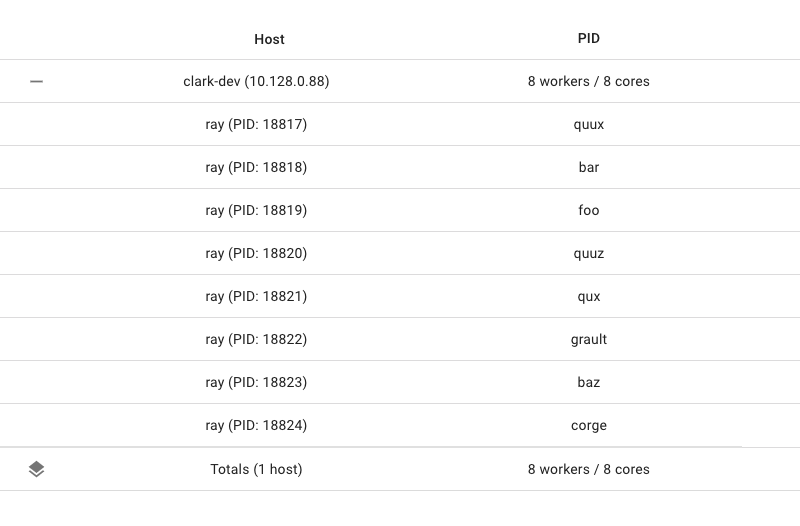
并在任务提交时为任务(以及 actor 方法)指定名称
import setproctitle

@ray.remote
def f(x):
   assert setproctitle.getproctitle() == "ray::special_f"
   return x + 1

obj = f.options(name="special_f").remote(3)
assert ray.get(obj) == 4
这个名称将作为任务名称显示在 dashboard 的机器视图中,在该任务执行时(如果是 Python 任务)将显示为 worker 进程名称,并作为任务名称显示在日志中。
重载函数#
Ray Java API 支持远程调用重载的 Java 函数。然而,由于 Java 编译器类型推断的限制,必须显式地将方法引用强制转换为正确的函数类型。例如,考虑以下情况。
重载的普通任务调用
public static class MyRayApp {

  public static int overloadFunction() {
    return 1;
  }

  public static int overloadFunction(int x) {
    return x;
  }
}

// Invoke overloaded functions.
Assert.assertEquals((int) Ray.task((RayFunc0<Integer>) MyRayApp::overloadFunction).remote().get(), 1);
Assert.assertEquals((int) Ray.task((RayFunc1<Integer, Integer>) MyRayApp::overloadFunction, 2).remote().get(), 2);
重载的 actor 任务调用
public static class Counter {
  protected int value = 0;

  public int increment() {
    this.value += 1;
    return this.value;
  }
}

public static class CounterOverloaded extends Counter {
  public int increment(int diff) {
    super.value += diff;
    return super.value;
  }

  public int increment(int diff1, int diff2) {
    super.value += diff1 + diff2;
    return super.value;
  }
}
ActorHandle<CounterOverloaded> a = Ray.actor(CounterOverloaded::new).remote();
// Call an overloaded actor method by super class method reference.
Assert.assertEquals((int) a.task(Counter::increment).remote().get(), 1);
// Call an overloaded actor method, cast method reference first.
a.task((RayFunc1<CounterOverloaded, Integer>) CounterOverloaded::increment).remote();
a.task((RayFunc2<CounterOverloaded, Integer, Integer>) CounterOverloaded::increment, 10).remote();
a.task((RayFunc3<CounterOverloaded, Integer, Integer, Integer>) CounterOverloaded::increment, 10, 10).remote();
Assert.assertEquals((int) a.task(Counter::increment).remote().get(), 33);
检查集群状态#
基于 Ray 编写的应用通常会希望获得一些关于集群的信息或诊断。常见问题包括
我的自动伸缩集群中有多少节点?
我的集群当前有多少可用资源,包括已用和总资源?
我的集群中当前有哪些对象?
为此,你可以使用全局状态 API。
节点信息#
要获取集群中当前节点的信息,你可以使用 ray.nodes()
- ray.nodes()[source]
获取集群中的节点列表(仅用于调试)。
- 返回:
集群中 Ray 客户端的信息。
开发者 API: 此 API 在 Ray 次要版本中可能会更改。
import ray

ray.init()
print(ray.nodes())
  [{'NodeID': '2691a0c1aed6f45e262b2372baf58871734332d7',
    'Alive': True,
    'NodeManagerAddress': '192.168.1.82',
    'NodeManagerHostname': 'host-MBP.attlocal.net',
    'NodeManagerPort': 58472,
    'ObjectManagerPort': 52383,
    'ObjectStoreSocketName': '/tmp/ray/session_2020-08-04_11-00-17_114725_17883/sockets/plasma_store',
    'RayletSocketName': '/tmp/ray/session_2020-08-04_11-00-17_114725_17883/sockets/raylet',
    'MetricsExportPort': 64860,
    'alive': True,
    'Resources': {'CPU': 16.0, 'memory': 100.0, 'object_store_memory': 34.0, 'node:192.168.1.82': 1.0}}]
上述信息包括
NodeID: raylet 的唯一标识符。
alive: 节点是否仍然存活。
NodeManagerAddress: raylet 所在节点的私有 IP。
Resources: 节点上的总资源容量。
MetricsExportPort: 通过 Prometheus 端点暴露指标的端口号。
资源信息#
要获取集群当前总资源容量的信息,你可以使用 ray.cluster_resources()。
- ray.cluster_resources()[source]
获取当前集群总资源。
请注意,当节点添加到或从集群中移除时,此信息可能会过时。
- 返回:
- 一个字典,将资源名称映射到该资源在集群中的总量。
资源在集群中的总量。
开发者 API: 此 API 在 Ray 次要版本中可能会更改。
要获取集群当前可用资源容量的信息,你可以使用 ray.available_resources()。
- ray.available_resources()[source]
获取当前可用集群资源。
这与
cluster_resources不同,因为它返回的是空闲(可用)资源,而不是总资源。请注意,当任务启动和完成时,此信息可能会过时。
- 返回:
- 一个字典,将资源名称映射到该资源在集群中的总量。
资源在集群中的总量。请注意,如果某个资源(例如,“CPU”)当前不可用(即数量为 0),则不会包含在此字典中。
开发者 API: 此 API 在 Ray 次要版本中可能会更改。
运行大型 Ray 集群#
这里有一些关于运行 Ray 集群节点数超过 1k 的提示。当使用如此大量的节点运行 Ray 时,可能需要调优一些系统设置,以实现大量机器之间的通信。
调优操作系统设置#
由于所有节点和 worker 都连接到 GCS,会创建许多网络连接,操作系统必须支持如此数量的连接。
最大打开文件数#
必须配置操作系统以支持打开大量 TCP 连接,因为每个 worker 和 raylet 都连接到 GCS。在 POSIX 系统中,可以使用 ulimit -n 检查当前限制,如果限制较小,应根据操作系统手册增加限制。
ARP 缓存#
另一个需要配置的事项是 ARP 缓存。在大型集群中,所有 worker 节点都连接到头节点,这会向 ARP 表添加大量条目。确保 ARP 缓存大小足够大以处理如此多的节点。未能做到这一点将导致头节点挂起。发生这种情况时,dmesg 将显示类似 neighbor table overflow message 的错误。
在 Ubuntu 中,可以通过增加 /etc/sysctl.conf 中 net.ipv4.neigh.default.gc_thresh1 - net.ipv4.neigh.default.gc_thresh3 的值来调优 ARP 缓存大小。更多详细信息请参考操作系统手册。
基准测试#
机器设置
1 个头节点:m5.4xlarge (16 vCPU/64GB 内存)
2000 个 worker 节点:m5.large (2 vCPU/8GB 内存)
操作系统设置
将最大打开文件数设置为 1048576
- 增加 ARP 缓存大小
net.ipv4.neigh.default.gc_thresh1=2048net.ipv4.neigh.default.gc_thresh2=4096net.ipv4.neigh.default.gc_thresh3=8192
Ray 设置
RAY_event_stats=false
测试工作负载
测试脚本:代码
Actor 数量 |
Actor 启动时间 |
Actor 就绪时间 |
总时间 |
|---|---|---|---|
20k (每个节点 10 个 actor) |
14.5s |
136.1s |
150.7s |