配置持久化存储#
Ray Train 运行会生成可保存到持久化存储位置的检查点。
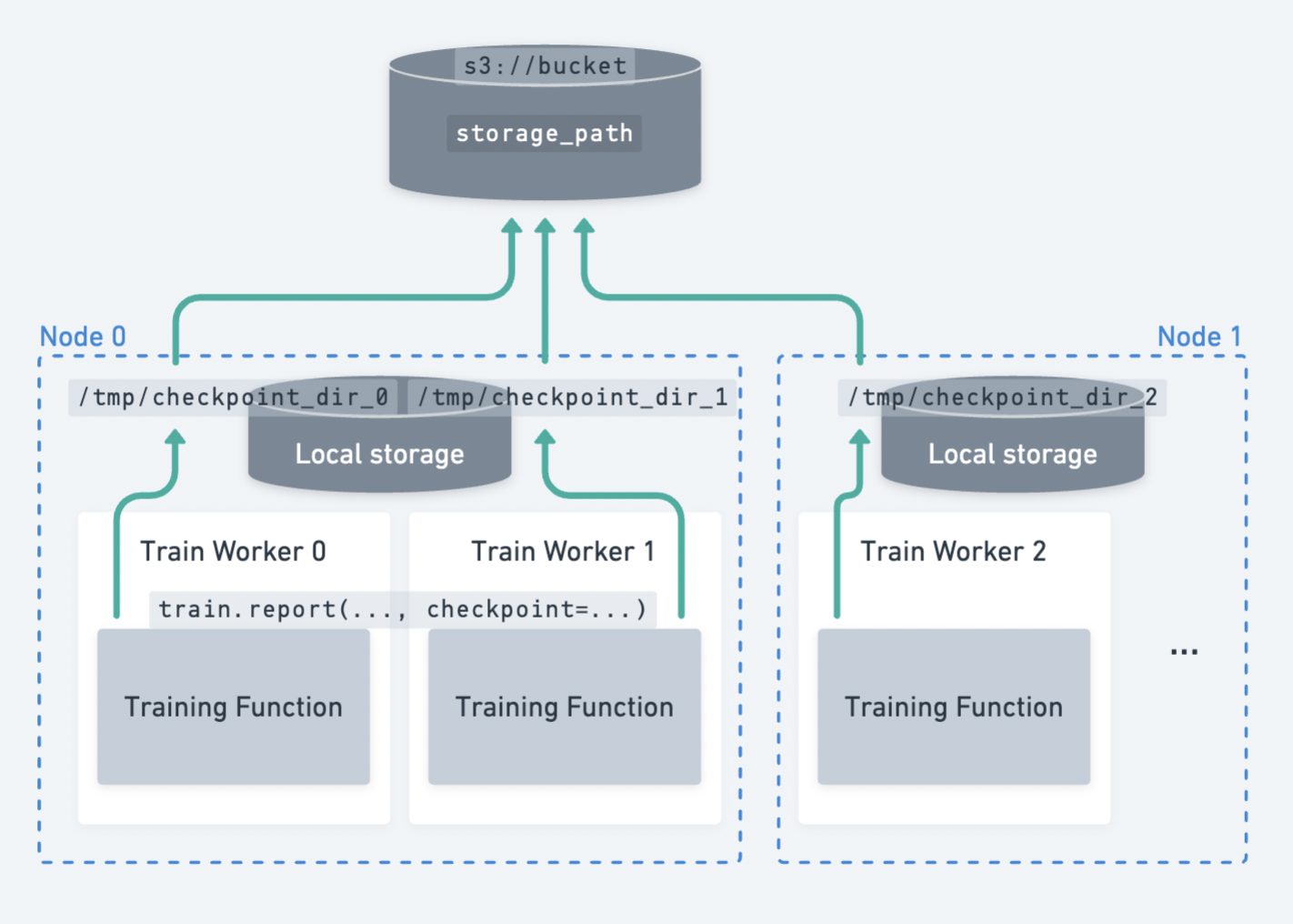
跨多个节点分散的多个 worker 将检查点上传到持久化存储的示例。#
Ray Train 要求所有 worker 都能够将文件写入到相同的持久化存储位置。 因此,对于多节点训练,Ray Train 需要某种形式的外部持久化存储,例如云存储(例如 S3、GCS)或共享文件系统(例如 AWS EFS、Google Filestore、HDFS)。
以下是持久化存储启用的一些功能:
检查点和容错:将检查点保存到持久化存储位置允许您在节点故障时从最后一个检查点恢复训练。有关如何设置检查点的详细指南,请参阅保存和加载检查点。
实验后分析:Ray 集群终止后,将最佳检查点和超参数配置等数据存储在一个合并位置。
连接训练/微调与下游服务和批量推理任务:您可以轻松访问模型和工件,与他人共享或在下游任务中使用。
云存储 (AWS S3, Google Cloud Storage)#
提示
云存储是推荐的持久化存储选项。
通过将 bucket URI 指定为 RunConfig(storage_path) 来使用云存储。
from ray import train
from ray.train.torch import TorchTrainer

trainer = TorchTrainer(
    ...,
    run_config=train.RunConfig(
        storage_path="s3://bucket-name/sub-path/",
        name="experiment_name",
    )
)
确保 Ray 集群中的所有节点都可以访问云存储,以便 worker 的输出可以上传到共享云 bucket。在此示例中,所有文件都上传到共享存储位置 s3://bucket-name/sub-path/experiment_name 以供进一步处理。
本地存储#
单节点集群使用本地存储#
如果您只在单个节点(例如笔记本电脑)上运行实验,Ray Train 将使用本地文件系统作为检查点和其他工件的存储位置。默认情况下,结果会保存到 ~/ray_results 中一个带有唯一自动生成名称的子目录,除非您在 RunConfig 中通过 storage_path 和 name 进行自定义。
from ray import train
from ray.train.torch import TorchTrainer

trainer = TorchTrainer(
    ...,
    run_config=train.RunConfig(
        storage_path="/tmp/custom/storage/path",
        name="experiment_name",
    )
)
在此示例中,所有实验结果都可以在本地找到 /tmp/custom/storage/path/experiment_name 以供进一步处理。
多节点集群使用本地存储#
警告
在多节点上运行时,不再支持使用头节点的本地文件系统作为持久化存储位置。
如果您使用 ray.train.report(..., checkpoint=...) 保存检查点并在多节点集群上运行,如果未设置 NFS 或云存储,Ray Train 将引发错误。这是因为 Ray Train 要求所有 worker 都能够将检查点写入到相同的持久化存储位置。
如果您的训练循环不保存检查点,报告的指标仍将聚合到头节点的本地存储路径。
有关更多信息,请参阅此问题。
自定义存储#
如果上述情况不适合您的需求,Ray Train 可以支持自定义文件系统并执行自定义逻辑。Ray Train 标准化使用 pyarrow.fs.FileSystem 接口与存储交互(请参阅此处 API 参考)。
默认情况下,传递 storage_path=s3://bucket-name/sub-path/ 将使用 pyarrow 的默认 S3 文件系统实现来上传文件。(请参阅其他默认实现。)
通过提供 pyarrow.fs.FileSystem 的实现给 RunConfig(storage_filesystem) 来实现自定义存储上传和下载逻辑。
警告
提供自定义文件系统时,关联的 storage_path 预期是一个合格的文件系统路径,**不包含协议前缀**。
例如,如果您为 s3://bucket-name/sub-path/ 提供自定义 S3 文件系统,则 storage_path 应该是去掉了 s3:// 的 bucket-name/sub-path/。有关用法示例,请参阅下面的示例。
import pyarrow.fs

from ray import train
from ray.train.torch import TorchTrainer

fs = pyarrow.fs.S3FileSystem(
    endpoint_override="https://:9000",
    access_key=...,
    secret_key=...
)

trainer = TorchTrainer(
    ...,
    run_config=train.RunConfig(
        storage_filesystem=fs,
        storage_path="bucket-name/sub-path",
        name="unique-run-id",
    )
)
fsspec 文件系统#
fsspec 提供了许多文件系统实现,例如 s3fs、gcsfs 等。
您可以通过使用 pyarrow.fs 实用程序包装 fsspec 文件系统来使用其中任何一种实现。
# Make sure to install: `pip install -U s3fs`
import s3fs
import pyarrow.fs

s3_fs = s3fs.S3FileSystem(
    key='miniokey...',
    secret='asecretkey...',
    endpoint_url='https://...'
)
custom_fs = pyarrow.fs.PyFileSystem(pyarrow.fs.FSSpecHandler(s3_fs))

run_config = RunConfig(storage_path="minio_bucket", storage_filesystem=custom_fs)
MinIO 和其他 S3 兼容存储#
您可以按照上面显示的示例配置自定义 S3 文件系统以与 MinIO 一起使用。
请注意,直接将这些作为查询参数包含在 storage_path URI 中是另一种选择。
from ray import train
from ray.train.torch import TorchTrainer

trainer = TorchTrainer(
    ...,
    run_config=train.RunConfig(
        storage_path="s3://bucket-name/sub-path?endpoint_override=https://:9000",
        name="unique-run-id",
    )
)
Ray Train 输出概述#
到目前为止,我们介绍了如何配置 Ray Train 输出的存储位置。下面通过一个具体示例来看看这些输出具体是什么,以及它们在存储中的结构。
另请参阅
此示例包含检查点,这在保存和加载检查点中有详细介绍。
import os
import tempfile

import ray.train
from ray.train import Checkpoint
from ray.train.torch import TorchTrainer

def train_fn(config):
    for i in range(10):
        # Training logic here
        metrics = {"loss": ...}

        with tempfile.TemporaryDirectory() as temp_checkpoint_dir:
            torch.save(..., os.path.join(temp_checkpoint_dir, "checkpoint.pt"))
            train.report(
                metrics,
                checkpoint=Checkpoint.from_directory(temp_checkpoint_dir)
            )

trainer = TorchTrainer(
    train_fn,
    scaling_config=ray.train.ScalingConfig(num_workers=2),
    run_config=ray.train.RunConfig(
        storage_path="s3://bucket-name/sub-path/",
        name="unique-run-id",
    )
)
result: train.Result = trainer.fit()
last_checkpoint: Checkpoint = result.checkpoint
以下是将持久化到存储的所有文件概览:
{RunConfig.storage_path}  (ex: "s3://bucket-name/sub-path/")
└── {RunConfig.name}      (ex: "unique-run-id")               <- Train run output directory
    ├── *_snapshot.json                                       <- Train run metadata files (DeveloperAPI)
    ├── checkpoint_epoch=0/                                   <- Checkpoints
    ├── checkpoint_epoch=1/
    └── ...
由 trainer.fit 返回的 Result 和 Checkpoint 对象是访问这些文件中数据的最简单方法。
result.filesystem, result.path
# S3FileSystem, "bucket-name/sub-path/unique-run-id"

result.checkpoint.filesystem, result.checkpoint.path
# S3FileSystem, "bucket-name/sub-path/unique-run-id/checkpoint_epoch=0"
高级配置#
保留原始当前工作目录#
Ray Train 会将每个 worker 的当前工作目录更改为同一路径。
默认情况下,此路径是 Ray 会话目录(例如 /tmp/ray/session_latest)的一个子目录,Ray 的其他日志和临时文件也在此处转储。Ray 会话目录的位置可以自定义。
要禁用 Ray Train 更改当前工作目录的默认行为,请设置环境变量 RAY_CHDIR_TO_TRIAL_DIR=0。
如果您希望训练 worker 能够从启动训练脚本的目录访问相对路径,这会很有用。
import os

import ray
import ray.train
from ray.train.torch import TorchTrainer

os.environ["RAY_CHDIR_TO_TRIAL_DIR"] = "0"

# Write some file in the current working directory
with open("./data.txt", "w") as f:
    f.write("some data")

# Set the working directory in the Ray runtime environment
ray.init(runtime_env={"working_dir": "."})

def train_fn_per_worker(config):
    # Check that each worker can access the working directory
    # NOTE: The working directory is copied to each worker and is read only.
    assert os.path.exists("./data.txt"), os.getcwd()

trainer = TorchTrainer(
    train_fn_per_worker,
    scaling_config=ray.train.ScalingConfig(num_workers=2),
    run_config=ray.train.RunConfig(
        # storage_path=...,
    ),
)
trainer.fit()
已弃用#
以下部分描述的行为自 Ray 2.43 起已弃用,并且在 Ray Train V2 中将不再支持,Ray Train V2 是对 Ray Train 实现和部分 API 的全面修改。
有关更多信息,请参阅以下资源:
Train V2 REP:关于 API 更改的技术细节
Train V2 迁移指南:Train V2 的完整迁移指南
(已弃用)持久化训练工件#
注意
自 Ray 2.43 起,持久化训练 worker 工件的功能已弃用。此功能依赖于 Ray Tune 的本地工作目录抽象,其中每个 worker 的本地文件会被复制到存储。Ray Train V2 将这两个库解耦,因此此 API(其提供的价值已有限)已被弃用。
在上面的示例中,我们在训练循环中将一些工件保存到 worker 的*当前工作目录*。如果您正在训练稳定的扩散模型,您可以时不时保存一些生成的图像样本作为训练工件。
默认情况下,Ray Train 将每个 worker 的当前工作目录更改为位于运行的本地暂存目录内。这样,所有分布式训练 worker 共享相同的绝对路径作为工作目录。请参阅下面如何禁用此默认行为,如果您希望训练 worker 保留其原始工作目录,这将很有用。
如果 RunConfig(SyncConfig(sync_artifacts=True)),则在此目录中保存的所有工件都将持久化到存储中。
工件同步的频率可以通过 SyncConfig 进行配置。请注意,此行为默认关闭。
以下是 Train 运行输出目录的示例,包含 worker 工件:
s3://bucket-name/sub-path (RunConfig.storage_path)
└── experiment_name (RunConfig.name)          <- The "experiment directory"
    ├── experiment_state-*.json
    ├── basic-variant-state-*.json
    ├── trainer.pkl
    ├── tuner.pkl
    └── TorchTrainer_46367_00000_0_...        <- The "trial directory"
        ├── events.out.tfevents...            <- Tensorboard logs of reported metrics
        ├── result.json                       <- JSON log file of reported metrics
        ├── checkpoint_000000/                <- Checkpoints
        ├── checkpoint_000001/
        ├── ...
        ├── artifact-rank=0-iter=0.txt        <- Worker artifacts
        ├── artifact-rank=1-iter=0.txt
        └── ...
警告
**每个 worker** 保存的工件都将同步到存储。如果同一节点上有多个 worker 共享位置,请确保 worker 不会删除其共享工作目录中的文件。
最佳实践是只从单个 worker 写入工件,除非您确实需要多个 worker 的工件。
from ray import train

if train.get_context().get_world_rank() == 0:
    # Only the global rank 0 worker saves artifacts.
    ...

if train.get_context().get_local_rank() == 0:
    # Every local rank 0 worker saves artifacts.
    ...
(已弃用)设置本地暂存目录#
注意
本节描述了依赖于 Ray Tune 实现细节的行为,这些行为不再适用于 Ray Train V2。
警告
在 2.10 之前,RAY_AIR_LOCAL_CACHE_DIR 环境变量和 RunConfig(local_dir) 是将本地暂存目录配置到主目录 (~/ray_results) 之外的方法。
**这些配置不再用于配置本地暂存目录。请转而使用** RunConfig(storage_path) **配置运行输出的去向。**
除了直接写入 storage_path 的文件(如检查点)之外,Ray Train 还会将一些日志文件和元数据文件写入到中间的*本地暂存目录*,然后再将它们持久化(复制/上传)到 storage_path。每个 worker 的当前工作目录都设置在此本地暂存目录内。
默认情况下,本地暂存目录是 Ray 会话目录(例如 /tmp/ray/session_latest)的一个子目录,Ray 的其他临时文件也在此处转储。
通过设置临时 Ray 会话目录的位置来自定义暂存目录的位置。
以下是本地暂存目录的示例:
/tmp/ray/session_latest/artifacts/<ray-train-job-timestamp>/
└── experiment_name
    ├── driver_artifacts    <- These are all uploaded to storage periodically
    │   ├── Experiment state snapshot files needed for resuming training
    │   └── Metrics logfiles
    └── working_dirs        <- These are uploaded to storage if `SyncConfig(sync_artifacts=True)`
        └── Current working directory of training workers, which contains worker artifacts
警告
您应该不需要查看本地暂存目录。storage_path 应该是您唯一需要交互的路径。
本地暂存目录的结构在 Ray Train 的未来版本中可能会发生变化 – 请勿在您的应用中依赖这些本地暂存文件。