使用 Ray Serve LLM 在 Kubernetes 上部署大型语言模型#
本指南提供了使用 Ray Serve LLM 在 Kubernetes 上部署大型语言模型 (LLM) 的分步指南。本指南利用 KubeRay、Ray Serve 和 vLLM,部署了 Hugging Face 的 Qwen/Qwen2.5-7B-Instruct 模型,从而在 Kubernetes 环境中实现了可扩展、高效且与 OpenAI 兼容的 LLM 服务。有关 Ray Serve LLM 的信息,请参阅 Serving LLMs。
先决条件#
此示例从 Qwen/Qwen2.5-7B-Instruct Hugging Face 存储库下载模型权重。要完全完成本指南,您必须满足以下要求:
一个 Hugging Face 账户 和一个具有对受限存储库读取权限的 Hugging Face 访问令牌。
在您的 RayService 自定义资源中,将
HUGGING_FACE_HUB_TOKEN环境变量设置为 Hugging Face 令牌,以启用模型下载。一个带有 GPU 的 Kubernetes 集群。
步骤 1:创建带有 GPU 的 Kubernetes 集群#
有关创建 Kubernetes 集群的指南,请参阅 Kubernetes 集群设置 说明。
步骤 2:安装 KubeRay operator#
通过 部署 KubeRay 操作员,从 Helm 存储库安装最新稳定的 KubeRay 操作员。示例配置中的 Kubernetes NoSchedule 污点可防止 KubeRay 操作员 pod 在 GPU 节点上运行。
第 3 步:创建一个包含您的 Hugging Face 访问令牌的 Kubernetes Secret#
为了增加安全性,请不要直接将 HF 访问令牌作为环境变量传递,而是创建一个包含您的 Hugging Face 访问令牌的 Kubernetes Secret。使用以下命令下载 Ray Serve LLM 服务配置 .yaml 文件:
curl -o ray-service.llm-serve.yaml https://raw.githubusercontent.com/ray-project/kuberay/master/ray-operator/config/samples/ray-service.llm-serve.yaml
下载后,在 Secret 中将 hf_token 的值更新为您的私有访问令牌。
apiVersion: v1
kind: Secret
metadata:
  name: hf-token
type: Opaque
stringData:
  hf_token: <your-hf-access-token-value>
第 4 步:部署 RayService#
添加 Hugging Face 访问令牌后,使用配置文件创建 RayService 自定义资源:
kubectl apply -f ray-service.llm-serve.yaml
此步骤设置了一个自定义 Ray Serve 应用来服务 Qwen/Qwen2.5-7B-Instruct 模型,并创建一个与 OpenAI 兼容的服务器。您可以检查和修改 YAML 文件中的 serveConfigV2 部分,以了解更多关于 Serve 应用的信息。
serveConfigV2: |
  applications:
  - name: llms
    import_path: ray.serve.llm:build_openai_app
    route_prefix: "/"
    args:
      llm_configs:
      - model_loading_config:
          model_id: qwen2.5-7b-instruct
          model_source: Qwen/Qwen2.5-7B-Instruct
        engine_kwargs:
          dtype: bfloat16
          max_model_len: 1024
          device: auto
          gpu_memory_utilization: 0.75
        deployment_config:
          autoscaling_config:
            min_replicas: 1
            max_replicas: 4
            target_ongoing_requests: 64
          max_ongoing_requests: 128
特别是,此配置从 Qwen/Qwen2.5-7B-Instruct 加载模型,并将其 model_id 设置为 qwen2.5-7b-instruct。 LLMDeployment 使用 engine_kwargs 字段初始化底层 LLM 引擎。 deployment_config 部分设置了所需的引擎副本数量。默认情况下,每个副本需要一个 GPU。有关更多信息,请参阅 Serving LLMs 和 Ray Serve 配置文档。
等待 RayService 资源变为健康状态。您可以通过运行以下命令确认其状态:
kubectl get rayservice ray-serve-llm -o yaml
几分钟后,结果应与以下内容相似:
status:
  activeServiceStatus:
    applicationStatuses:
      llms:
        serveDeploymentStatuses:
          LLMDeployment:qwen2_5-7b-instruct:
            status: HEALTHY
          LLMRouter:
            status: HEALTHY
        status: RUNNING
第 5 步:发送请求#
要向 Ray Serve 部署发送请求,请将 Serve 应用服务的 8000 端口转发:
kubectl port-forward ray-serve-llm-serve-svc 8000
请注意,此 Kubernetes 服务仅在 Ray Serve 应用运行并准备就绪后才会出现。
使用以下命令测试服务:
curl --location 'https://:8000/v1/chat/completions' --header 'Content-Type: application/json'
  --data '{
      "model": "qwen2.5-7b-instruct",
      "messages": [
          {
              "role": "system",
              "content": "You are a helpful assistant."
          },
          {
              "role": "user",
              "content": "Provide steps to serve an LLM using Ray Serve."
          }
      ]
  }'
输出应为以下格式:
{
  "id": "qwen2.5-7b-instruct-550d3fd491890a7e7bca74e544d3479e",
  "object": "chat.completion",
  "created": 1746595284,
  "model": "qwen2.5-7b-instruct",
  "choices": [
      {
          "index": 0,
          "message": {
              "role": "assistant",
              "reasoning_content": null,
              "content": "Sure! Ray Serve is a library built on top of Ray...",
              "tool_calls": []
          },
          "logprobs": null,
          "finish_reason": "stop",
          "stop_reason": null
      }
  ],
  "usage": {
      "prompt_tokens": 30,
      "total_tokens": 818,
      "completion_tokens": 788,
      "prompt_tokens_details": null
  },
  "prompt_logprobs": null
}
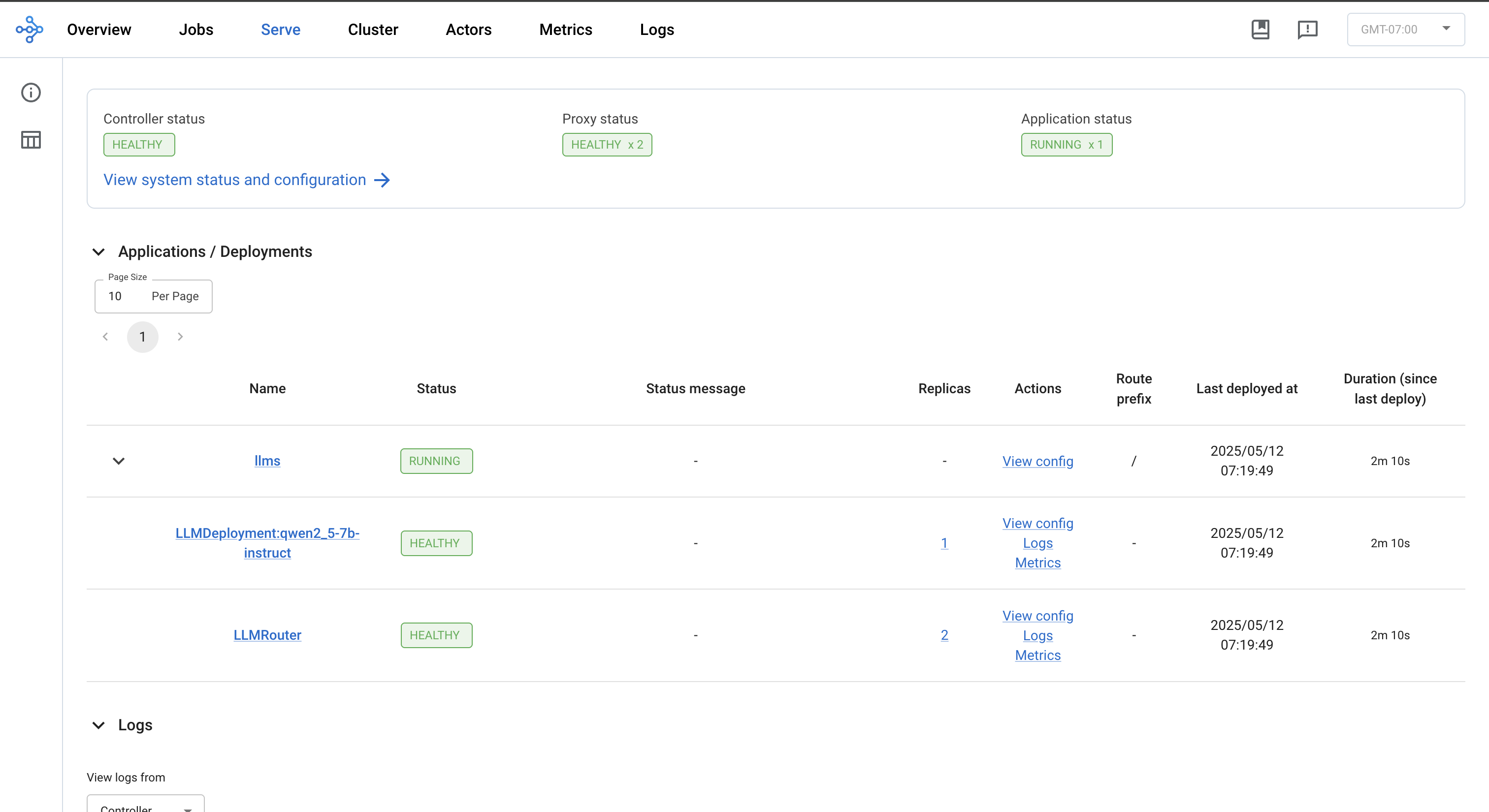
第 6 步:查看 Ray Dashboard#
kubectl port-forward svc/ray-serve-llm-head-svc 8265
转发后,导航到仪表板上的 Serve 选项卡,以查看应用程序状态、部署、路由器、日志和其他相关功能。