使用 KubeRay 和 verl 对 LLM 进行基于人类反馈的强化学习 (RLHF)#
verl 是一个开源框架,为大型语言模型 (LLM) 提供了一个灵活、高效且生产就绪的 RL 训练库。本指南将演示如何在 KubeRay 上使用 verl 对 Qwen2.5-0.5B-Instruct 在 GSM8K 数据集上进行近端策略优化 (PPO) 训练。
为了方便理解,本指南将启动一个具有 4 个 GPU 的单节点 RayCluster。您也可以轻松地使用 KubeRay 启动多节点 RayCluster 来训练更大的模型。
您还可以使用 RayJob CRD 来满足生产环境的需求。
步骤 1:创建带有 GPU 的 Kubernetes 集群#
请按照 托管 Kubernetes 服务 中的说明创建带有 GPU 的 Kubernetes 集群。
本指南将使用一个带有 4 个 L4 GPU 的 Kubernetes 集群。
对于 GKE,您可以按照 本教程 中的说明进行操作,并使用以下命令创建每台 Kubernetes 节点具有 4 个 L4 GPU 的 GPU 节点池。
gcloud container node-pools create gpu-node-pool \
  --accelerator type=nvidia-l4-vws,count=4 \
  --zone us-west1-b \
  --cluster kuberay-gpu-cluster \
  --num-nodes 1 \
  --min-nodes 0 \
  --max-nodes 1 \
  --enable-autoscaling \
  --machine-type g2-standard-48
步骤 2:安装 KubeRay operator#
请按照 KubeRay operator 中的说明安装 KubeRay operator。
步骤 3:创建 RayCluster#
kubectl apply -f https://raw.githubusercontent.com/ray-project/kuberay/master/ray-operator/config/samples/ray-cluster.verl.yaml
步骤 4:在 head Pod 中安装 verl#
登录到 head Pod 并安装 verl。目前 verl 社区尚未提供预装 verl 的镜像(verl#2222)。
# Log in to the head Pod.
export HEAD_POD=$(kubectl get pods --selector=ray.io/node-type=head -o custom-columns=POD:metadata.name --no-headers)
kubectl exec -it $HEAD_POD -- bash

# Follow the instructions in https://verl.readthedocs.io/en/latest/start/install.html#install-from-docker-image to install verl.
git clone https://github.com/volcengine/verl && cd verl
pip3 install -e .[vllm]
步骤 5:准备数据集并下载 Qwen2.5-0.5B-Instruct 模型#
在 head Pod 的 verl 根目录下运行以下命令来准备数据集并下载 Qwen2.5-0.5B-Instruct 模型。
# Prepare the dataset.
python3 examples/data_preprocess/gsm8k.py --local_dir ~/data/gsm8k

# Download the `Qwen2.5-0.5B-Instruct` model.
python3 -c "import transformers; transformers.pipeline('text-generation', model='Qwen/Qwen2.5-0.5B-Instruct')"
步骤 6:运行 PPO 训练任务#
运行以下命令启动 PPO 训练任务。这与 verl 文档中的说明略有不同。主要区别如下:
由于 head Pod 有 4 个 GPU,将
n_gpus_per_node设置为4。将
save_freq设置为-1,以避免因检查点而导致的磁盘压力。
PYTHONUNBUFFERED=1 python3 -m verl.trainer.main_ppo \
 data.train_files=$HOME/data/gsm8k/train.parquet \
 data.val_files=$HOME/data/gsm8k/test.parquet \
 data.train_batch_size=256 \
 data.max_prompt_length=512 \
 data.max_response_length=256 \
 actor_rollout_ref.model.path=Qwen/Qwen2.5-0.5B-Instruct \
 actor_rollout_ref.actor.optim.lr=1e-6 \
 actor_rollout_ref.actor.ppo_mini_batch_size=64 \
 actor_rollout_ref.actor.ppo_micro_batch_size_per_gpu=4 \
 actor_rollout_ref.rollout.log_prob_micro_batch_size_per_gpu=8 \
 actor_rollout_ref.rollout.tensor_model_parallel_size=1 \
 actor_rollout_ref.rollout.gpu_memory_utilization=0.4 \
 actor_rollout_ref.ref.log_prob_micro_batch_size_per_gpu=4 \
 critic.optim.lr=1e-5 \
 critic.model.path=Qwen/Qwen2.5-0.5B-Instruct \
 critic.ppo_micro_batch_size_per_gpu=4 \
 algorithm.kl_ctrl.kl_coef=0.001 \
 trainer.logger=['console'] \
 trainer.val_before_train=False \
 trainer.default_hdfs_dir=null \
 trainer.n_gpus_per_node=4 \
 trainer.nnodes=1 \
 trainer.save_freq=-1 \
 trainer.test_freq=10 \
 trainer.total_epochs=15 2>&1 | tee verl_demo.log
此任务需要 5 小时才能完成。在运行期间,您可以查看 Ray Dashboard 以了解 PPO 任务和 Ray 集群的更多详细信息。此外,您可以按照下一步检查 PPO 任务日志,了解模型如何改进。
# Port forward the Ray dashboard to your local machine's port 8265.
kubectl port-forward $HEAD_POD 8265:8265
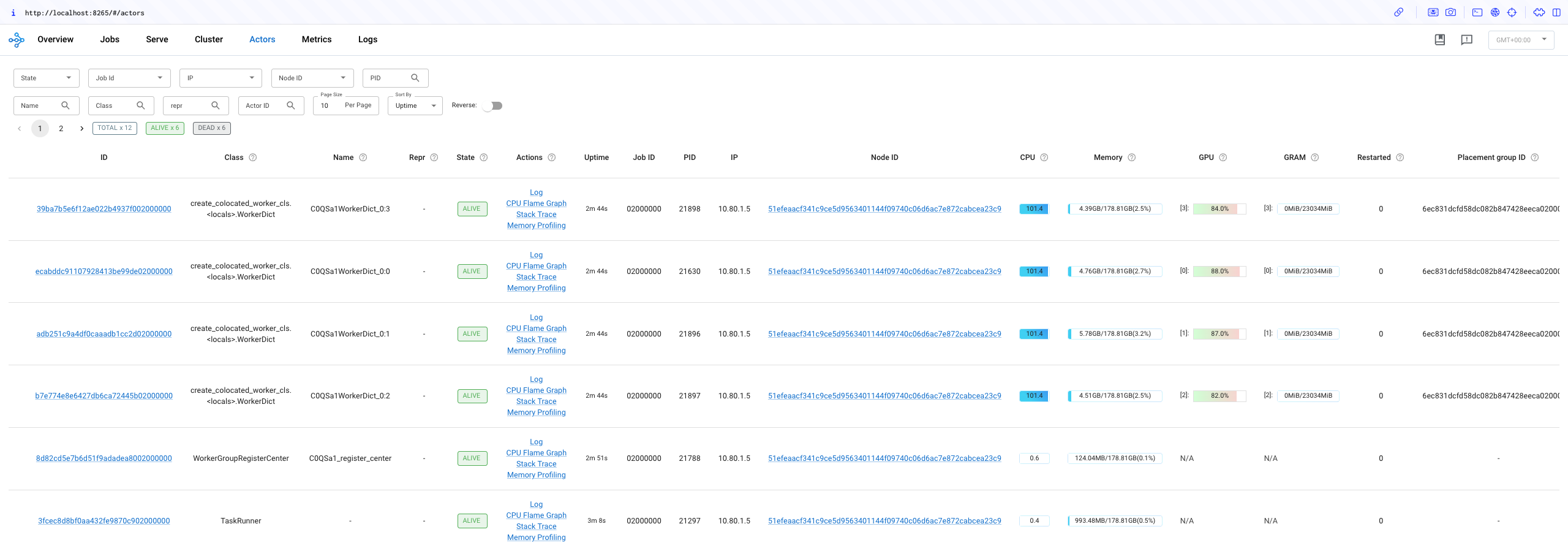
在浏览器中打开 127.0.0.1:8265 以查看 Ray Dashboard,并检查是否所有 GPU 都已使用。
步骤 7:检查 PPO 任务日志#
检查 head Pod 中的 verl_demo.log 文件以查看 PPO 任务的日志。每隔 10 步,verl 会使用一个简单的数学问题来验证模型。
数学题
Janet’s ducks lay 16 eggs per day. She eats three for breakfast every morning and bakes muffins for her friends every day with four. She sells the remainder at the farmers' market daily for $2 per fresh duck egg. How much in dollars does she make every day at the farmers' market? Let's think step by step and output the final answer after
答案:
(16 - 3 - 4) * 2 = 18
您应该能够看到模型在几步之后对这个问题的回答能力逐渐提高。
在此示例运行中,模型最初在 130 步后给出了正确答案,以下是日志。在整个过程中,验证运行了 44 次,正确回答了 20 次。这可能会因随机种子而异。
(TaskRunner pid=21297) [response] First, we calculate the number of eggs Janet's ducks lay in a day. Since there are 16 eggs per day and Janet lays these eggs every day, the number of eggs laid in a day is 16.
(TaskRunner pid=21297)
(TaskRunner pid=21297) Next, we calculate the number of eggs Janet eats in a day. She eats 3 eggs for breakfast and bakes 4 muffins, so the total number of eggs she eats in a day is 3 + 4 = 7.
(TaskRunner pid=21297)
(TaskRunner pid=21297) The number of eggs she sells in a day is the total number of eggs laid minus the number of eggs she eats, which is 16 - 7 = 9 eggs.
(TaskRunner pid=21297)
(TaskRunner pid=21297) She sells each egg for $2, so the total amount she makes every day is 9 * 2 = 18 dollars.
(TaskRunner pid=21297)
(TaskRunner pid=21297) #### 18
(TaskRunner pid=21297) #### 18 dollars
不必等待所有步骤完成。如果您观察到模型改进的过程,可以停止任务。
步骤 8:清理#
kubectl delete -f https://raw.githubusercontent.com/ray-project/kuberay/master/ray-operator/config/samples/ray-cluster.verl.yaml