分布式训练#


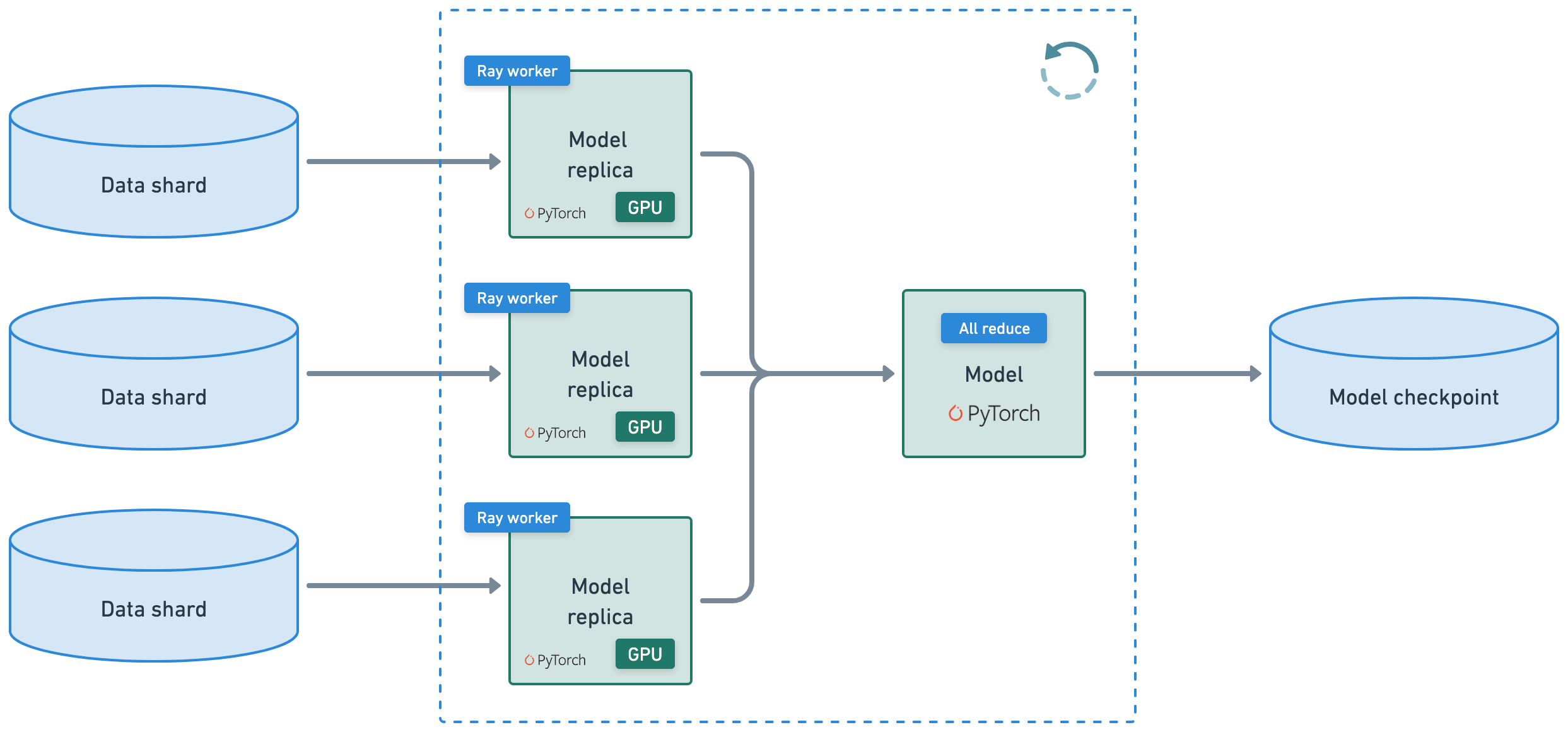
本教程执行一个分布式训练工作负载,它连接了以下异构工作负载:
在训练前预处理数据集
使用 Ray Train 和 PyTorch 进行分布式训练,并具备可观测性
评估(批量推理和评估逻辑)
将模型构件保存到模型注册表(MLOps)
注意:本教程不进行模型调优,但有关实验执行和任意规模的超参数调优,请参阅 Ray Tune。
%%bash
pip install -q -r /home/ray/default/requirements.txt
pip install -q -e /home/ray/default/doggos
Successfully registered `ipywidgets, matplotlib` and 4 other packages to be installed on all cluster nodes.
View and update dependencies here: https://console.anyscale.com/cld_kvedZWag2qA8i5BjxUevf5i7/prj_cz951f43jjdybtzkx1s5sjgz99/workspaces/expwrk_23ry3pgfn3jgq2jk3e5z25udhz?workspace-tab=dependencies
Successfully registered `doggos` package to be installed on all cluster nodes.
View and update dependencies here: https://console.anyscale.com/cld_kvedZWag2qA8i5BjxUevf5i7/prj_cz951f43jjdybtzkx1s5sjgz99/workspaces/expwrk_23ry3pgfn3jgq2jk3e5z25udhz?workspace-tab=dependencies
注意:可能需要重启内核才能使所有依赖项可用。
如果使用 uv,则
关闭运行时依赖项(顶部“
Dependencies”选项卡 > 关闭Pip packages)。无需运行上面的pip install命令。请将此笔记本的 Python 内核更改为使用
venv(点击笔记本右上角的base (Python x.yy.zz)>Select another Kernel>Python Environments...>Create Python Environment>Venv>Use Existing),然后完成!现在笔记本中的所有单元格都将使用虚拟环境。通过在导入 ray 后添加此行,将 Python 可执行文件更改为使用
uv run而不是python。
import os
os.environ.pop("RAY_RUNTIME_ENV_HOOK", None)
import ray
ray.init(runtime_env={"py_executable": "uv run", "working_dir": "/home/ray/default"})
%load_ext autoreload
%autoreload all
import os
import ray
import sys
sys.path.append(os.path.abspath("../doggos/"))
# If using UV
# os.environ.pop("RAY_RUNTIME_ENV_HOOK", None)
# Enable Ray Train v2. It's too good to wait for public release!
os.environ["RAY_TRAIN_V2_ENABLED"] = "1"
ray.init(
    # connect to existing ray runtime (from previous notebook if still running)
    address=os.environ.get("RAY_ADDRESS", "auto"),
    runtime_env={
        "env_vars": {"RAY_TRAIN_V2_ENABLED": "1"},
        # "py_executable": "uv run", # if using uv
        # "working_dir": "/home/ray/default",  # if using uv
    },
)
2025-08-28 05:06:48,041	INFO worker.py:1771 -- Connecting to existing Ray cluster at address: 10.0.17.148:6379...
2025-08-28 05:06:48,052	INFO worker.py:1942 -- Connected to Ray cluster. View the dashboard at https://session-jhxhj69d6ttkjctcxfnsfe7gwk.i.anyscaleuserdata.com
2025-08-28 05:06:48,061	INFO packaging.py:588 -- Creating a file package for local module '/home/ray/default/doggos/doggos'.
2025-08-28 05:06:48,064	INFO packaging.py:380 -- Pushing file package 'gcs://_ray_pkg_86cc12e3f2760ca4.zip' (0.03MiB) to Ray cluster...
2025-08-28 05:06:48,065	INFO packaging.py:393 -- Successfully pushed file package 'gcs://_ray_pkg_86cc12e3f2760ca4.zip'.
2025-08-28 05:06:48,068	INFO packaging.py:380 -- Pushing file package 'gcs://_ray_pkg_563e3191c4f9ed5f5d5e8601702cfa5ff10660e4.zip' (1.09MiB) to Ray cluster...
2025-08-28 05:06:48,073	INFO packaging.py:393 -- Successfully pushed file package 'gcs://_ray_pkg_563e3191c4f9ed5f5d5e8601702cfa5ff10660e4.zip'.
%%bash
# This will be removed once Ray Train v2 is enabled by default.
echo "RAY_TRAIN_V2_ENABLED=1" > /home/ray/default/.env
# Load env vars in notebooks.
from dotenv import load_dotenv
load_dotenv()
True
预处理#
您需要将类别转换为标签(唯一的整数),以便训练一个能够正确预测给定输入图像的类别的分类器。但在执行此操作之前,请应用与前一个笔记本相同的data ingestion和预处理。
def add_class(row):
    row["class"] = row["path"].rsplit("/", 3)[-2]
    return row
# Preprocess data splits.
train_ds = ray.data.read_images("s3://doggos-dataset/train", include_paths=True, shuffle="files")
train_ds = train_ds.map(add_class)
val_ds = ray.data.read_images("s3://doggos-dataset/val", include_paths=True)
val_ds = val_ds.map(add_class)
定义一个 Preprocessor 类,该类
创建一个 embedding。后续步骤会将 embedding 层移出模型,因为您将冻结 embedding 层的权重,这样就不必在模型的正向传播中重复执行此操作,从而节省不必要的计算。
将类别转换为分类器的标签。
虽然您可以将此步骤作为一个简单的操作来完成,但您会花时间将其组织成一个类,以便稍后可以保存和加载以进行推理。
def convert_to_label(row, class_to_label):
    if "class" in row:
        row["label"] = class_to_label[row["class"]]
    return row
import numpy as np
from PIL import Image
import torch
from transformers import CLIPModel, CLIPProcessor
from doggos.embed import EmbedImages
class Preprocessor:
    """Preprocessor class."""
    def __init__(self, class_to_label=None):
        self.class_to_label = class_to_label or {}  # mutable defaults
        self.label_to_class = {v: k for k, v in self.class_to_label.items()}

    def fit(self, ds, column):
        self.classes = ds.unique(column=column)
        self.class_to_label = {tag: i for i, tag in enumerate(self.classes)}
        self.label_to_class = {v: k for k, v in self.class_to_label.items()}
        return self

    def transform(self, ds, concurrency=4, batch_size=64, num_gpus=1):
        ds = ds.map(
            convert_to_label,
            fn_kwargs={"class_to_label": self.class_to_label},
        )
        ds = ds.map_batches(
            EmbedImages,
            fn_constructor_kwargs={
                "model_id": "openai/clip-vit-base-patch32",
                "device": "cuda",
            },
            concurrency=4,
            batch_size=64,
            num_gpus=1,
            accelerator_type="T4",
        )
        ds = ds.drop_columns(["image"])
        return ds

    def save(self, fp):
        with open(fp, "w") as f:
            json.dump(self.class_to_label, f)
# Preprocess.
preprocessor = Preprocessor()
preprocessor = preprocessor.fit(train_ds, column="class")
train_ds = preprocessor.transform(ds=train_ds)
val_ds = preprocessor.transform(ds=val_ds)
2025-08-28 05:06:54,182	INFO dataset.py:3248 -- Tip: Use `take_batch()` instead of `take() / show()` to return records in pandas or numpy batch format.
2025-08-28 05:06:54,184	INFO logging.py:295 -- Registered dataset logger for dataset dataset_14_0
2025-08-28 05:06:54,206	INFO streaming_executor.py:159 -- Starting execution of Dataset dataset_14_0. Full logs are in /tmp/ray/session_2025-08-28_04-57-43_348032_12595/logs/ray-data
2025-08-28 05:06:54,207	INFO streaming_executor.py:160 -- Execution plan of Dataset dataset_14_0: InputDataBuffer[Input] -> TaskPoolMapOperator[ListFiles] -> TaskPoolMapOperator[ReadFiles] -> TaskPoolMapOperator[Map(add_class)] -> AllToAllOperator[Aggregate] -> LimitOperator[limit=1]
2025-08-28 05:06:54,275	WARNING resource_manager.py:134 -- ⚠️  Ray's object store is configured to use only 28.5% of available memory (63.9GiB out of 224.0GiB total). For optimal Ray Data performance, we recommend setting the object store to at least 50% of available memory. You can do this by setting the 'object_store_memory' parameter when calling ray.init() or by setting the RAY_DEFAULT_OBJECT_STORE_MEMORY_PROPORTION environment variable.
2025-08-28 05:07:03,480	INFO streaming_executor.py:279 -- ✔️  Dataset dataset_14_0 execution finished in 9.27 seconds
有关在训练模型之前所需的最后一步预处理,请参阅有关 数据加载和预处理 的广泛指南。但是,Ray Data 支持高性能的 join、filter、aggregation 等操作,以满足您的工作负载可能需要的更结构化的数据处理需求。
import shutil
# Write processed data to cloud storage.
preprocessed_data_path = os.path.join("/mnt/cluster_storage", "doggos/preprocessed_data")
if os.path.exists(preprocessed_data_path):  # Clean up.
    shutil.rmtree(preprocessed_data_path)
preprocessed_train_path = os.path.join(preprocessed_data_path, "preprocessed_train")
preprocessed_val_path = os.path.join(preprocessed_data_path, "preprocessed_val")
train_ds.write_parquet(preprocessed_train_path)
val_ds.write_parquet(preprocessed_val_path)
2025-08-28 05:07:04,254	INFO logging.py:295 -- Registered dataset logger for dataset dataset_22_0
2025-08-28 05:07:04,270	INFO streaming_executor.py:159 -- Starting execution of Dataset dataset_22_0. Full logs are in /tmp/ray/session_2025-08-28_04-57-43_348032_12595/logs/ray-data
2025-08-28 05:07:04,271	INFO streaming_executor.py:160 -- Execution plan of Dataset dataset_22_0: InputDataBuffer[Input] -> TaskPoolMapOperator[ListFiles] -> TaskPoolMapOperator[ReadFiles] -> TaskPoolMapOperator[Map(add_class)->Map(convert_to_label)] -> ActorPoolMapOperator[MapBatches(EmbedImages)] -> TaskPoolMapOperator[MapBatches(drop_columns)->Write]
(MapWorker(MapBatches(EmbedImages)) pid=9215, ip=10.0.5.252) Using a slow image processor as `use_fast` is unset and a slow processor was saved with this model. `use_fast=True` will be the default behavior in v4.52, even if the model was saved with a slow processor. This will result in minor differences in outputs. You'll still be able to use a slow processor with `use_fast=False`.
2025-08-28 05:07:20,682	INFO streaming_executor.py:279 -- ✔️  Dataset dataset_22_0 execution finished in 16.41 seconds
2025-08-28 05:07:20,747	INFO dataset.py:4871 -- Data sink Parquet finished. 2880 rows and 5.9MB data written.
2025-08-28 05:07:20,759	INFO logging.py:295 -- Registered dataset logger for dataset dataset_25_0
2025-08-28 05:07:20,774	INFO streaming_executor.py:159 -- Starting execution of Dataset dataset_25_0. Full logs are in /tmp/ray/session_2025-08-28_04-57-43_348032_12595/logs/ray-data
2025-08-28 05:07:20,775	INFO streaming_executor.py:160 -- Execution plan of Dataset dataset_25_0: InputDataBuffer[Input] -> TaskPoolMapOperator[ListFiles] -> TaskPoolMapOperator[ReadFiles] -> TaskPoolMapOperator[Map(add_class)->Map(convert_to_label)] -> ActorPoolMapOperator[MapBatches(EmbedImages)] -> TaskPoolMapOperator[MapBatches(drop_columns)->Write]
2025-08-28 05:07:22,417	WARNING streaming_executor_state.py:790 -- Operator produced a RefBundle with a different schema than the previous one. Previous schema: image: extension<ray.data.arrow_variable_shaped_tensor<ArrowVariableShapedTensorType>>
path: string, new schema: image: extension<ray.data.arrow_tensor_v2<ArrowTensorTypeV2>>
path: string. This may lead to unexpected behavior.
2025-08-28 05:07:22,642	WARNING streaming_executor_state.py:790 -- Operator produced a RefBundle with a different schema than the previous one. Previous schema: image: extension<ray.data.arrow_variable_shaped_tensor<ArrowVariableShapedTensorType>>
path: string
class: string
label: int64, new schema: image: extension<ray.data.arrow_tensor_v2<ArrowTensorTypeV2>>
path: string
class: string
label: int64. This may lead to unexpected behavior.
(MapWorker(MapBatches(EmbedImages)) pid=23307, ip=10.0.5.252) Using a slow image processor as `use_fast` is unset and a slow processor was saved with this model. `use_fast=True` will be the default behavior in v4.52, even if the model was saved with a slow processor. This will result in minor differences in outputs. You'll still be able to use a slow processor with `use_fast=False`. [repeated 4x across cluster] (Ray deduplicates logs by default. Set RAY_DEDUP_LOGS=0 to disable log deduplication, or see https://docs.rayai.org.cn/en/master/ray-observability/user-guides/configure-logging.html#log-deduplication for more options.)
2025-08-28 05:07:33,184	INFO streaming_executor.py:279 -- ✔️  Dataset dataset_25_0 execution finished in 12.41 seconds
2025-08-28 05:07:33,214	INFO dataset.py:4871 -- Data sink Parquet finished. 720 rows and 1.5MB data written.
将预处理后的数据存储到共享云存储中,以
保存此预处理数据外观的记录
避免在模型处理的每个批次触发完整的预处理
避免预处理数据的
materialize,因为不应强制大型数据适应内存
模型#
定义模型 – 一个简单的两层神经网络,带有 Softmax 层来预测类别概率。请注意,这完全是基于 PyTorch 的,没有其他东西。
import json
from pathlib import Path
import torch
import torch.nn as nn
import torch.nn.functional as F
class ClassificationModel(torch.nn.Module):
    def __init__(self, embedding_dim, hidden_dim, dropout_p, num_classes):
        super().__init__()
        # Hyperparameters
        self.embedding_dim = embedding_dim
        self.hidden_dim = hidden_dim
        self.dropout_p = dropout_p
        self.num_classes = num_classes

        # Define layers
        self.fc1 = nn.Linear(embedding_dim, hidden_dim)
        self.batch_norm = nn.BatchNorm1d(hidden_dim)
        self.relu = nn.ReLU()
        self.dropout = nn.Dropout(dropout_p)
        self.fc2 = nn.Linear(hidden_dim, num_classes)

    def forward(self, batch):
        z = self.fc1(batch["embedding"])
        z = self.batch_norm(z)
        z = self.relu(z)
        z = self.dropout(z)
        z = self.fc2(z)
        return z

    @torch.inference_mode()
    def predict(self, batch):
        z = self(batch)
        y_pred = torch.argmax(z, dim=1).cpu().numpy()
        return y_pred

    @torch.inference_mode()
    def predict_probabilities(self, batch):
        z = self(batch)
        y_probs = F.softmax(z, dim=1).cpu().numpy()
        return y_probs

    def save(self, dp):
        Path(dp).mkdir(parents=True, exist_ok=True)
        with open(Path(dp, "args.json"), "w") as fp:
            json.dump({
                "embedding_dim": self.embedding_dim,
                "hidden_dim": self.hidden_dim,
                "dropout_p": self.dropout_p,
                "num_classes": self.num_classes,
            }, fp, indent=4)
        torch.save(self.state_dict(), Path(dp, "model.pt"))

    @classmethod
    def load(cls, args_fp, state_dict_fp, device="cpu"):
        with open(args_fp, "r") as fp:
            model = cls(**json.load(fp))
        model.load_state_dict(torch.load(state_dict_fp, map_location=device))
        return model
# Initialize model.
num_classes = len(preprocessor.classes)
model = ClassificationModel(
    embedding_dim=512,
    hidden_dim=256,
    dropout_p=0.3,
    num_classes=num_classes,
)
print (model)
ClassificationModel(
  (fc1): Linear(in_features=512, out_features=256, bias=True)
  (batch_norm): BatchNorm1d(256, eps=1e-05, momentum=0.1, affine=True, track_running_stats=True)
  (relu): ReLU()
  (dropout): Dropout(p=0.3, inplace=False)
  (fc2): Linear(in_features=256, out_features=36, bias=True)
)
批处理#
查看数据样本批次,并确保张量具有正确的数据类型。
from ray.train.torch import get_device
def collate_fn(batch, device=None):
    dtypes = {"embedding": torch.float32, "label": torch.int64}
    tensor_batch = {}

    # If no device is provided, try to get it from Ray Train context
    if device is None:
        try:
            device = get_device()
        except RuntimeError:
            # When not in Ray Train context, use CPU for testing
            device = "cpu"

    for key in dtypes.keys():
        if key in batch:
            tensor_batch[key] = torch.as_tensor(
                batch[key],
                dtype=dtypes[key],
                device=device,
            )
    return tensor_batch
# Sample batch
sample_batch = train_ds.take_batch(batch_size=3)
collate_fn(batch=sample_batch, device="cpu")
2025-08-28 05:07:34,380	INFO logging.py:295 -- Registered dataset logger for dataset dataset_27_0
2025-08-28 05:07:34,394	INFO streaming_executor.py:159 -- Starting execution of Dataset dataset_27_0. Full logs are in /tmp/ray/session_2025-08-28_04-57-43_348032_12595/logs/ray-data
2025-08-28 05:07:34,395	INFO streaming_executor.py:160 -- Execution plan of Dataset dataset_27_0: InputDataBuffer[Input] -> TaskPoolMapOperator[ListFiles] -> TaskPoolMapOperator[ReadFiles] -> TaskPoolMapOperator[Map(add_class)->Map(convert_to_label)] -> ActorPoolMapOperator[MapBatches(EmbedImages)] -> TaskPoolMapOperator[MapBatches(drop_columns)] -> LimitOperator[limit=3]
(MapWorker(MapBatches(EmbedImages)) pid=26114, ip=10.0.5.252) Using a slow image processor as `use_fast` is unset and a slow processor was saved with this model. `use_fast=True` will be the default behavior in v4.52, even if the model was saved with a slow processor. This will result in minor differences in outputs. You'll still be able to use a slow processor with `use_fast=False`.
2025-08-28 05:07:45,755	INFO streaming_executor.py:279 -- ✔️  Dataset dataset_27_0 execution finished in 11.36 seconds
/tmp/ipykernel_31027/417303983.py:6: UserWarning: The given NumPy array is not writable, and PyTorch does not support non-writable tensors. This means writing to this tensor will result in undefined behavior. You may want to copy the array to protect its data or make it writable before converting it to a tensor. This type of warning will be suppressed for the rest of this program. (Triggered internally at /pytorch/torch/csrc/utils/tensor_numpy.cpp:203.)
  tensor_batch[key] = torch.as_tensor(
{'embedding': tensor([[ 0.0245,  0.6505,  0.0627,  ...,  0.4001, -0.2721, -0.0673],
         [-0.2416,  0.2315,  0.0255,  ...,  0.4065,  0.2805, -0.1156],
         [-0.2301, -0.3628,  0.1086,  ...,  0.3038,  0.0543,  0.6214]]),
 'label': tensor([10, 29, 27])}
模型注册表#
在 Anyscale 用户存储 中创建一个模型注册表,用于保存模型检查点。使用 OSS MLflow,但您可以轻松地 设置其他实验跟踪器 与 Ray 一起使用。
import shutil
model_registry = "/mnt/cluster_storage/mlflow/doggos"
if os.path.isdir(model_registry):
    shutil.rmtree(model_registry)  # clean up
os.makedirs(model_registry, exist_ok=True)
训练#
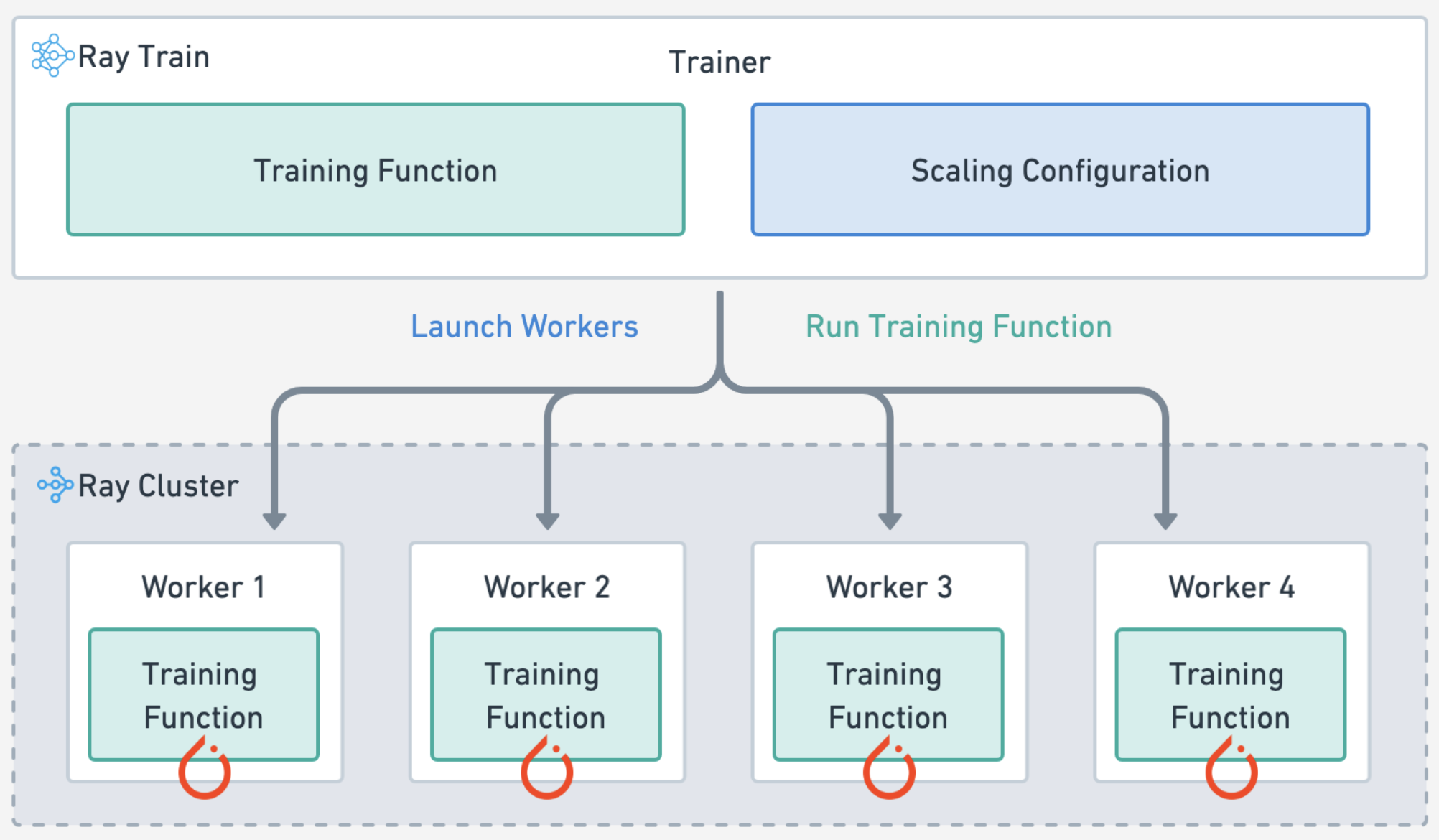
通过指定以下内容来定义训练工作负载:
实验和模型参数
计算扩展配置
训练和验证数据批次的正向传播
每个 epoch 的训练循环和检查点
# Train loop config.
experiment_name = "doggos"
train_loop_config = {
    "model_registry": model_registry,
    "experiment_name": experiment_name,
    "embedding_dim": 512,
    "hidden_dim": 256,
    "dropout_p": 0.3,
    "lr": 1e-3,
    "lr_factor": 0.8,
    "lr_patience": 3,
    "num_epochs": 20,
    "batch_size": 256,
}
# Scaling config
num_workers = 4
scaling_config = ray.train.ScalingConfig(
    num_workers=num_workers,
    use_gpu=True,
    resources_per_worker={"CPU": 8, "GPU": 2},
    accelerator_type="T4",
)
import tempfile
import mlflow
import numpy as np
from ray.train.torch import TorchTrainer
def train_epoch(ds, batch_size, model, num_classes, loss_fn, optimizer):
    model.train()
    loss = 0.0
    ds_generator = ds.iter_torch_batches(batch_size=batch_size, collate_fn=collate_fn)
    for i, batch in enumerate(ds_generator):
        optimizer.zero_grad()  # Reset gradients.
        z = model(batch)  # Forward pass.
        targets = F.one_hot(batch["label"], num_classes=num_classes).float()
        J = loss_fn(z, targets)  # Define loss.
        J.backward()  # Backward pass.
        optimizer.step()  # Update weights.
        loss += (J.detach().item() - loss) / (i + 1)  # Cumulative loss
    return loss
def eval_epoch(ds, batch_size, model, num_classes, loss_fn):
    model.eval()
    loss = 0.0
    y_trues, y_preds = [], []
    ds_generator = ds.iter_torch_batches(batch_size=batch_size, collate_fn=collate_fn)
    with torch.inference_mode():
        for i, batch in enumerate(ds_generator):
            z = model(batch)
            targets = F.one_hot(batch["label"], num_classes=num_classes).float()  # one-hot (for loss_fn)
            J = loss_fn(z, targets).item()
            loss += (J - loss) / (i + 1)
            y_trues.extend(batch["label"].cpu().numpy())
            y_preds.extend(torch.argmax(z, dim=1).cpu().numpy())
    return loss, np.vstack(y_trues), np.vstack(y_preds)
def train_loop_per_worker(config):
    # Hyperparameters.
    model_registry = config["model_registry"]
    experiment_name = config["experiment_name"]
    embedding_dim = config["embedding_dim"]
    hidden_dim = config["hidden_dim"]
    dropout_p = config["dropout_p"]
    lr = config["lr"]
    lr_factor = config["lr_factor"]
    lr_patience = config["lr_patience"]
    num_epochs = config["num_epochs"]
    batch_size = config["batch_size"]
    num_classes = config["num_classes"]

    # Experiment tracking.
    if ray.train.get_context().get_world_rank() == 0:
        mlflow.set_tracking_uri(f"file:{model_registry}")
        mlflow.set_experiment(experiment_name)
        mlflow.start_run()
        mlflow.log_params(config)

    # Datasets.
    train_ds = ray.train.get_dataset_shard("train")
    val_ds = ray.train.get_dataset_shard("val")

    # Model.
    model = ClassificationModel(
        embedding_dim=embedding_dim,
        hidden_dim=hidden_dim,
        dropout_p=dropout_p,
        num_classes=num_classes,
    )
    model = ray.train.torch.prepare_model(model)

    # Training components.
    loss_fn = torch.nn.CrossEntropyLoss()
    optimizer = torch.optim.Adam(model.parameters(), lr=lr)
    scheduler = torch.optim.lr_scheduler.ReduceLROnPlateau(
        optimizer,
        mode="min",
        factor=lr_factor,
        patience=lr_patience,
    )

    # Training.
    best_val_loss = float("inf")
    for epoch in range(num_epochs):
        # Steps
        train_loss = train_epoch(train_ds, batch_size, model, num_classes, loss_fn, optimizer)
        val_loss, _, _ = eval_epoch(val_ds, batch_size, model, num_classes, loss_fn)
        scheduler.step(val_loss)

        # Checkpoint (metrics, preprocessor and model artifacts).
        with tempfile.TemporaryDirectory() as dp:
            model.module.save(dp=dp)
            metrics = dict(lr=optimizer.param_groups[0]["lr"], train_loss=train_loss, val_loss=val_loss)
            with open(os.path.join(dp, "class_to_label.json"), "w") as fp:
                json.dump(config["class_to_label"], fp, indent=4)
            if ray.train.get_context().get_world_rank() == 0:  # only on main worker 0
                mlflow.log_metrics(metrics, step=epoch)
                if val_loss < best_val_loss:
                    best_val_loss = val_loss
                    mlflow.log_artifacts(dp)

    # End experiment tracking.
    if ray.train.get_context().get_world_rank() == 0:
        mlflow.end_run()
请注意,在基础 PyTorch 代码之上,新的 Ray Train 代码并不多。您指定了如何扩展训练工作负载,加载 Ray 数据集,然后在主工作节点上进行检查点,仅此而已。请参阅这些指南(PyTorch、PyTorch Lightning、Hugging Face Transformers),了解分发训练工作负载所需的最小代码更改。请参阅此广泛的 Ray Train 用户指南 列表。
# Load preprocessed datasets.
preprocessed_train_ds = ray.data.read_parquet(preprocessed_train_path)
preprocessed_val_ds = ray.data.read_parquet(preprocessed_val_path)
/home/ray/anaconda3/lib/python3.12/site-packages/ray/data/_internal/datasource/parquet_datasource.py:750: FutureWarning: The default `file_extensions` for `read_parquet` will change from `None` to ['parquet'] after Ray 2.43, and your dataset contains files that don't match the new `file_extensions`. To maintain backwards compatibility, set `file_extensions=None` explicitly.
  warnings.warn(
# Trainer.
train_loop_config["class_to_label"] = preprocessor.class_to_label
train_loop_config["num_classes"] = len(preprocessor.class_to_label)
trainer = TorchTrainer(
    train_loop_per_worker=train_loop_per_worker,
    train_loop_config=train_loop_config,
    scaling_config=scaling_config,
    datasets={"train": preprocessed_train_ds, "val": preprocessed_val_ds},
)
# Train.
results = trainer.fit()
Ray Train#
自动处理 **多节点、多 GPU** 设置,无需手动 SSH 设置或主机文件配置。
定义 **每个工作节点的零碎资源需求**,例如,每个工作节点 2 个 CPU 和 0.5 个 GPU。
在 **异构机器** 上运行并灵活扩展,例如,CPU 用于预处理,GPU 用于训练。
内置 **容错**,可以重试失败的工作节点并从最后一个检查点继续。
支持数据并行、模型并行、参数服务器,甚至自定义策略。
Ray 编译图 允许您为 Megatron、DeepSpeed 等多个模型的联合优化定义不同的并行策略,或者只允许一个全局设置。
您还可以使用 Torch DDP、FSPD、DeepSpeed 等作为底层。
🔥 RayTurbo Train 为性价比、性能监控等提供了进一步的改进。
**弹性训练**,可以扩展到动态数量的工作节点,在较少资源下继续训练,甚至可以在 spot 实例上进行。
**专用仪表板**,旨在简化 Ray Train 工作负载的调试。
监控:查看训练运行和训练工作节点的状态。
指标:查看有关训练吞吐量和训练系统运行时间的相关信息。
性能分析:调查单个训练工作节点进程的瓶颈、挂起或错误。
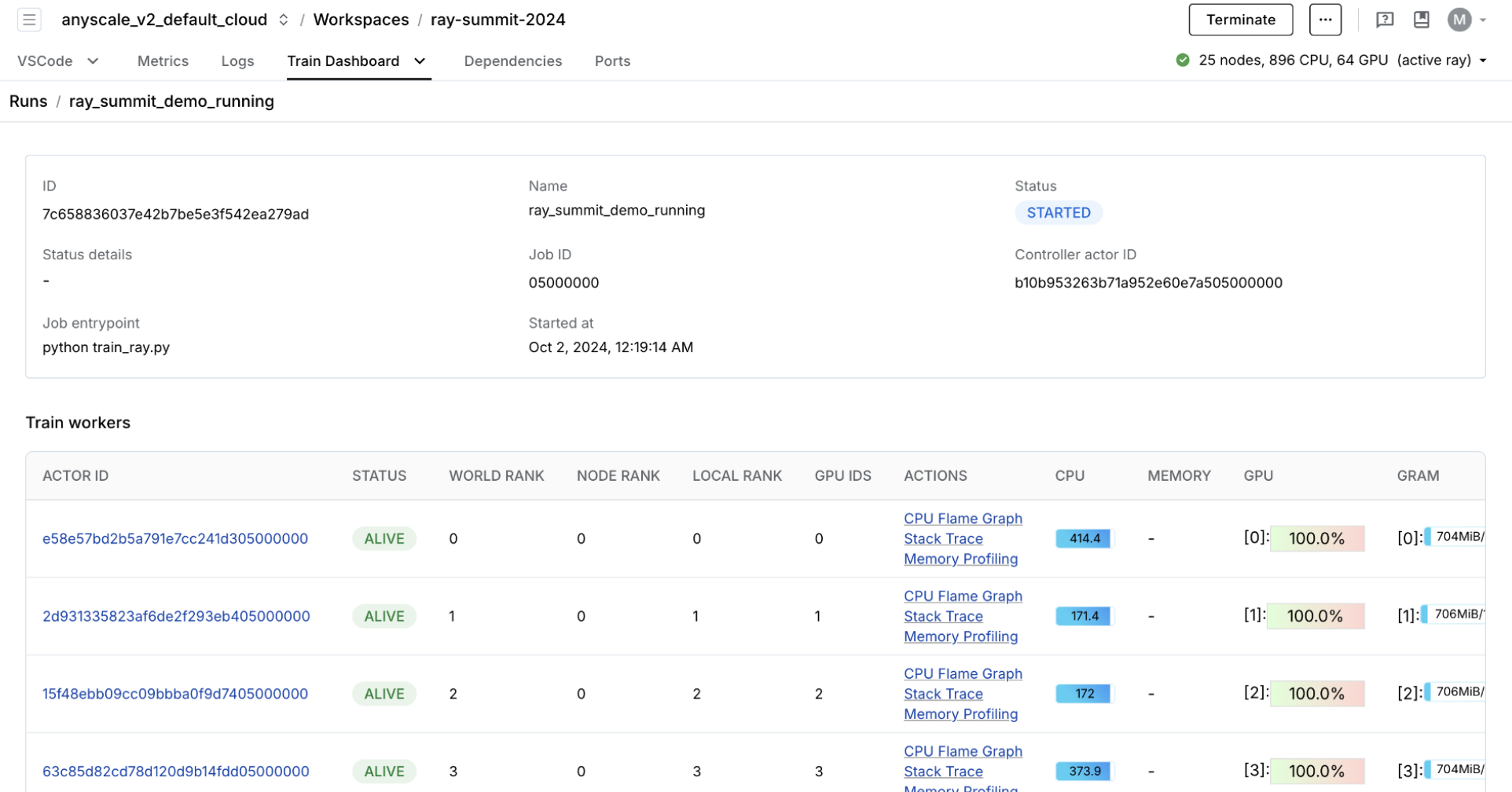
您可以在模型注册表中查看实验指标和模型构件。您正在使用 OSS MLflow,因此可以通过指向模型注册表位置来运行服务器。
mlflow server -h 0.0.0.0 -p 8080 --backend-store-uri /mnt/cluster_storage/mlflow/doggos
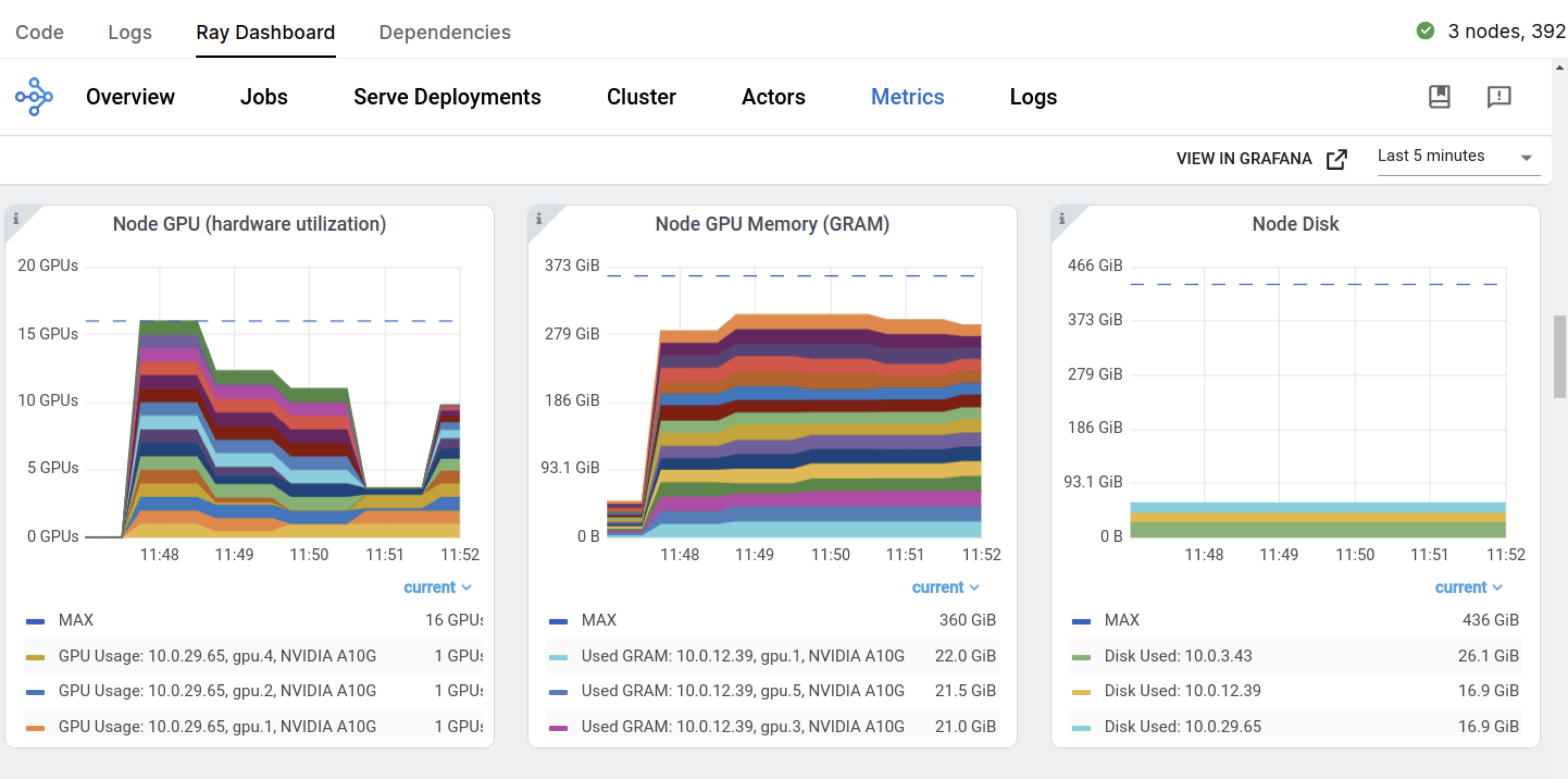
通过转到 **Overview 选项卡** > **Open Ports** 来查看仪表板。
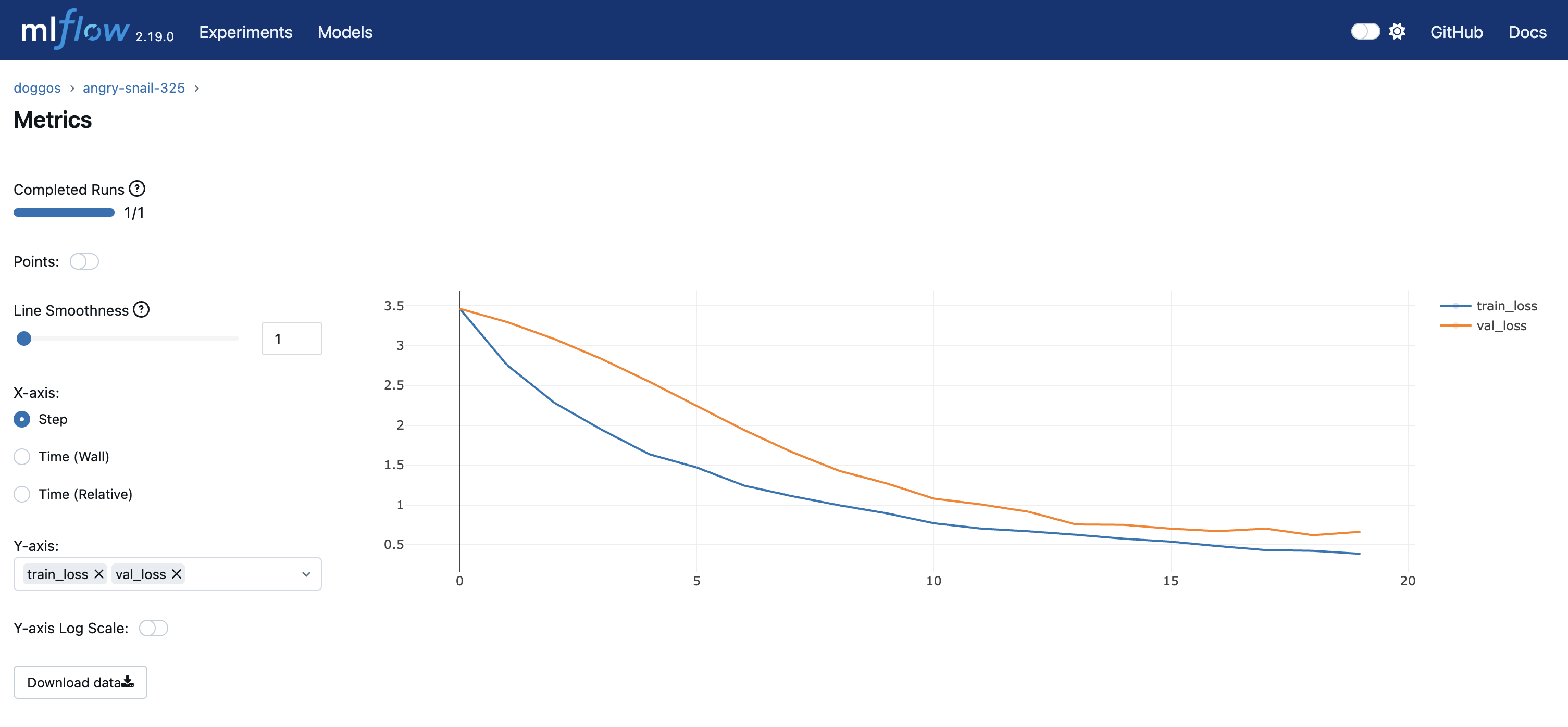
您还拥有之前的 Ray 仪表板和特定于 Train 工作负载的仪表板。
# Sorted runs
mlflow.set_tracking_uri(f"file:{model_registry}")
sorted_runs = mlflow.search_runs(
    experiment_names=[experiment_name],
    order_by=["metrics.val_loss ASC"])
best_run = sorted_runs.iloc[0]
best_run
run_id                                      d54aa07059384d139ea572123ae9409c
experiment_id                                             653138458592289747
status                                                              FINISHED
artifact_uri               file:///mnt/cluster_storage/mlflow/doggos/6531...
start_time                                  2025-08-28 05:10:15.049000+00:00
end_time                                    2025-08-28 05:10:33.936000+00:00
metrics.lr                                                             0.001
metrics.val_loss                                                    0.778273
metrics.train_loss                                                   0.39104
params.lr_factor                                                         0.8
params.hidden_dim                                                        256
params.embedding_dim                                                     512
params.dropout_p                                                         0.3
params.experiment_name                                                doggos
params.batch_size                                                        256
params.lr                                                              0.001
params.num_classes                                                        36
params.class_to_label      {'pomeranian': 0, 'rottweiler': 1, 'boxer': 2,...
params.num_epochs                                                         20
params.lr_patience                                                         3
params.model_registry                     /mnt/cluster_storage/mlflow/doggos
tags.mlflow.source.name    /home/ray/anaconda3/lib/python3.12/site-packag...
tags.mlflow.source.type                                                LOCAL
tags.mlflow.runName                                      judicious-panda-916
tags.mlflow.user                                                         ray
Name: 0, dtype: object
生产作业#
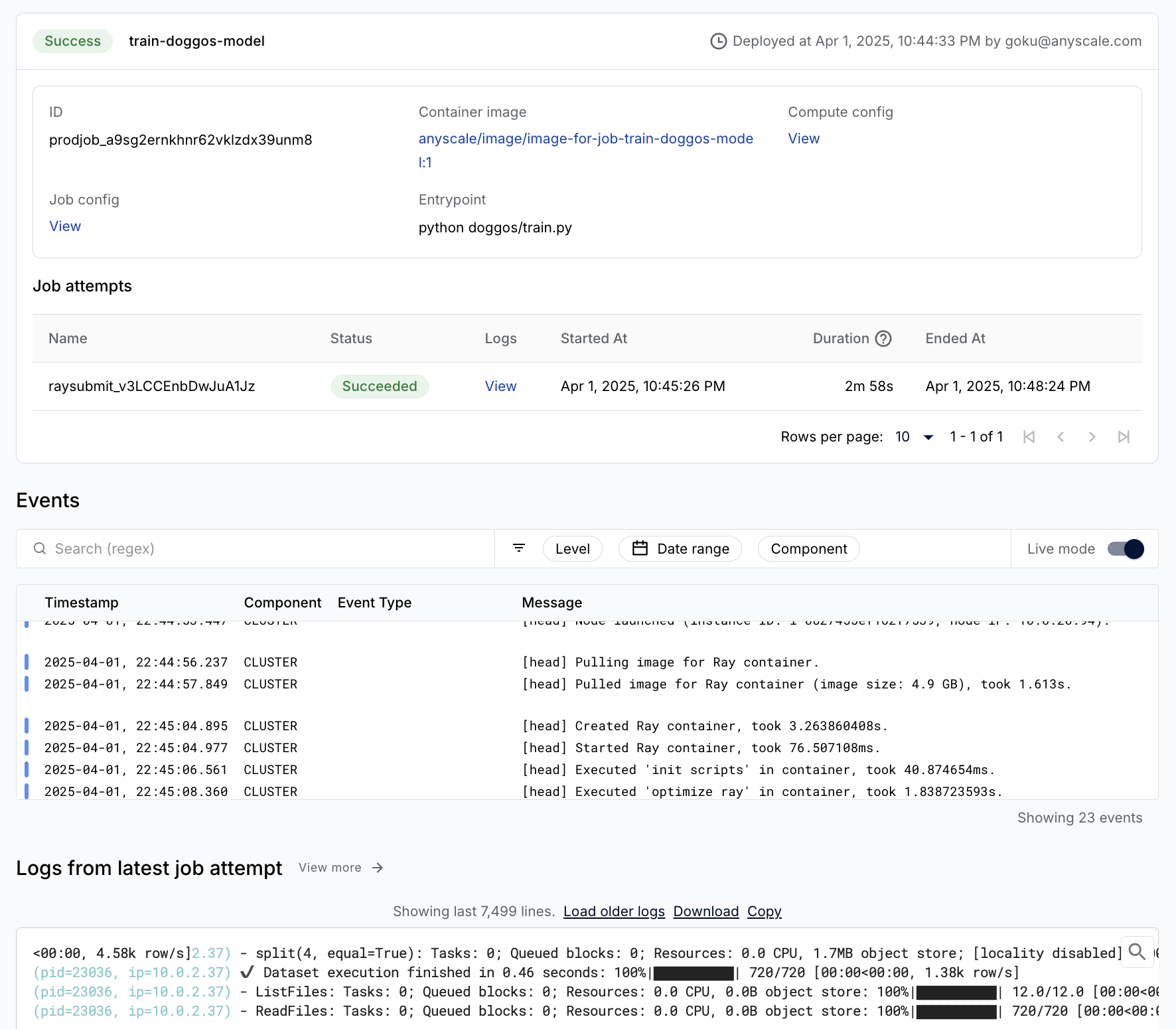
您可以轻松地将训练工作负载包装为生产级的 Anyscale 作业(API 参考)。
注意:
此作业使用
containerfile来定义依赖项,但您也可以轻松使用预构建的镜像。当您在工作空间中启动时未指定计算时,此配置将默认为工作空间的计算配置。
%%bash
# Production model training job
anyscale job submit -f /home/ray/default/configs/train_model.yaml
Output
(anyscale +0.8s) Submitting job with config JobConfig(name='train-image-model', image_uri='anyscale/ray:2.48.0-slim-py312-cu128', compute_config=None, env_vars=None, py_modules=['/home/ray/default/doggos'], py_executable=None, cloud=None, project=None, ray_version=None, job_queue_config=None).
(anyscale +3.0s) Uploading local dir '/home/ray/default' to cloud storage.
(anyscale +3.8s) Uploading local dir '/home/ray/default/doggos' to cloud storage.
(anyscale +4.9s) Job 'train-image-model' submitted, ID: 'prodjob_zfy5ak9a5masjb4vuidtxvxpqt'.
(anyscale +4.9s) View the job in the UI: https://console.anyscale.com/jobs/prodjob_zfy5ak9a5masjb4vuidtxvxpqt
(anyscale +4.9s) Use `--wait` to wait for the job to run and stream logs.
评估#
本教程最后在测试数据集上评估训练好的模型。评估本质上与批量推理工作负载相同,您将模型应用于数据批次,然后使用预测与真实标签来计算指标。Ray Data 对吞吐量进行了高度优化,因此保留顺序不是优先事项。但对于评估,这种方法至关重要。通过保留整个行并将预测标签添加为每一行的另一个列来实现这种方法。
from urllib.parse import urlparse
from sklearn.metrics import multilabel_confusion_matrix
class TorchPredictor:
    def __init__(self, preprocessor, model):
        self.preprocessor = preprocessor
        self.model = model
        self.model.eval()

    def __call__(self, batch, device="cuda"):
        self.model.to(device)
        batch["prediction"] = self.model.predict(collate_fn(batch, device=device))
        return batch

    def predict_probabilities(self, batch, device="cuda"):
        self.model.to(device)
        predicted_probabilities = self.model.predict_probabilities(collate_fn(batch, device=device))
        batch["probabilities"] = [
            {
                self.preprocessor.label_to_class[i]: float(prob)
                for i, prob in enumerate(probabilities)
            }
            for probabilities in predicted_probabilities
        ]
        return batch

    @classmethod
    def from_artifacts_dir(cls, artifacts_dir):
        with open(os.path.join(artifacts_dir, "class_to_label.json"), "r") as fp:
            class_to_label = json.load(fp)
        preprocessor = Preprocessor(class_to_label=class_to_label)
        model = ClassificationModel.load(
            args_fp=os.path.join(artifacts_dir, "args.json"),
            state_dict_fp=os.path.join(artifacts_dir, "model.pt"),
        )
        return cls(preprocessor=preprocessor, model=model)
# Load and preproces eval dataset.
artifacts_dir = urlparse(best_run.artifact_uri).path
predictor = TorchPredictor.from_artifacts_dir(artifacts_dir=artifacts_dir)
test_ds = ray.data.read_images("s3://doggos-dataset/test", include_paths=True)
test_ds = test_ds.map(add_class)
test_ds = predictor.preprocessor.transform(ds=test_ds)
# y_pred (batch inference).
pred_ds = test_ds.map_batches(
    predictor,
    concurrency=4,
    batch_size=64,
    num_gpus=1,
    accelerator_type="T4",
)
pred_ds.take(1)
2025-08-28 05:10:42,369	INFO logging.py:295 -- Registered dataset logger for dataset dataset_40_0
2025-08-28 05:10:42,388	INFO streaming_executor.py:159 -- Starting execution of Dataset dataset_40_0. Full logs are in /tmp/ray/session_2025-08-28_04-57-43_348032_12595/logs/ray-data
2025-08-28 05:10:42,388	INFO streaming_executor.py:160 -- Execution plan of Dataset dataset_40_0: InputDataBuffer[Input] -> TaskPoolMapOperator[ListFiles] -> TaskPoolMapOperator[ReadFiles] -> TaskPoolMapOperator[Map(add_class)->Map(convert_to_label)] -> ActorPoolMapOperator[MapBatches(EmbedImages)] -> TaskPoolMapOperator[MapBatches(drop_columns)] -> TaskPoolMapOperator[MapBatches(TorchPredictor)] -> LimitOperator[limit=1]
(MapWorker(MapBatches(EmbedImages)) pid=33395, ip=10.0.5.252) Using a slow image processor as `use_fast` is unset and a slow processor was saved with this model. `use_fast=True` will be the default behavior in v4.52, even if the model was saved with a slow processor. This will result in minor differences in outputs. You'll still be able to use a slow processor with `use_fast=False`.
(MapBatches(TorchPredictor) pid=34104, ip=10.0.5.252) /tmp/ipykernel_31027/417303983.py:6: UserWarning: The given NumPy array is not writable, and PyTorch does not support non-writable tensors. This means writing to this tensor will result in undefined behavior. You may want to copy the array to protect its data or make it writable before converting it to a tensor. This type of warning will be suppressed for the rest of this program. (Triggered internally at /pytorch/torch/csrc/utils/tensor_numpy.cpp:203.)
(MapWorker(MapBatches(EmbedImages)) pid=6674, ip=10.0.5.20) Using a slow image processor as `use_fast` is unset and a slow processor was saved with this model. `use_fast=True` will be the default behavior in v4.52, even if the model was saved with a slow processor. This will result in minor differences in outputs. You'll still be able to use a slow processor with `use_fast=False`. [repeated 3x across cluster]
2025-08-28 05:10:59,374	INFO streaming_executor.py:279 -- ✔️  Dataset dataset_40_0 execution finished in 16.98 seconds
[{'path': 'doggos-dataset/test/basset/basset_10005.jpg',
  'class': 'basset',
  'label': 30,
  'embedding': array([ 8.86104554e-02, -5.89382686e-02,  1.15464866e-01,  2.15815112e-01,
         -3.43266308e-01, -3.35150540e-01,  1.48883224e-01, -1.02369718e-01,
         -1.69915810e-01,  4.34856862e-03,  2.41593361e-01,  1.79200619e-01,
          4.34402555e-01,  4.59785998e-01,  1.59284808e-02,  4.16959971e-01,
          5.20779848e-01,  1.86366066e-01, -3.43496174e-01, -4.00813907e-01,
         -1.15213782e-01, -3.04853529e-01,  1.77998394e-01,  1.82090014e-01,
         -3.56360346e-01, -2.30711952e-01,  1.69025257e-01,  3.78455579e-01,
          8.37044120e-02, -4.81875241e-02,  3.17967087e-01, -1.40099749e-01,
         -2.15949178e-01, -4.72761095e-01, -3.01893711e-01,  7.59940967e-02,
         -2.64865339e-01,  5.89084566e-01, -3.75831634e-01,  3.11807573e-01,
         -3.82964134e-01, -1.86417520e-01,  1.07007243e-01,  4.81416702e-01,
         -3.70819569e-01,  9.12090182e-01,  3.13470632e-01, -3.69494259e-02,
         -2.21142501e-01,  3.32214013e-02,  8.51379186e-02,  3.64337176e-01,
         -3.90754700e-01,  4.39904258e-02,  5.39945886e-02, -5.02359867e-01,
         -4.76054996e-02,  3.87604594e-01, -3.71239424e-01, -8.79095644e-02,
          5.62141061e-01,  1.96927994e-01,  3.54419112e-01, -6.80974126e-03,
          2.86425143e-01, -3.24660867e-01, -4.56204057e-01,  6.41017914e-01,
         -1.67037442e-01, -2.29641497e-01,  4.71122622e-01,  5.03865302e-01,
         -9.06585157e-03, -1.23926058e-01, -3.32888782e-01,  1.59683321e-02,
         -5.00816345e-01, -3.53796408e-02, -1.60535276e-01, -2.88702995e-01,
          5.51706925e-02, -3.47863048e-01, -3.01085338e-02, -6.00592375e-01,
          2.04530790e-01, -1.17298350e-01,  8.88321698e-01, -3.18641007e-01,
          2.02193573e-01, -1.50856599e-01, -2.96603352e-01, -5.45758486e-01,
         -7.55531311e+00, -3.07271361e-01, -7.33374238e-01,  2.76708573e-01,
         -3.76666151e-02, -4.25825119e-01, -5.56892097e-01,  7.15545475e-01,
          1.02834240e-01, -1.19939610e-01,  1.94998607e-01, -2.46950224e-01,
          2.61530429e-01, -4.19263542e-01,  1.31001920e-01, -2.49398082e-01,
         -3.26750994e-01, -3.92482489e-01,  3.30219358e-01, -5.78646958e-01,
          1.53134540e-01, -3.10127169e-01, -3.67199332e-01, -7.94161111e-02,
         -2.93402106e-01,  2.62198240e-01,  2.91103810e-01,  1.32868871e-01,
         -5.78317158e-02, -4.26885992e-01,  2.99195677e-01,  4.23972368e-01,
          2.30407149e-01, -2.98300147e-01, -1.55886114e-01, -1.24661736e-01,
         -1.17139973e-01, -4.21351314e-01, -1.45010501e-02, -3.06388348e-01,
          2.89572328e-01,  9.73405361e-01, -5.52814901e-01,  2.36222595e-01,
         -2.13898420e-01, -1.00043082e+00, -3.57041806e-01, -1.50843680e-01,
          4.69288528e-02,  2.08646134e-01, -2.70194232e-01,  2.63797104e-01,
          1.31332219e-01,  2.82329589e-01,  2.69341841e-02, -1.21627375e-01,
          3.80910456e-01,  2.65330970e-01, -3.01948935e-01, -6.39178753e-02,
         -3.13922286e-01, -4.14075851e-01, -2.19056532e-01,  2.22424790e-01,
          8.13730657e-02, -3.03519934e-01,  9.32400897e-02, -3.76873404e-01,
          8.34950879e-02,  1.01878762e-01,  2.87054926e-01,  2.09415853e-02,
         -1.22204229e-01,  1.64302550e-02, -2.41174936e-01,  1.78844824e-01,
          9.15416703e-03,  1.66462481e-01, -1.45732313e-01, -5.85511327e-04,
          2.25536823e-01,  3.30472469e-01, -1.25101686e-01,  1.13093004e-01,
          1.52094781e-01,  4.37459409e-01,  3.22061956e-01,  1.37893021e-01,
         -2.53650725e-01, -1.94988877e-01, -2.72130489e-01, -2.57504702e-01,
          1.92389667e-01, -2.07393348e-01,  1.73574477e-01,  2.59756446e-02,
          2.20320046e-01,  6.48344308e-02,  3.96853566e-01,  1.11773282e-01,
         -4.38930988e-01, -5.10937572e-02,  5.92644155e-01,  6.10140711e-03,
         -3.97206768e-02,  7.65584633e-02, -7.68468618e-01,  1.23042464e-01,
          3.48037392e-01,  1.49242997e-01,  2.86662281e-02,  2.79642552e-01,
         -2.26151049e-01, -6.73239648e-01, -8.07924390e-01,  8.62701386e-02,
          4.94999364e-02,  1.61207989e-02, -1.30242959e-01,  1.77768275e-01,
          3.62961054e-01, -3.20745975e-01,  3.67820978e-01, -9.77848917e-02,
         -2.64019221e-01,  6.74475431e-01,  9.26629007e-01, -4.54470068e-02,
          9.59405363e-01,  3.02993000e-01, -5.81385851e-01,  3.98850322e-01,
          7.40434751e-02,  1.79926023e-01,  9.12196040e-02,  2.77938917e-02,
         -2.20950916e-02, -1.98561847e-01, -4.33019698e-01,  1.35872006e-01,
         -3.84440348e-02,  1.63487554e-01,  5.38927615e-02,  8.52212310e-01,
         -8.64772916e-01, -3.00439209e-01,  1.66039094e-02, -4.84181255e-01,
         -2.57156193e-01,  4.46582437e-01,  3.71635705e-02, -7.58354291e-02,
         -1.38248950e-02,  1.01295078e+00,  2.14489758e-01, -1.17217854e-01,
         -2.82662451e-01,  7.08411038e-01,  2.08262652e-01, -1.69240460e-02,
          1.02334268e-01,  4.20059741e-01,  1.07706316e-01, -3.89203757e-01,
         -5.91410846e-02, -1.77690476e-01, -1.26772380e+00,  1.75859511e-01,
         -2.49499828e-01,  1.60166726e-01,  8.72884393e-02, -4.53421593e-01,
          1.96858853e-01, -2.25365251e-01, -1.31235719e-02, -4.58204031e-01,
         -1.54087022e-01, -1.87472761e-01,  2.73187131e-01,  4.14693624e-01,
          6.00348413e-01,  5.16499318e-02, -2.52319247e-01, -2.08351701e-01,
         -3.85643661e-01, -6.44139796e-02, -2.70672083e-01, -5.09124994e-02,
         -1.17392734e-01, -1.16136428e-02, -1.69710606e-01,  2.30101690e-01,
         -6.31506741e-02,  2.20495850e-01,  4.81231391e-01,  3.76428038e-01,
         -2.14597031e-01, -4.70009223e-02,  4.38644290e-01,  2.72557199e-01,
         -1.89499091e-02,  6.36664629e-02, -4.86765429e-02, -6.02428794e-01,
          5.40002957e-02, -9.60005671e-02,  4.63560931e-02, -3.55034113e-01,
          2.27724269e-01, -1.30642965e-01, -5.17771959e-01,  7.08835796e-02,
         -2.57462114e-01, -4.82860744e-01,  1.13421358e-01,  9.88648832e-02,
          6.21988237e-01,  2.64641732e-01, -9.67874378e-03,  1.94528699e-01,
          9.72453296e-01, -4.36969042e-01, -5.50681949e-02,  1.42934144e-01,
          1.37221038e-01,  5.63952804e-01, -3.20022464e-01, -5.56031644e-01,
          9.09894407e-01,  1.02216589e+00, -2.79887915e-01,  1.69066399e-01,
          6.48921371e-01,  1.68456510e-02, -2.58911937e-01,  4.62736428e-01,
          8.00172612e-03,  1.66315883e-01, -5.30062854e-01, -3.96020412e-01,
          4.43380117e-01, -4.35658276e-01, -1.11912012e-01, -5.91614306e-01,
         -7.02220649e-02,  1.41544282e-01, -5.65246567e-02, -1.19229007e+00,
         -1.00026041e-01,  1.35173336e-01, -1.37986809e-01,  4.58395988e-01,
          2.99769610e-01,  1.13845997e-01, -3.23149785e-02,  4.82394725e-01,
         -6.13934547e-03,  3.68614852e-01, -4.91497517e-01, -4.97332066e-01,
          8.73729736e-02,  3.60586494e-01, -2.91166097e-01,  1.89481646e-01,
          2.87948608e-01,  1.90306157e-01,  4.15048778e-01,  3.93784940e-01,
          6.75817132e-02,  1.18251920e-01,  2.03508779e-01,  3.09830695e-01,
         -1.03927016e+00,  1.00612268e-01, -3.46988708e-01, -7.09752440e-01,
          2.20241398e-01, -3.74946982e-01, -1.48783788e-01, -1.31232068e-01,
          3.87498319e-01,  1.67044029e-01, -2.79640555e-01,  3.40543866e-01,
          1.28378880e+00,  4.47215438e-01, -5.00054121e-01,  6.85076341e-02,
          1.93691164e-01, -4.66935217e-01, -3.24348718e-01,  4.53348368e-01,
          6.36629641e-01, -5.52294970e-01, -3.59640062e-01,  2.45728597e-01,
          4.48195577e-01, -1.36022663e+00, -6.26060665e-01, -4.96963590e-01,
         -2.55071461e-01, -2.31453001e-01, -4.22013104e-01,  5.81141561e-02,
          1.66424632e-01, -1.81557357e-01, -2.85358205e-02, -1.10628068e+00,
         -2.42026821e-01, -4.49676067e-03,  5.53836450e-02,  4.92810488e-01,
          5.83105981e-01,  6.97781667e-02, -1.33217961e-01, -1.25093237e-01,
          1.17499933e-01, -5.19634366e-01,  1.42042309e-01,  2.34404474e-01,
         -2.55929470e-01,  3.23758684e-02, -2.34450802e-01, -7.54091814e-02,
          1.83672294e-01, -2.25883007e-01, -4.76478487e-02, -4.84889567e-01,
          1.12959743e-03,  1.80705532e-01, -5.87785244e-02,  4.82457250e-01,
         -1.88920692e-01,  1.47517592e-01,  1.10182568e-01, -2.28278339e-02,
          8.62778306e-01,  4.46689427e-02,  4.16403189e-02, -1.07179873e-01,
         -1.42522454e+00, -2.31161788e-02,  3.05959303e-02, -6.58722073e-02,
         -3.69132429e-01,  3.49290550e-01, -1.39178723e-01, -3.51127565e-01,
          5.00785351e-01,  2.31236637e-01,  6.77590072e-02, -3.59323025e-02,
          2.69076526e-01, -3.60533416e-01,  1.48107335e-01, -1.11518174e-01,
          1.65307403e-01, -1.74086124e-01,  6.01880312e-01, -5.95235109e-01,
          5.29538319e-02,  3.12422097e-01, -1.14403330e-01,  2.30422497e-01,
         -9.48345065e-02,  3.76421027e-02,  4.77573276e-02,  3.89954895e-01,
         -1.91829026e-01, -6.26232028e-01,  1.29549801e-01, -2.84714490e-01,
          2.88834363e-01,  6.25569642e-01, -2.44193405e-01,  3.08956832e-01,
         -4.79587227e-01,  1.59115836e-01, -1.07442781e-01,  1.57203451e-01,
         -8.51369202e-02, -1.20136715e-01, -2.91232206e-02,  1.08408488e-01,
         -5.97195402e-02, -1.21715315e-01, -5.79822421e-01,  3.90639007e-01,
         -2.83878148e-01, -2.72939146e-01,  3.87672335e-04, -2.62640566e-01,
         -1.67415068e-01,  1.97720259e-01,  3.60535234e-01, -1.85247302e-01,
         -2.80813038e-01,  3.32875013e-01, -3.98125350e-01, -3.53022516e-02,
          5.48863769e-01, -1.35882646e-01,  2.50048220e-01, -1.27448589e-01,
         -3.03174406e-01,  3.85489166e-02, -7.27320850e-01,  5.22592783e-01,
         -1.97360516e-01, -1.98229402e-01, -1.42074719e-01,  4.11824808e-02,
         -2.92105675e-01,  2.07964912e-01,  4.97746691e-02,  1.48062438e-01,
         -2.94304550e-01,  7.31720269e-01,  1.14105418e-02,  5.50758056e-02],
        dtype=float32),
  'prediction': 8}]
def batch_metric(batch):
    labels = batch["label"]
    preds = batch["prediction"]
    mcm = multilabel_confusion_matrix(labels, preds)
    tn, fp, fn, tp = [], [], [], []
    for i in range(mcm.shape[0]):
        tn.append(mcm[i, 0, 0])  # True negatives
        fp.append(mcm[i, 0, 1])  # False positives
        fn.append(mcm[i, 1, 0])  # False negatives
        tp.append(mcm[i, 1, 1])  # True positives
    return {"TN": tn, "FP": fp, "FN": fn, "TP": tp}
# Aggregated metrics after processing all batches.
metrics_ds = pred_ds.map_batches(batch_metric)
aggregate_metrics = metrics_ds.sum(["TN", "FP", "FN", "TP"])

# Aggregate the confusion matrix components across all batches.
tn = aggregate_metrics["sum(TN)"]
fp = aggregate_metrics["sum(FP)"]
fn = aggregate_metrics["sum(FN)"]
tp = aggregate_metrics["sum(TP)"]

# Calculate metrics.
precision = tp / (tp + fp) if (tp + fp) > 0 else 0
recall = tp / (tp + fn) if (tp + fn) > 0 else 0
f1 = 2 * precision * recall / (precision + recall) if (precision + recall) > 0 else 0
accuracy = (tp + tn) / (tp + tn + fp + fn)
2025-08-28 05:10:59,627	INFO logging.py:295 -- Registered dataset logger for dataset dataset_43_0
2025-08-28 05:10:59,639	INFO streaming_executor.py:159 -- Starting execution of Dataset dataset_43_0. Full logs are in /tmp/ray/session_2025-08-28_04-57-43_348032_12595/logs/ray-data
2025-08-28 05:10:59,640	INFO streaming_executor.py:160 -- Execution plan of Dataset dataset_43_0: InputDataBuffer[Input] -> TaskPoolMapOperator[ListFiles] -> TaskPoolMapOperator[ReadFiles] -> TaskPoolMapOperator[Map(add_class)->Map(convert_to_label)] -> ActorPoolMapOperator[MapBatches(EmbedImages)] -> TaskPoolMapOperator[MapBatches(drop_columns)] -> TaskPoolMapOperator[MapBatches(TorchPredictor)] -> TaskPoolMapOperator[MapBatches(batch_metric)] -> AllToAllOperator[Aggregate] -> LimitOperator[limit=1]
(MapWorker(MapBatches(EmbedImages)) pid=34103, ip=10.0.5.252) Using a slow image processor as `use_fast` is unset and a slow processor was saved with this model. `use_fast=True` will be the default behavior in v4.52, even if the model was saved with a slow processor. This will result in minor differences in outputs. You'll still be able to use a slow processor with `use_fast=False`.
(MapBatches(TorchPredictor) pid=8149, ip=10.0.5.20) /tmp/ipykernel_31027/417303983.py:6: UserWarning: The given NumPy array is not writable, and PyTorch does not support non-writable tensors. This means writing to this tensor will result in undefined behavior. You may want to copy the array to protect its data or make it writable before converting it to a tensor. This type of warning will be suppressed for the rest of this program. (Triggered internally at /pytorch/torch/csrc/utils/tensor_numpy.cpp:203.)
(MapWorker(MapBatches(EmbedImages)) pid=40389, ip=10.0.5.252) Using a slow image processor as `use_fast` is unset and a slow processor was saved with this model. `use_fast=True` will be the default behavior in v4.52, even if the model was saved with a slow processor. This will result in minor differences in outputs. You'll still be able to use a slow processor with `use_fast=False`. [repeated 3x across cluster]
(MapBatches(TorchPredictor) pid=8263, ip=10.0.5.20) /tmp/ipykernel_31027/417303983.py:6: UserWarning: The given NumPy array is not writable, and PyTorch does not support non-writable tensors. This means writing to this tensor will result in undefined behavior. You may want to copy the array to protect its data or make it writable before converting it to a tensor. This type of warning will be suppressed for the rest of this program. (Triggered internally at /pytorch/torch/csrc/utils/tensor_numpy.cpp:203.) [repeated 4x across cluster]
(MapBatches(TorchPredictor) pid=8340, ip=10.0.5.20) /tmp/ipykernel_31027/417303983.py:6: UserWarning: The given NumPy array is not writable, and PyTorch does not support non-writable tensors. This means writing to this tensor will result in undefined behavior. You may want to copy the array to protect its data or make it writable before converting it to a tensor. This type of warning will be suppressed for the rest of this program. (Triggered internally at /pytorch/torch/csrc/utils/tensor_numpy.cpp:203.) [repeated 4x across cluster]
(MapBatches(TorchPredictor) pid=17879, ip=10.0.5.20) /tmp/ipykernel_31027/417303983.py:6: UserWarning: The given NumPy array is not writable, and PyTorch does not support non-writable tensors. This means writing to this tensor will result in undefined behavior. You may want to copy the array to protect its data or make it writable before converting it to a tensor. This type of warning will be suppressed for the rest of this program. (Triggered internally at /pytorch/torch/csrc/utils/tensor_numpy.cpp:203.) [repeated 4x across cluster]
(MapBatches(TorchPredictor) pid=18144, ip=10.0.5.20) /tmp/ipykernel_31027/417303983.py:6: UserWarning: The given NumPy array is not writable, and PyTorch does not support non-writable tensors. This means writing to this tensor will result in undefined behavior. You may want to copy the array to protect its data or make it writable before converting it to a tensor. This type of warning will be suppressed for the rest of this program. (Triggered internally at /pytorch/torch/csrc/utils/tensor_numpy.cpp:203.) [repeated 4x across cluster]
(MapBatches(TorchPredictor) pid=18411, ip=10.0.5.20) /tmp/ipykernel_31027/417303983.py:6: UserWarning: The given NumPy array is not writable, and PyTorch does not support non-writable tensors. This means writing to this tensor will result in undefined behavior. You may want to copy the array to protect its data or make it writable before converting it to a tensor. This type of warning will be suppressed for the rest of this program. (Triggered internally at /pytorch/torch/csrc/utils/tensor_numpy.cpp:203.) [repeated 4x across cluster]
(MapBatches(TorchPredictor) pid=18682, ip=10.0.5.20) /tmp/ipykernel_31027/417303983.py:6: UserWarning: The given NumPy array is not writable, and PyTorch does not support non-writable tensors. This means writing to this tensor will result in undefined behavior. You may want to copy the array to protect its data or make it writable before converting it to a tensor. This type of warning will be suppressed for the rest of this program. (Triggered internally at /pytorch/torch/csrc/utils/tensor_numpy.cpp:203.) [repeated 4x across cluster]
(MapBatches(TorchPredictor) pid=18950, ip=10.0.5.20) /tmp/ipykernel_31027/417303983.py:6: UserWarning: The given NumPy array is not writable, and PyTorch does not support non-writable tensors. This means writing to this tensor will result in undefined behavior. You may want to copy the array to protect its data or make it writable before converting it to a tensor. This type of warning will be suppressed for the rest of this program. (Triggered internally at /pytorch/torch/csrc/utils/tensor_numpy.cpp:203.) [repeated 4x across cluster]
(MapBatches(TorchPredictor) pid=19219, ip=10.0.5.20) /tmp/ipykernel_31027/417303983.py:6: UserWarning: The given NumPy array is not writable, and PyTorch does not support non-writable tensors. This means writing to this tensor will result in undefined behavior. You may want to copy the array to protect its data or make it writable before converting it to a tensor. This type of warning will be suppressed for the rest of this program. (Triggered internally at /pytorch/torch/csrc/utils/tensor_numpy.cpp:203.) [repeated 4x across cluster]
(MapBatches(TorchPredictor) pid=19564, ip=10.0.5.20) /tmp/ipykernel_31027/417303983.py:6: UserWarning: The given NumPy array is not writable, and PyTorch does not support non-writable tensors. This means writing to this tensor will result in undefined behavior. You may want to copy the array to protect its data or make it writable before converting it to a tensor. This type of warning will be suppressed for the rest of this program. (Triggered internally at /pytorch/torch/csrc/utils/tensor_numpy.cpp:203.) [repeated 4x across cluster]
2025-08-28 05:12:20,741	INFO streaming_executor.py:279 -- ✔️  Dataset dataset_43_0 execution finished in 81.10 seconds
print(f"Precision: {precision:.2f}")
print(f"Recall: {recall:.2f}")
print(f"F1: {f1:.2f}")
print(f"Accuracy: {accuracy:.2f}")
Precision: 0.84
Recall: 0.84
F1: 0.84
Accuracy: 0.98
🚨 注意:使用笔记本菜单栏中的“🔄 Restart”按钮重置此笔记本。这样我们就可以释放此笔记本中使用的所有变量、实用程序等。