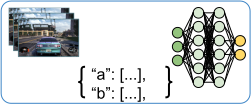

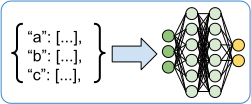
Env-to-module 管道#
在每个 EnvRunner 上都存在一个 env-to-module 管道,负责处理从 gymnasium.Env 到 RLModule 的数据流。
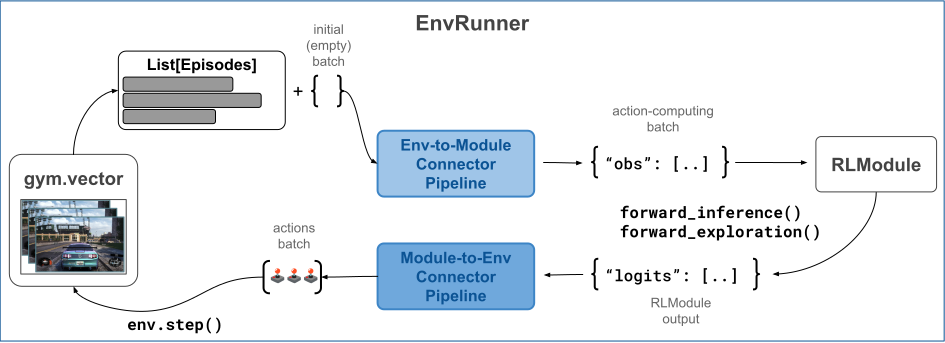
EnvRunner ConnectorV2 管道:Env-to-module 和 module-to-env 管道都位于 EnvRunner 工作节点上。Env-to-module 管道位于 RL 环境(一个 gymnasium.Env)和 RLModule 之间,并将正在进行的 episode 转换为模型 forward_...() 方法的批次。#
调用 env-to-module 管道时,它会执行从一系列正在进行的 Episode 对象 到 forward_inference() 或 forward_exploration() 方法(取决于您的探索设置)的可读张量批次的转换。RLlib 将此生成的批次作为第一个参数传递给 RLModule 的这些方法。
提示
在您的 AlgorithmConfig 中设置 config.exploration(explore=True),让 RLlib 使用连接器的输出调用 forward_exploration() 方法。否则,RLlib 会调用 forward_inference()。另外请注意,通常这两个方法之间的区别仅在于当 explore=True 时会采样动作,而当 explore=False 时会贪婪地选择动作。但是,每种情况下的具体行为取决于您的 RLModule 实现。
默认的 env-to-module 行为#
默认情况下,RLlib 会为每个 env-to-module 管道填充以下内置连接器组件。
AddObservationsFromEpisodesToBatch:将每个正在进行的 episode 的最新观察值放入批次。列名为obs。请注意,如果每个EnvRunner有 N 个环境,则您的批次大小也为 N。仅对有状态模型相关:
AddTimeDimToBatchAndZeroPad:如果RLModule是有状态的,则在所有数据上添加一个时间步(第二个轴),使其成为序列。仅对有状态模型相关:
AddStatesFromEpisodesToBatch:如果RLModule是有状态的,则将模块的最新状态输出来作为新的状态输入到批次中。列名为state_in,值没有时间维度。仅适用于多智能体:
AgentToModuleMapping:根据您定义的从智能体到模块的映射函数,将每个智能体的数据映射到相应的每个模块的数据。BatchIndividualItems:将批次中迄今为止的每个单独项的列表转换为批处理结构,即 NumPy 数组,其第 0 轴是批次轴。NumpyToTensor:将批次中的所有 NumPy 数组转换为特定框架的张量,并在需要时将其移至 GPU。
您可以通过在您的 算法配置 中设置 config.env_runners(add_default_connectors_to_env_to_module_pipeline=False) 来禁用所有前面的默认连接器组件。
请注意,这些转换的顺序对于管道的功能非常重要。请参阅 此处关于如何编写和添加自定义连接器组件 的说明。
构建 env-to-module 连接器#
通常,您无需自己构建 env-to-module 连接器管道。RLlib 的 EnvRunner actor 最初会执行此操作。但是,如果您想测试或调试默认管道或自定义管道,可以使用以下代码片段作为起点
import gymnasium as gym

from ray.rllib.algorithms.ppo import PPOConfig
from ray.rllib.env.single_agent_episode import SingleAgentEpisode

# Start with an algorithm config.
config = (
    PPOConfig()
    .environment("CartPole-v1")
)
# Create an env to generate some episode data.
env = gym.make("CartPole-v1")

# Build the env-to-module connector through the config object.
env_to_module = config.build_env_to_module_connector(env=env, spaces=None)
或者,如果 env 对象不可用,则应改用 spaces 参数。RLlib 需要其中一项信息来计算管道的正确输出观察空间,以便 RLModule 能够接收正确的输入空间进行其自身的设置过程。理想情况下,spaces 参数的结构应为
spaces = {
    "__env__": ([env observation space], [env action space]),  # <- may be vectorized
    "__env_single__": ([env observation space], [env action space]),  # <- never vectorized!
    "[module ID, e.g. 'default_policy']": ([module observation space], [module action space]),
    ...  # <- more modules in multi-agent case
}
但是,对于单智能体情况,提供非向量化、单个观察和动作空间可能就足够了
# No `env` available? Use `spaces` instead:
env_to_module = config.build_env_to_module_connector(
    env=None,
    spaces={
        # At minimum, pass in a 2-tuple of the single, non-vectorized
        # observation- and action spaces:
        "__env_single__": (env.observation_space, env.action_space),
    },
)
要测试实际行为或创建的管道,请查看无状态和有状态 RLModule 的这些代码片段
from ray.rllib.env.single_agent_episode import SingleAgentEpisode

# Create two SingleAgentEpisode instances. You pass these to the connector pipeline
# as input.
episode1 = SingleAgentEpisode()
episode2 = SingleAgentEpisode()

# Fill episodes with some data, as if we were currently stepping through them
# to collect samples.
# - episode 1 (two timesteps)
obs, _ = env.reset()
episode1.add_env_reset(observation=obs)
action = 0
obs, _, _, _, _ = env.step(action)
episode1.add_env_step(observation=obs, action=action, reward=1.0)
# - episode 2 (just one timestep)
obs, _ = env.reset()
episode2.add_env_reset(observation=obs)

# Call the connector on the two running episodes.
batch = {}
batch = env_to_module(
    episodes=[episode1, episode2],
    batch=batch,
    rl_module=None,  # in stateless case, RLModule is not strictly required
    explore=True,
)
# Print out the resulting batch.
print(batch)
from ray.rllib.core.rl_module.default_model_config import DefaultModelConfig
from ray.rllib.env.single_agent_episode import SingleAgentEpisode

# Alter the config to use the default LSTM model of RLlib.
config.rl_module(model_config=DefaultModelConfig(use_lstm=True))

# For stateful RLModules, we do need to pass in the RLModule to every call to the
# connector. so construct an instance here.
rl_module_spec = config.get_rl_module_spec(env=env)
rl_module = rl_module_spec.build()

# Create a SingleAgentEpisode instance. You pass this to the connector pipeline
# as input.
episode = SingleAgentEpisode()

# Initialize episode with first (reset) observation.
obs, _ = env.reset()
episode.add_env_reset(observation=obs)

# Call the connector on the running episode.
batch = {}
batch = env_to_module(
    episodes=[episode],
    batch=batch,
    rl_module=rl_module,  # in stateful case, RLModule is required
    explore=True,
)
# Print out the resulting batch.
print(batch)
您可以看到,管道已从两个正在运行的 episode 中提取了当前观察值,并将它们放在 forward 批次的 obs 列下。批次大小为 2,因为我们有两个 episode,并且应该与此类似
{'obs': tensor([[ 0.0212, -0.1996, -0.0414,  0.2848],
        [ 0.0292,  0.0259, -0.0322, -0.0004]])}
在有状态的情况下,您还可以预期 STATE_IN 列会出现。请注意,由于 LSTM 层,模块的内部状态包含两个组件:c 和 h
{
    'obs': tensor(
        [[ 0.0212, -0.1996, -0.0414,  0.2848],
        [ 0.0292,  0.0259, -0.0322, -0.0004]]
    ),
    'state_in': {
        # Note: The shape of each state tensor here is
        # (B=2, [num LSTM-layers=1], [LSTM cell size]).
        'h': tensor([[[0., 0., .., 0.]]]),
        'c': tensor([[[0., 0., ... 0.]]]),
    },
}
提示
您可以自由设计自定义 RLModule 类的内部状态。您只需要重写 get_initial_state() 方法,并确保从 forward_..() 方法在固定的 state_out 键下返回任何嵌套结构和形状的新状态。请参阅 此处 了解包含自定义 LSTM 层的 RLModule 类的示例。
编写自定义 env-to-module 连接器#
您可以通过在 AlgorithmConfig 中指定一个函数来定制 RLlib 创建的默认 env-to-module 管道,该函数接受可选的 RL 环境对象(env)和一个可选的 spaces 字典作为输入参数,并返回一个 ConnectorV2 片段或其列表。RLlib 会按照返回的顺序将这些 ConnectorV2 实例添加到 默认的 env-to-module 管道 中,除非您在配置中设置 add_default_connectors_to_env_to_module_pipeline=False,在这种情况下,RLlib 将仅使用提供的 ConnectorV2 片段,而没有任何自动添加的默认行为。
例如,要在 env-to-module 管道的前面添加一个自定义 ConnectorV2 片段,您可以在配置中这样做
# Your builder function must accept an optional `gymnasium.Env` and an optional `spaces` dict
# as arguments.
config.env_runners(
    env_to_module_connector=lambda env, spaces, device: MyEnvToModuleConnector(..),
)
如果您想向管道添加多个自定义片段,请将它们作为列表返回
# Return a list of connector pieces to make RLlib add all of them to your
# env-to-module pipeline.
config.env_runners(
    env_to_module_connector=lambda env, spaces, device: [
        MyEnvToModuleConnector(..),
        MyOtherEnvToModuleConnector(..),
        AndOneMoreConnector(..),
    ],
)
RLlib 将您的函数返回的连接器片段添加到 env-to-module 管道的开头,在 RLlib 自动添加的默认连接器片段之前

将自定义 ConnectorV2 片段插入 env-to-module 管道:RLlib 在默认片段之前插入自定义连接器片段,例如观察预处理器。这样,如果您的自定义连接器以任何方式改变输入 episode,例如通过更改观察值(如在 ObservationPreprocessor 中),则后续的默认片段会自动将这些更改后的观察值添加到批次中。#
观察预处理器#
自定义 env-to-module 管道的最简单方法是编写自己的 SingleAgentObservationPreprocessor 子类,实现两个方法,并将您的配置指向新类
import gymnasium as gym
import numpy as np

from ray.rllib.connectors.env_to_module.observation_preprocessor import SingleAgentObservationPreprocessor


class IntObservationToOneHotTensor(SingleAgentObservationPreprocessor):
    """Converts int observations (Discrete) into one-hot tensors (Box)."""

    def recompute_output_observation_space(self, in_obs_space, in_act_space):
        # Based on the input observation space, either from the preceding connector piece or
        # directly from the environment, return the output observation space of this connector
        # piece.
        # Implementing this method is crucial for the pipeline to know its output
        # spaces, which are an important piece of information to construct the succeeding
        # RLModule.
        return gym.spaces.Box(0.0, 1.0, (in_obs_space.n,), np.float32)

    def preprocess(self, observation, episode):
        # Convert an input observation (int) into a one-hot (float) tensor.
        # Note that 99% of all connectors in RLlib operate on NumPy arrays.
        new_obs = np.zeros(shape=self.observation_space.shape, dtype=np.float32)
        new_obs[observation] = 1.0
        return new_obs
请注意,任何观察预处理器实际上都会就地更改底层的 episode 对象,但不会向正在构建的批次贡献任何内容。由于 RLlib 始终在用户定义的预处理器(和其他自定义 ConnectorV2 片段)之前插入它们,因此 AddObservationsFromEpisodesToBatch 默认片段会自动负责将预处理和更新后的观察值从 episode 添加到批次中。
现在,您可以在具有整数观察值的环境中(例如 FrozenLake RL 环境)使用自定义预处理器。
from ray.rllib.algorithms.ppo import PPOConfig

config = (
    PPOConfig()

    # Configure a simple 2x2 grid-world.
    # ____
    # |S |  <- S=start position
    # | G|  <- G=goal position
    # ----
    .environment("FrozenLake-v1", env_config={"desc": ["SF", "FG"]})

    # Plug your custom connector piece into the env-to-module pipeline.
    .env_runners(
        env_to_module_connector=(
            lambda env, spaces, device: IntObservationToOneHotTensor()
        ),
    )
)
algo = config.build()
# Train one iteration.
print(algo.train())
示例:将最近的奖励添加到批次#
假设您编写了一个自定义 RLModule,它在调用其任何 forward_..() 方法时都需要最后三个收到的奖励作为输入。
您可以使用相同的 SingleAgentObservationPreprocessor API 来实现此目的。
在以下示例中,您从正在进行的 episode 中提取最后三个奖励,并将它们与观察值连接起来形成一个新的观察值张量。请注意,您还必须更改连接器返回的观察值空间,因为每个观察值现在多了三个值。
import gymnasium as gym
import numpy as np

from ray.rllib.connectors.env_to_module.observation_preprocessor import SingleAgentObservationPreprocessor


class AddPastThreeRewards(SingleAgentObservationPreprocessor):
    """Extracts last three rewards from episode and concatenates them to the observation tensor."""

    def recompute_output_observation_space(self, in_obs_space, in_act_space):
        # Based on the input observation space (), return the output observation
        # space. Implementing this method is crucial for the pipeline to know its output
        # spaces, which are an important piece of information to construct the succeeding
        # RLModule.

        assert isinstance(in_obs_space, gym.spaces.Box) and len(in_obs_space.shape) == 1
        return gym.spaces.Box(-100.0, 100.0, (in_obs_space.shape[0] + 3,), np.float32)

    def preprocess(self, observation, episode):
        # Extract the last 3 rewards from the ongoing episode using a python `slice` object.
        # Alternatively, you can also pass in a list of indices, [-3, -2, -1].
        past_3_rewards = episode.get_rewards(indices=slice(-3, None))

        # Concatenate the rewards to the actual observation.
        new_observation = np.concatenate([
            observation, np.array(past_3_rewards, np.float32)
        ])

        # Return the new observation.
        return new_observation
注意
请注意,上面的示例应该可以在不要求模型(无论是自定义模型还是 RLlib 提供的默认模型)进行任何进一步操作的情况下正常工作,只要模型通过其自己的 self.observation_space 属性来确定其输入层的大小。连接器管道正确捕获了观察值空间的更改,从环境的 1D-Box 到增强了奖励的、更大的 1D-Box,并将这个新的观察值空间传递给您的 RLModule 的 setup() 方法。
示例:在多智能体设置中预处理观察值#
在多智能体设置中,您可以通过定制 env-to-module 管道来预处理智能体各自的观察值,有以下两种选择:
逐个智能体:使用与前面示例相同的 API
SingleAgentObservationPreprocessor,您可以将单个预处理逻辑应用于所有智能体。但是,如果您为每个AgentID需要一个不同的预处理逻辑,请在preprocess()方法中从提供的episode参数查找智能体信息。def recompute_output_observation_space(self, in_obs_space, in_act_space): # `in_obs_space` is a `Dict` space, mapping agent IDs to individual agents' spaces. # Alter this dict according to which agents you want to preprocess observations for # and return the new `Dict` space. # For example: return gym.spaces.Dict({ "some_agent_id": [obs space], "other_agent_id": [another obs space], ... }) def preprocess(self, observation, episode): # Skip preprocessing for certain agent ID(s). if episode.agent_id != "some_agent_id": return observation # Preprocess other agents' observations. ...
访问整个多智能体观察字典的多智能体预处理器:或者,您可以子类化
MultiAgentObservationPreprocessorAPI,并重写相同的两个方法:recompute_output_observation_space和preprocess。请参阅此处一个 2 智能体观察预处理器示例,其中展示了如何通过添加来自相应其他智能体的信息来增强每个智能体的观察值。
当您需要通过查找其他智能体的信息来预处理一个智能体的观察值时(例如,它们的观察值、奖励和先前动作),请使用
MultiAgentObservationPreprocessor。
示例:向批次添加新列#
到目前为止,您已经更改了输入 episode 中的观察值,无论是通过 直接操作它们 还是 添加其他信息(如奖励)到它们。
RLlib 的默认 env-to-module 连接器将 episode 中的观察值添加到批次下 obs 列。如果您想在批次中创建新列,您可以直接子类化 ConnectorV2 并实现其 __call__() 方法。这样,如果您有一个 RLModule 需要在输入批次中存在某些自定义列,请按照此处的示例编写自定义连接器片段。
import numpy as np
from ray.rllib.connectors.connector_v2 import ConnectorV2

class AddNewColumnToBatch(ConnectorV2):

    def __init__(
        self,
        input_observation_space=None,
        input_action_space=None,
        *,
        col_name: str = "last_3_rewards_mean",
    ):
        super().__init__(input_observation_space, input_action_space)

        self.col_name = col_name

    def __call__(self, *, episodes, batch, rl_module, explore, shared_data, **kwargs):

        # Use the convenience `single_agent_episode_iterator` to loop through given episodes.
        # Even if `episodes` are a list of MultiAgentEpisodes, RLlib splits them up into
        # their single-agent subcomponents.

        for sa_episode in self.single_agent_episode_iterator(episodes):

            # Compute some example new-data item for your `batch` (to be added
            # under a new column).
            # Here, we compile the average over the last 3 rewards.
            last_3_rewards = sa_episode.get_rewards(
                indices=[-3, -2, -1],
                fill=0.0,  # at beginning of episode, fill with 0s
            )
            new_data_item = np.mean(last_3_rewards)
            # Use the convenience utility: `add_item_to_batch` to add a new value to
            # a new or existing column.
            self.add_batch_item(
                batch=batch,
                column=self.col_name,
                item_to_add=new_data_item,
                single_agent_episode=sa_episode,
            )

        # Return the altered batch (with the new column in it).
        return batch
运行此连接器片段后,您应该会在批次中看到新列。
请注意,如果您的 RLModule 在训练批次中也需要新信息,那么您也需要将相同的自定义连接器片段添加到您的算法的 LearnerConnectorPipeline 中。
有关如何自定义 Learner 连接器管道 的更多详细信息,请参阅相关文档。