LLM 训练和推理#


本端到端教程将对 LLM 进行微调,以大规模执行批量推理和在线服务。虽然命名实体识别 (NER) 是本教程中的主要任务,但您可以轻松地将这些端到端工作流扩展到任何用例。
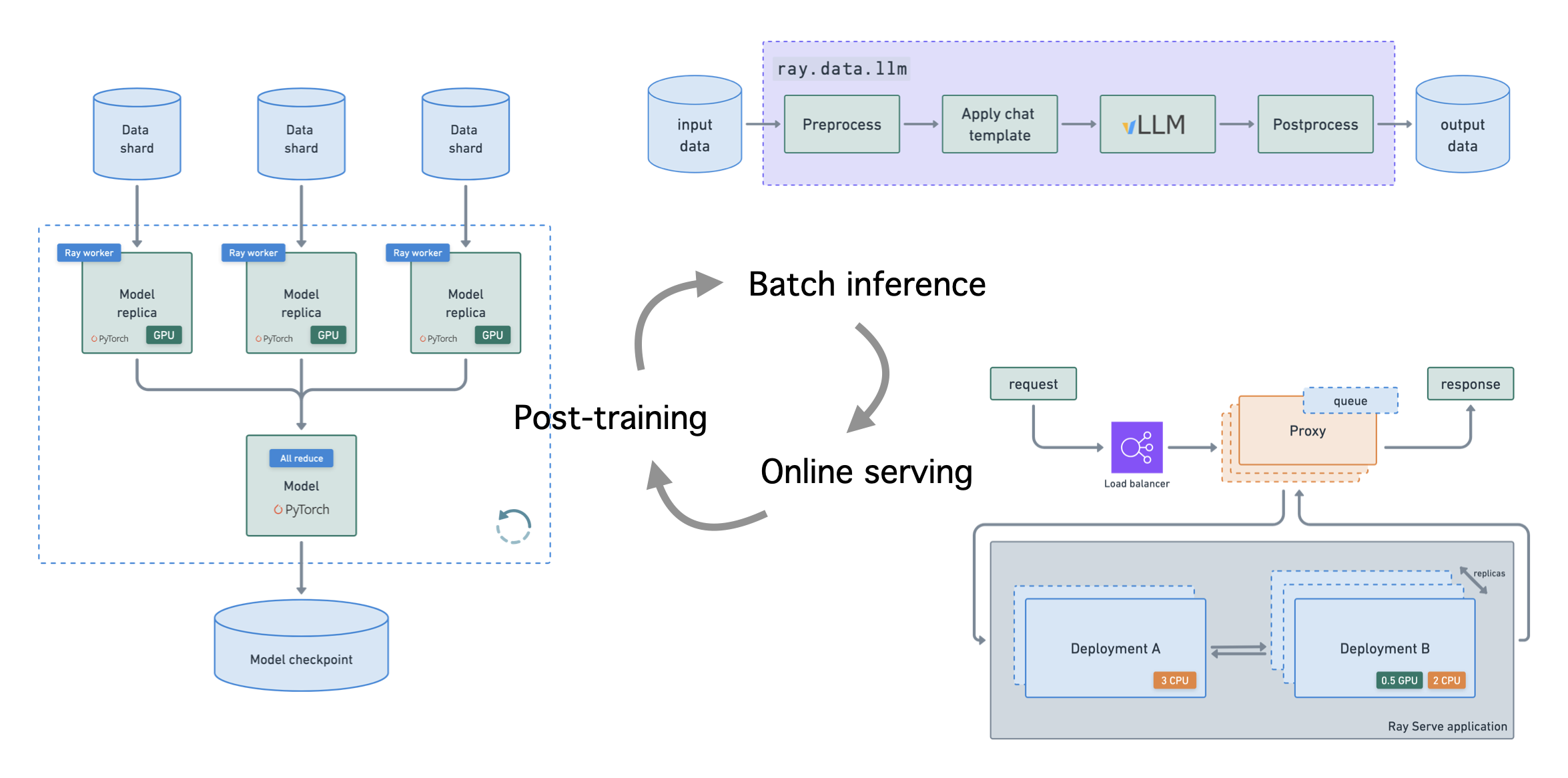
注意:本教程的目的是展示如何使用 Ray 实现可扩展到任何用例(包括多模态)的端到端 LLM 工作流。
本教程使用 Ray 库来实现这些工作流,即 LLM API
分布式数据集上的批量推理
用于吞吐量的流式和异步执行
内置指标和跟踪,包括可观测性
零拷贝 GPU 数据传输
可与预处理和后处理步骤组合
自动扩展和负载均衡
统一的多节点多模型部署
支持 Multi-LoRA 和共享基础模型
与推理引擎深度集成,从 vLLM 开始
可组合的多模型 LLM 管道
所有这些工作负载都附带您调试和优化以最大化吞吐量/延迟所需的所有可观测性视图。
设置#
计算#
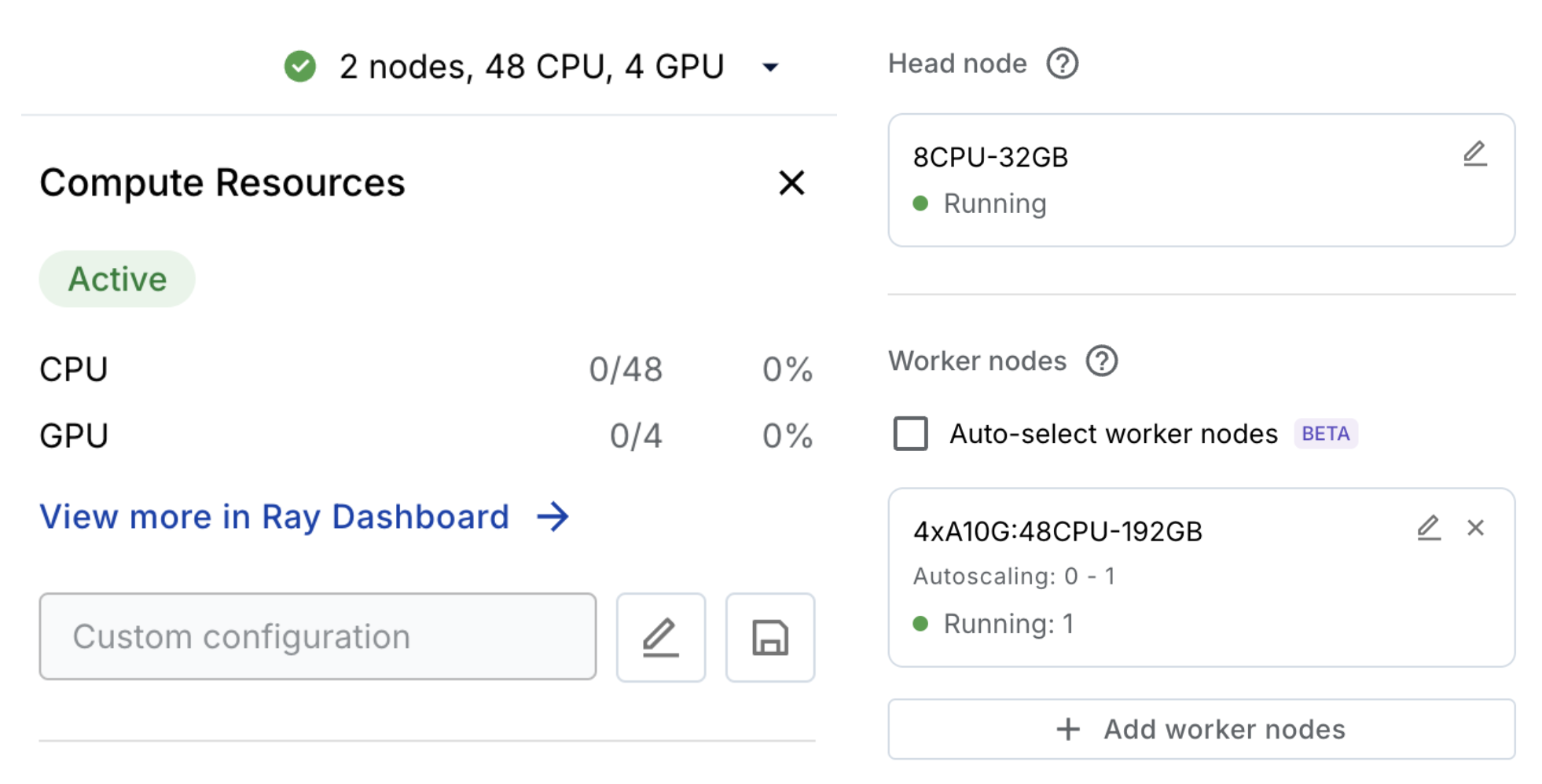
这个 Anyscale Workspace 会自动配置和自动扩展您的工作负载所需的计算资源。如果您不在 Anyscale 上,则需要为本教程配置合适的计算资源 (L4)。
依赖项#
首先下载本教程所需的依赖项。请注意,在您的 containerfile 中,您有一个基础镜像 anyscale/ray-llm:latest-py311-cu124,后面跟着一个 pip 包列表。如果您不在 Anyscale 上,您可以自行拉取此 Docker 镜像并安装依赖项。
%%bash
# Install dependencies
pip install -q \
    "xgrammar==0.1.11" \
    "pynvml==12.0.0" \
    "hf_transfer==0.1.9" \
    "tensorboard==2.19.0" \
    "llamafactory@git+https://github.com/hiyouga/LLaMA-Factory.git@ac8c6fdd3ab7fb6372f231f238e6b8ba6a17eb16#egg=llamafactory"
Successfully registered `ray, vllm` and 5 other packages to be installed on all cluster nodes.
View and update dependencies here: https://console.anyscale.com/cld_kvedZWag2qA8i5BjxUevf5i7/prj_cz951f43jjdybtzkx1s5sjgz99/workspaces/expwrk_mp8cxvgle2yeumgcpu1yua2r3e?workspace-tab=dependencies
数据摄取#
import json
import textwrap
from IPython.display import Code, Image, display
首先从云存储下载数据到本地共享存储。
%%bash
rm -rf /mnt/cluster_storage/viggo  # clean up
mkdir /mnt/cluster_storage/viggo
wget https://viggo-ds.s3.amazonaws.com/train.jsonl -O /mnt/cluster_storage/viggo/train.jsonl
wget https://viggo-ds.s3.amazonaws.com/val.jsonl -O /mnt/cluster_storage/viggo/val.jsonl
wget https://viggo-ds.s3.amazonaws.com/test.jsonl -O /mnt/cluster_storage/viggo/test.jsonl
wget https://viggo-ds.s3.amazonaws.com/dataset_info.json -O /mnt/cluster_storage/viggo/dataset_info.json
download: s3://viggo-ds/train.jsonl to ../../../mnt/cluster_storage/viggo/train.jsonl
download: s3://viggo-ds/val.jsonl to ../../../mnt/cluster_storage/viggo/val.jsonl
download: s3://viggo-ds/test.jsonl to ../../../mnt/cluster_storage/viggo/test.jsonl
download: s3://viggo-ds/dataset_info.json to ../../../mnt/cluster_storage/viggo/dataset_info.json
%%bash
head -n 1 /mnt/cluster_storage/viggo/train.jsonl | python3 -m json.tool
{
    "instruction": "Given a target sentence construct the underlying meaning representation of the input sentence as a single function with attributes and attribute values. This function should describe the target string accurately and the function must be one of the following ['inform', 'request', 'give_opinion', 'confirm', 'verify_attribute', 'suggest', 'request_explanation', 'recommend', 'request_attribute']. The attributes must be one of the following: ['name', 'exp_release_date', 'release_year', 'developer', 'esrb', 'rating', 'genres', 'player_perspective', 'has_multiplayer', 'platforms', 'available_on_steam', 'has_linux_release', 'has_mac_release', 'specifier']",
    "input": "Blizzard North is mostly an okay developer, but they released Diablo II for the Mac and so that pushes the game from okay to good in my view.",
    "output": "give_opinion(name[Diablo II], developer[Blizzard North], rating[good], has_mac_release[yes])"
}
with open("/mnt/cluster_storage/viggo/train.jsonl", "r") as fp:
    first_line = fp.readline()
    item = json.loads(first_line)
system_content = item["instruction"]
print(textwrap.fill(system_content, width=80))
Given a target sentence construct the underlying meaning representation of the
input sentence as a single function with attributes and attribute values. This
function should describe the target string accurately and the function must be
one of the following ['inform', 'request', 'give_opinion', 'confirm',
'verify_attribute', 'suggest', 'request_explanation', 'recommend',
'request_attribute']. The attributes must be one of the following: ['name',
'exp_release_date', 'release_year', 'developer', 'esrb', 'rating', 'genres',
'player_perspective', 'has_multiplayer', 'platforms', 'available_on_steam',
'has_linux_release', 'has_mac_release', 'specifier']
您还有一个信息文件,其中包含用于训练后处理的数据集和格式(Alpaca 和 ShareGPT 格式)。
display(Code(filename="/mnt/cluster_storage/viggo/dataset_info.json", language="json"))
{
    "viggo-train": {
        "file_name": "/mnt/cluster_storage/viggo/train.jsonl",
        "formatting": "alpaca",
        "columns": {
            "prompt": "instruction",
            "query": "input",
            "response": "output"
        }
    },
    "viggo-val": {
        "file_name": "/mnt/cluster_storage/viggo/val.jsonl",
        "formatting": "alpaca",
        "columns": {
            "prompt": "instruction",
            "query": "input",
            "response": "output"
        }
    }
}
分布式微调#
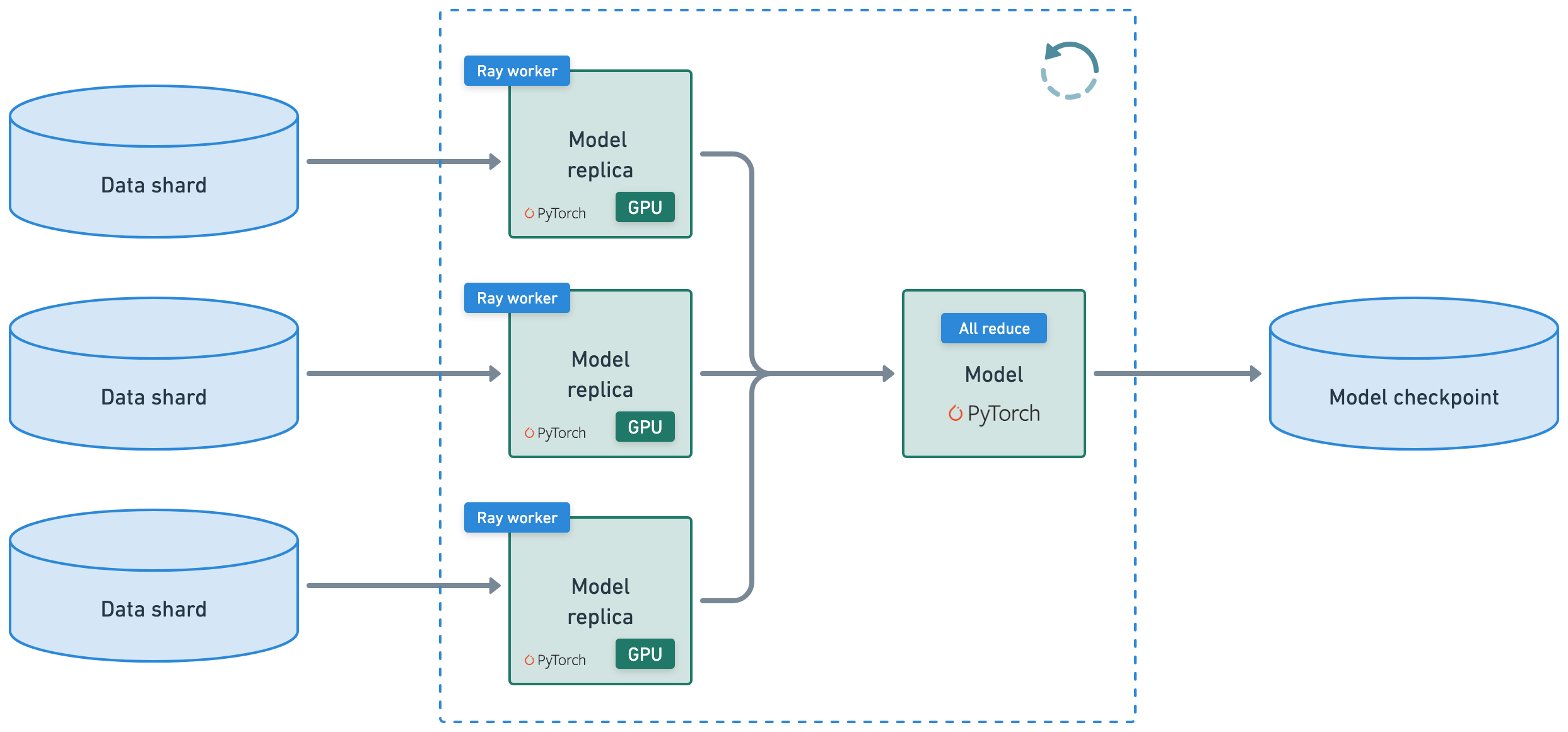
使用 Ray Train + LLaMA-Factory 进行多节点训练。在 llama3_lora_sft_ray.yaml 配置文件中查找训练工作负载、训练后方法、数据集位置、训练/验证详细信息等的参数。有关更多训练后方法,如 SFT、预训练、PPO、DPO、KTO 等,请参阅 GitHub 上的配方。
注意:Ray 还支持使用 axolotl 等其他工具,甚至可以直接使用 Ray Train + HF Accelerate + FSDP/DeepSpeed 来完全控制您的训练后工作负载。
config#
import os
from pathlib import Path
import yaml
display(Code(filename="lora_sft_ray.yaml", language="yaml"))
### model
model_name_or_path: Qwen/Qwen2.5-7B-Instruct
trust_remote_code: true

### method
stage: sft
do_train: true
finetuning_type: lora
lora_rank: 8
lora_target: all

### dataset
dataset: viggo-train
dataset_dir: /mnt/cluster_storage/viggo  # shared storage workers have access to
template: qwen
cutoff_len: 2048
max_samples: 1000
overwrite_cache: true
preprocessing_num_workers: 16
dataloader_num_workers: 4

### output
output_dir: /mnt/cluster_storage/viggo/outputs  # should be somewhere workers have access to (ex. s3, nfs)
logging_steps: 10
save_steps: 500
plot_loss: true
overwrite_output_dir: true
save_only_model: false

### ray
ray_run_name: lora_sft_ray
ray_storage_path: /mnt/cluster_storage/viggo/saves  # should be somewhere workers have access to (ex. s3, nfs)
ray_num_workers: 4
resources_per_worker:
  GPU: 1
  anyscale/accelerator_shape:4xL4: 0.001  # Use this to specify a specific node shape,
  # accelerator_type:L4: 1           # Or use this to simply specify a GPU type.
  # see https://docs.rayai.org.cn/en/master/ray-core/accelerator-types.html#accelerator-types for a full list of accelerator types
placement_strategy: PACK

### train
per_device_train_batch_size: 1
gradient_accumulation_steps: 8
learning_rate: 1.0e-4
num_train_epochs: 5.0
lr_scheduler_type: cosine
warmup_ratio: 0.1
bf16: true
ddp_timeout: 180000000
resume_from_checkpoint: null

### eval
eval_dataset: viggo-val  # uses same dataset_dir as training data
# val_size: 0.1  # only if using part of training data for validation
per_device_eval_batch_size: 1
eval_strategy: steps
eval_steps: 500
model_id = "ft-model"  # call it whatever you want
model_source = yaml.safe_load(open("lora_sft_ray.yaml"))["model_name_or_path"]  # HF model ID, S3 mirror config, or GCS mirror config
print (model_source)
Qwen/Qwen2.5-7B-Instruct
多节点训练#
使用 Ray Train + LlamaFactory 执行多节点训练循环。
使用 Ray Train 有几个优点
它会自动处理多节点、多 GPU 设置,无需手动 SSH 设置或
hostfile配置。您可以定义每个工作节点的比例资源需求,例如,每个工作节点 2 个 CPU 和 0.5 个 GPU。
您可以运行在异构机器上并灵活扩展,例如,CPU 用于预处理,GPU 用于训练。
它具有内置的容错能力,可以通过重试失败的工作节点来继续从最后一个检查点进行训练。
它支持数据并行、模型并行、参数服务器,甚至自定义策略。
Ray 编译图甚至允许您为多个模型的联合优化定义不同的并行性。Megatron、DeepSpeed 和类似框架仅允许一个全局设置。
RayTurbo Train 在性价比、性能监控等方面提供了更多改进
弹性训练,以动态数量的工作节点进行扩展,并在较少的资源上继续训练,甚至在 spot 实例上。
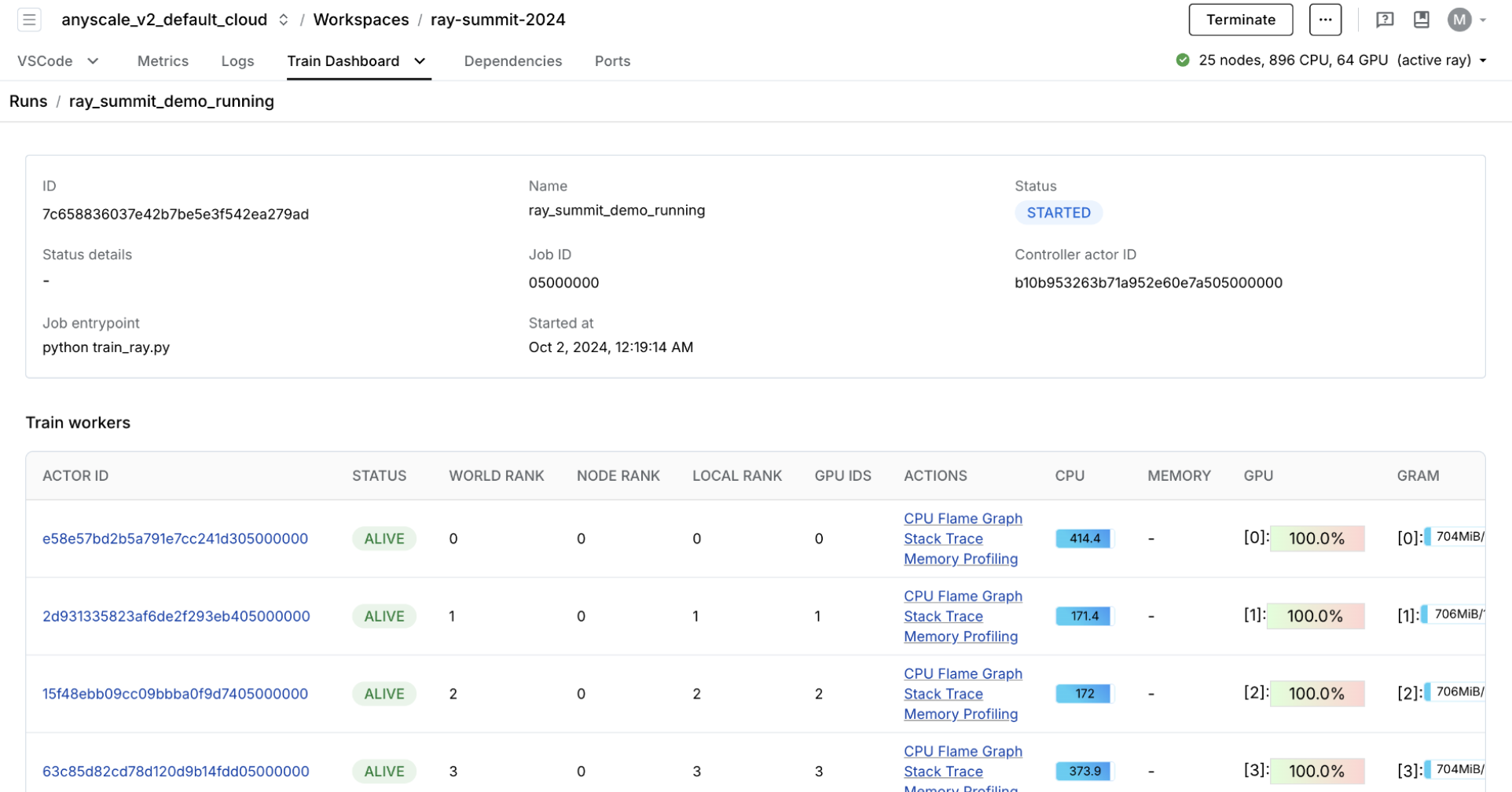
专用仪表板,旨在简化 Ray Train 工作负载的调试
监控:查看训练运行和训练工作节点的状态。
指标:查看训练吞吐量和训练系统运行时间的见解。
性能分析:调查单个训练工作节点进程的瓶颈、挂起或错误。
%%bash
# Run multi-node distributed fine-tuning workload
USE_RAY=1 llamafactory-cli train lora_sft_ray.yaml
Training started with configuration:
    ╭──────────────────────────────────────────────────────────────────────────────────────────────────────╮
    │ Training config                                                                                      │
    ├──────────────────────────────────────────────────────────────────────────────────────────────────────┤
    │ train_loop_config/args/bf16                                                                     True │
    │ train_loop_config/args/cutoff_len                                                               2048 │
    │ train_loop_config/args/dataloader_num_workers                                                      4 │
    │ train_loop_config/args/dataset                                                           viggo-train │
    │ train_loop_config/args/dataset_dir                                              ...ter_storage/viggo │
    │ train_loop_config/args/ddp_timeout                                                         180000000 │
    │ train_loop_config/args/do_train                                                                 True │
    │ train_loop_config/args/eval_dataset                                                        viggo-val │
    │ train_loop_config/args/eval_steps                                                                500 │
    │ train_loop_config/args/eval_strategy                                                           steps │
    │ train_loop_config/args/finetuning_type                                                          lora │
    │ train_loop_config/args/gradient_accumulation_steps                                                 8 │
    │ train_loop_config/args/learning_rate                                                          0.0001 │
    │ train_loop_config/args/logging_steps                                                              10 │
    │ train_loop_config/args/lora_rank                                                                   8 │
    │ train_loop_config/args/lora_target                                                               all │
    │ train_loop_config/args/lr_scheduler_type                                                      cosine │
    │ train_loop_config/args/max_samples                                                              1000 │
    │ train_loop_config/args/model_name_or_path                                       ...en2.5-7B-Instruct │
    │ train_loop_config/args/num_train_epochs                                                          5.0 │
    │ train_loop_config/args/output_dir                                               ...age/viggo/outputs │
    │ train_loop_config/args/overwrite_cache                                                          True │
    │ train_loop_config/args/overwrite_output_dir                                                     True │
    │ train_loop_config/args/per_device_eval_batch_size                                                  1 │
    │ train_loop_config/args/per_device_train_batch_size                                                 1 │
    │ train_loop_config/args/placement_strategy                                                       PACK │
    │ train_loop_config/args/plot_loss                                                                True │
    │ train_loop_config/args/preprocessing_num_workers                                                  16 │
    │ train_loop_config/args/ray_num_workers                                                             4 │
    │ train_loop_config/args/ray_run_name                                                     lora_sft_ray │
    │ train_loop_config/args/ray_storage_path                                         ...orage/viggo/saves │
    │ train_loop_config/args/resources_per_worker/GPU                                                    1 │
    │ train_loop_config/args/resources_per_worker/anyscale/accelerator_shape:4xA10G                      1 │
    │ train_loop_config/args/resume_from_checkpoint                                                        │
    │ train_loop_config/args/save_only_model                                                         False │
    │ train_loop_config/args/save_steps                                                                500 │
    │ train_loop_config/args/stage                                                                     sft │
    │ train_loop_config/args/template                                                                 qwen │
    │ train_loop_config/args/trust_remote_code                                                        True │
    │ train_loop_config/args/warmup_ratio                                                              0.1 │
    │ train_loop_config/callbacks                                                     ... 0x7e1262910e10>] │
    ╰──────────────────────────────────────────────────────────────────────────────────────────────────────╯

    100%|██████████| 155/155 [07:12<00:00,  2.85s/it][INFO|trainer.py:3942] 2025-04-11 14:57:59,207 >> Saving model checkpoint to /mnt/cluster_storage/viggo/outputs/checkpoint-155

    Training finished iteration 1 at 2025-04-11 14:58:02. Total running time: 10min 24s
    ╭─────────────────────────────────────────╮
    │ Training result                         │
    ├─────────────────────────────────────────┤
    │ checkpoint_dir_name   checkpoint_000000 │
    │ time_this_iter_s              521.83827 │
    │ time_total_s                  521.83827 │
    │ training_iteration                    1 │
    │ epoch                             4.704 │
    │ grad_norm                       0.14288 │
    │ learning_rate                        0. │
    │ loss                             0.0065 │
    │ step                                150 │
    ╰─────────────────────────────────────────╯
    Training saved a checkpoint for iteration 1 at: (local)/mnt/cluster_storage/viggo/saves/lora_sft_ray/TorchTrainer_95d16_00000_0_2025-04-11_14-47-37/checkpoint_000000
display(Code(filename="/mnt/cluster_storage/viggo/outputs/all_results.json", language="json"))
{
    "epoch": 4.864,
    "eval_viggo-val_loss": 0.13618840277194977,
    "eval_viggo-val_runtime": 20.2797,
    "eval_viggo-val_samples_per_second": 35.208,
    "eval_viggo-val_steps_per_second": 8.827,
    "total_flos": 4.843098686147789e+16,
    "train_loss": 0.2079355036479331,
    "train_runtime": 437.2951,
    "train_samples_per_second": 11.434,
    "train_steps_per_second": 0.354
}
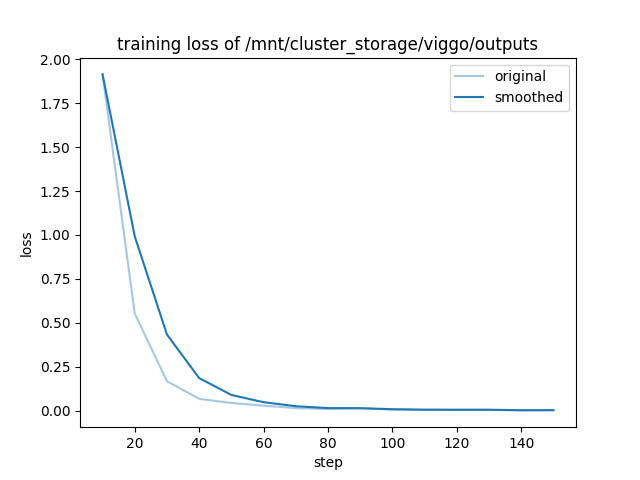
可观察性#
OSS Ray 提供了一个广泛的 可观测性套件,其中包含日志和可观测性仪表板,您可以使用它们来监控和调试。仪表板包含许多不同的组件,例如
集群中运行任务的内存、利用率等 集群
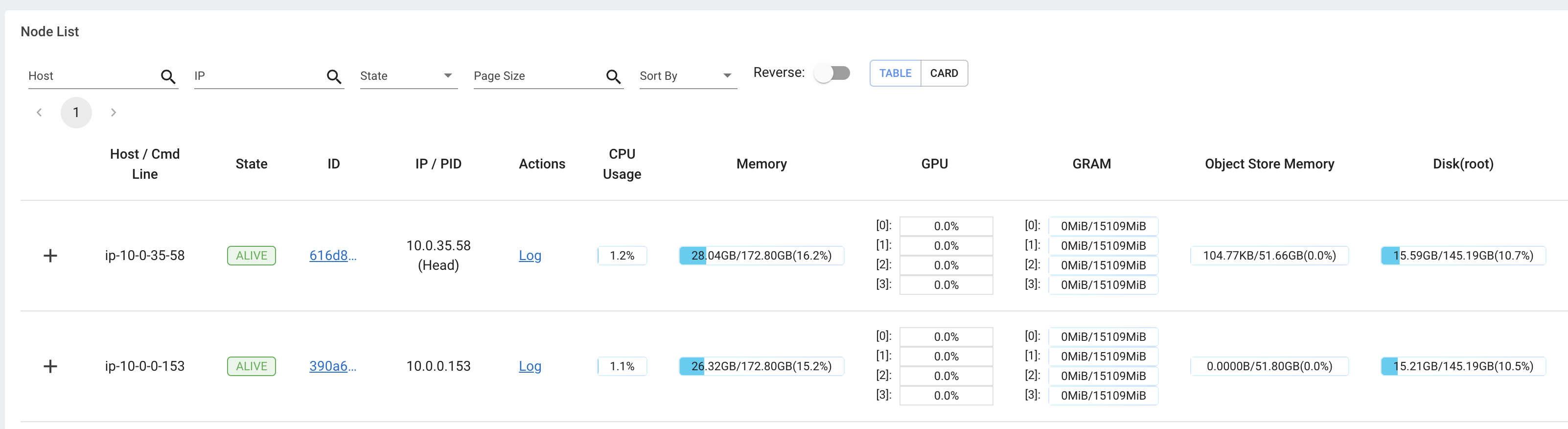
用于查看所有正在运行的任务、实例类型之间的利用率、自动扩展等的视图。

OSS Ray 附带了一个广泛的可观测性套件,Anyscale 在此基础上更进一步,通过以下方式使监控和调试您的工作负载更加轻松快捷:
统一日志查看器,用于查看所有驱动程序和工作节点进程的日志 统一日志查看器
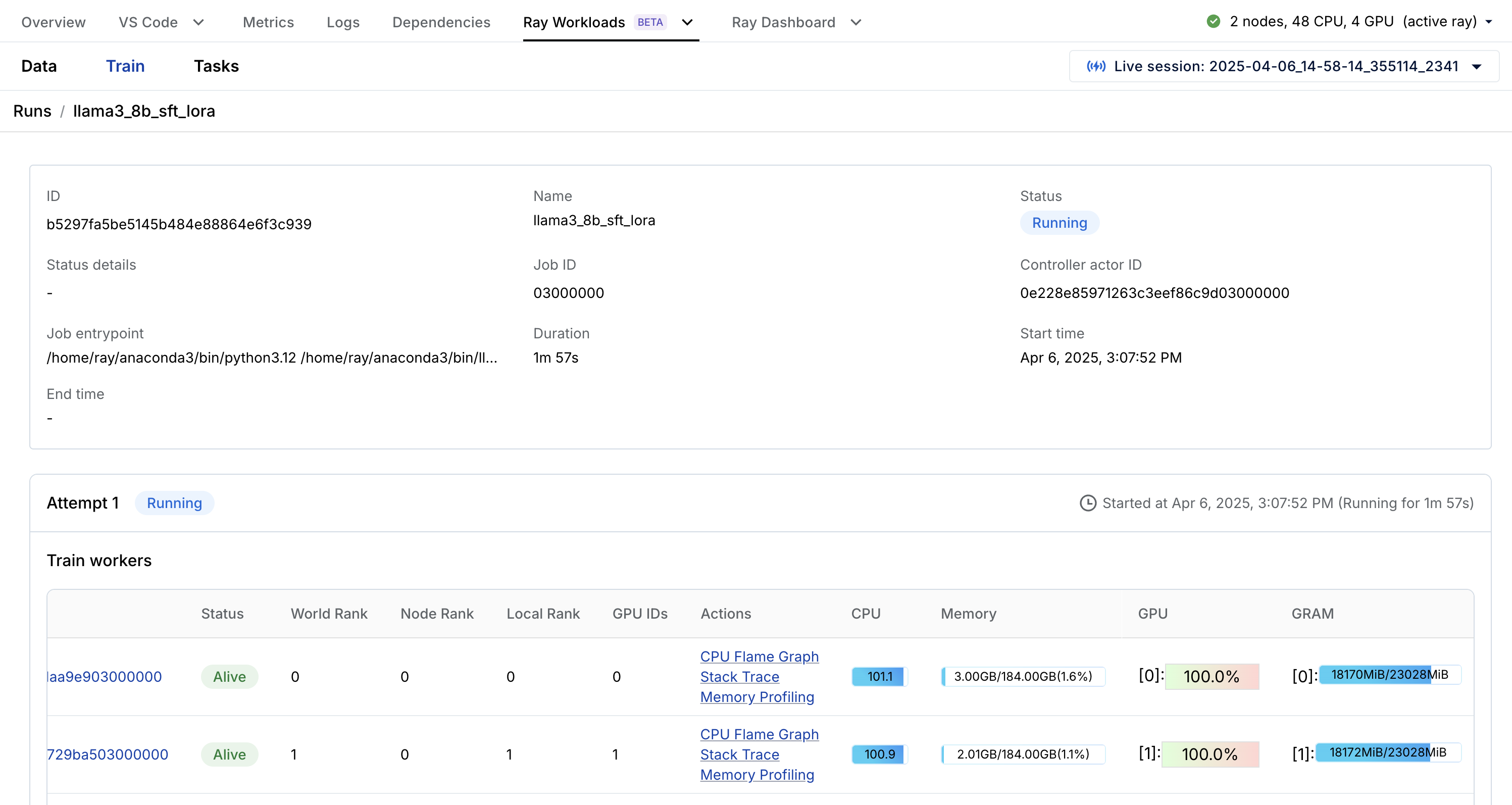
特定于 Ray 工作负载的仪表板,如 Data、Train 等,可以分解任务。例如,您可以通过 Train 特定 Ray Workloads 仪表板实时观察之前的训练工作负载。
保存到云存储#
您可以随时将数据存储到任何存储桶中,但 Anyscale 提供了一个默认存储桶,以便更轻松。您还可以获得许多其他存储选项,这些选项在集群、用户和云级别共享。
%%bash
# Anyscale default storage bucket.
echo $ANYSCALE_ARTIFACT_STORAGE
s3://anyscale-test-data-cld-i2w99rzq8b6lbjkke9y94vi5/org_7c1Kalm9WcX2bNIjW53GUT/cld_kvedZWag2qA8i5BjxUevf5i7/artifact_storage
%%bash
# Save fine-tuning artifacts to cloud storage.
STORAGE_PATH="$ANYSCALE_ARTIFACT_STORAGE/viggo"
LOCAL_OUTPUTS_PATH="/mnt/cluster_storage/viggo/outputs"
LOCAL_SAVES_PATH="/mnt/cluster_storage/viggo/saves"

# AWS S3 operations.
if [[ "$STORAGE_PATH" == s3://* ]]; then
    if aws s3 ls "$STORAGE_PATH" > /dev/null 2>&1; then
        aws s3 rm "$STORAGE_PATH" --recursive --quiet
    fi
    aws s3 cp "$LOCAL_OUTPUTS_PATH" "$STORAGE_PATH/outputs" --recursive --quiet
    aws s3 cp "$LOCAL_SAVES_PATH" "$STORAGE_PATH/saves" --recursive --quiet

# Google Cloud Storage operations.
elif [[ "$STORAGE_PATH" == gs://* ]]; then
    if gsutil ls "$STORAGE_PATH" > /dev/null 2>&1; then
        gsutil -m -q rm -r "$STORAGE_PATH"
    fi
    gsutil -m -q cp -r "$LOCAL_OUTPUTS_PATH" "$STORAGE_PATH/outputs"
    gsutil -m -q cp -r "$LOCAL_SAVES_PATH" "$STORAGE_PATH/saves"

else
    echo "Unsupported storage protocol: $STORAGE_PATH"
    exit 1
fi
%%bash
ls /mnt/cluster_storage/viggo/saves/lora_sft_ray
TorchTrainer_95d16_00000_0_2025-04-11_14-47-37
TorchTrainer_f9e4e_00000_0_2025-04-11_12-41-34
basic-variant-state-2025-04-11_12-41-34.json
basic-variant-state-2025-04-11_14-47-37.json
experiment_state-2025-04-11_12-41-34.json
experiment_state-2025-04-11_14-47-37.json
trainer.pkl
tuner.pkl
# LoRA paths.
save_dir = Path("/mnt/cluster_storage/viggo/saves/lora_sft_ray")
trainer_dirs = [d for d in save_dir.iterdir() if d.name.startswith("TorchTrainer_") and d.is_dir()]
latest_trainer = max(trainer_dirs, key=lambda d: d.stat().st_mtime, default=None)
lora_path = f"{latest_trainer}/checkpoint_000000/checkpoint"
cloud_lora_path = os.path.join(os.getenv("ANYSCALE_ARTIFACT_STORAGE"), lora_path.split("/mnt/cluster_storage/")[-1])
dynamic_lora_path, lora_id = cloud_lora_path.rsplit("/", 1)
print (lora_path)
print (cloud_lora_path)
print (dynamic_lora_path)
print (lora_id)
/mnt/cluster_storage/viggo/saves/lora_sft_ray/TorchTrainer_95d16_00000_0_2025-04-11_14-47-37/checkpoint_000000/checkpoint
s3://anyscale-test-data-cld-i2w99rzq8b6lbjkke9y94vi5/org_7c1Kalm9WcX2bNIjW53GUT/cld_kvedZWag2qA8i5BjxUevf5i7/artifact_storage/viggo/saves/lora_sft_ray/TorchTrainer_95d16_00000_0_2025-04-11_14-47-37/checkpoint_000000/checkpoint
s3://anyscale-test-data-cld-i2w99rzq8b6lbjkke9y94vi5/org_7c1Kalm9WcX2bNIjW53GUT/cld_kvedZWag2qA8i5BjxUevf5i7/artifact_storage/viggo/saves/lora_sft_ray/TorchTrainer_95d16_00000_0_2025-04-11_14-47-37/checkpoint_000000
checkpoint
%%bash -s "$lora_path"
ls $1
README.md
adapter_config.json
adapter_model.safetensors
added_tokens.json
merges.txt
optimizer.pt
rng_state_0.pth
rng_state_1.pth
rng_state_2.pth
rng_state_3.pth
scheduler.pt
special_tokens_map.json
tokenizer.json
tokenizer_config.json
trainer_state.json
training_args.bin
vocab.json
批量推理#
ray.data.llm 模块集成了关键的大型语言模型 (LLM) 推理引擎和已部署的模型,以实现 LLM 批量推理。这些 LLM 模块在底层使用 Ray Data,这使得分发工作负载变得非常容易,同时也确保它们能够:
高效:通过异构资源调度最小化 CPU/GPU 空闲时间。
大规模:通过流式执行处理 PB 级数据集,尤其是在处理 LLM 时。
可靠:通过检查点进程,尤其是在使用具有按需回退功能的 spot 实例运行工作负载时。
灵活:连接来自任何来源的数据,应用转换,并保存到任何格式和位置以供下一个工作负载使用。
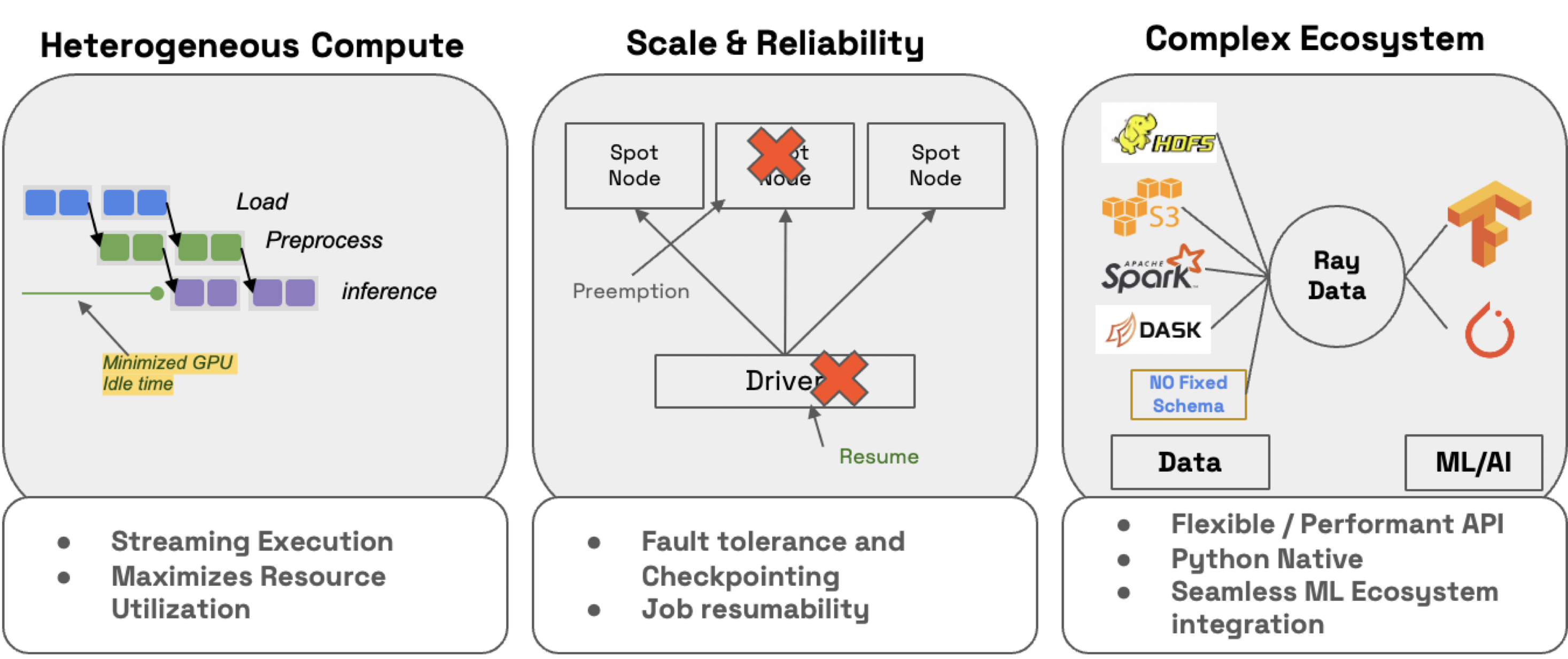
RayTurbo Data 在 Ray Data 之上提供了更多功能
加速元数据获取,以提高首次从大型数据集读取的速度
优化的自动扩展,作业可以在等待整个集群启动之前就开始执行
高可靠性,整个失败的作业(如头节点、集群、未捕获的异常等)可以从检查点恢复。OSS Ray 只能从工作节点故障中恢复。
首先定义 vLLM 引擎处理器配置,您可以在其中选择要使用的模型和引擎行为。模型可以来自 Hugging Face (HF) Hub 或本地模型路径 /path/to/your/model。Anyscale 支持 GPTQ、GGUF 或 LoRA 模型格式。

vLLM 引擎处理器#
import os
import ray
from ray.data.llm import vLLMEngineProcessorConfig
INFO 04-11 14:58:40 __init__.py:194] No platform detected, vLLM is running on UnspecifiedPlatform
config = vLLMEngineProcessorConfig(
    model_source=model_source,
    runtime_env={
        "env_vars": {
            "VLLM_USE_V1": "0",  # v1 doesn't support lora adapters yet
            # "HF_TOKEN": os.environ.get("HF_TOKEN"),
        },
    },
    engine_kwargs={
        "enable_lora": True,
        "max_lora_rank": 8,
        "max_loras": 1,
        "pipeline_parallel_size": 1,
        "tensor_parallel_size": 1,
        "enable_prefix_caching": True,
        "enable_chunked_prefill": True,
        "max_num_batched_tokens": 4096,
        "max_model_len": 4096,  # or increase KV cache size
        # complete list: https://docs.vllm.com.cn/en/stable/serving/engine_args.html
    },
    concurrency=1,
    batch_size=16,
    accelerator_type="L4",
)
LLM 处理器#
接下来,将配置传递给 LLM 处理器,您可以在其中定义推理周围的预处理和后处理步骤。在处理器配置中定义了基础模型后,您可以将 LoRA 适配器层定义为 LLM 处理器本身的预处理步骤的一部分。
from ray.data.llm import build_processor
processor = build_processor(
    config,
    preprocess=lambda row: dict(
        model=lora_path,  # REMOVE this line if doing inference with just the base model
        messages=[
            {"role": "system", "content": system_content},
            {"role": "user", "content": row["input"]}
        ],
        sampling_params={
            "temperature": 0.3,
            "max_tokens": 250,
            # complete list: https://docs.vllm.com.cn/en/stable/api/inference_params.html
        },
    ),
    postprocess=lambda row: {
        **row,  # all contents
        "generated_output": row["generated_text"],
        # add additional outputs
    },
)
2025-04-11 14:58:40,942	INFO worker.py:1660 -- Connecting to existing Ray cluster at address: 10.0.51.51:6379...
2025-04-11 14:58:40,953	INFO worker.py:1843 -- Connected to Ray cluster. View the dashboard at https://session-zt5t77xa58pyp3uy28glg2g24d.i.anyscaleuserdata.com
2025-04-11 14:58:40,960	INFO packaging.py:367 -- Pushing file package 'gcs://_ray_pkg_e71d58b4dc01d065456a9fc0325ee2682e13de88.zip' (2.16MiB) to Ray cluster...
2025-04-11 14:58:40,969	INFO packaging.py:380 -- Successfully pushed file package 'gcs://_ray_pkg_e71d58b4dc01d065456a9fc0325ee2682e13de88.zip'.
(pid=51260) INFO 04-11 14:58:47 __init__.py:194] No platform detected, vLLM is running on UnspecifiedPlatform
# Evaluation on test dataset
ds = ray.data.read_json("/mnt/cluster_storage/viggo/test.jsonl")  # complete list: https://docs.rayai.org.cn/en/latest/data/api/input_output.html
ds = processor(ds)
results = ds.take_all()
results[0]
{
  "batch_uuid": "d7a6b5341cbf4986bb7506ff277cc9cf",
  "embeddings": null,
  "generated_text": "request(esrb)",
  "generated_tokens": [2035, 50236, 10681, 8, 151645],
  "input": "Do you have a favorite ESRB content rating?",
  "instruction": "Given a target sentence construct the underlying meaning representation of the input sentence as a single function with attributes and attribute values. This function should describe the target string accurately and the function must be one of the following ['inform', 'request', 'give_opinion', 'confirm', 'verify_attribute', 'suggest', 'request_explanation', 'recommend', 'request_attribute']. The attributes must be one of the following: ['name', 'exp_release_date', 'release_year', 'developer', 'esrb', 'rating', 'genres', 'player_perspective', 'has_multiplayer', 'platforms', 'available_on_steam', 'has_linux_release', 'has_mac_release', 'specifier']",
  "messages": [
    {
      "content": "Given a target sentence construct the underlying meaning representation of the input sentence as a single function with attributes and attribute values. This function should describe the target string accurately and the function must be one of the following ['inform', 'request', 'give_opinion', 'confirm', 'verify_attribute', 'suggest', 'request_explanation', 'recommend', 'request_attribute']. The attributes must be one of the following: ['name', 'exp_release_date', 'release_year', 'developer', 'esrb', 'rating', 'genres', 'player_perspective', 'has_multiplayer', 'platforms', 'available_on_steam', 'has_linux_release', 'has_mac_release', 'specifier']",
      "role": "system"
    },
    {
      "content": "Do you have a favorite ESRB content rating?",
      "role": "user"
    }
  ],
  "metrics": {
    "arrival_time": 1744408857.148983,
    "finished_time": 1744408863.09091,
    "first_scheduled_time": 1744408859.130259,
    "first_token_time": 1744408862.7087252,
    "last_token_time": 1744408863.089174,
    "model_execute_time": null,
    "model_forward_time": null,
    "scheduler_time": 0.04162892400017881,
    "time_in_queue": 1.981276035308838
  },
  "model": "/mnt/cluster_storage/viggo/saves/lora_sft_ray/TorchTrainer_95d16_00000_0_2025-04-11_14-47-37/checkpoint_000000/checkpoint",
  "num_generated_tokens": 5,
  "num_input_tokens": 164,
  "output": "request_attribute(esrb[])",
  "params": "SamplingParams(n=1, presence_penalty=0.0, frequency_penalty=0.0, repetition_penalty=1.0, temperature=0.3, top_p=1.0, top_k=-1, min_p=0.0, seed=None, stop=[], stop_token_ids=[], bad_words=[], include_stop_str_in_output=False, ignore_eos=False, max_tokens=250, min_tokens=0, logprobs=None, prompt_logprobs=None, skip_special_tokens=True, spaces_between_special_tokens=True, truncate_prompt_tokens=None, guided_decoding=None)",
  "prompt": "<|im_start|>system
Given a target sentence construct the underlying meaning representation of the input sentence as a single function with attributes and attribute values. This function should describe the target string accurately and the function must be one of the following ['inform', 'request', 'give_opinion', 'confirm', 'verify_attribute', 'suggest', 'request_explanation', 'recommend', 'request_attribute']. The attributes must be one of the following: ['name', 'exp_release_date', 'release_year', 'developer', 'esrb', 'rating', 'genres', 'player_perspective', 'has_multiplayer', 'platforms', 'available_on_steam', 'has_linux_release', 'has_mac_release', 'specifier']<|im_end|>
<|im_start|>user
Do you have a favorite ESRB content rating?<|im_end|>
<|im_start|>assistant
",
  "prompt_token_ids": [151644, "...", 198],
  "request_id": 94,
  "time_taken_llm": 6.028705836999961,
  "generated_output": "request(esrb)"
}
# Exact match (strict!)
matches = 0
for item in results:
    if item["output"] == item["generated_output"]:
        matches += 1
matches / float(len(results))
0.6879039704524469
注意:此处微调的目标不是创建性能最佳的模型,而是展示您可以将其用于下游工作负载,例如大规模批量推理和在线服务。但是,如果您愿意,可以增加 num_train_epochs。
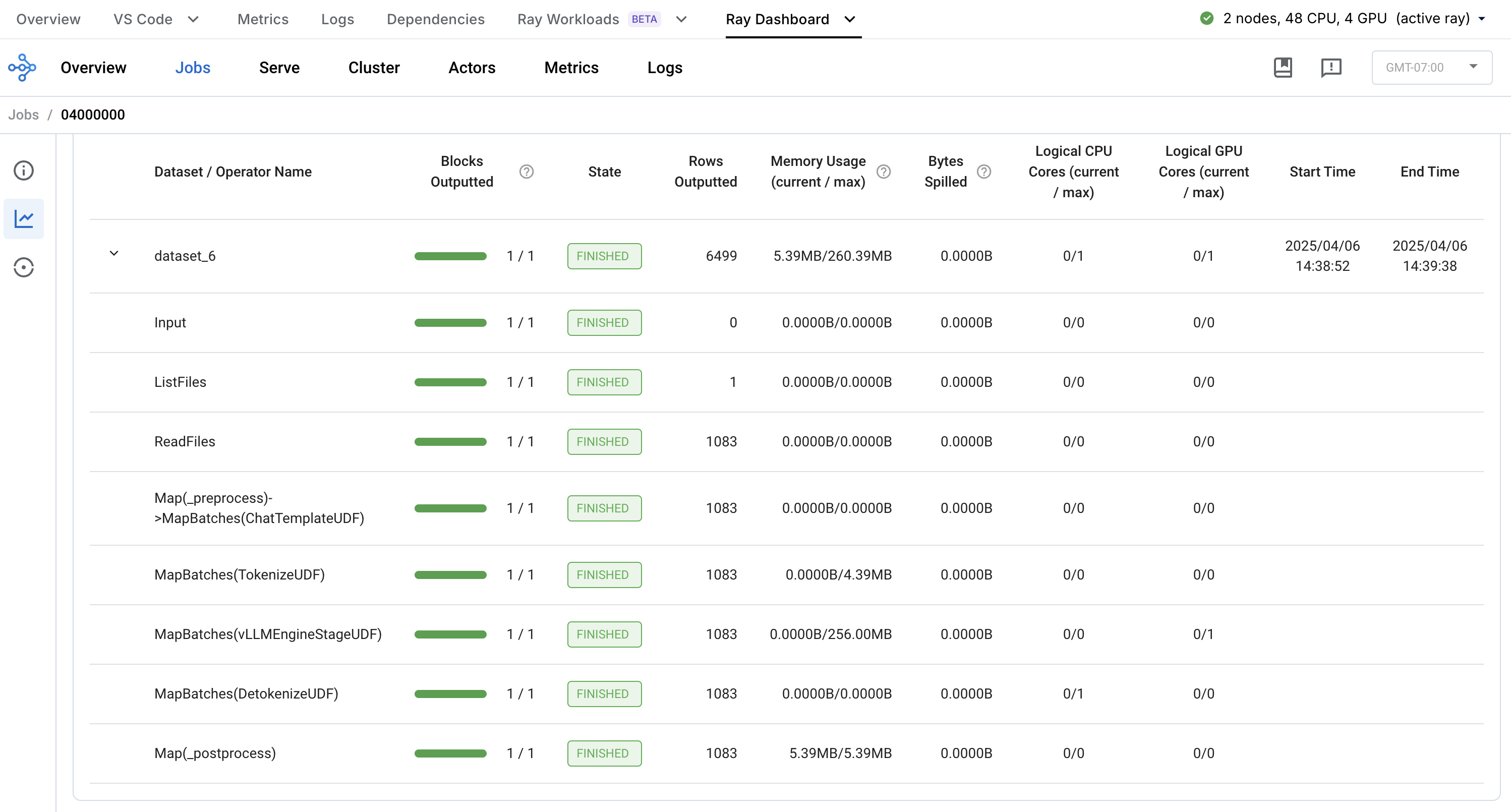
通过 Anyscale Ray Data 仪表板观察批量推理工作负载中的各个步骤
在线服务#
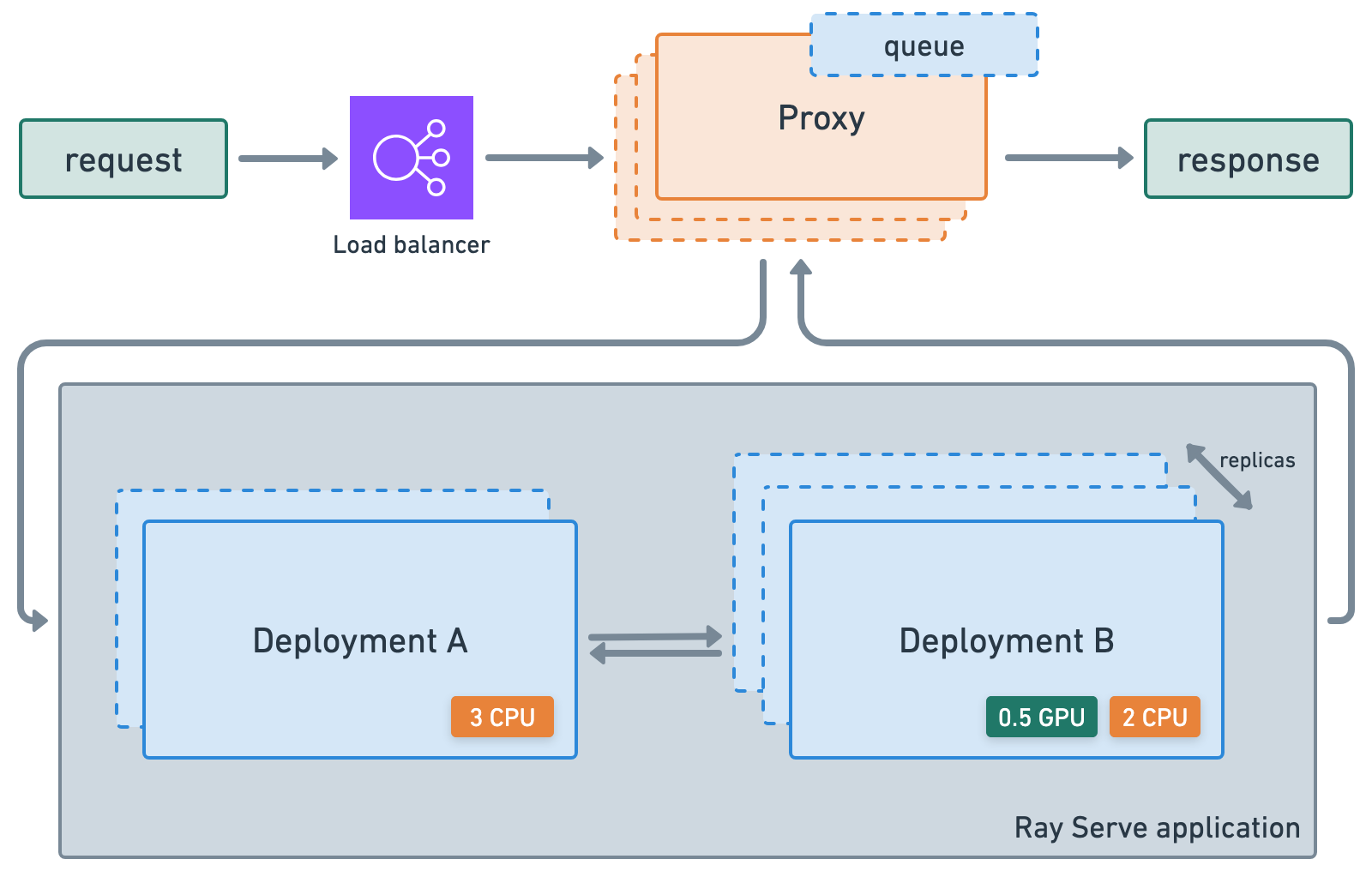
ray.serve.llm API 允许用户将多个 LLM 模型一起部署,并提供熟悉的 Ray Serve API,同时提供与 OpenAI API 的兼容性。
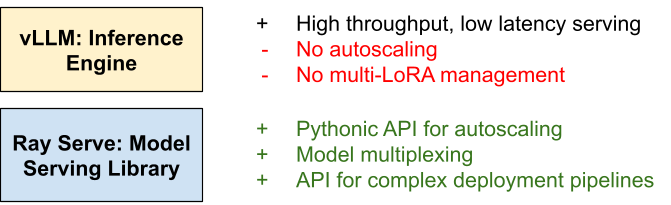
Ray Serve LLM 设计具有以下特点:
自动扩展和负载均衡
统一的多节点多模型部署
OpenAI 兼容性
支持 Multi-LoRA 和共享基础模型
与推理引擎深度集成,从 vLLM 开始
可组合的多模型 LLM 管道
Anyscale 上的 RayTurbo Serve 在 Ray Serve 之上提供了更多功能
快速自动扩展和模型加载,使服务启动和运行速度更快:即使对于 LLM,也能实现5 倍的性能提升。
对于高流量服务用例,QPS 提高 54%,每秒流式传输的 token 数量增加高达 3 倍。
副本压缩,尽可能合并到更少的节点中,以减少资源碎片并提高硬件利用率。
零停机增量滚动更新,确保您的服务永不中断。
在多服务应用程序中为每个服务提供不同的环境 不同的环境。
多可用区感知 Ray Serve 副本调度,为可用区故障提供更高的冗余度。
LLM 服务配置#
import os
from openai import OpenAI  # to use openai api format
from ray import serve
from ray.serve.llm import LLMConfig, build_openai_app
定义一个 LLM 配置,您可以在其中定义模型的来源、其自动扩展行为、要使用的硬件和引擎参数。
注意:如果您使用的是 AWS S3,请在下面的 runtime_env 的 env_vars 中将 AWS_REGION 替换为您保存模型工件的云存储和相应区域。如果您使用其他云存储选项,也请执行相同操作。
# Define config.
llm_config = LLMConfig(
    model_loading_config={
        "model_id": model_id,
        "model_source": model_source
    },
    lora_config={  # REMOVE this section if you're only using a base model.
        "dynamic_lora_loading_path": dynamic_lora_path,
        "max_num_adapters_per_replica": 16,  # You only have 1.
    },
    runtime_env={"env_vars": {"AWS_REGION": "us-west-2"}},
    # runtime_env={"env_vars": {"HF_TOKEN": os.environ.get("HF_TOKEN")}},
    deployment_config={
        "autoscaling_config": {
            "min_replicas": 1,
            "max_replicas": 2,
            # complete list: https://docs.rayai.org.cn/en/latest/serve/autoscaling-guide.html#serve-autoscaling
        }
    },
    accelerator_type="L4",
    engine_kwargs={
        "max_model_len": 4096,  # Or increase KV cache size.
        "tensor_parallel_size": 1,
        "enable_lora": True,
        # complete list: https://docs.vllm.com.cn/en/stable/serving/engine_args.html
    },
)
现在将 LLM 配置部署为一个应用程序。由于此应用程序完全建立在 Ray Serve 之上,因此您可以拥有围绕组合模型、部署多个应用程序、模型多路复用、可观测性等的高级服务逻辑。
# Deploy.
app = build_openai_app({"llm_configs": [llm_config]})
serve.run(app)
DeploymentHandle(deployment='LLMRouter')
服务请求#
# Initialize client.
client = OpenAI(base_url="https://:8000/v1", api_key="fake-key")
response = client.chat.completions.create(
    model=f"{model_id}:{lora_id}",
    messages=[
        {"role": "system", "content": "Given a target sentence construct the underlying meaning representation of the input sentence as a single function with attributes and attribute values. This function should describe the target string accurately and the function must be one of the following ['inform', 'request', 'give_opinion', 'confirm', 'verify_attribute', 'suggest', 'request_explanation', 'recommend', 'request_attribute']. The attributes must be one of the following: ['name', 'exp_release_date', 'release_year', 'developer', 'esrb', 'rating', 'genres', 'player_perspective', 'has_multiplayer', 'platforms', 'available_on_steam', 'has_linux_release', 'has_mac_release', 'specifier']"},
        {"role": "user", "content": "Blizzard North is mostly an okay developer, but they released Diablo II for the Mac and so that pushes the game from okay to good in my view."},
    ],
    stream=True
)
for chunk in response:
    if chunk.choices[0].delta.content is not None:
        print(chunk.choices[0].delta.content, end="", flush=True)
Avg prompt throughput: 20.3 tokens/s, Avg generation throughput: 0.1 tokens/s, Running: 1 reqs, Swapped: 0 reqs, Pending: 0 reqs, GPU KV cache usage: 0.3%, CPU KV cache usage: 0.0%.

_opinion(name[Diablo II], developer[Blizzard North], rating[good], has_mac_release[yes])
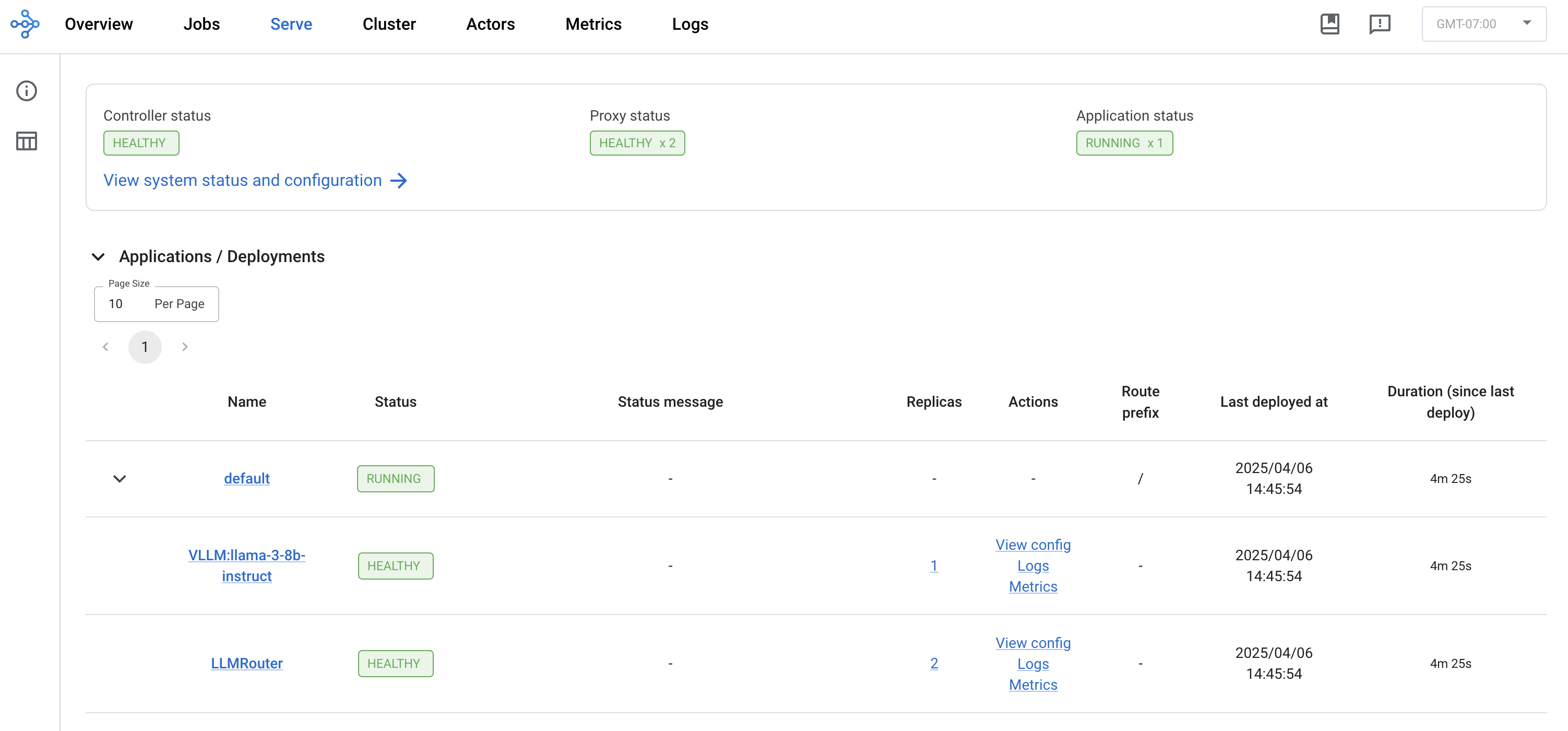
当然,您可以通过 Ray Dashboard 的 Serve 视图来观察正在运行的服务、部署以及 QPS、延迟等指标 Ray Dashboard。
生产#
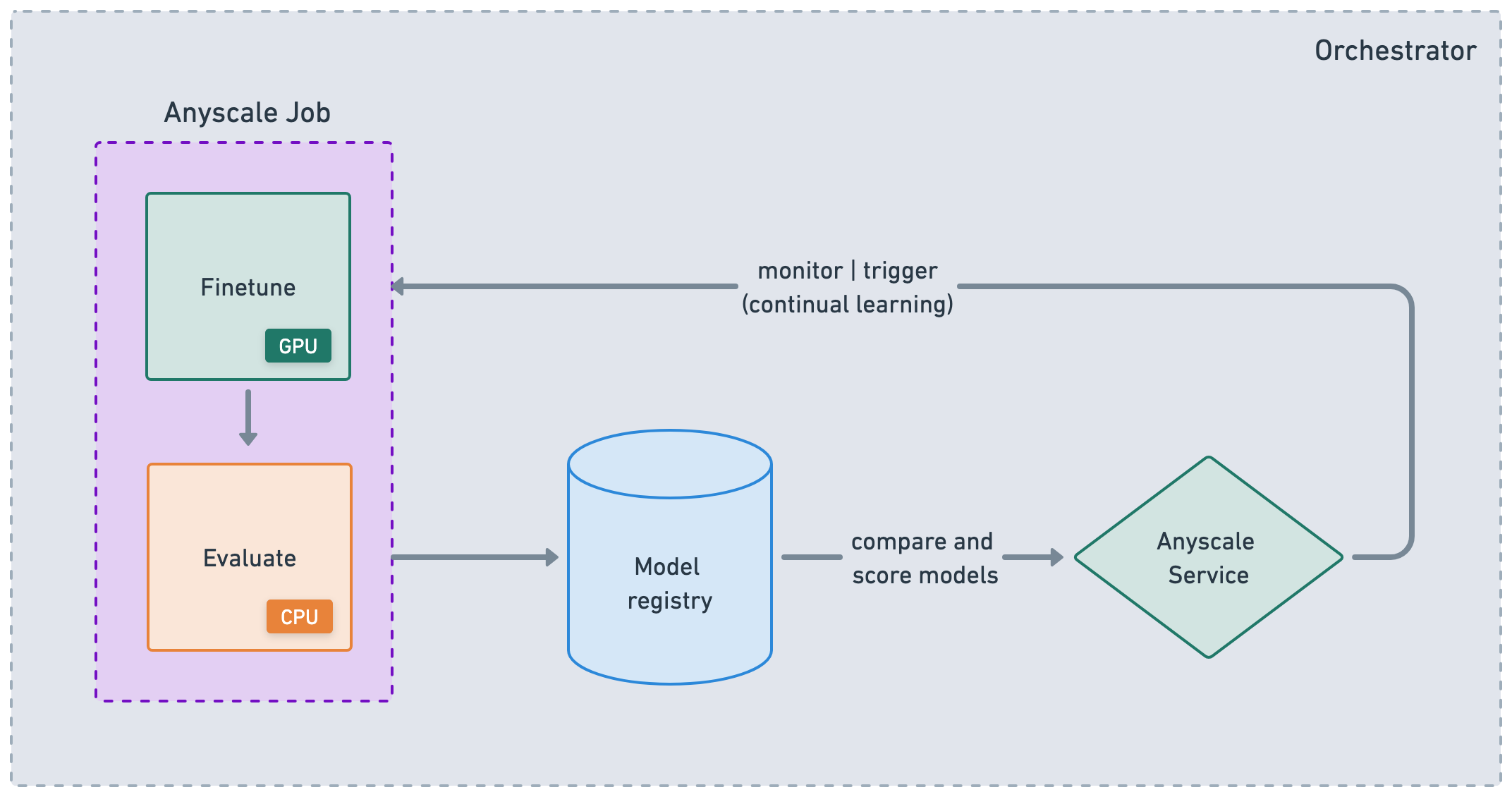
通过利用 Anyscale CLI 或 SDK,可以无缝集成到您现有的 CI/CD 管道中,以运行可靠的批量作业并部署高可用性服务。考虑到您一直在一个与生产环境几乎相同的环境中开发,并且使用了多节点集群,这种集成应该会大大加快您的开发到生产的速度。
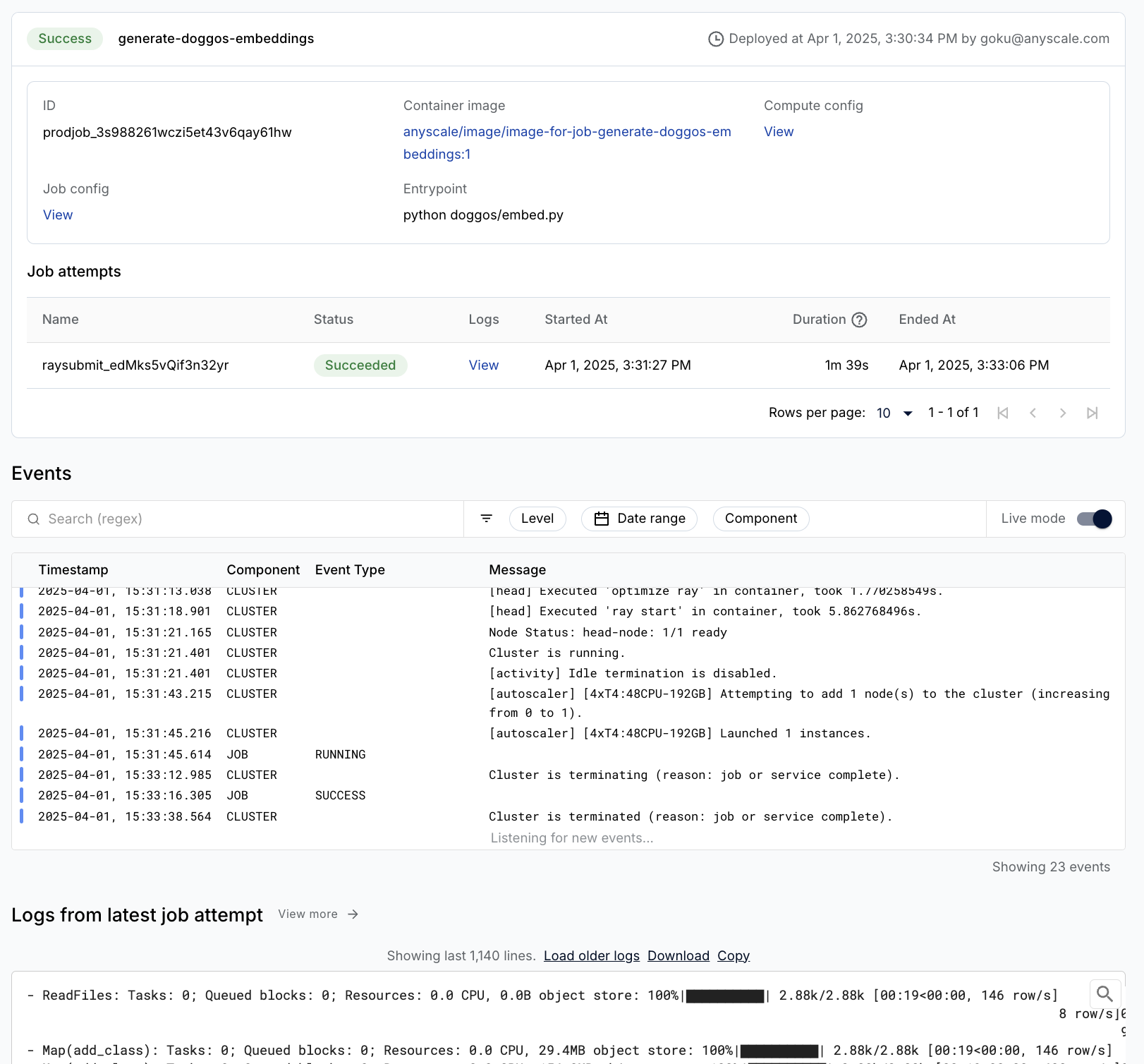
作业#
Anyscale Jobs(API 参考)允许您在生产环境中执行离散工作负载,如批量推理、嵌入生成或模型微调。
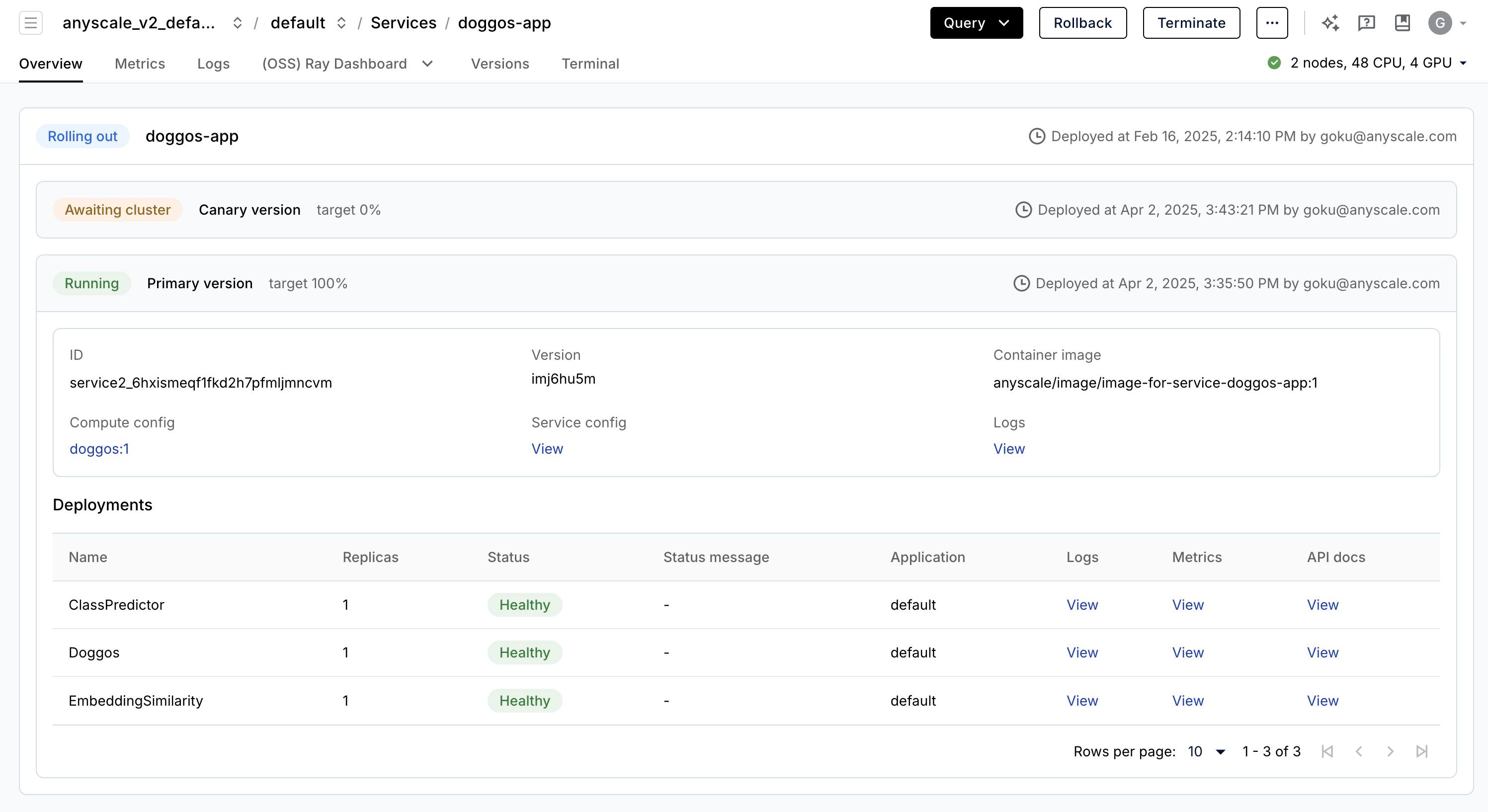
服务#
Anyscale Services(API 参考)提供了一种极其容错、可扩展且优化的方式来服务您的 Ray Serve 应用程序。
您可以通过金丝雀部署滚动和更新服务,实现零停机升级。
通过专用服务页面、统一日志查看器、跟踪等监控您的服务,设置警报等。
扩展服务(
num_replicas=auto),并利用副本压缩来合并利用率较低的节点。头节点容错,因为 OSS Ray 可以从工作节点和副本故障中恢复,但无法从头节点崩溃中恢复 头节点容错。
在单个服务中服务多个应用程序。
%%bash
# clean up
rm -rf /mnt/cluster_storage/viggo
STORAGE_PATH="$ANYSCALE_ARTIFACT_STORAGE/viggo"
if [[ "$STORAGE_PATH" == s3://* ]]; then
    aws s3 rm "$STORAGE_PATH" --recursive --quiet
elif [[ "$STORAGE_PATH" == gs://* ]]; then
    gsutil -m -q rm -r "$STORAGE_PATH"
fi