在线服务#


本教程将启动一个在线服务,该服务部署训练好的模型以生成预测,并根据传入的流量进行自动伸缩。
%%bash
pip install -q -r /home/ray/default/requirements.txt
pip install -q -e /home/ray/default/doggos
Successfully registered `ipywidgets, matplotlib` and 4 other packages to be installed on all cluster nodes.
View and update dependencies here: https://console.anyscale.com/cld_kvedZWag2qA8i5BjxUevf5i7/prj_cz951f43jjdybtzkx1s5sjgz99/workspaces/expwrk_23ry3pgfn3jgq2jk3e5z25udhz?workspace-tab=dependencies
Successfully registered `doggos` package to be installed on all cluster nodes.
View and update dependencies here: https://console.anyscale.com/cld_kvedZWag2qA8i5BjxUevf5i7/prj_cz951f43jjdybtzkx1s5sjgz99/workspaces/expwrk_23ry3pgfn3jgq2jk3e5z25udhz?workspace-tab=dependencies
注意:可能需要重启内核才能使所有依赖项可用。
如果使用 uv,则
关闭运行时依赖项(顶部“
Dependencies”选项卡 > 关闭Pip packages)。无需运行上面的pip install命令。将此 notebook 的 python 内核更改为使用
venv(点击 notebook 右上角的base (Python x.yy.zz)>Select another Kernel>Python Environments...>Create Python Environment>Venv>Use Existing),然后完成!现在 notebook 的所有单元格都将使用虚拟环境。通过在导入 ray 后添加此行,将 Python 可执行文件更改为使用
uv run而不是python。
import os
os.environ.pop("RAY_RUNTIME_ENV_HOOK", None)
import ray
ray.init(runtime_env={"py_executable": "uv run", "working_dir": "/home/ray/default"})
%load_ext autoreload
%autoreload all
import os
import ray
import sys
sys.path.append(os.path.abspath("../doggos/"))
# If using UV
# os.environ.pop("RAY_RUNTIME_ENV_HOOK", None)
# ray.init(runtime_env={"py_executable": "uv run", "working_dir": "/home/ray/default"})
import os
from fastapi import FastAPI
import mlflow
import requests
from starlette.requests import Request
from urllib.parse import urlparse
from ray import serve
import numpy as np
from PIL import Image
import torch
from transformers import CLIPModel, CLIPProcessor
from doggos.infer import TorchPredictor
from doggos.model import collate_fn
from doggos.utils import url_to_array
部署#
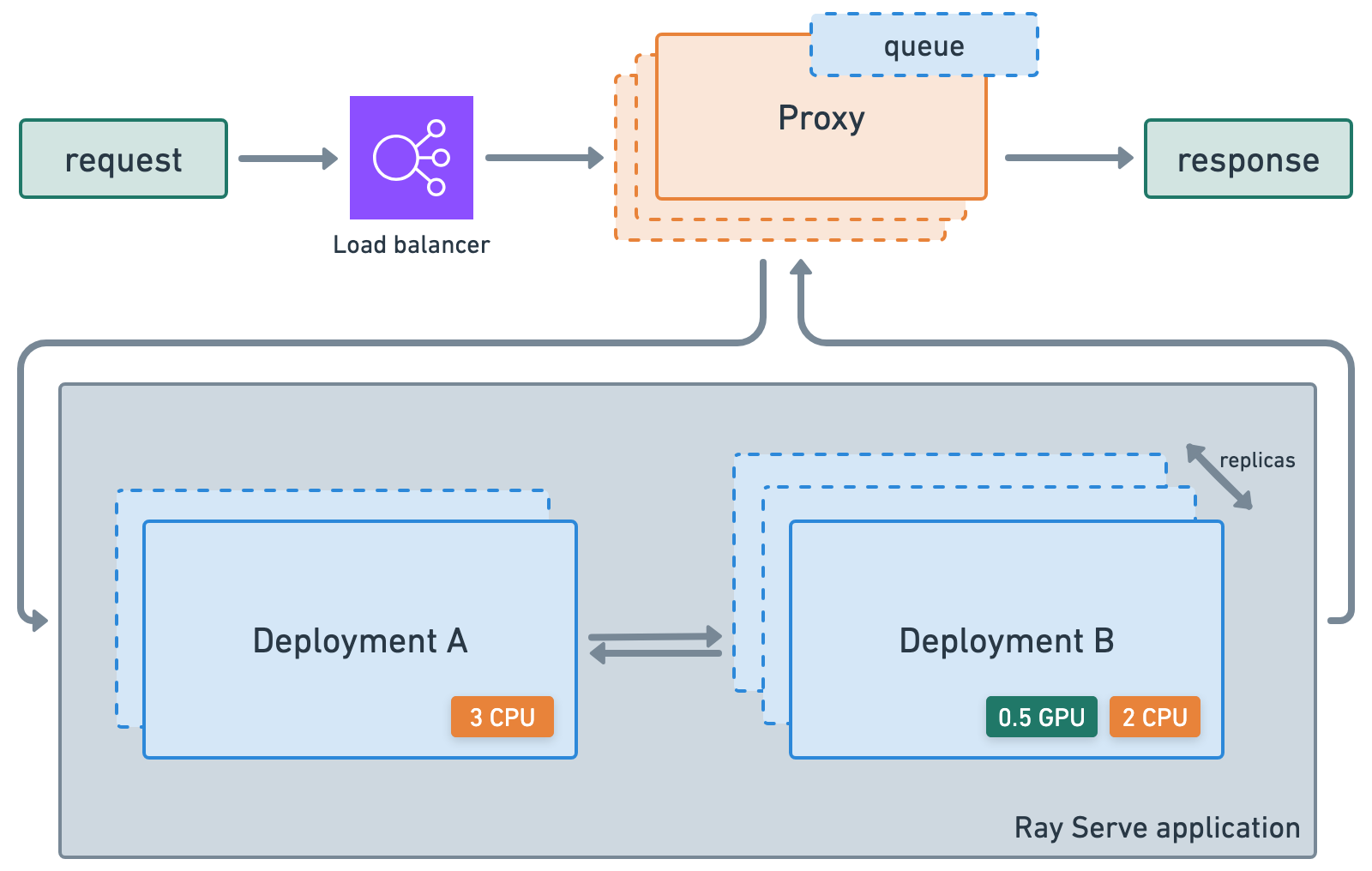
首先,为训练好的模型创建一个部署,该模型为给定的图像 URL 生成概率分布。您可以使用 ray_actor_options 指定要使用的计算资源,并使用 num_replicas 指定如何水平伸缩此特定部署。
@serve.deployment(
    num_replicas="1",
    ray_actor_options={
        "num_gpus": 1,
        "accelerator_type": "T4",
    },
)
class ClassPredictor:
    def __init__(self, model_id, artifacts_dir, device="cuda"):
        """Initialize the model."""
        # Embdding model
        self.processor = CLIPProcessor.from_pretrained(model_id)
        self.model = CLIPModel.from_pretrained(model_id)
        self.model.to(device=device)
        self.device = device

        # Trained classifier
        self.predictor = TorchPredictor.from_artifacts_dir(artifacts_dir=artifacts_dir)
        self.preprocessor = self.predictor.preprocessor

    def get_probabilities(self, url):
        image = Image.fromarray(np.uint8(url_to_array(url=url))).convert("RGB")
        inputs = self.processor(images=[image], return_tensors="pt", padding=True).to(self.device)
        with torch.inference_mode():
            embedding = self.model.get_image_features(**inputs).cpu().numpy()
        outputs = self.predictor.predict_probabilities(
            collate_fn({"embedding": embedding}))
        return {"probabilities": outputs["probabilities"][0]}
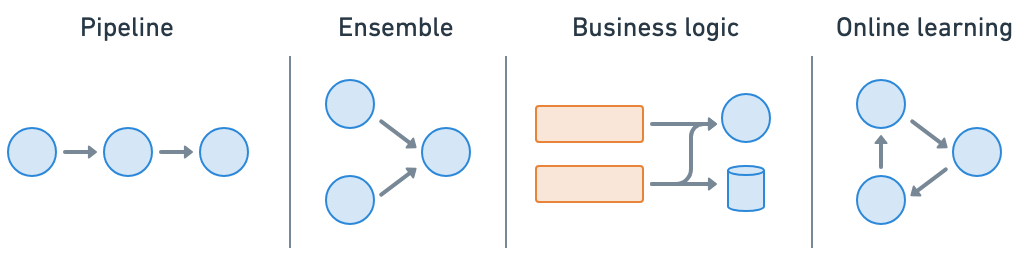
Ray Serve 使 模型组合 变得容易,您可以将包含 ML 模型或业务逻辑的多个部署组合成一个单一的应用程序。您可以独立伸缩甚至是小数资源,并配置每个部署。
应用程序#
# Define app.
api = FastAPI(
    title="doggos",
    description="classify your dog",
    version="0.1",
)
@serve.deployment
@serve.ingress(api)
class Doggos:
    def __init__(self, classifier):
        self.classifier = classifier

    @api.post("/predict/")
    async def predict(self, request: Request):
        data = await request.json()
        probabilities = await self.classifier.get_probabilities.remote(url=data["url"])
        return probabilities
# Model registry.
model_registry = "/mnt/cluster_storage/mlflow/doggos"
experiment_name = "doggos"
mlflow.set_tracking_uri(f"file:{model_registry}")
# Get best_run's artifact_dir.
sorted_runs = mlflow.search_runs(
    experiment_names=[experiment_name],
    order_by=["metrics.val_loss ASC"])
best_run = sorted_runs.iloc[0]
artifacts_dir = urlparse(best_run.artifact_uri).path
# Define app.
app = Doggos.bind(
    classifier=ClassPredictor.bind(
        model_id="openai/clip-vit-base-patch32",
        artifacts_dir=artifacts_dir,
        device="cuda"
    )
)
# Run service locally.
serve.run(app, route_prefix="/")
2025-08-28 05:15:38,455	INFO worker.py:1771 -- Connecting to existing Ray cluster at address: 10.0.17.148:6379...
2025-08-28 05:15:38,465	INFO worker.py:1942 -- Connected to Ray cluster. View the dashboard at https://session-jhxhj69d6ttkjctcxfnsfe7gwk.i.anyscaleuserdata.com
2025-08-28 05:15:38,471	INFO packaging.py:588 -- Creating a file package for local module '/home/ray/default/doggos/doggos'.
2025-08-28 05:15:38,475	INFO packaging.py:380 -- Pushing file package 'gcs://_ray_pkg_62e649352ce105b6.zip' (0.04MiB) to Ray cluster...
2025-08-28 05:15:38,476	INFO packaging.py:393 -- Successfully pushed file package 'gcs://_ray_pkg_62e649352ce105b6.zip'.
2025-08-28 05:15:38,478	INFO packaging.py:380 -- Pushing file package 'gcs://_ray_pkg_c3f5a1927d401ecc93333d17727d37c3401aeed9.zip' (1.08MiB) to Ray cluster...
2025-08-28 05:15:38,484	INFO packaging.py:393 -- Successfully pushed file package 'gcs://_ray_pkg_c3f5a1927d401ecc93333d17727d37c3401aeed9.zip'.
(autoscaler +9s) Tip: use `ray status` to view detailed cluster status. To disable these messages, set RAY_SCHEDULER_EVENTS=0.
(ProxyActor pid=42150) INFO 2025-08-28 05:15:42,208 proxy 10.0.17.148 -- Proxy starting on node 524d54fa7a3dfe7fcd55149e6efeaa7a697a4ce87282da72073206b6 (HTTP port: 8000).
INFO 2025-08-28 05:15:42,290 serve 41929 -- Started Serve in namespace "serve".
(ProxyActor pid=42150) INFO 2025-08-28 05:15:42,286 proxy 10.0.17.148 -- Got updated endpoints: {}.
(ServeController pid=42086) INFO 2025-08-28 05:15:47,403 controller 42086 -- Deploying new version of Deployment(name='ClassPredictor', app='default') (initial target replicas: 1).
(ServeController pid=42086) INFO 2025-08-28 05:15:47,404 controller 42086 -- Deploying new version of Deployment(name='Doggos', app='default') (initial target replicas: 1).
(ProxyActor pid=42150) INFO 2025-08-28 05:15:47,423 proxy 10.0.17.148 -- Got updated endpoints: {Deployment(name='Doggos', app='default'): EndpointInfo(route='/', app_is_cross_language=False)}.
(ProxyActor pid=42150) WARNING 2025-08-28 05:15:47,430 proxy 10.0.17.148 -- ANYSCALE_RAY_SERVE_GRPC_RUN_PROXY_ROUTER_SEPARATE_LOOP has been deprecated and will be removed in the ray v2.50.0. Please use RAY_SERVE_RUN_ROUTER_IN_SEPARATE_LOOP instead.
(ProxyActor pid=42150) INFO 2025-08-28 05:15:47,434 proxy 10.0.17.148 -- Started <ray.serve._private.router.SharedRouterLongPollClient object at 0x79fb040771d0>.
(ServeController pid=42086) INFO 2025-08-28 05:15:47,524 controller 42086 -- Adding 1 replica to Deployment(name='ClassPredictor', app='default').
(ServeController pid=42086) INFO 2025-08-28 05:15:47,525 controller 42086 -- Adding 1 replica to Deployment(name='Doggos', app='default').
(ServeReplica:default:ClassPredictor pid=20055, ip=10.0.5.20) Using a slow image processor as `use_fast` is unset and a slow processor was saved with this model. `use_fast=True` will be the default behavior in v4.52, even if the model was saved with a slow processor. This will result in minor differences in outputs. You'll still be able to use a slow processor with `use_fast=False`.
(ProxyActor pid=20172, ip=10.0.5.20) INFO 2025-08-28 05:15:56,055 proxy 10.0.5.20 -- Proxy starting on node b84e244dca75c40ea981202cae7a1a06df9598ac29ad2b18e1bedb99 (HTTP port: 8000).
(ProxyActor pid=20172, ip=10.0.5.20) INFO 2025-08-28 05:15:56,131 proxy 10.0.5.20 -- Got updated endpoints: {Deployment(name='Doggos', app='default'): EndpointInfo(route='/', app_is_cross_language=False)}.
(ProxyActor pid=20172, ip=10.0.5.20) WARNING 2025-08-28 05:15:56,137 proxy 10.0.5.20 -- ANYSCALE_RAY_SERVE_GRPC_RUN_PROXY_ROUTER_SEPARATE_LOOP has been deprecated and will be removed in the ray v2.50.0. Please use RAY_SERVE_RUN_ROUTER_IN_SEPARATE_LOOP instead.
(ProxyActor pid=20172, ip=10.0.5.20) INFO 2025-08-28 05:15:56,141 proxy 10.0.5.20 -- Started <ray.serve._private.router.SharedRouterLongPollClient object at 0x76c838542d80>.
INFO 2025-08-28 05:15:57,505 serve 41929 -- Application 'default' is ready at http://127.0.0.1:8000/.
INFO 2025-08-28 05:15:57,511 serve 41929 -- Started <ray.serve._private.router.SharedRouterLongPollClient object at 0x7955d893cd70>.
DeploymentHandle(deployment='Doggos')
# Send a request.
url = "https://doggos-dataset.s3.us-west-2.amazonaws.com/samara.png"
data = {"url": url}
response = requests.post("http://127.0.0.1:8000/predict/", json=data)
probabilities = response.json()["probabilities"]
sorted_probabilities = sorted(probabilities.items(), key=lambda x: x[1], reverse=True)
sorted_probabilities[0:3]
(ServeReplica:default:Doggos pid=42244) INFO 2025-08-28 05:15:57,646 default_Doggos fs1weamq 31c15b70-89a9-4b2d-b4ab-f8424fe6d8d2 -- Started <ray.serve._private.router.SharedRouterLongPollClient object at 0x7ba028149fd0>.
(ServeReplica:default:ClassPredictor pid=20055, ip=10.0.5.20) /home/ray/anaconda3/lib/python3.12/site-packages/ray/serve/_private/replica.py:1397: UserWarning: Calling sync method 'get_probabilities' directly on the asyncio loop. In a future version, sync methods will be run in a threadpool by default. Ensure your sync methods are thread safe or keep the existing behavior by making them `async def`. Opt into the new behavior by setting RAY_SERVE_RUN_SYNC_IN_THREADPOOL=1.
(ServeReplica:default:ClassPredictor pid=20055, ip=10.0.5.20)   warnings.warn(
[('border_collie', 0.1990548074245453),
 ('collie', 0.1363961398601532),
 ('german_shepherd', 0.07545585185289383)]
(ServeReplica:default:Doggos pid=42244) INFO 2025-08-28 05:15:58,150 default_Doggos fs1weamq 31c15b70-89a9-4b2d-b4ab-f8424fe6d8d2 -- POST /predict/ 200 516.2ms
(ServeReplica:default:ClassPredictor pid=20055, ip=10.0.5.20) INFO 2025-08-28 05:15:58,148 default_ClassPredictor y7tebd3e 31c15b70-89a9-4b2d-b4ab-f8424fe6d8d2 -- CALL /predict/ OK 491.4ms
Ray Serve#
Ray Serve 是一个高度可伸缩且灵活的模型服务库,用于构建在线推理 API,它允许您:
避免使用一个受网络和计算限制的大型服务,以及低效的资源利用。
利用小数的异构 资源,这在 SageMaker、Vertex、KServe 等平台中是**不可能**的,并使用
num_replicas进行水平伸缩。根据流量自动伸缩(向上和向下)。
与 FastAPI 和 HTTP 集成。
设置 gRPC 服务,以构建分布式系统和微服务。
启用基于批量大小、时间等的 动态批处理。
访问用于 服务 LLM 的实用工具集,这些工具集与推理引擎无关,并对 LLM 特定的功能(如多 LoRA 支持)提供了开箱即用的支持。
🔥 Anyscale 上的 RayTurbo Serve 在 Ray Serve 的基础上提供了更多功能。
可观察性#
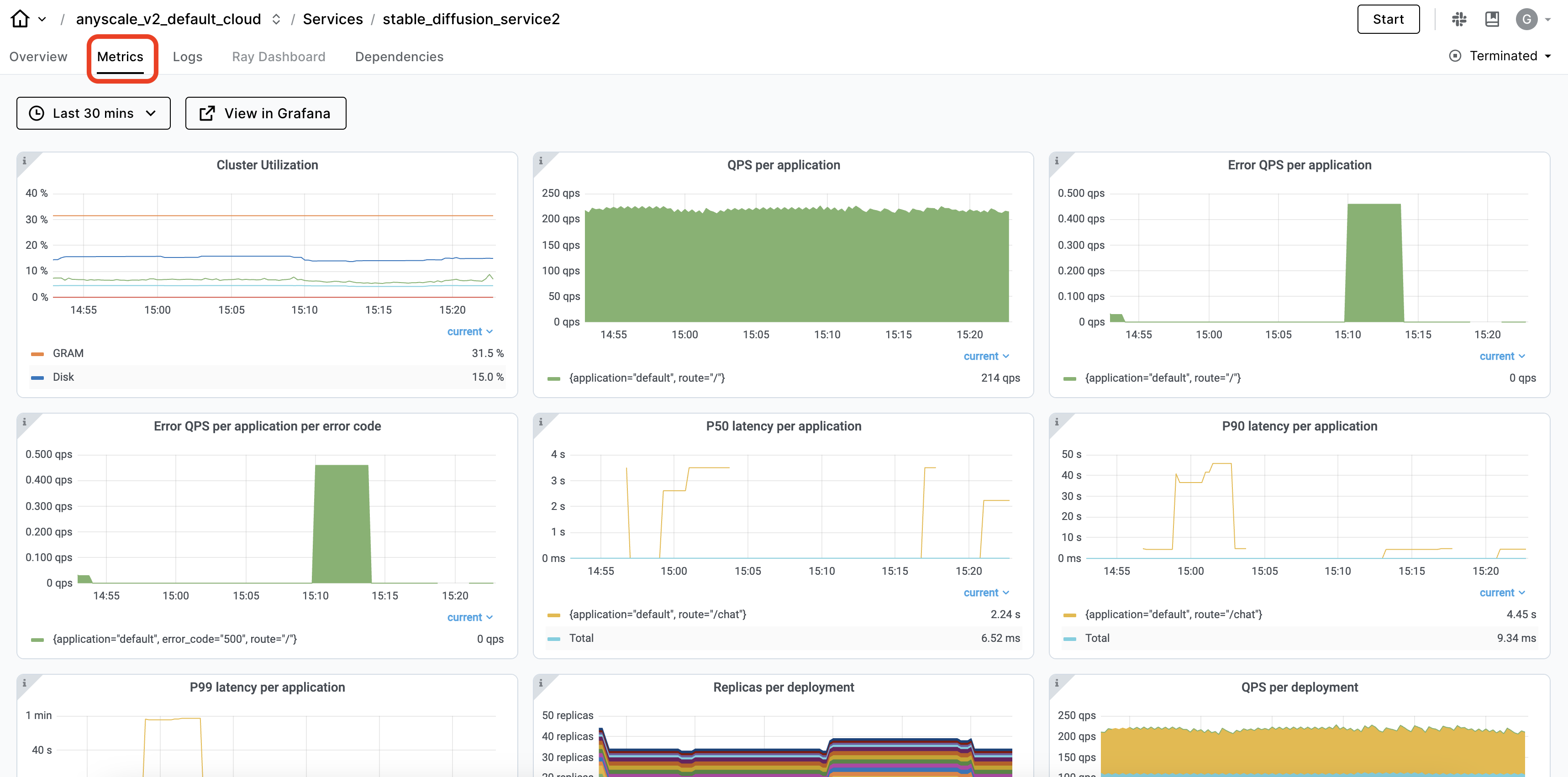
Ray dashboard,特别是 Serve 视图,会自动捕获 Ray Serve 应用程序的可观察性。您可以查看服务 部署及其副本,以及时间序列指标,以了解服务的健康状况。
生产级服务#
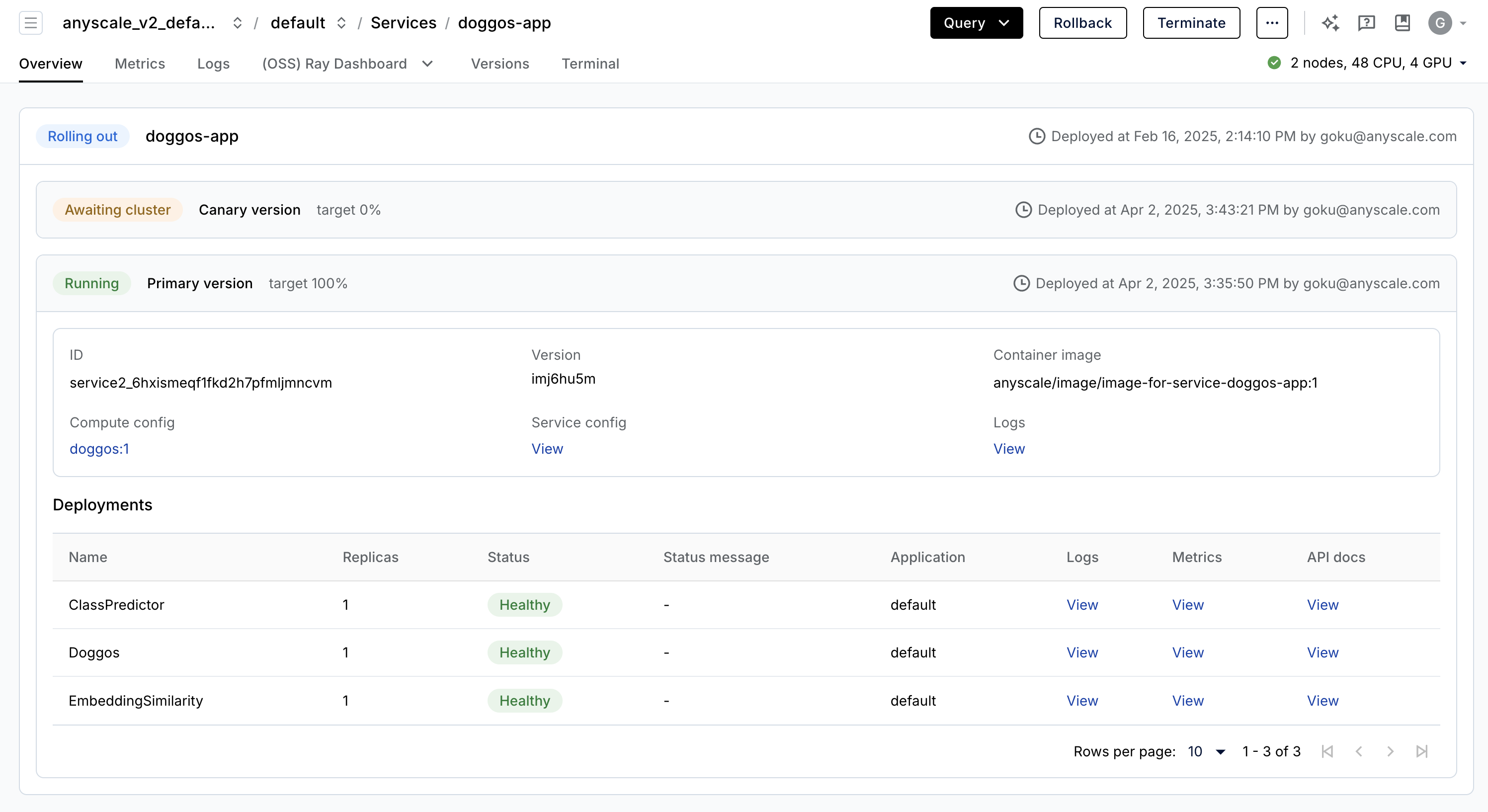
Anyscale Services(API 参考)提供了一种容错、可伸缩且优化的方式来服务 Ray Serve 应用程序。您可以:
通过专用服务页面、统一日志查看器、追踪等方式监控服务,并设置警报。
使用
num_replicas=auto伸缩服务,并利用副本压缩来整合利用率低的部分节点。获得 头节点容错。OSS Ray 可以从失败的工作节点和副本中恢复,但无法从头节点崩溃中恢复。
在一个服务中 服务多个应用程序。
注意:
本教程使用
containerfile来定义依赖项,但您也可以轻松使用预构建的映像。当您在工作空间中启动时未指定计算资源,则此配置将默认使用工作空间的计算配置。
# Production online service.
anyscale service deploy -f /home/ray/default/configs/service.yaml
(anyscale +1.9s) Restarting existing service 'doggos-app'.
(anyscale +3.2s) Uploading local dir '/home/ray/default' to cloud storage.
(anyscale +5.2s) Including workspace-managed pip dependencies.
(anyscale +5.8s) Service 'doggos-app' deployed (version ID: akz9ul28).
(anyscale +5.8s) View the service in the UI: 'https://console.anyscale.com/services/service2_6hxismeqf1fkd2h7pfmljmncvm'
(anyscale +5.8s) Query the service once it's running using the following curl command (add the path you want to query):
(anyscale +5.8s) curl -H "Authorization: Bearer <BEARER_TOKEN>" https://doggos-app-bxauk.cld-kvedzwag2qa8i5bj.s.anyscaleuserdata.com/
curl -X POST "https://doggos-app-bxauk.cld-kvedzwag2qa8i5bj.s.anyscaleuserdata.com/predict/" \
     -H "Authorization: Bearer <BEARER_TOKEN>" \
     -H "Content-Type: application/json" \
     -d '{"url": "https://doggos-dataset.s3.us-west-2.amazonaws.com/samara.png", "k": 4}'
# Terminate service.
anyscale service terminate --name doggos-app
(anyscale +1.5s) Service service2_6hxismeqf1fkd2h7pfmljmncvm terminate initiated.
(anyscale +1.5s) View the service in the UI at https://console.anyscale.com/services/service2_6hxismeqf1fkd2h7pfmljmncvm
CI/CD#
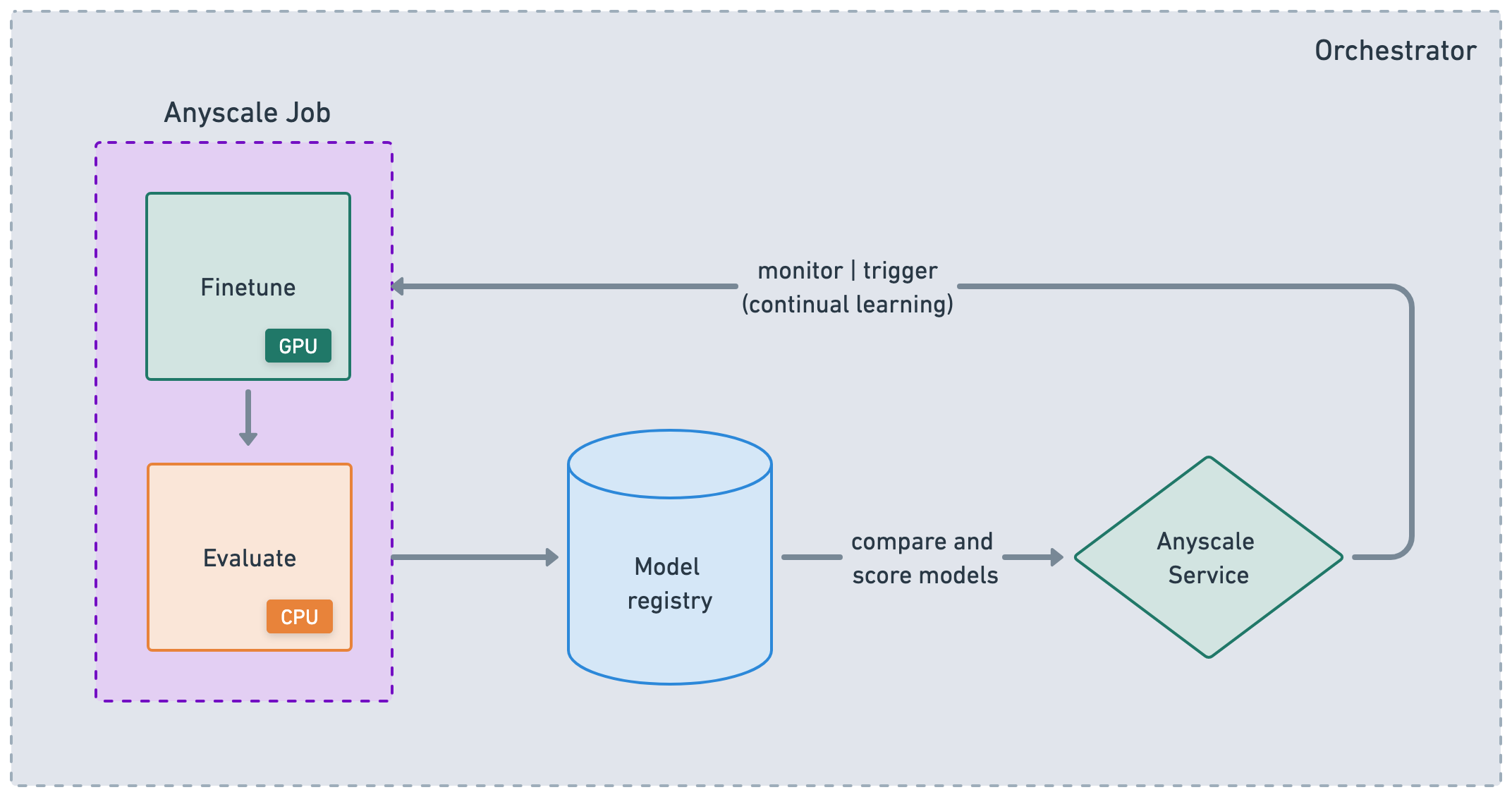
虽然 Anyscale 的 Jobs 和 Services 是帮助您生产化工作负载的原子化概念,但它们也适用于大型 ML DAG 或 CI/CD 工作流中的节点。您可以将 Jobs 链接在一起,存储结果,然后使用这些工件来服务您的应用程序。然后,您可以根据事件、时间等触发服务更新并重新触发 Jobs。虽然您可以使用 Anyscale CLI 与任何编排平台集成,但 Anyscale 也支持一些专门的集成,如 Airflow 和 Prefect。
🚨 注意:使用笔记本菜单栏中的“🔄 Restart”按钮重置此笔记本。这样我们就可以释放此笔记本中使用的所有变量、实用程序等。