使用 Ray Serve 进行可扩展的在线 XGBoost 推理#


本教程将启动一个在线服务,该服务:
部署训练好的 XGBoost 模型工件以生成预测。
根据实时传入流量自动扩展。
涵盖了围绕该服务的可观测性和调试。
请注意,本笔记本要求您先运行 XGBoost 模型分布式训练 教程,以生成本教程将获取的预训练模型工件。
Ray Serve 是一个高度可扩展且灵活的模型服务库,用于构建在线推理 API。您可以:
避免一个受网络和计算限制的大型服务,以及资源使用效率低下。
利用异构的 分片资源(SageMaker、Vertex、KServe 等 **不可能** 实现这一点),并通过 `num_replicas` 进行水平扩展。
根据流量 自动扩展。
与 FastAPI 和 HTTP 集成。
设置 gRPC 服务 来构建分布式系统和微服务。
启用基于批量大小、时间等的 动态批处理。
访问用于 服务 LLM 的实用工具集,这些工具集与推理引擎无关,并对 LLM 特定的功能(如多 LoRA 支持)提供了开箱即用的支持。

%load_ext autoreload
%autoreload all
# Enable loading of the dist_xgboost module.
import os
import sys

sys.path.append(os.path.abspath(".."))
# Enable Ray Train v2.
os.environ["RAY_TRAIN_V2_ENABLED"] = "1"
# Now it's safe to import from ray.train.
import ray
import dist_xgboost

# Initialize Ray with the dist_xgboost package.
ray.init(runtime_env={"py_modules": [dist_xgboost]})
加载模型#
接下来,从 MLflow 注册表中加载预训练的预处理器和 XGBoost 模型,如验证笔记本中所述。
创建 Ray Serve 部署#
接下来,定义 Ray Serve 端点。使用可重用类来避免为每个请求重新加载模型和预处理器。该部署支持 Pythonic 和 HTTP 请求。
import pandas as pd
import xgboost
from ray import serve
from starlette.requests import Request

from dist_xgboost.data import load_model_and_preprocessor


@serve.deployment(num_replicas=2, max_ongoing_requests=25, ray_actor_options={"num_cpus": 2})
class XGBoostModel:
    def __init__(self):
        self.preprocessor, self.model = load_model_and_preprocessor()

    @serve.batch(max_batch_size=16, batch_wait_timeout_s=0.1)
    async def predict_batch(self, input_data: list[dict]) -> list[float]:
        print(f"Batch size: {len(input_data)}")
        # Convert list of dictionaries to DataFrame.
        input_df = pd.DataFrame(input_data)
        # Preprocess the input.
        preprocessed_batch = self.preprocessor.transform_batch(input_df)
        # Create DMatrix for prediction.
        dmatrix = xgboost.DMatrix(preprocessed_batch)
        # Get predictions.
        predictions = self.model.predict(dmatrix)
        return predictions.tolist()

    async def __call__(self, request: Request):
        # Parse the request body as JSON.
        input_data = await request.json()
        return await self.predict_batch(input_data)
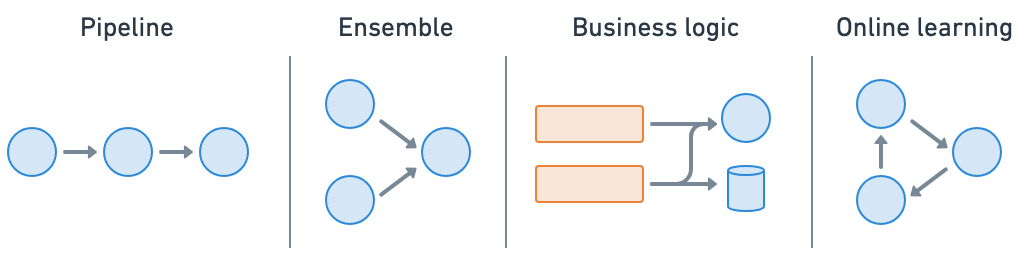
Ray Serve 使得 模型组合 变得极其容易,您可以将包含 ML 模型或业务逻辑的多个部署组合成一个应用程序。您可以独立扩展分片资源,并配置每个部署。
首先确保您没有任何现有部署,可以使用 serve.shutdown()。
if "default" in serve.status().applications and serve.status().applications["default"].status == "RUNNING":
    print("Shutting down existing serve application")
    serve.shutdown()
2025-04-16 21:35:03,819	INFO worker.py:1660 -- Connecting to existing Ray cluster at address: 10.0.23.200:6379...
2025-04-16 21:35:03,828	INFO worker.py:1843 -- Connected to Ray cluster. View the dashboard at https://session-1kebpylz8tcjd34p4sv2h1f9tg.i.anyscaleuserdata.com
2025-04-16 21:35:03,833	INFO packaging.py:367 -- Pushing file package 'gcs://_ray_pkg_dbf2a602028d604b4b1f9474b353f0574c4a48ce.zip' (0.08MiB) to Ray cluster...
2025-04-16 21:35:03,834	INFO packaging.py:380 -- Successfully pushed file package 'gcs://_ray_pkg_dbf2a602028d604b4b1f9474b353f0574c4a48ce.zip'.
现在您已经定义了部署,您可以使用 `.bind()` 方法创建 ray.serve.Application。
# Define the app.
xgboost_model = XGBoostModel.bind()
准备测试数据#
准备一些示例数据来测试部署。使用保留集中的样本。
sample_input = {
    "mean radius": 14.9,
    "mean texture": 22.53,
    "mean perimeter": 102.1,
    "mean area": 685.0,
    "mean smoothness": 0.09947,
    "mean compactness": 0.2225,
    "mean concavity": 0.2733,
    "mean concave points": 0.09711,
    "mean symmetry": 0.2041,
    "mean fractal dimension": 0.06898,
    "radius error": 0.253,
    "texture error": 0.8749,
    "perimeter error": 3.466,
    "area error": 24.19,
    "smoothness error": 0.006965,
    "compactness error": 0.06213,
    "concavity error": 0.07926,
    "concave points error": 0.02234,
    "symmetry error": 0.01499,
    "fractal dimension error": 0.005784,
    "worst radius": 16.35,
    "worst texture": 27.57,
    "worst perimeter": 125.4,
    "worst area": 832.7,
    "worst smoothness": 0.1419,
    "worst compactness": 0.709,
    "worst concavity": 0.9019,
    "worst concave points": 0.2475,
    "worst symmetry": 0.2866,
    "worst fractal dimension": 0.1155,
}
sample_target = 0  # Ground truth label
运行服务#
有两种运行 Ray Serve 服务的方式:
Serve API:使用 `serve run` CLI 命令,例如 `serve run tutorial:xgboost_model`。
Pythonic API:使用 `ray.serve` 的
serve.run命令,例如 `serve.run(xgboost_model)`。
此示例使用 Pythonic API。
from ray.serve.handle import DeploymentHandle

handle: DeploymentHandle = serve.run(xgboost_model, name="xgboost-breast-cancer-classifier")
INFO 2025-04-16 21:35:08,246 serve 30790 -- Started Serve in namespace "serve".
INFO 2025-04-16 21:35:13,363 serve 30790 -- Application 'xgboost-breast-cancer-classifier' is ready at http://127.0.0.1:8000/.
(ProxyActor pid=31032) INFO 2025-04-16 21:35:08,167 proxy 10.0.23.200 -- Proxy starting on node dc30e171b93f61245644ba4d0147f8b27f64e9e1eaf34d1bb63c9c99 (HTTP port: 8000).
(ProxyActor pid=31032) INFO 2025-04-16 21:35:08,226 proxy 10.0.23.200 -- Got updated endpoints: {}.
(ServeController pid=30973) INFO 2025-04-16 21:35:08,307 controller 30973 -- Deploying new version of Deployment(name='XGBoostModel', app='xgboost-breast-cancer-classifier') (initial target replicas: 2).
(ProxyActor pid=31032) INFO 2025-04-16 21:35:08,310 proxy 10.0.23.200 -- Got updated endpoints: {Deployment(name='XGBoostModel', app='xgboost-breast-cancer-classifier'): EndpointInfo(route='/', app_is_cross_language=False)}.
(ProxyActor pid=31032) INFO 2025-04-16 21:35:08,323 proxy 10.0.23.200 -- Started <ray.serve._private.router.SharedRouterLongPollClient object at 0x77864005ee70>.
(ServeController pid=30973) INFO 2025-04-16 21:35:08,411 controller 30973 -- Adding 2 replicas to Deployment(name='XGBoostModel', app='xgboost-breast-cancer-classifier').
(ServeController pid=30973) INFO 2025-04-16 21:35:09,387 controller 30973 -- Deploying new version of Deployment(name='XGBoostModel', app='xgboost-breast-cancer-classifier') (initial target replicas: 2).
(ServeController pid=30973) INFO 2025-04-16 21:35:10,337 controller 30973 -- Deploying new version of Deployment(name='XGBoostModel', app='xgboost-breast-cancer-classifier') (initial target replicas: 2).
(ServeController pid=30973) INFO 2025-04-16 21:35:10,550 controller 30973 -- Deploying new version of Deployment(name='XGBoostModel', app='xgboost-breast-cancer-classifier') (initial target replicas: 2).
(ServeController pid=30973) INFO 2025-04-16 21:35:11,395 controller 30973 -- Deploying new version of Deployment(name='XGBoostModel', app='xgboost-breast-cancer-classifier') (initial target replicas: 2).
(ServeController pid=30973) INFO 2025-04-16 21:35:12,449 controller 30973 -- Deploying new version of Deployment(name='XGBoostModel', app='xgboost-breast-cancer-classifier') (initial target replicas: 2).
(ServeController pid=30973) INFO 2025-04-16 21:35:13,402 controller 30973 -- Deploying new version of Deployment(name='XGBoostModel', app='xgboost-breast-cancer-classifier') (initial target replicas: 2).
(ServeController pid=30973) INFO 2025-04-16 21:35:13,613 controller 30973 -- Deploying new version of Deployment(name='XGBoostModel', app='xgboost-breast-cancer-classifier') (initial target replicas: 2).
您应该会看到一些日志表明服务正在本地运行。
INFO 2025-04-09 14:06:55,760 serve 31684 -- Started Serve in namespace "serve".
INFO 2025-04-09 14:06:57,875 serve 31684 -- Application 'default' is ready at http://127.0.0.1:8000/.
您还可以使用 serve.status() 来检查它是否正在运行。
serve.status().applications["xgboost-breast-cancer-classifier"].status == "RUNNING"
True
查询服务#
使用 HTTP#
查询服务的最常见方式是通过 HTTP 请求。此请求会调用前面定义的 `__call__` 方法。
import requests

url = "http://127.0.0.1:8000/"

prediction = requests.post(url, json=sample_input).json()

print(f"Prediction: {prediction:.4f}")
print(f"Ground truth: {sample_target}")
Prediction: 0.0503
Ground truth: 0
这种方法适用于处理单个查询,但不适用于您有许多查询的情况。由于 `requests.post` 是一个阻塞调用,如果您在 for 循环中运行它,您将无法获得 Ray Serve 动态批处理的好处。
相反,您希望使用异步请求并发地发送许多请求,并让 Ray Serve 对它们进行缓冲和批量处理。您可以使用 `aiohttp` 来实现此方法。
import asyncio

import aiohttp


async def fetch(session, url, data):
    async with session.post(url, json=data) as response:
        return await response.json()


async def fetch_all(requests: list):
    async with aiohttp.ClientSession() as session:
        tasks = [fetch(session, url, input_item) for input_item in requests]
        responses = await asyncio.gather(*tasks)
        return responses
(ServeReplica:xgboost-breast-cancer-classifier:XGBoostModel pid=4874, ip=10.0.240.129) Batch size: 1
(ServeReplica:xgboost-breast-cancer-classifier:XGBoostModel pid=4874, ip=10.0.240.129) INFO 2025-04-16 21:35:13,834 xgboost-breast-cancer-classifier_XGBoostModel ep2o1d1x 0ddcd27d-d671-4365-b7e3-6e4cae856d9b -- POST / 200 117.8ms
(ServeReplica:xgboost-breast-cancer-classifier:XGBoostModel pid=4875, ip=10.0.240.129) INFO 2025-04-16 21:35:14,352 xgboost-breast-cancer-classifier_XGBoostModel cxd4bxd1 aeb83339-359a-41e2-99c4-4ab06252d0b9 -- POST / 200 94.7ms
(ServeReplica:xgboost-breast-cancer-classifier:XGBoostModel pid=4875, ip=10.0.240.129) INFO 2025-04-16 21:35:14,353 xgboost-breast-cancer-classifier_XGBoostModel cxd4bxd1 8c80adfd-2033-41d3-a718-aecbd5bcb996 -- POST / 200 93.9ms
(ServeReplica:xgboost-breast-cancer-classifier:XGBoostModel pid=4875, ip=10.0.240.129) INFO 2025-04-16 21:35:14,354 xgboost-breast-cancer-classifier_XGBoostModel cxd4bxd1 7ed45f79-c665-4a17-94f7-6d02c56ab504 -- POST / 200 93.8ms
(ServeReplica:xgboost-breast-cancer-classifier:XGBoostModel pid=4875, ip=10.0.240.129) INFO 2025-04-16 21:35:14,355 xgboost-breast-cancer-classifier_XGBoostModel cxd4bxd1 56fd016b-497a-43cc-b500-edafe878cda8 -- POST / 200 88.6ms
(ServeReplica:xgboost-breast-cancer-classifier:XGBoostModel pid=4875, ip=10.0.240.129) INFO 2025-04-16 21:35:14,356 xgboost-breast-cancer-classifier_XGBoostModel cxd4bxd1 4910e208-d042-4fcb-aba9-330400fba538 -- POST / 200 85.5ms
(ServeReplica:xgboost-breast-cancer-classifier:XGBoostModel pid=4875, ip=10.0.240.129) INFO 2025-04-16 21:35:14,356 xgboost-breast-cancer-classifier_XGBoostModel cxd4bxd1 b4999d9c-72fd-4bd2-aa9c-3c854ebe7457 -- POST / 200 84.7ms
(ServeReplica:xgboost-breast-cancer-classifier:XGBoostModel pid=4875, ip=10.0.240.129) INFO 2025-04-16 21:35:14,358 xgboost-breast-cancer-classifier_XGBoostModel cxd4bxd1 04bc7c27-ae22-427f-8bee-c9dbc48a0b82 -- POST / 200 85.3ms
(ServeReplica:xgboost-breast-cancer-classifier:XGBoostModel pid=4875, ip=10.0.240.129) INFO 2025-04-16 21:35:14,358 xgboost-breast-cancer-classifier_XGBoostModel cxd4bxd1 dcbbe5fa-d278-4568-a0fb-ea9347889990 -- POST / 200 84.3ms
(ServeReplica:xgboost-breast-cancer-classifier:XGBoostModel pid=4875, ip=10.0.240.129) INFO 2025-04-16 21:35:14,359 xgboost-breast-cancer-classifier_XGBoostModel cxd4bxd1 22683613-16a5-479a-92bc-14f07dc317aa -- POST / 200 83.3ms
(ServeReplica:xgboost-breast-cancer-classifier:XGBoostModel pid=4875, ip=10.0.240.129) INFO 2025-04-16 21:35:14,360 xgboost-breast-cancer-classifier_XGBoostModel cxd4bxd1 b773626c-8607-4572-bb87-8d8f80964de5 -- POST / 200 82.8ms
(ServeReplica:xgboost-breast-cancer-classifier:XGBoostModel pid=4875, ip=10.0.240.129) INFO 2025-04-16 21:35:14,361 xgboost-breast-cancer-classifier_XGBoostModel cxd4bxd1 bceee2b4-ff30-4866-a300-7591e0cdc598 -- POST / 200 79.2ms
(ServeReplica:xgboost-breast-cancer-classifier:XGBoostModel pid=4875, ip=10.0.240.129) INFO 2025-04-16 21:35:14,362 xgboost-breast-cancer-classifier_XGBoostModel cxd4bxd1 edaeb2f7-8de3-494d-8db0-8ebf2009acf7 -- POST / 200 74.7ms
(ServeReplica:xgboost-breast-cancer-classifier:XGBoostModel pid=4875, ip=10.0.240.129) INFO 2025-04-16 21:35:14,362 xgboost-breast-cancer-classifier_XGBoostModel cxd4bxd1 09a38fe8-47d3-4c0e-8f5e-c312cded2c35 -- POST / 200 74.6ms
(ServeReplica:xgboost-breast-cancer-classifier:XGBoostModel pid=4875, ip=10.0.240.129) INFO 2025-04-16 21:35:14,363 xgboost-breast-cancer-classifier_XGBoostModel cxd4bxd1 7f0d2f52-e59b-4f26-8931-61a1e9e4f988 -- POST / 200 72.9ms
(ServeReplica:xgboost-breast-cancer-classifier:XGBoostModel pid=4875, ip=10.0.240.129) INFO 2025-04-16 21:35:14,363 xgboost-breast-cancer-classifier_XGBoostModel cxd4bxd1 269b045d-0b42-407d-a52f-7222cafce0d6 -- POST / 200 71.5ms
(ServeReplica:xgboost-breast-cancer-classifier:XGBoostModel pid=4875, ip=10.0.240.129) INFO 2025-04-16 21:35:14,364 xgboost-breast-cancer-classifier_XGBoostModel cxd4bxd1 98b7ef19-f5a1-4ab2-a71c-a2b7f6a6c1ad -- POST / 200 71.1ms
(ServeController pid=30973) INFO 2025-04-16 21:35:14,457 controller 30973 -- Deploying new version of Deployment(name='XGBoostModel', app='xgboost-breast-cancer-classifier') (initial target replicas: 2).
(ProxyActor pid=5012, ip=10.0.240.129) INFO 2025-04-16 21:35:14,484 proxy 10.0.240.129 -- Proxy starting on node 9d22416ba66c129a3b66c96533eaa5455f7e882c37408b4fe7dc81f8 (HTTP port: 8000).
sample_input_list = [sample_input] * 100

# Notebook is already running an asyncio event loop in background, so use `await`.
# In other cases, you would use `asyncio.run(fetch_all(sample_input_list))`.
responses = await fetch_all(sample_input_list)
print(f"Finished processing {len(responses)} queries. Example result: {responses[0]}")
(ServeReplica:xgboost-breast-cancer-classifier:XGBoostModel pid=4875, ip=10.0.240.129) Batch size: 16
Finished processing 100 queries. Example result: 0.05025313049554825
(ProxyActor pid=5012, ip=10.0.240.129) INFO 2025-04-16 21:35:14,555 proxy 10.0.240.129 -- Got updated endpoints: {Deployment(name='XGBoostModel', app='xgboost-breast-cancer-classifier'): EndpointInfo(route='/', app_is_cross_language=False)}.
(ProxyActor pid=5012, ip=10.0.240.129) INFO 2025-04-16 21:35:14,576 proxy 10.0.240.129 -- Started <ray.serve._private.router.SharedRouterLongPollClient object at 0x7835f2b9acc0>.
(ServeReplica:xgboost-breast-cancer-classifier:XGBoostModel pid=4874, ip=10.0.240.129) INFO 2025-04-16 21:35:14,619 xgboost-breast-cancer-classifier_XGBoostModel ep2o1d1x 24933cc1-07b4-4680-bb84-adcd54ff2de3 -- POST / 200 139.5ms
(ServeReplica:xgboost-breast-cancer-classifier:XGBoostModel pid=4874, ip=10.0.240.129) INFO 2025-04-16 21:35:14,620 xgboost-breast-cancer-classifier_XGBoostModel ep2o1d1x 15167894-ceac-4464-bbb6-0556c8299d8a -- POST / 200 138.3ms
(ServeReplica:xgboost-breast-cancer-classifier:XGBoostModel pid=4874, ip=10.0.240.129) INFO 2025-04-16 21:35:14,621 xgboost-breast-cancer-classifier_XGBoostModel ep2o1d1x e4bb73d9-6b5b-4cd0-8dc0-5bbe5329c29e -- POST / 200 138.6ms
(ServeReplica:xgboost-breast-cancer-classifier:XGBoostModel pid=4874, ip=10.0.240.129) INFO 2025-04-16 21:35:14,621 xgboost-breast-cancer-classifier_XGBoostModel ep2o1d1x 004be5f3-9ce7-4708-8579-31da77926491 -- POST / 200 94.1ms
(ServeReplica:xgboost-breast-cancer-classifier:XGBoostModel pid=4874, ip=10.0.240.129) INFO 2025-04-16 21:35:14,621 xgboost-breast-cancer-classifier_XGBoostModel ep2o1d1x 233fc1bb-6486-4704-bf03-8599176e539c -- POST / 200 92.7ms
(ServeReplica:xgboost-breast-cancer-classifier:XGBoostModel pid=4874, ip=10.0.240.129) INFO 2025-04-16 21:35:14,621 xgboost-breast-cancer-classifier_XGBoostModel ep2o1d1x cd417685-cad4-4c9d-ab51-fcd33babe57c -- POST / 200 88.5ms
(ServeReplica:xgboost-breast-cancer-classifier:XGBoostModel pid=4874, ip=10.0.240.129) INFO 2025-04-16 21:35:14,622 xgboost-breast-cancer-classifier_XGBoostModel ep2o1d1x 0ea1c55a-6722-4cb6-a9ab-9e0ffa156ef4 -- POST / 200 84.6ms
(ServeReplica:xgboost-breast-cancer-classifier:XGBoostModel pid=4874, ip=10.0.240.129) INFO 2025-04-16 21:35:14,622 xgboost-breast-cancer-classifier_XGBoostModel ep2o1d1x 3315400d-9213-46ac-9abd-baa576c73107 -- POST / 200 77.9ms
(ServeReplica:xgboost-breast-cancer-classifier:XGBoostModel pid=4874, ip=10.0.240.129) INFO 2025-04-16 21:35:14,622 xgboost-breast-cancer-classifier_XGBoostModel ep2o1d1x 25054e1f-e3e7-4106-910b-f6ba94f111be -- POST / 200 76.9ms
(ServeReplica:xgboost-breast-cancer-classifier:XGBoostModel pid=4874, ip=10.0.240.129) INFO 2025-04-16 21:35:14,623 xgboost-breast-cancer-classifier_XGBoostModel ep2o1d1x a0dbd826-c595-455f-8869-7c567c0dfac2 -- POST / 200 75.6ms
(ServeReplica:xgboost-breast-cancer-classifier:XGBoostModel pid=4874, ip=10.0.240.129) INFO 2025-04-16 21:35:14,623 xgboost-breast-cancer-classifier_XGBoostModel ep2o1d1x 136060ac-9705-49a5-b743-dc29164a3eee -- POST / 200 75.4ms
使用 Python#
要更直接地以 Pythonic 方式查询模型,您可以使用部署句柄。
response = await handle.predict_batch.remote(sample_input)
print(response)
INFO 2025-04-16 21:35:14,803 serve 30790 -- Started <ray.serve._private.router.SharedRouterLongPollClient object at 0x7156ffcf6d80>.
(ServeReplica:xgboost-breast-cancer-classifier:XGBoostModel pid=4874, ip=10.0.240.129) Batch size: 11
(ServeReplica:xgboost-breast-cancer-classifier:XGBoostModel pid=4875, ip=10.0.240.129) Batch size: 1
0.05025313049554825
如果您需要与同一 Ray 集群中的另一个进程交互服务,则此方法很有用。如果您需要重新生成服务句柄,可以使用 serve.get_deployment_handle。
handle = serve.get_deployment_handle("XGBoostModel", "xgboost-breast-cancer-classifier")
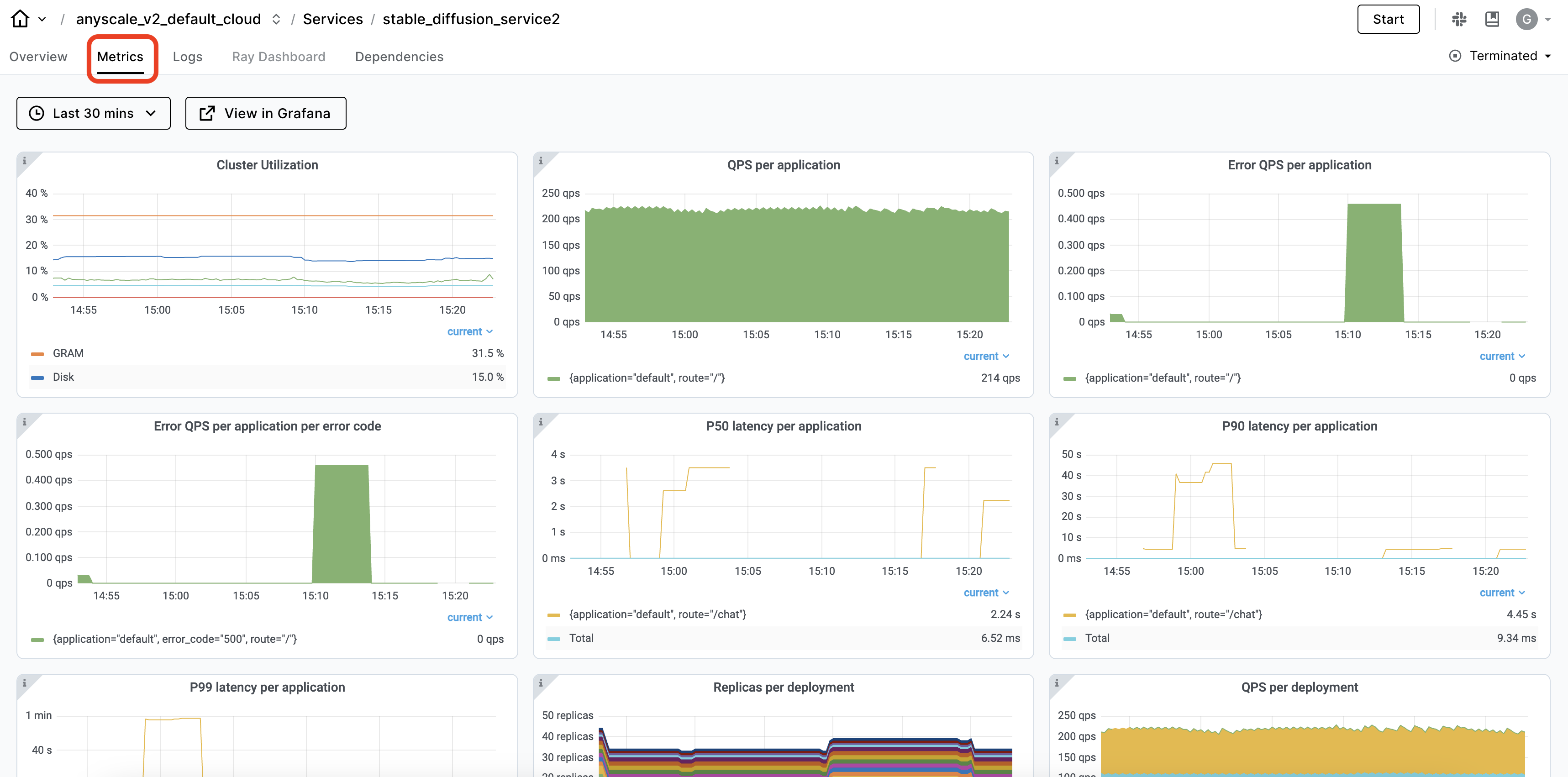
Ray 仪表板会在 Serve 视图 中自动捕获 Ray Serve 应用程序的可观测性。您可以查看服务 部署及其副本 以及有关服务运行状况的时间序列指标。
# Shutdown service.
serve.shutdown()
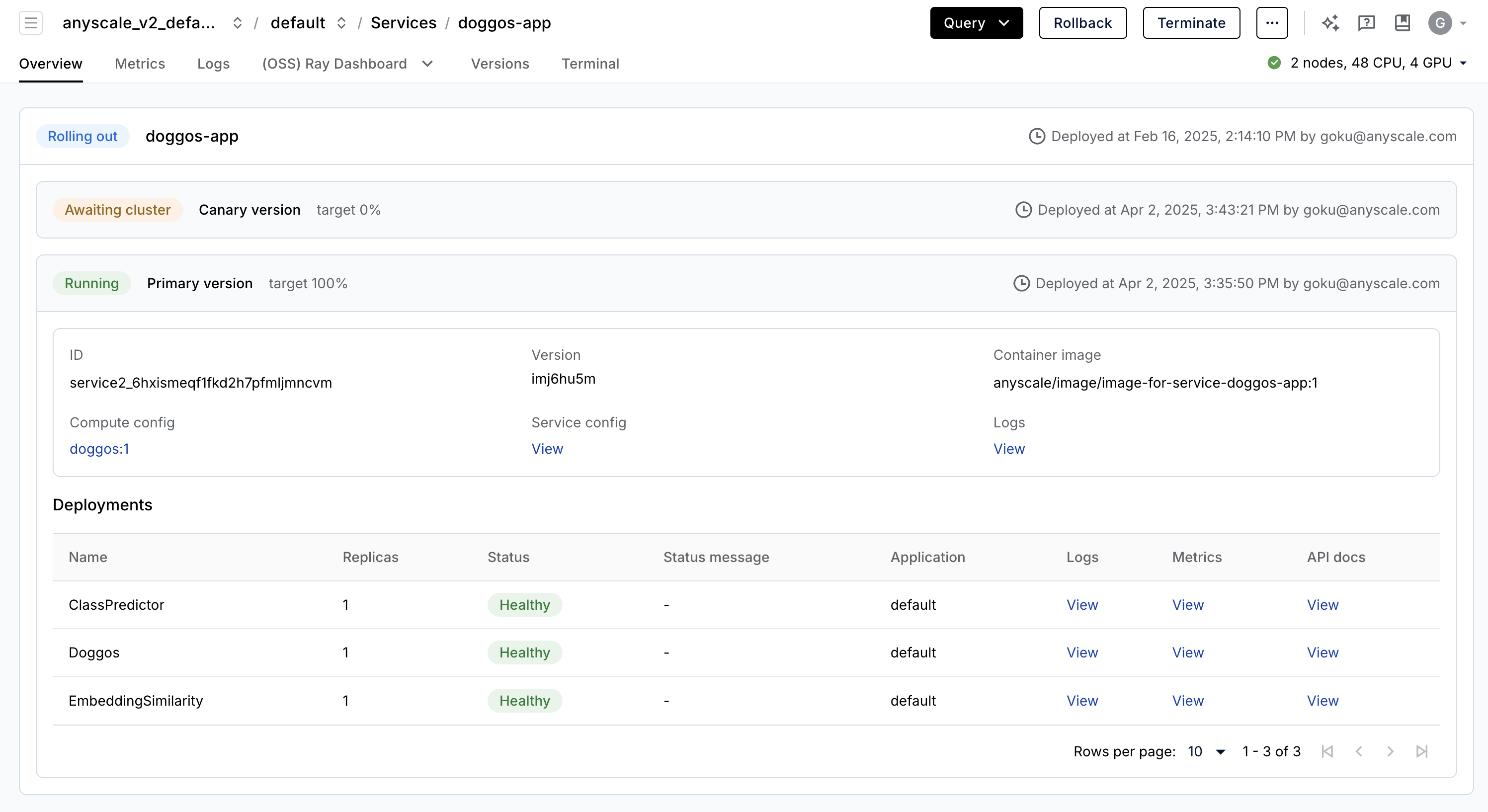
Anyscale Services 提供了一种容错、可扩展且经过优化的方式来服务 Ray Serve 应用程序。有关更多详细信息,请参阅 API 参考。您可以:
通过专用服务页面、统一日志查看器、追踪等方式监控服务,并设置警报。
使用 `num_replicas=auto` 扩展服务,并利用副本压缩来整合碎片化利用的节点。
实现 主节点容错。OSS Ray 可以从失败的工作节点和副本中恢复,但不能从主节点崩溃中恢复。
在一个服务中提供 多个应用程序。
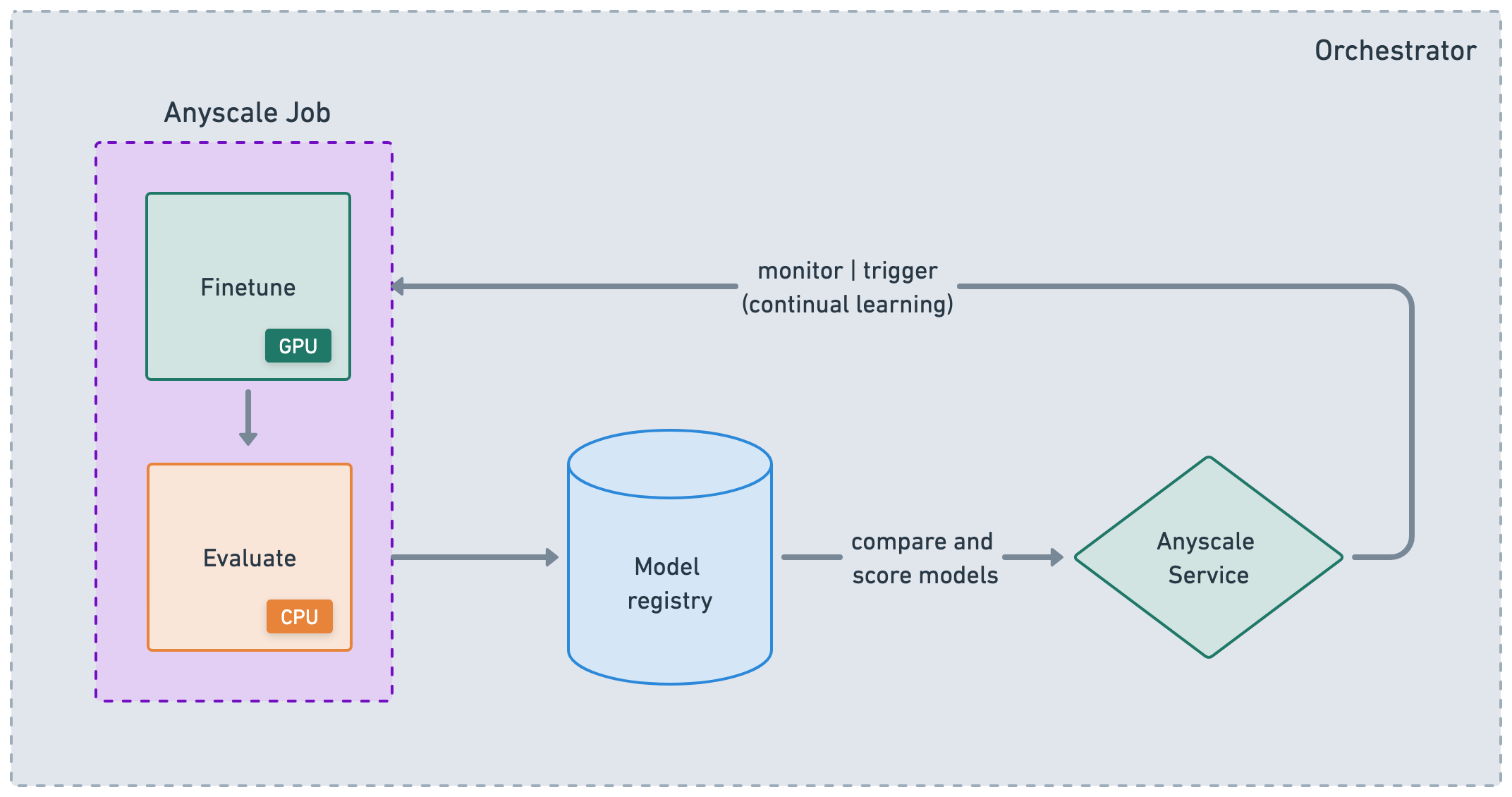
Anyscale 上的 RayTurbo Serve 在 Ray Serve 之上提供了更多功能:
快速自动扩展和模型加载,使服务即使对于 LLM 也能以 5 倍的改进 速度启动和运行。
为高流量服务用例提供 54% 的 **更高 QPS** 和高达 3 倍的 **每秒流式传输令牌数**,没有代理瓶颈。
副本压缩,尽可能合并到更少的节点中,以减少资源碎片并提高硬件利用率。
零停机 增量滚动更新,从而不会中断服务。
在多服务应用程序中为每个服务提供不同的环境 不同的环境。
多可用区感知 Ray Serve 副本调度,为可用区故障提供更高的冗余度。
注意:
此示例使用 `containerfile` 定义依赖项,但您也可以轻松使用预构建镜像。
当您未指定计算资源并从工作区启动时,默认使用工作区的计算配置。
# Production online service.
anyscale service deploy dist_xgboost.serve:xgboost_model --name=xgboost-breast_cancer_all_features \
  --containerfile="${WORKING_DIR}/containerfile" \
  --working-dir="${WORKING_DIR}" \
  --exclude=""
请注意,要使此命令成功,您需要配置 MLflow 将工件存储在集群之间可读的存储中。Anyscale 提供多种开箱即用的存储选项,例如 默认存储桶,以及在集群、用户和云级别共享的 自动挂载的网络存储。您也可以设置自己的网络挂载或存储桶。
运行此命令将在生产环境中启动服务。在此过程中,Anyscale 会创建并保存容器镜像,以便将来能够快速启动此服务。终端节点链接和身份验证令牌将显示在日志中。在服务远程运行时,您需要使用身份验证令牌来查询它。以下是如何修改前面的 `requests` 代码以使用此令牌:
# Service specific config. Replace with your own values from the preceding logs.
base_url = "https://xgboost-breast-cancer-all-features-jgz99.cld-kvedzwag2qa8i5bj.s.anyscaleuserdata.com"
token = "tXhmYYY7qMbrb1ToO9_J3n5_kD7ym7Nirs8djtip7P0"

# Requests config.
path = "/"
full_url = f"{base_url}{path}"
headers = {"Authorization": f"Bearer {token}"}

prediction = requests.post(url, json=sample_input, headers=headers).json()
请记住,一旦不再需要服务,请将其停止。
anyscale service terminate --name e2e-xgboost